1. Introducció
The Energizer Smart 2K QHD Security Camera provides advanced indoor surveillance with high-resolution video and convenient features. This camera captures detailed footage, offers clear night vision, and includes two-way audio for communication. It supports customizable motion detection zones with instant alerts and provides flexible storage options via cloud service or a Micro SD card. The foldable design enhances privacy when the camera is not actively monitoring.
Característiques principals:
- Qualitat de vídeo 2K HD: Captura un vídeo clar i detallattage.
- Reliable Night Vision: Provides clear monochrome footage en condicions de poca llum.
- Àudio bidireccional: Enables communication through the camera via the mobile app.
- Customizable Motion Detection: Set specific monitoring zones and receive instant alerts.
- Emmagatzematge flexible: Supports cloud storage (with trial) and local Micro SD card storage (not included).
- Disseny plegable: Allows for lens coverage to ensure privacy.
- Control de l'aplicació: Manage and monitor your camera using the Energizer Connect app.
2. Què hi ha a la caixa
Si us plau, comproveu el contingut del paquet per assegurar-vos que hi hagi tots els elements:
- Energizer Smart 2K QHD Foldable Camera
- Cable d'alimentació USB
- Adaptador d'alimentació
- Manual d'usuari
3. Producte acabatview
Familiarize yourself with the components of your Energizer Smart 2K QHD Security Camera.
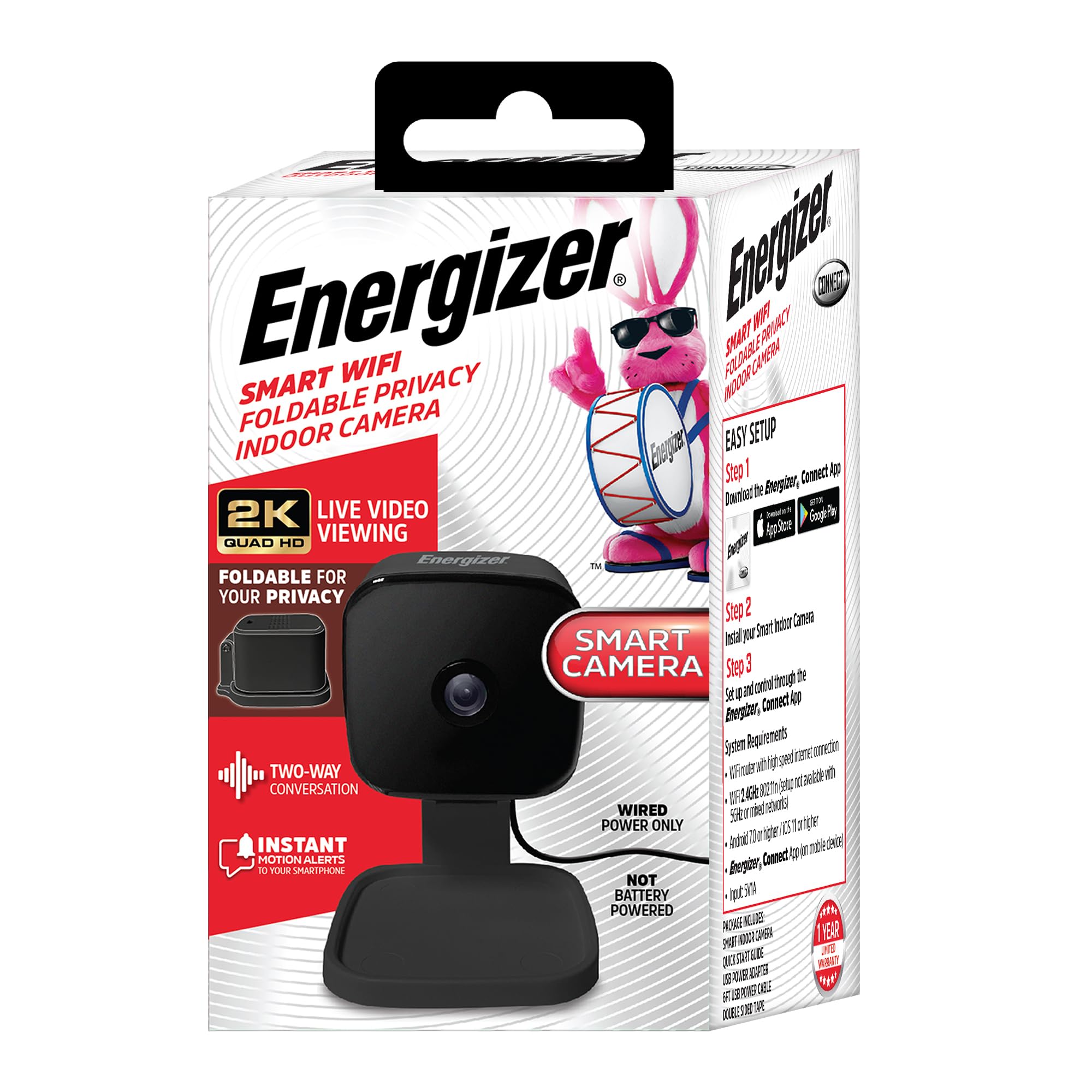
Imatge: Frontal view of the Energizer Smart 2K QHD Security Camera, showing the lens and base.

Imatge: Lateral view of the camera, illustrating its compact design and connection point.
- Lent de la càmera: Captura vídeo 2K QHD.
- Micròfon: Per a comunicació d'àudio bidireccional.
- Ponent: Per a comunicació d'àudio bidireccional.
- Llum indicador d'estat: Shows camera status (e.g., pairing mode, connected).
- Port micro USB: Per a la connexió d'alimentació.
- Botó de restabliment: S'utilitza per restablir la càmera a la configuració de fàbrica.
- Ranura per a targetes Micro SD: Per a emmagatzematge de vídeo local (targeta no inclosa).
- Base plegable: Allows the camera to be folded for privacy.
4. Guia de configuració
4.1 Engegar la càmera
- Connect the USB power cable to the camera's Micro USB port.
- Connecteu l'adaptador d'alimentació a una presa de corrent estàndard.
- The camera's status indicator light will illuminate, indicating it is powered on.

Image: The camera connected to a power source, emphasizing it is wired power only.
4.2 Downloading the Energizer Connect App
- Scan the QR code provided in the camera's packaging or search for "Energizer Connect" in your mobile device's app store (Apple App Store for iOS, Google Play Store for Android).
- Baixeu i instal·leu l'aplicació.
- Obriu l'aplicació i creeu un compte o inicieu sessió si ja en teniu un.
4.3 Emparellar la càmera amb l'aplicació
Ensure your mobile device is connected to a 2.4GHz Wi-Fi network. The camera does not support 5GHz Wi-Fi.
- In the Energizer Connect app, tap the "+" icon to add a new device.
- Select "Camera" from the device list.
- Follow the on-screen instructions to put the camera into pairing mode. This usually involves pressing and holding the reset button until the status light blinks rapidly.
- The app will prompt you to enter your 2.4GHz Wi-Fi network password.
- A QR code will appear on your phone screen. Hold your phone approximately 6-8 inches (15-20 cm) in front of the camera lens until you hear a confirmation sound from the camera.
- Once connected, the camera's status light will turn solid, and the camera will appear in your app.
5. Funcionament de la càmera
5.1 Viu View
Access real-time video streaming from your camera through the Energizer Connect app. Simply tap on the camera's name in the app to view la seva transmissió en directe.

Image: Screenshot of the Energizer Connect app displaying a live feed from the camera, showing a dog.
5.2 Àudio bidireccional
Per utilitzar la funció d'àudio bidireccional:
- Mentre està en directe view, toca la icona del micròfon a l'aplicació.
- Parla al micròfon del telèfon. La teva veu es transmetrà a través de l'altaveu de la càmera.
- To listen, ensure the speaker icon in the app is enabled.
5.3 Detecció de moviment i alertes
The camera can detect motion and send instant notifications to your phone.
- Activa la detecció de moviment: Go to the camera settings in the app and enable motion detection.
- Customize Detection Zones: Defineix àrees específiques dins de la càmera view where you want motion to be detected, reducing false alerts.
- Ajustar la sensibilitat: Set the motion detection sensitivity level to suit your environment.
5.4 Visió nocturna
The camera automatically switches to night vision mode in low-light conditions, providing clear black and white video.

Image: Screenshot of the Energizer Connect app displaying a night vision view of a baby crib.
5.5 Emmagatzematge de vídeo
- Targeta micro SD: Insert a Micro SD card (up to 128GB, not included) into the designated slot for local storage of recorded video. The camera supports continuous recording or event-based recording.
- Emmagatzematge al núvol: Optional cloud storage plans are available through the Energizer Connect app, often with a free trial period. This provides off-site backup of your recordings.
5.6 Privacy Mode (Foldable Design)
To ensure privacy, the camera features a foldable design. When you wish to temporarily disable surveillance, simply fold the camera head down to cover the lens. This physically blocks the camera's view.

Image: The camera in its folded position, demonstrating the privacy feature.
6. Manteniment
6.1 Neteja
- Ensure the camera is unplugged before cleaning.
- Feu servir un drap suau i sec per netejar el cos de la càmera.
- Per a la lent, feu servir un drap de neteja de lents dissenyat específicament per a òptiques per evitar ratllades. No utilitzeu productes químics agressius ni netejadors abrasius.
6.2 Consideracions ambientals
- This camera is designed for indoor use only. Do not expose it to water, moisture, or extreme temperatures.
- Eviteu col·locar la càmera sota la llum solar directa o a prop de fonts de calor.
7. Solució De Problemes
If you encounter issues with your Energizer Smart 2K QHD Security Camera, refer to the following common solutions:
| Problema | Possible solució |
|---|---|
| La càmera no s'encén | Ensure the power cable is securely connected to both the camera and the power adapter, and the adapter is plugged into a working electrical outlet. Try a different outlet. |
| La càmera no es connecta a la Wi-Fi | Verify your Wi-Fi network is 2.4GHz. Ensure your phone is connected to the same 2.4GHz network during setup. Move the camera closer to your Wi-Fi router. Reset the camera and try the pairing process again. |
| QR code scanning issues during setup | Ensure your phone screen brightness is high. Hold the phone 6-8 inches (15-20 cm) from the camera lens. Adjust the distance slowly. Ensure the camera lens is clean. |
| Poca qualitat de vídeo | Check your Wi-Fi signal strength. A weak signal can affect video streaming quality. Ensure the camera lens is clean. |
| No s'han rebut alertes de moviment | Verify motion detection is enabled in the app settings. Check app notification settings on your phone. Ensure detection zones are correctly configured. |
| L'àudio bidireccional no funciona | Ensure microphone and speaker permissions are granted to the Energizer Connect app on your phone. Check volume settings on your phone and within the app. |
| Camera stopped working/unpaired | Try resetting the camera using the reset button. If the issue persists, contact customer support. Note: The QR code on the original packaging may be needed for re-pairing after a full reset. |
8. Especificacions
| Característica | Detall |
|---|---|
| Número de model | EIX1-1005 |
| Resolució de captura de vídeo | 2K QHD |
| Ús interior/exterior | Interior |
| Protocol de connectivitat | Wi-Fi (només 2.4 GHz) |
| Font d'alimentació | Elèctric amb cable |
| Dispositius compatibles | Apple (iOS), Android Smartphones and Tablets |
| Tipus de controlador | App (Energizer Connect) |
| Característiques especials | 2-Way Audio, Night Vision, Motion Detection, App Control, Motion Detection Zone, Alert Notification, Foldable Design for Privacy |
| Opcions d'emmagatzematge | Cloud Storage (subscription), Micro SD Card (up to 128GB, not included) |
| Dimensions (L x A x A) | 2.75 x 2.75 x 4.75 polzades |
| Pes de l'article | 5.6 unces (0.16 quilograms) |
| Color | Negre |
9. Informació de la garantia
This Energizer Smart 2K QHD Security Camera comes with a limited manufacturer's warranty. For specific details regarding warranty coverage, duration, and terms, please refer to the warranty card included in your product packaging or visit the official Energizer Connect weblloc web. Conserveu el comprovant de compra per a reclamacions de garantia.
10. Atenció al client
For further assistance, technical support, or inquiries regarding your Energizer Smart 2K QHD Security Camera, please visit the official Energizer Connect support website or contact their customer service department. You can typically find contact information on the Energizer Connect website or within the Energizer Connect mobile application.
Assistència en línia: www.energizerconnect.com/support (Example Link - please verify official support URL)


