Introducció
This manual provides essential instructions for setting up, operating, maintaining, and troubleshooting your OPPO Reno 12 F 5G CPH2637 smartphone. Please read this guide thoroughly to ensure proper use and to maximize the device's capabilities.
1. Configuració
1.1 Desembalatge i inspecció inicial
Traieu amb cura tots els elements de l'embalatge. Verifiqueu que hi hagi els components següents:
- OPPO Reno 12 F 5G CPH2637 Smartphone
- Cable USB-Type C
- Adaptador d'alimentació
- Eina expulsora de SIM
- Guia d'inici ràpid (aquest document)
Inspeccioneu el dispositiu per detectar qualsevol dany físic abans de continuar.
1.2 Inserció de targetes SIM
The OPPO Reno 12 F 5G CPH2637 supports Dual SIM functionality.
- Localitza la safata de la targeta SIM al lateral del dispositiu.
- Introduïu l'eina d'expulsió de la SIM al forat petit que hi ha al costat de la safata i premeu suaument fins que la safata surti.
- Col·loqueu les targetes Nano-SIM a les ranures designades de la safata, assegurant-vos que els contactes daurats estiguin mirant cap avall.
- Empenyeu amb cura la safata cap a dins del dispositiu fins que quedi alineada amb el lateral.
1.3 Càrrega del dispositiu
Abans del primer ús, es recomana carregar completament el dispositiu.
- Connecteu el cable USB tipus C al port de càrrega de la part inferior del telèfon.
- Connecteu l'altre extrem del cable a l'adaptador d'alimentació.
- Connecteu l'adaptador de corrent a una presa de corrent.
- L'indicador de càrrega apareixerà a la pantalla.
1.4 Engegada i configuració inicial
To power on the device, press and hold the Power button located on the side until the OPPO logo appears. Follow the on-screen instructions to complete the initial setup, including language selection, Wi-Fi connection, Google account setup, and security settings.
2. Instruccions de funcionament
2.1 Navegació bàsica
The OPPO Reno 12 F 5G CPH2637 features a touchscreen interface. Use gestures such as tapping, swiping, pinching, and spreading to interact with the device. The navigation bar at the bottom of the screen typically includes Back, Home, and Recent Apps buttons.
2.2 Fer trucades i enviar missatges
Per fer una trucada, obriu la Telèfon aplicació, introdueix el número i toca la icona de trucada. Per enviar un missatge, obre l'aplicació Missatges app, tap the new message icon, enter the recipient and your message, then tap send.
2.3 Connexió a xarxes
Your device supports both Wi-Fi and 5G cellular networks.
- Wi-Fi: Vés a Configuració > Wi-Fi, turn on Wi-Fi, select your desired network, and enter the password if required.
- Dades mòbils 5G: Ensure your SIM card has an active 5G plan. Go to Settings > Mobile Network > Data usage to manage your cellular data.
2.4 Ús de la càmera
Obriu el Càmera app from your home screen or app drawer. Tap the shutter button to take a photo. Swipe left or right to switch between different camera modes such as Photo, Video, Portrait, and Night. Tap on the screen to focus on a specific area.
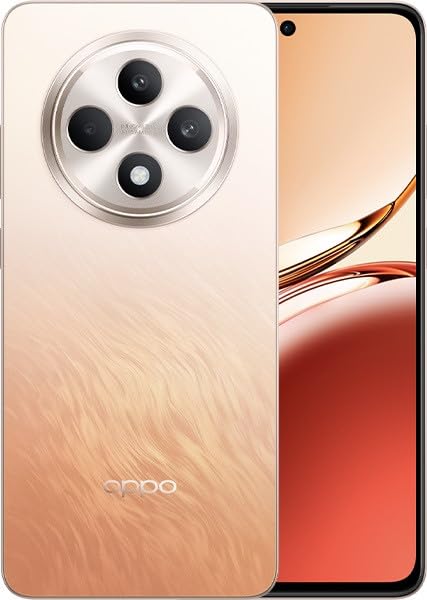
Image: OPPO Reno 12 F 5G CPH2637 smartphone in Amber Orange. This image displays the front and back of the device, highlighting its design and camera module.
2.5 Funcions de seguretat
The device offers various security options to protect your data:
- Desbloqueig de les empremtes digitals: Registra les teves empremtes dactilars a Settings > Password & Biometrics > Fingerprint.
- Desbloqueig facial: Configura el reconeixement facial a Settings > Password & Biometrics > Face.
- Bloqueig de pantalla: Choose a PIN, pattern, or password for screen lock in Settings > Password & Biometrics > Lock screen password.
3. Manteniment
3.1 Neteja del dispositiu
Use a soft, lint-free cloth to clean the screen and body of your phone. Avoid using harsh chemicals, abrasive materials, or aerosol sprays, as these can damage the device's finish and coatings. For stubborn smudges, slightly dampen el drap amb aigua.
3.2 Actualitzacions de programari
Comproveu i instal·leu regularment si hi ha actualitzacions de programari per garantir un rendiment òptim, seguretat i accés a noves funcions. Aneu a Configuració > Quant al dispositiu > Actualitzat per comprovar si hi ha actualitzacions disponibles.
3.3 Cura de la bateria
To prolong battery life, avoid exposing the device to extreme temperatures. It is recommended to keep the battery charge between 20% and 80% for daily use. Avoid leaving the phone plugged in for extended periods after it is fully charged.
3.4 Gestió d'emmagatzematge
Periòdicament review i eliminar innecessaris files, apps, and media to free up storage space. You can check storage usage in Settings > About device > Storage.
4. Solució De Problemes
4.1 El dispositiu no s'encén
If your device does not turn on, ensure it is sufficiently charged. Connect it to the charger for at least 15 minutes, then try pressing and holding the Power button again for 10-15 seconds.
4.2 Problemes de connectivitat de xarxa
If you experience issues with cellular data or Wi-Fi:
- Activa i desactiva el mode avió.
- Reinicieu el dispositiu.
- For cellular issues, ensure your SIM card is properly inserted and your plan is active.
- For Wi-Fi issues, restart your router and ensure you are within range.
4.3 Les aplicacions es bloquegen o es bloquegen
If an app is not responding, try force-closing it from the Recent Apps screen. If the issue persists, clear the app's cache and data in Settings > Apps > [App Name] > Storage usageCom a últim recurs, desinstal·leu i torneu a instal·lar l'aplicació.
4.4 Restabliment de fàbrica
A factory reset will erase all data on your device and restore it to its original factory settings. Back up all important data before performing a factory reset. Vés a Configuració > Configuració del sistema > Còpia de seguretat i restabliment > Restablir telèfon > Esborrar totes les dades.
5. Especificacions
| Característica | Especificació |
|---|---|
| Marca | OPPO |
| Nom del model | Reno 12 F 5G |
| Número de model | CPH2637 |
| Capacitat d'emmagatzematge de memòria | 256 GB |
| Mida instal·lada de la memòria RAM | 12 GB |
| Tecnologia cel·lular | 5G |
| Tecnologia de connectivitat | 5G |
| Nombre de ranures per a targetes SIM | Doble SIM |
| Color | Amber Orange |
| Entrada de la interfície humana | Pantalla tàctil |
| Factor de forma | Pissarra |
6. Garantia i Suport
Your OPPO Reno 12 F 5G CPH2637 is covered by a limited warranty. Please refer to the warranty card included in your product packaging for specific terms and conditions, including warranty period and coverage details. For technical support, service inquiries, or further assistance, please visit the official OPPO support weblloc web o poseu-vos en contacte amb la línia directa d'atenció al client de la vostra regió.


