1. Producte acabatview
The amaran Ace 25c is a compact, powerful, and versatile RGB portable video light designed for photography and videography. It features a wide CCT range, high CRI/TLCI, app control, and convenient magnetic mounting, making it an essential tool for creators on the go.

The amaran Ace 25c light shown with its included accessories: a cold shoe adapter, a USB-C charging cable, and a dome diffuser.
2. Què hi ha a la caixa
- 1 x amaran Ace 25c light
- 1 x Difusor de cúpula Ace d'amaran
- 1 x Adaptador Amaran Ace Lock a Cool Shoe
- 1 cable de càrrega USB-C Amaran (50 cm)
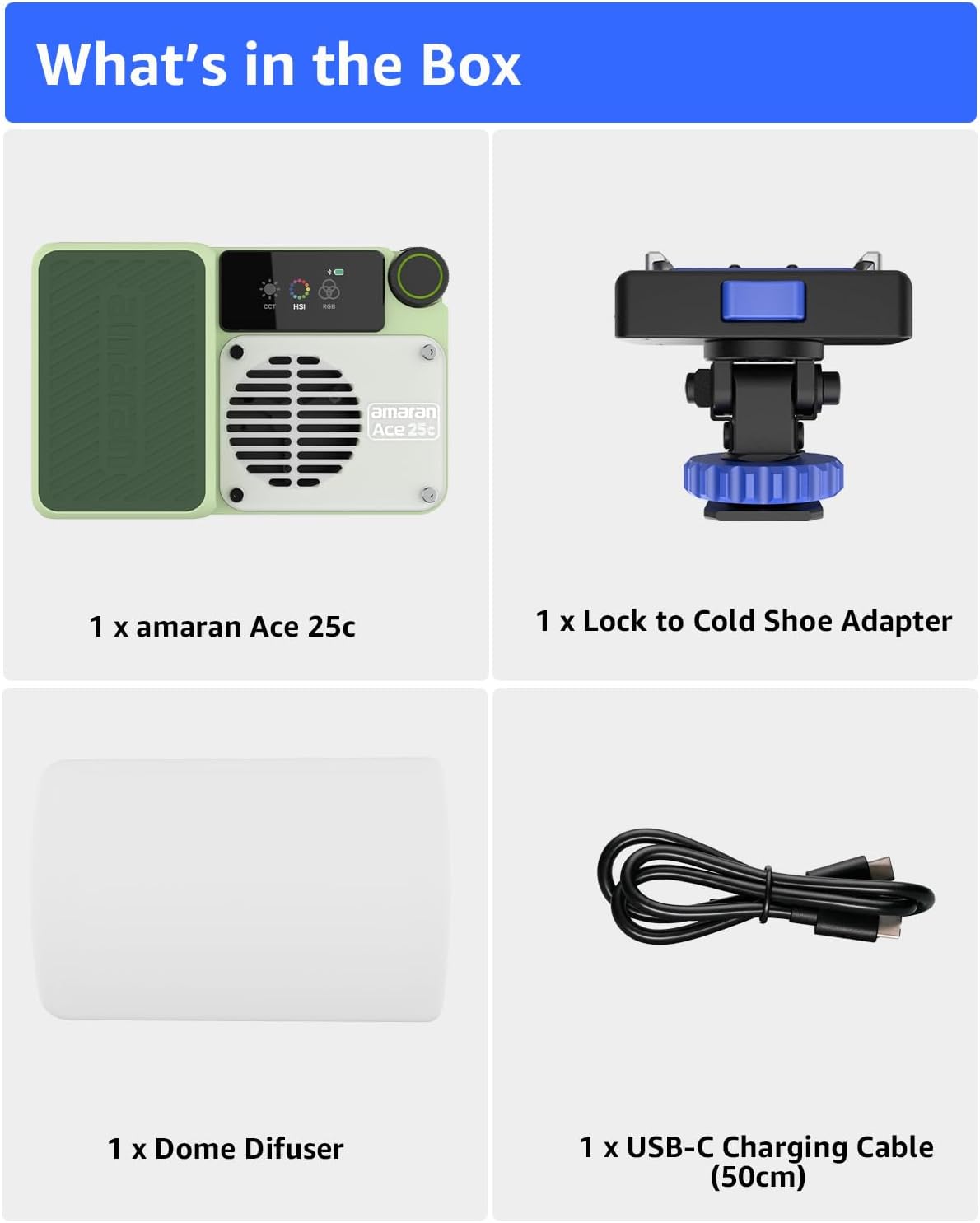
All components included in the amaran Ace 25c package.
3. Característiques clau
- Mida compacta: Measuring 11.8 x 7.7 x 3.3cm (4.65 x 3.03 x 1.30in), this mini on-camera light is designed for portability and convenience.
- Powerful Illumination & BOOST Mode: One-click boost from 25W to 32W. Bare Light Illuminance Up to 5,908 lux @ 0.5m (4,300K), with CCT from 2,300K to 10,000K.
- Mètodes de control dual: Control via on-board interface or wirelessly using the amaran App / Sidus Link App.
- amaran Ace Lock Quick Mount: Enables one-second installation and removal, compatible with various camera mounts and accessories.
- Llarga vida útil de la bateria: Up to 4 hours 40 minutes in Silent Mode and 70 minutes in Standard Mode. Super fast charging (0%-80% in 1 hour, 80%-100% in 30 minutes).
- Disseny magnètic: Built-in back magnetic silicone pad allows easy attachment to any magnetic surface.

Acabatview of the compact design and versatile features.

Illustrates palm-sized form factor, magnetic accessories, app control, and knob control.

Demonstrates the wide range of color temperature and HSI control.

The light can also function as a power bank to charge other devices.
4. Guia de configuració
4.1 Càrrega inicial
Before first use, fully charge your amaran Ace 25c using the provided USB-C charging cable. Connect the cable to the USB-C port on the light and to a compatible USB power adapter (not included). The display will indicate charging status.
4.2 Muntatge de la llum
The amaran Ace 25c offers multiple mounting options:
- Amaran Ace Lock: Use the included Amaran Ace Lock to Cold Shoe Adapter for quick attachment to cameras or light stands with a cold shoe mount. Simply slide the light onto the adapter until it locks into place.
- Muntatge magnètic: The built-in magnetic silicone pad on the back allows you to attach the light to any ferrous metal surface for versatile placement.
- Standard Screw Mounts: The light also supports standard 1/4-inch screw mounts for compatibility with tripods and other accessories.

The Amaran Ace Lock system allows for rapid attachment and detachment.

The powerful magnetic base provides flexible mounting options.
Official product video demonstrating the features and usage of the amaran Ace 25c video light, including its compact size, magnetic mounting, and app control capabilities.
5. Instruccions de funcionament
5.1 Encès/Apagat
Locate the power switch on the side of the unit. Slide the switch to the 'ON' position to power on the light. Slide it to 'OFF' to power down.
5.2 On-Board Controls
The amaran Ace 25c features an intuitive display and a multi-function knob for direct control:
- Perilla: Rotate to adjust brightness, CCT (Correlated Color Temperature), or HSI (Hue, Saturation, Intensity) values. Press to confirm selections or switch between modes.
- Botons: Additional buttons allow for quick access to different lighting modes (CCT, HSI, RGB) and other settings.
5.3 App Control (Sidus Link)
For advanced control and features, download the Sidus Link app from your device's app store. Pair your amaran Ace 25c with the app via Bluetooth to access a full range of adjustments, including precise color selection, effects, and firmware updates.
5.4 Adjusting Color and Brightness
In CCT mode, adjust the color temperature from 2,300K (warm) to 10,000K (cool). In HSI/RGB mode, select from a full spectrum of colors to achieve desired lighting effects. Brightness can be adjusted from 0% to 100% in all modes.
5.5 Mode BOOST
Activate BOOST mode for a temporary increase in light output from 25W to 32W, providing extra intensity when needed for critical shots. Refer to the on-screen display for BOOST mode activation and duration.
6. Manteniment
To ensure the longevity and optimal performance of your amaran Ace 25c, follow these maintenance guidelines:
- Mantingueu el dispositiu net netejant-lo amb un drap suau i sec. Eviteu utilitzar productes químics agressius o materials abrasius.
- Guardeu la llum en un lloc fresc i sec, allunyat de la llum solar directa i de temperatures extremes.
- Protect the light panel from scratches and impacts. Use the included dome diffuser when transporting or storing to prevent damage.
- Ensure the USB-C port is free of dust and debris to maintain proper charging and data transfer.
7. Solució De Problemes
| Problema | Causa possible | Solució |
|---|---|---|
| La llum no s'encén | Bateria baixa; interruptor apagat | Charge the device; Ensure power switch is in 'ON' position |
| Cannot connect to Sidus Link App | Bluetooth off; App not updated; Device not paired | Ensure Bluetooth is enabled on your phone; Update the app; Follow in-app pairing instructions |
| La sortida de llum és tènue | Brightness set too low; Not in BOOST mode | Increase brightness via knob or app; Activate BOOST mode if higher intensity is needed |
| La llum es sobreescalfa | Prolonged use at high intensity; Blocked ventilation | Reduce intensity or use Silent Mode; Ensure ventilation grilles are clear |
8. Especificacions
| Característica | Detall |
|---|---|
| Dimensions del producte | 6.1 x 3.94 x 3.44 polzades |
| Pes de l'article | 1.1 lliures |
| Número de model de l'article | Wihte |
| Marca | Amaran |
| Durada de la bateria (mode estàndard) | 70 minuts |
| Durada de la bateria (mode silenciós) | Fins a 4 hores 40 minuts |
| Tecnologia de connectivitat | Bluetooth |
| Descripció dels modes de flaix | Constant illumination, adjustable brightness, adjustable color temperature |
| Fabricant | Aputura |
| País d'origen | Xina |
9. Garantia i Suport
Per obtenir informació detallada sobre la garantia i l'atenció al client, consulteu la pàgina oficial d'Amaran. website or the user manual PDF available for download. You can find the user manual PDF at: Amaran Ace 25c User Manual (PDF).
For further assistance, please contact Amaran customer service through their official channels.


