1. Introducció
Thank you for choosing the hohem iSteady X3 SE Gimbal Stabilizer. This device is designed to provide ultra-smooth, professional-grade video footage and photos using your smartphone. Its portable and foldable design, combined with advanced stabilization technology and smart features, makes it an ideal tool for vlogging, travel, and everyday content creation. Please read this manual carefully before use to ensure proper operation and maximize your experience.
2. Què hi ha a la caixa
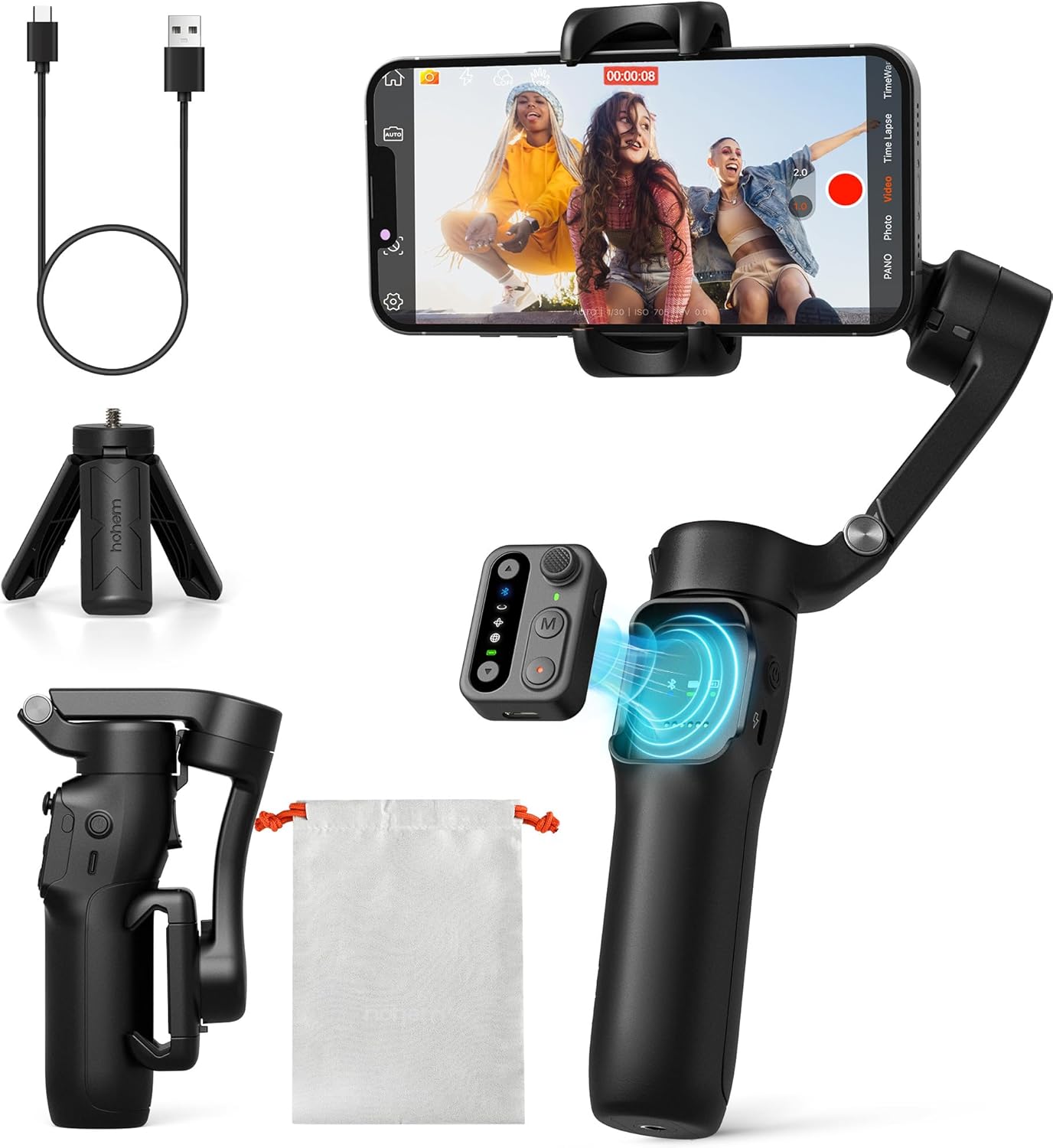
The hohem iSteady X3 SE package includes all essential components for immediate use. Upon opening the box, you will find the main iSteady X3 SE Gimbal unit, a detachable Remote Controller, a compact Tripod for stable shots, a Type-C Charging Cable for convenient power replenishment, a soft Storage Pouch for protection and portability, a Quick Start Guide for initial setup, and a Warranty Card for product registration and support.
- iSteady X3 SE Gimbal
- Control remot
- Trípode
- Cable de càrrega tipus C.
- Bossa d'emmagatzematge
- Guia d'inici ràpid
- Targeta de garantia
3. Producte acabatview
The hohem iSteady X3 SE features a user-friendly design with intuitive controls and a robust build. Key components include the phone clamp, 3-axis stabilization system, control panel with various buttons, and a comfortable handle that integrates a detachable remote control.

Sistema d'estabilització de 3 eixos: Ensures smooth and steady footage by compensating for unwanted movements across three axes.

Detachable Remote Control: A magnetic remote that allows for convenient control of the gimbal and phone camera from a distance of up to 33 feet.
4. Configuració
4.1 Desplegament del cardan

To unfold the gimbal, gently extend the handle and the phone clamp arm until they lock into position. The design allows for quick transformation from a compact, pocket-sized device to a fully functional stabilizer. Refer to the included Quick Start Guide for detailed visual instructions on the unfolding process.
4.2 Muntatge del telèfon intel·ligent
Obre el telèfon clamp and carefully insert your smartphone. Ensure the phone is securely centered in the clamp. The iSteady X3 SE supports a wide range of smartphones with a clip width of 2.28-3.86 inches and a payload capacity of up to 0.66 lbs (300 grams). This gimbal is designed to work without manual balancing, simplifying setup.
4.3 Càrrega del cardan

Connect the supplied Type-C charging cable to the gimbal's charging port and a 5V power adapter (not included). A full charge takes approximately 2 hours and provides up to 11 hours of continuous operation. The LED indicator lights will show the charging status and battery level.
4.4 Instal·lació de l'aplicació i connexió Bluetooth
Descarrega't el Aplicació Hohem Joy from your smartphone's app store (available for iOS and Android). Once installed, enable Bluetooth on your phone and open the Hohem Joy App. The app will automatically detect and connect to your iSteady X3 SE gimbal. This seamless Bluetooth connection enables full control over the gimbal's features and access to advanced shooting modes.

The Hohem Joy App is essential for unlocking the full potential of your iSteady X3 SE, providing features like AI tracking, gesture control, and various creative templates. Ensure your phone's Bluetooth is active for a quick and stable connection.
5. Instruccions de funcionament
5.1 Encès/Apagat
Press and hold the power button on the gimbal for 3 seconds to power it on or off. The indicator lights will illuminate when the device is active.
5.2 Using the Detachable Remote Control
The magnetic remote control can be detached from the gimbal handle for remote operation. It allows you to control various functions, including starting/stopping recording, switching modes, and zooming. Ensure the remote is charged and paired via Bluetooth for optimal performance.
5.3 Switching Between Horizontal and Vertical Modes

The iSteady X3 SE allows for quick switching between landscape (horizontal) and portrait (vertical) modes. This can typically be done via a dedicated button on the gimbal or through the Hohem Joy App, enabling seamless transitions for different content formats.
5.4 AI Tracking and Gesture Control

Seguiment d'IA: Utilize the Hohem Joy App to enable AI face and object tracking, ensuring your subject remains in focus even when moving. This feature is ideal for dynamic vlogging and action shots.
Control de gestos: Start or stop recording with simple hand gestures, providing a hands-free shooting experience, especially useful for solo content creators.
5.5 Hohem Joy App Features
The Hohem Joy App offers a suite of creative features to enhance your videos:
- Plantilles creatives: Access pre-set shooting templates for various scenarios.
- Timelapse Mode: Capture stunning time-lapse videos with precise stabilization.
- Mode inicial: Create dynamic 180-degree roll rotations for unique visual effects.
- Actualitzacions de firmware: Keep your gimbal updated with the latest features and performance improvements.
6. Manteniment
- Neteja: Feu servir un drap suau i sec per netejar el cardan. Eviteu utilitzar netejadors líquids o dissolvents.
- Emmagatzematge: Store the gimbal in its storage pouch in a cool, dry place away from direct sunlight and extreme temperatures.
- Cura de la bateria: For long-term storage, charge the battery to about 50-60% every three months to maintain battery health.
- Eviteu la sobrecàrrega: Do not exceed the maximum payload capacity of 0.66 lbs (300 grams) to prevent damage to the motors.
7. Solució De Problemes
| Problema | Causa possible | Solució |
|---|---|---|
| Gimbal not powering on | Bateria baixa; el botó d'engegada no s'ha premut prou estona | Charge the gimbal fully; Press and hold the power button for 3 seconds |
| Phone not stable/tilting | Phone not properly seated; Phone too heavy/light; Gimbal not calibrated | Ensure phone is centered and secure; Check phone weight against specifications; Perform gimbal calibration via the Hohem Joy App |
| Problemes de connexió Bluetooth | Bluetooth off on phone; App not open; Interference | Enable Bluetooth; Open Hohem Joy App; Restart gimbal and phone; Move away from other wireless devices |
| El comandament a distància no respon | Remote battery low; Not paired; Out of range | Charge remote; Re-pair remote via Bluetooth; Ensure remote is within 33ft of gimbal |
| El seguiment per IA no funciona | Poor lighting; Subject too far/close; App not updated | Ensure adequate lighting; Maintain optimal distance (1-3 meters); Update Hohem Joy App to the latest version |
If you encounter issues not listed here, please refer to the official Hohem Joy App for further assistance or contact hohem customer support.
8. Especificacions
| Característica | Detall |
|---|---|
| Número de model | HPG-X3 SE |
| Dimensions del producte (plegat) | 3.86 x 1.73 x 6.32 polzades |
| Pes de l'article | 12.6 unces (0.79 lliures) |
| Maximum Payload Capacity | 0.66 lliures (300 grams) |
| Amplada del clip del telèfon | 2.28 - 3.86 polzades |
| Tipus de bateria | Ió de liti (inclòs) |
| Temps de càrrega | Aprox. 2 hores |
| Durada de la bateria | Fins a 11 hores |
| Estabilització | 3-Eix |
| Interval de control remot | Fins a 32.81 peus (10 metres) |
| Dispositius compatibles | iPhone 11-16 Pro Max, Huawei P-series, Samsung Galaxy S-series, OnePlus, Google Pixel, OPPO, Vivo (check Hohem Joy App for full compatibility) |
9. Garantia i Suport
The hohem iSteady X3 SE Gimbal Stabilizer comes with a Warranty Card included in the package. Please refer to this card for detailed information regarding your product's warranty period and terms. For technical support, troubleshooting assistance, or any inquiries about your device, please visit the official hohem website or contact their customer service directly. Keeping your Hohem Joy App updated will also provide access to the latest support resources and firmware.


