1. Introducció
The Irfora A500 Camera is a 5-megapixel HD industrial digital camera designed to enhance the precision and efficiency of engraving machines. It features advanced capabilities such as automatic pattern recognition, precise positioning with an error margin of less than 0.5mm, and a large scanning area of up to 400x400mm. This camera module is compatible with a wide range of frame-type engraving machines and can also function as an external computer camera for recording creative processes.
2. Producte acabatview i llista d'embalatge
Before proceeding with installation and operation, please verify that all components listed below are present in your package.

Imatge: Detallada view of the Irfora A500 Camera packing list, illustrating each included item and key specifications.
Contingut del paquet:
- 5 x Kraft paper
- 2 x Focusing piece
- 1 x Soft ruler
- 1 x connector
- 1 x Camera (A500 module)
- 1 x base
- 1 x suport
3. Especificacions
The following table details the technical specifications of the Irfora A500 Camera:
| Característica | Especificació |
|---|---|
| Marca | Irfora (Maker) |
| Model | A500 |
| Píxel | 5MP |
| Resolució | 2592*1944 |
| Sensor | 1/2.5" CMOS Sensor |
| Mida de píxels | 2.2u00b5m x 2.2u00b5m |
| FOV (camp de View) | D:92u00b0 H:86u00b0 V:56u00b0 |
| Photography Area | 400 mm x 400 mm |
| Mida de la càmera | 42 mm x 42 mm x 29 mm |
| Compatibilitat de programari | Lightburn |
| Conductor | Sense controladors per a sistemes Windows/Mac |
| Dimensions del producte | 22.09 x 5.94 x 4.33 polzades (envasat) |
| Pes | 1100G (packaged) |

Image: Comparison of the A500 camera's professional quality lens specifications against general lenses, highlighting sensor size, pixel size, and field of view.
4. Guia de configuració
Follow these steps to properly set up your Irfora A500 Camera with your engraving machine.
4.1 Assembling the Camera Bracket
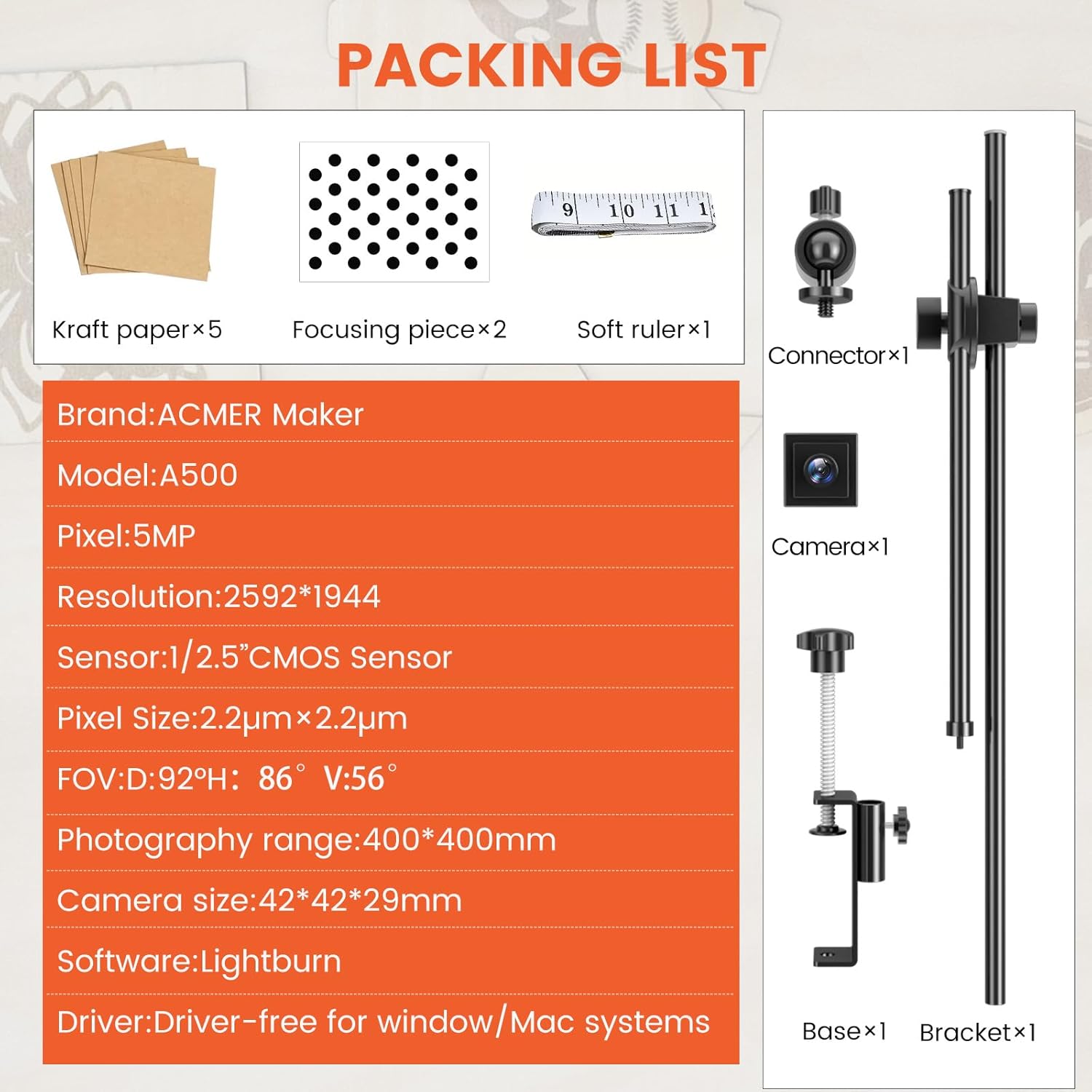
Image: The individual components of the camera bracket and base, ready for assembly.
- Attach the camera module to the adjustable arm of the bracket using the provided connector. Ensure it is securely fastened.
- Connect the adjustable arm to the vertical support rod.
- Secure the vertical support rod to the base clamp.
- Adjust the height and angle of the camera on the bracket to ensure it can capture the entire working area of your engraving machine.
4.2 Mounting the Camera to Your Engraving Machine

Image: The Irfora A500 Camera system fully assembled and positioned on an engraving machine, demonstrating its typical setup.
- Identify a stable mounting point on your engraving machine's frame, typically at the side or rear, where the camera can have an unobstructed view of the entire engraving area.
- Use the base clamp to firmly attach the assembled camera bracket to the chosen mounting point. Ensure the clamp is tightened sufficiently to prevent movement during operation.
- Position the camera so that its field of view (400x400mm) covers your machine's working area. The camera should be elevated enough to capture the full extent of the engraving bed.
- Connect the camera to your computer via a USB cable. The A500 camera is driver-free for Windows and Mac systems, simplifying the connection process.
5. Instruccions de funcionament
The Irfora A500 Camera integrates seamlessly with Lightburn software to provide advanced functionalities for your engraving tasks.
5.1 Intelligent Precise Positioning
The A500 camera features a 5-megapixel HD industrial digital camera that ensures accurate positioning. It precisely identifies the engraving position and automatically locates the engraving area with an error margin of less than 0.5mm.

Image: Visual representation of the intelligent precise positioning feature, illustrating how the camera automatically aligns the engraving pattern with high accuracy.
5.2 Sculpting Area Preview with Lightburn
The large camera scan area (up to 400x400mm) allows Lightburn software to preview the engraving area. This eliminates the need for manual setting of the working edge, as the engraving machine automatically recognizes the pattern position for carving.

Image: A laptop screen displaying the Lightburn software interface with a live preview window, demonstrating the camera's ability to show the engraving area in real-time.
5.3 Boundary Recognition for Cutting and Carving
The A500 camera module utilizes a boundary recognition function to precisely cut and carve on objects, ensuring accurate execution of your designs.

Image: A visual example of the boundary recognition feature, showing how the camera identifies and processes patterns for precise cutting and carving operations.
5.4 Video Recording Functionality
Beyond its primary function, the A500 camera can also be used as an external computer camera to record your creative process, compatible with Windows, macOS, and Linux systems.

Image: The A500 camera set up to record the engraving process, with the video feed displayed on a laptop screen, demonstrating its use as an external recording device.
5.5 Compatibilitat àmplia
The A500 camera module is designed for broad compatibility, supporting 95% of frame engraving machines on the market, including but not limited to the brands listed below.
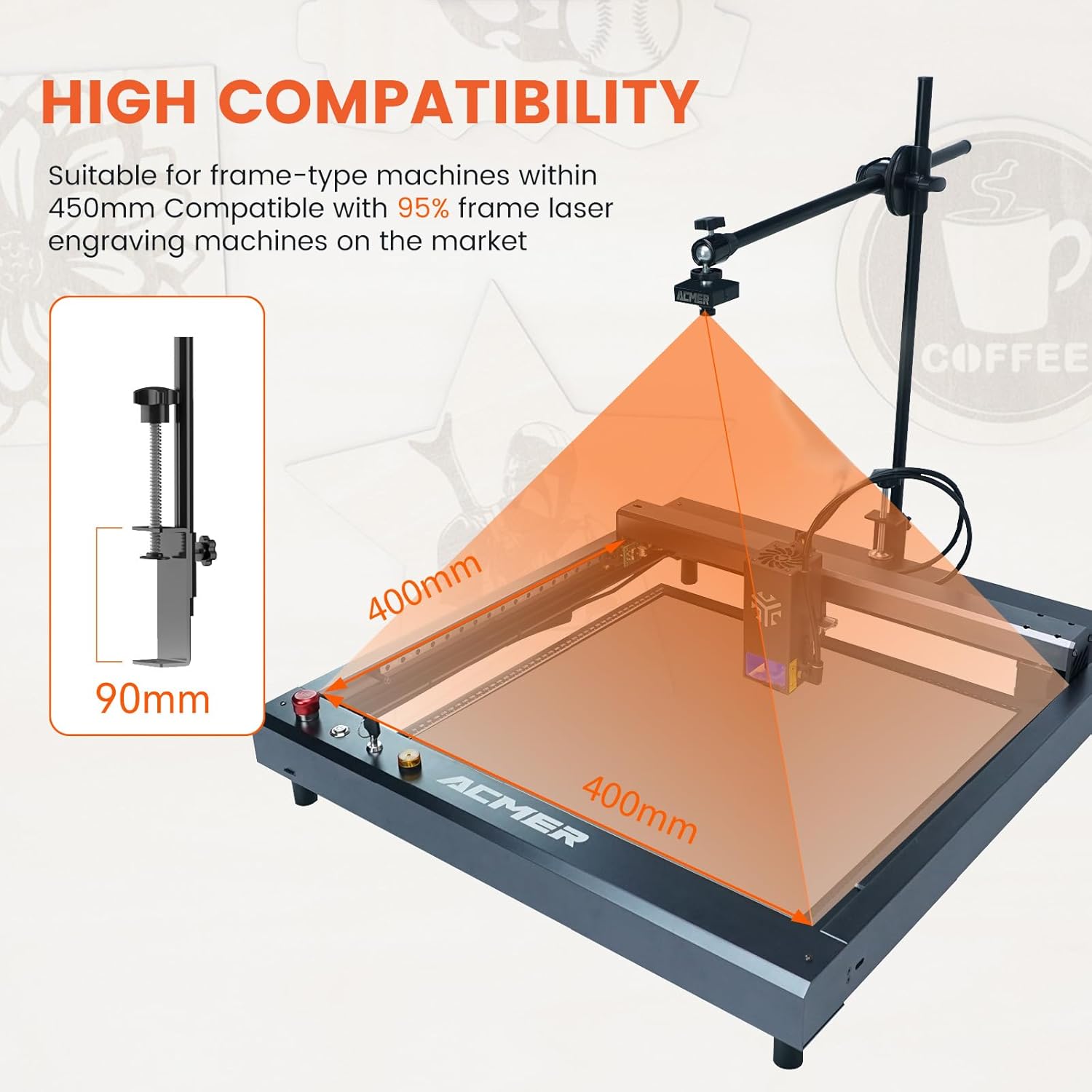
Image: A diagram showing the A500 camera mounted on an engraving machine, highlighting its 400mm x 400mm photography area and 90mm bracket height, emphasizing its high compatibility.
Compatible brands and models include:
- ACMER: P1/P2
- XTOOL: D1/D1 PRO
- Orur: Master 1/2/3
- SCULPFUN: S9/S10/S30 Etc...
- ATOMSTACK: A/S/X Series
- iKIER: K1/K1 PRO
- CREALITY: FALCON Series
- TWO TREES: TTS/TS2 Series
- COMGROW: Z1
- ATEZR: P5/P10/P20/V35
6. Manteniment
To ensure the longevity and optimal performance of your Irfora A500 Camera, follow these maintenance guidelines:
- Neteja de la lent: Gently wipe the camera lens with a soft, lint-free cloth. For stubborn smudges, use a lens cleaning solution specifically designed for optical surfaces. Avoid abrasive materials or harsh chemicals.
- Eliminació de pols: Regularly use a can of compressed air to remove dust from the camera body and any crevices. Dust accumulation can affect performance and lifespan.
- Emmagatzematge: When not in use for extended periods, store the camera in a dry, cool place, away from direct sunlight and extreme temperatures. Consider using the original packaging or a protective case.
- Inspecció del cable: Periodically check the USB cable for any signs of wear, fraying, or damage. Replace damaged cables immediately to prevent connectivity issues.
- Actualitzacions de programari: Keep your Lightburn software updated to the latest version to ensure compatibility and access to new features or performance improvements related to camera integration.
7. Solució De Problemes
This section addresses common issues you might encounter with your Irfora A500 Camera.
7.1 Camera Not Detected by Computer/Software
- Comprova la connexió USB: Assegureu-vos que el cable USB estigui ben connectat tant a la càmera com a l'ordinador. Proveu un port USB diferent.
- Proveu un cable diferent: A faulty USB cable can prevent detection. Test with another known-good USB cable.
- Restart Computer/Software: Sometimes a simple restart of your computer or the Lightburn software can resolve detection issues.
- Verify Driver Status (Windows): Although driver-free, sometimes Windows might have issues. Check Device Manager to see if the camera is listed under 'Cameras' or 'Imaging devices' without any error symbols.
- Configuració del programari: Within Lightburn, ensure the correct camera device is selected in the camera settings.
7.2 Image Quality Issues (Blurry, Dark, etc.)
- Netegeu la lent: Dust or smudges on the lens can significantly degrade image quality. Refer to the Maintenance section for cleaning instructions.
- Condicions d'il·luminació: Ensure adequate and even lighting over your engraving area. Poor lighting can result in dark or grainy images.
- Enfocament: While the camera is designed for precise positioning, ensure the focus is clear. If adjustable, fine-tune the focus.
- Camera Height/Angle: Incorrect camera positioning can lead to distorted or blurry images, especially at the edges. Adjust the bracket to ensure the camera is level and at an optimal height.
7.3 Inaccurate Positioning/Pattern Recognition
- Calibració: Ensure your camera is properly calibrated within Lightburn. Recalibrate if you suspect inaccuracies or if the camera's position has been moved.
- Il·luminació: Consistent and uniform lighting is crucial for accurate pattern recognition. Shadows or glare can interfere with the camera's ability to identify patterns.
- Workpiece Placement: Ensure the workpiece is flat and stable on the engraving bed. Uneven surfaces can lead to positioning errors.
- Actualitzacions de programari: Ensure your Lightburn software is up to date, as updates often include improvements to camera recognition algorithms.
8. Garantia i Suport
For warranty information and technical support regarding your Irfora A500 Camera, please refer to the documentation provided at the time of purchase or contact your retailer. You may also visit the official Irfora weblloc web per obtenir els recursos de suport i les dades de contacte més actualitzats.
When contacting support, please have your product model (A500) and any relevant purchase information readily available.