1. Introducció
This manual provides detailed instructions for assembling, setting up, and operating your Irfora DS3231 DIY Digital Dot Matrix LED Alarm Clock Kit. This kit allows you to build a functional clock with high accuracy, featuring time, date, temperature, and week display capabilities. It includes a transparent case to protect the components and offers various customizable display options.

Image 1.1: The fully assembled Irfora DS3231 Digital Dot Matrix LED Alarm Clock Kit, showcasing its blue LED display.
2. Contingut del kit
Before beginning assembly, please verify that all components listed below are present in your kit.
- Placa de circuit principal (PCB)
- Dot Matrix LED Display Modules
- Transparent Acrylic Case Panels (Top, Bottom, Sides)
- DS3231 High Accuracy Clock Chip
- Microcontroller Unit (MCU)
- Toqueu les tecles
- Sensor de llum
- Microphone (for voice control)
- Resistors, Capacitors, Diodes, and other small electronic components
- Cable d'alimentació USB
- Mounting Hardware (screws, nuts, standoffs)

Imatge 2.1: Un sobreview of all components included in the DIY kit, featuring the PCB, LED matrix, acrylic panels, and various electronic parts.
3. Instruccions de muntatge
Follow these steps carefully to assemble your digital clock kit. Basic soldering skills are required.
- Preparació dels components: Carefully unpack all components. Remove the protective film from both sides of the transparent acrylic case panels.
- Solder Small Components: Begin by soldering the smaller electronic components (resistors, capacitors, diodes, IC sockets if applicable) onto the main circuit board (PCB) according to the markings on the PCB.
- Solder ICs and Sensors: Solder the DS3231 clock chip, microcontroller, touch keys, light sensor, and microphone onto their designated positions on the PCB. Ensure correct orientation for polarized components.
- Attach LED Display Modules: Carefully align and solder the dot matrix LED display modules to the PCB. Ensure all pins make good contact.
- Assemble Acrylic Case: Once all electronic components are soldered, mount the assembled PCB into the bottom acrylic panel using the provided standoffs and screws. Then, attach the side panels and finally the top acrylic panel, securing them with the remaining screws. Ensure the USB port and touch keys are accessible through the case openings.

Image 3.1: Peeling off the protective film from the acrylic case panels before assembly.
4. Configuració i configuració inicial
After assembly, connect the clock to a power source and perform initial setup.
- Connexió d'alimentació: Connect the provided USB cable to the clock's USB interface and plug the other end into a standard USB power adapter (not included) or a computer USB port. The clock will power on and display default settings.
- Initial Time/Date Setting: Upon first power-up, you may need to set the current time and date. Use the touch keys (usually located on the sides or top of the case) to navigate through the settings menu.
- Navegació: Typically, one touch key is for 'Mode' or 'Select', and another for 'Adjust' or 'Next'. Refer to the on-screen prompts for specific navigation.
- Establir hora: Enter the time setting mode. Adjust hours, then minutes. Confirm each setting.
- Establir data: Enter the date setting mode. Adjust year, month, then day. Confirm each setting.
- Unitat de temperatura: Select between Celsius (°C) and Fahrenheit (°F) for temperature display.
- Format horari: Choose between 12-hour (with AM/PM) or 24-hour format.

Image 4.1: The USB port on the back of the clock for power connection.
5. Instruccions de funcionament
Your clock offers various display modes and functions. Use the built-in touch keys to access and configure them.
5.1 Basic Display Modes
Press the 'Mode' key to cycle through the primary display modes:
- Visualització de l'hora: Shows current time (12H/24H format).
- Visualització de la data: Shows current date (Year/Month/Day).
- Visualització de la temperatura: Shows current ambient temperature (°C/°F).
- Visualització de la setmana: Mostra el dia actual de la setmana.

Imatge 5.1: Ex.amples of the clock displaying time, date, and other information in various LED colors.
5.2 Funció de despertador
Per configurar l'alarma:
- Enter the alarm setting mode using the 'Mode' key.
- Use the 'Adjust' key to set the desired alarm hour and minute.
- Confirm the alarm setting. You can usually enable or disable the alarm from this menu.
5.3 Personalització de la pantalla
The clock allows customization of font, display effects, and animation effects. Access these options through the settings menu (refer to on-screen prompts for navigation).
- Selecció de fonts: Choose from available font styles for the display.
- Display Effects: Select different ways information transitions on the screen.
- Animation Effects: Enable or disable various animations.
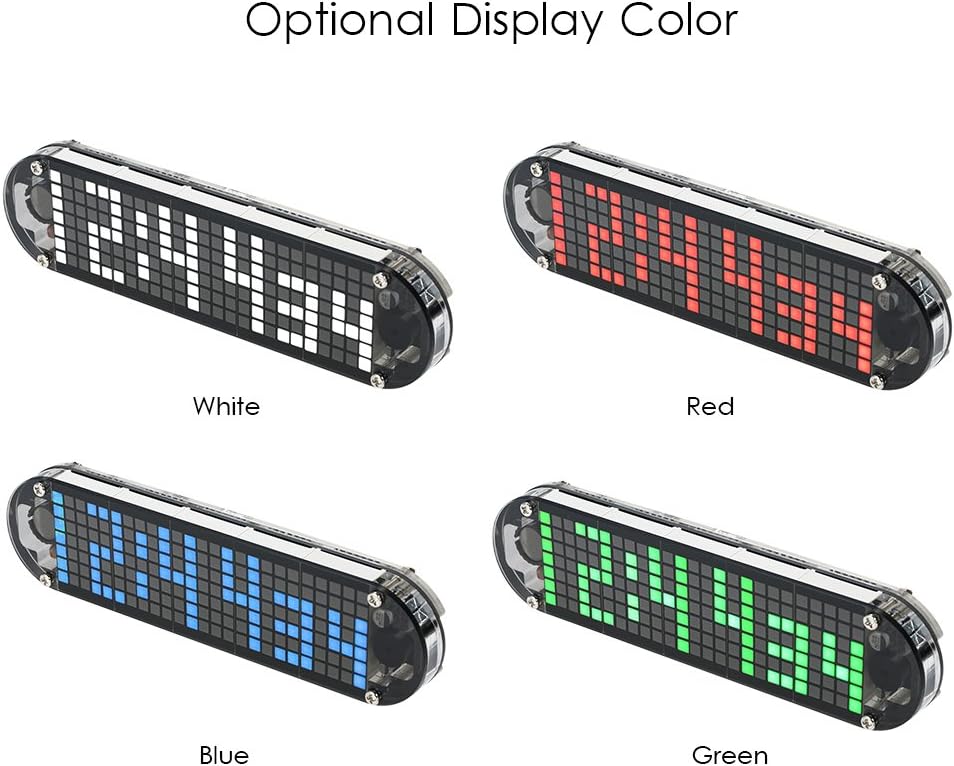
Image 5.2: The clock is available with various LED display colors, including White, Red, Blue, and Green.
5.4 Ajust de brillantor
The clock can automatically adjust brightness based on ambient light using its built-in light sensor. You can also manually set the brightness level through the settings menu.
5.5 Voice Control and Countdown
The clock includes voice control capabilities and a countdown function. Refer to the on-screen menu for activation and configuration of these features.
6. Manteniment
To ensure the longevity and proper functioning of your clock:
- Neteja: Use a soft, dry cloth to clean the acrylic case. Avoid abrasive cleaners or solvents that could damage the material.
- Font d'alimentació: Always use a stable 5V USB power source.
- Bateria de seguretat: The DS3231 chip includes temperature compensation and maintains accurate time even if the main power is disconnected, thanks to its internal backup battery (not user-replaceable). This ensures time settings are preserved during power outages.
- Medi ambient: Operate the clock indoors and avoid exposure to extreme temperatures, humidity, or direct sunlight.
7. Solució De Problemes
If you encounter issues with your clock, refer to the following common problems and solutions:
- Clock does not power on:
- Ensure the USB cable is securely connected to both the clock and a working power source.
- Verifiqueu que l'adaptador de corrent funciona correctament.
- Check for any visible soldering errors on the PCB.
- La pantalla és tènue o parpelleja:
- Check the brightness settings in the menu.
- Ensure the light sensor is not obstructed if automatic brightness is enabled.
- Inspect connections to the LED display modules for loose contacts.
- El temps és inexacte:
- Re-set the time and date.
- The DS3231 chip is highly accurate; significant inaccuracy might indicate a component issue or improper soldering.
- Touch keys are unresponsive:
- Ensure the touch key components are correctly soldered and not obstructed by the case.
- Restart the clock by disconnecting and reconnecting power.
8. Especificacions
| Característica | Especificació |
|---|---|
| Marca | Irfora |
| Model | DS3231 |
| Tipus de visualització | Digital Dot Matrix LED |
| Display Color (Kit) | Blue (Other colors may be available in different product variations) |
| Font d'alimentació | USB Interface (5V DC) |
| Clock Chip | DS3231 (High Accuracy with Temperature Compensation) |
| Material de la caixa | Acrílic transparent |
| Material PCB | FR4 |
| Acrylic Board Size | 16.6 cm x 4.2 cm (6.54 polzades x 1.65 polzades) |
| Dot Matrix Module Size (1pc) | 2.8 cm x 4.2 cm (1.10 polzades x 1.65 polzades) |
| Pes de l'article | Aproximadament 140 g (4.9 unces) |
| Característiques | Time, Date, Temperature, Week Display, Alarm, Voice Control, Countdown, Auto/Manual Brightness, 12H/24H, °C/°F |
| Ús interior/exterior | Interior |
| Piles incloses | No (Internal backup battery for clock chip is not user-replaceable) |

Image 8.1: Detailed dimensions of the individual dot matrix LED module and the main circuit board.
9. Garantia i Suport
This DIY kit is intended for hobbyists and requires assembly. Due to the nature of DIY kits, specific warranty terms may vary. Please refer to your purchase documentation or contact the seller directly for information regarding warranty coverage and technical support.
For further assistance or inquiries, please reach out to the Irfora customer support team through the platform where you purchased this product.


