Introducció
The YUNZII B68 is a versatile 65% compact mechanical keyboard designed for enhanced productivity and gaming. It features tri-mode connectivity, hot-swappable switches, gasket mount design for a comfortable typing experience, and customizable RGB backlighting. This manual provides detailed instructions for setting up, operating, and maintaining your keyboard.

Figure 1: YUNZII B68 Wireless Mechanical Keyboard (Black, Milk V2 Switch)
Contingut del paquet
- Teclat mecànic sense fil YUNZII B68
- Cable USB-C a USB-A
- Receptor sense fil 2.4G (adaptador USB)
- Eina d'extracció de tecles/interruptors
- Additional Gradient Rainbow Keycaps
- Manual d'usuari
Característiques del producte
Connectivitat trimodal
The B68 keyboard offers three connection options: Bluetooth 5.0, 2.4GHz wireless, and wired USB-C. It is compatible with Windows, MacOS, iOS, and Android devices, allowing connection to up to five devices simultaneously.

Figure 2: Tri-Mode Connectivity Options
Bateria de 5000 mAh
Equipped with a large 5000mAh battery, the keyboard ensures extended use for productivity and gaming on the go.

Figura 3: Bateria de 5000 mAh per a ús prolongat
Interruptors intercanviables en calent
The B68 features full-key hot-swappable sockets compatible with 3-pin and 5-pin switches. It comes pre-installed with pre-lubricated linear switches (Milk V2 Switch) for a smooth typing experience. The hot-swappable design allows for easy switch replacement without soldering.

Figure 4: Hot-Swappable Switch Sockets
Disseny de muntatge de junta
Experience quieter and smoother typing with the precision gasket mount structure, featuring five layers of sound-absorbing padding (PE sandwich foam, IXPE switch pad, PET sound foam, switch foam, and a silicone button pad) to reduce noise and vibration.

Figure 5: Gasket Mount Design with Five-Layer Padding
RGB Backlighting & PBT Keycaps
The keyboard features colorful RGB backlighting with south-facing LEDs. It includes durable double-shot PBT keycaps and additional gradient rainbow keycaps for personalization. RGB settings can be customized via software.
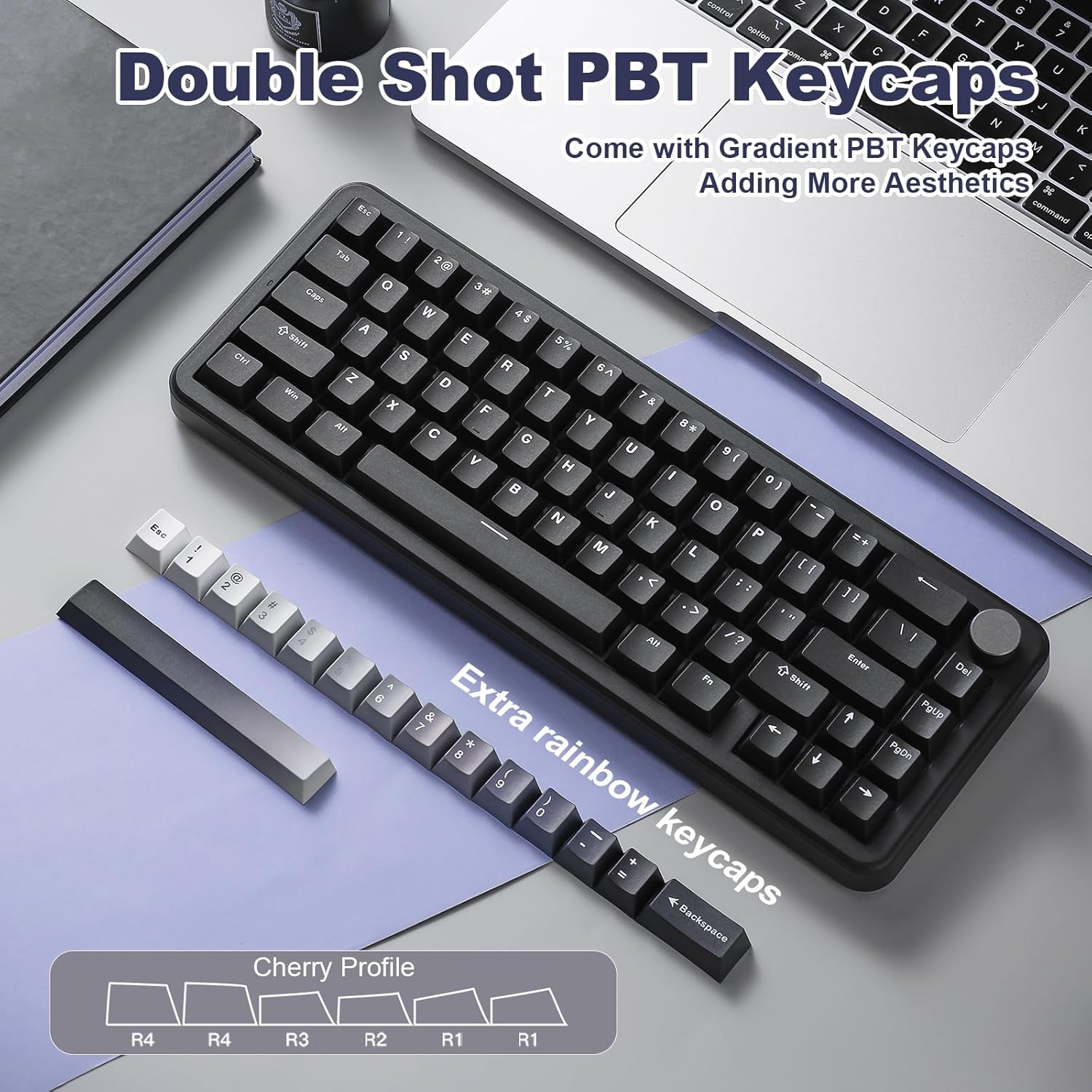
Figure 6: Double-Shot PBT Keycaps and RGB Backlighting
65% Compact Layout with Multifunction Knob
The 65% compact layout maximizes desk space while retaining essential keys. A versatile multifunction knob allows effortless switching between multimedia and RGB modes, and adjusts volume and RGB brightness.
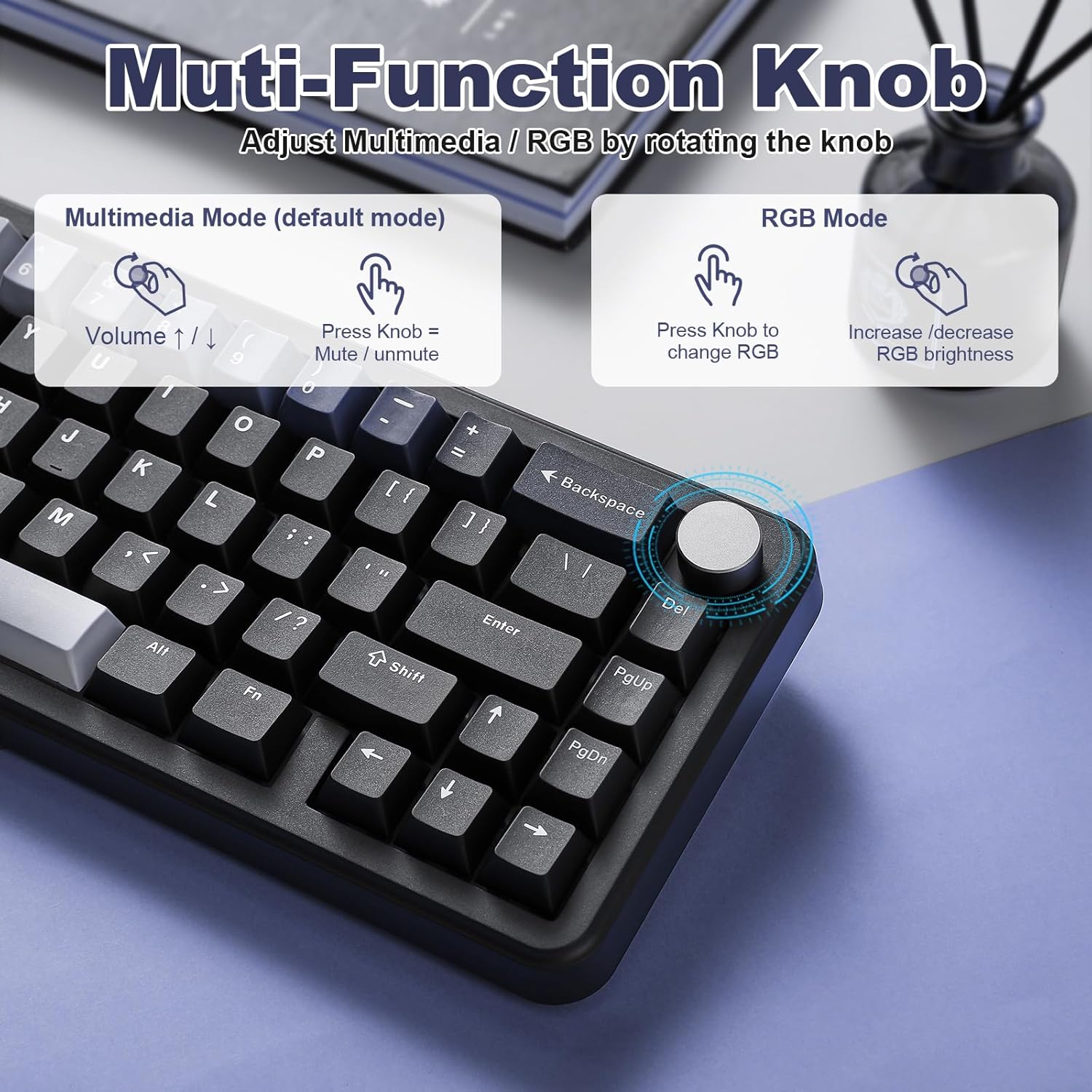
Figure 7: Multifunction Knob Controls
Configuració
Connexió per cable
- Localitza el port USB-C al teclat i el port USB-A a l'ordinador.
- Connect the provided USB-C to USB-A cable between the keyboard and your computer.
- Ensure the mode switch on the keyboard is set to 'Line' or 'USB' mode.
- El teclat ja està llest per utilitzar-lo.
Connexió sense fils a 2.4 GHz
- Locate the 2.4G wireless receiver (USB dongle) in the packaging.
- Plug the 2.4G wireless receiver into an available USB port on your computer.
- Set the mode switch on the keyboard to '2.4G' mode.
- El teclat s'hauria de connectar automàticament. Si no, premeu Fn + R to enter pairing mode. The R key will flash blue, indicating pairing.
- Once connected, the R key will return to normal backlight mode.
Connexió Bluetooth
- Set the mode switch on the keyboard to 'BT' mode.
- Mantén premut Fn + Q/W/E to enter Bluetooth pairing mode. The Q, W, or E key will flash in cyan/pink/yellow, indicating pairing for device 1, 2, or 3 respectively.
- On your device (computer, tablet, phone), go to Bluetooth settings and search for 'B68 3.0/5.0'.
- Select the keyboard to connect. Once connected, the corresponding Q/W/E key will return to normal backlight mode.
- Per canviar entre dispositius Bluetooth emparellats, premeu Fn + Q, Fn + W, o Fn + E.
Instruccions de funcionament
Pom multifunció
- Default (Multimedia) Mode: Rotate the knob to adjust volume (up/down). Short press the knob to mute/unmute audio.
- Mode RGB: Long press the knob to switch to RGB mode. Rotate the knob to increase/decrease RGB brightness. Short press the knob to change RGB effects.
Control de retroil·luminació RGB
- Fn + Retrocés: Efecte de llum de fons ON/OFF
- Fn + |: Change Backlight Effect (15 default modes)
- Fn + Enter: Change Backlight Color (8 colors)
- Fn + Tabulador: White Light ON/OFF
- Fn + ↑ / ↓: Brillant amunt / avall
- Fn + ← / →: Blinking Speed Up/Down
FN Key Shortcuts (Windows)
- Fn + Caps Lock: Restableix el teclat
- Fn + Win: Bloquejar/Desbloquejar la clau de Windows
- Fn+F1: Baixa la brillantor de la pantalla
- Fn+F2: Augmenta la brillantor de la pantalla
- Fn+F3: Calculadora
- Fn+F4: Ordinador
- Fn+F5: Jugador
- Fn+F6: Cançó anterior
- Fn+F7: Següent Cançó
- Fn+F8: Reproduir/Pausa
- Fn+F9: Atureu-vos
- Fn+F10: Silenciar
- Fn+F11: Baixa el volum
- Fn+F12: Puja el volum
Programari programable
The YUNZII B68 supports programmable software for Windows systems only. This software allows for advanced customization of key settings, RGB lighting, and macro functions.

Figure 8: Programmable Software Interface
Video 1: YUNZII B68 Wireless Mechanical Keyboard Features Overview
Video 2: YUNZII B68 Wireless Mechanical Keyboard Typing Sound Demo
Manteniment
- Neteja de les tecles: Feu servir l'extractor de tecles proporcionat per treure amb cura les tecles. Netegeu-les amb un drap suau i sec.amp cloth and mild soap if necessary. Ensure they are completely dry before reattaching.
- Cleaning Keyboard Body: Wipe the keyboard body with a soft, dry, or slightly damp tela. Eviteu utilitzar productes químics o materials abrasius.
- Manteniment de l'interruptor: If replacing switches, use the switch puller tool to gently remove and insert switches. Avoid excessive force to prevent damage to the PCB.
- Cura de la bateria: To prolong battery life, avoid fully discharging the keyboard frequently. Charge the keyboard using a 5V USB port.
Resolució de problemes
- El teclat no es connecta: Ensure the mode switch (BT, 2.4G, USB) is set correctly. For wireless modes, ensure the receiver is properly plugged in or Bluetooth is enabled and paired. Try resetting the keyboard (Fn + Bloq majúscules).
- RGB lights not working/customizing: Check if RGB is turned on (Fn + Retrocés). Ensure the multifunction knob is in RGB mode for brightness/effect changes. Use the programmable software for advanced customization.
- Les tecles no responen: Check if the Windows key is locked (Fn + Win). If switches are hot-swappable, ensure they are seated correctly. Try resetting the keyboard.
- Battery drain: Adjust the sleep time settings via the programmable software to conserve battery. Reduce RGB brightness or turn off backlighting when not needed.
Especificacions
| Model | B68 |
| Disseny | 65% Compact (68 keys + 1 knob) |
| Connectivitat | Bluetooth 5.0, sense fil de 2.4 GHz, USB-C amb cable |
| Capacitat de la bateria | 5000 mAh |
| Interruptors | Hot-swappable (3-pin/5-pin), Milk V2 Linear Switches (pre-lubricated) |
| Taps de claus | PBT de doble injecció |
| Il·luminació de fons | RGB, LED orientats al sud |
| Compatibilitat | Windows, MacOS, iOS, Android |
| Dimensions del producte | 12.83 x 12.83 x 1.26 polzades |
| Pes de l'article | 2.38 lliures |
Garantia i Suport
YUNZII products typically come with a standard manufacturer's warranty. Please refer to the warranty information provided in your product packaging or visit the official YUNZII website for detailed terms and conditions. For technical support or inquiries, please contact YUNZII customer service.


