Introducció
This manual provides detailed instructions for the setup, operation, and maintenance of your Xiaomi Redmi Computer Speaker. This soundbar features both wired and Bluetooth connectivity, 4-unit drivers for enhanced audio, 5 distinct audio modes, two-channel stereo sound, a DSP chip for optimized performance, customizable RGB lighting, and intuitive knob-type control. Please read this manual thoroughly before using the product to ensure proper functionality and longevity.
Contingut del paquet
- Xiaomi Redmi Computer Speaker
- Cable d'alimentació USB
- Cable d'àudio (si escau)
- Manual d'usuari (aquest document)
Producte acabatview

Davant view of the Xiaomi Redmi Computer Speaker, showcasing its sleek design and integrated RGB light strip along the bottom edge.

Detallada view of the speaker's features, including the metallic control knob, textured fabric grille, and rear port cover.
Controls i indicadors:
- Control de potència/volum: Rotate to adjust volume, press to power on/off or switch input modes.
- Tira de llum RGB: Located at the bottom, indicates status and provides ambient lighting.
- Botó de mode: Button on top for switching audio modes or RGB effects.
Configuració
1. Connexió d'alimentació:
Connect the provided USB power cable to the speaker's power input port and then to a compatible USB power source (e.g., computer USB port, USB wall adapter).
2. Connexió d'àudio:
Connexió per cable:
Connect the audio cable (if included or required) from your computer's audio output jack to the speaker's audio input port.
Connexió Bluetooth:
- Assegureu-vos que l'altaveu estigui encès.
- Press the Power/Volume knob or dedicated mode button to switch to Bluetooth mode. The RGB light strip may indicate Bluetooth pairing mode (e.g., blinking blue).
- On your device (computer, smartphone), enable Bluetooth and search for "Xiaomi Redmi Speaker" or similar.
- Select the speaker from the list of available devices to pair. A confirmation sound or steady light will indicate successful pairing.
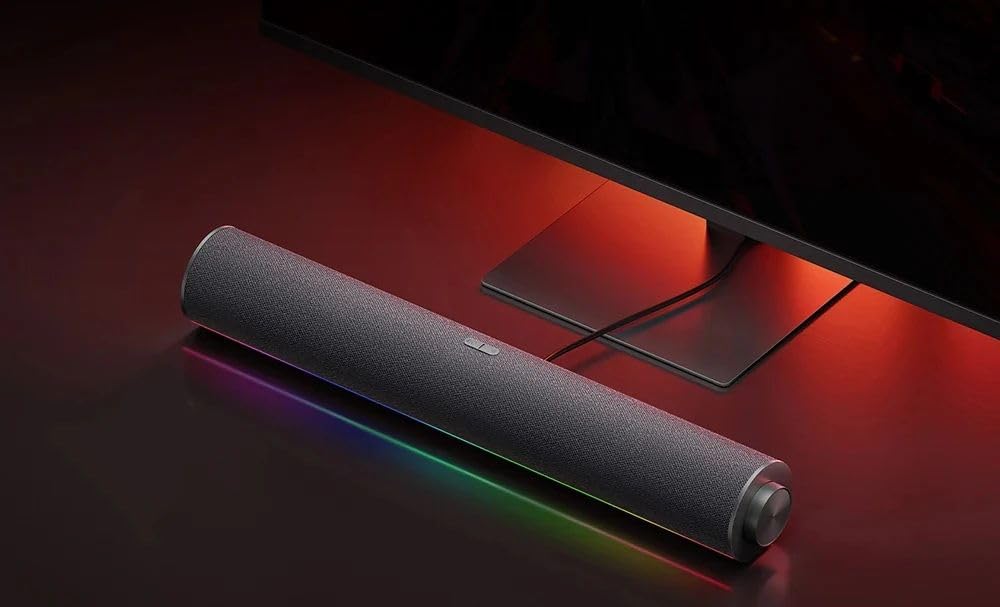
The Xiaomi Redmi Computer Speaker positioned neatly below a desktop monitor, ready for use.
Instruccions de funcionament
Encès/apagat:
Press and hold the Power/Volume knob for approximately 3 seconds to power the speaker on or off.
Control de volum:
Gireu el botó d'engegada/volum en sentit horari per augmentar el volum i en sentit antihorari per disminuir-lo.
Input Mode Switching:
Short press the Power/Volume knob to cycle through available input modes (e.g., Bluetooth, Wired).
Modes d'àudio:
The speaker supports 5 audio modes. Short press the dedicated mode button to cycle through different audio equalization presets (e.g., Music, Movie, Game, Voice, Standard). Refer to the RGB light indicator for the active mode.
Control d'il·luminació RGB:
The RGB light strip offers various effects. Press the mode button to change lighting patterns or colors. Some common modes include:
- Pickup rhythm movement (reacts to audio)
- Fashion neon
- Dream aurora
- Warm fire
- Solid color respiration

Visual representation of the various RGB lighting modes available on the speaker, including "Pickup rhythm movement" and "Fashion neon".

The speaker connected via Bluetooth to a smartphone, demonstrating its wireless audio playback capability.
Manteniment
- Neteja: Feu servir un drap suau i sec per netejar la superfície de l'altaveu. No utilitzeu netejadors líquids ni materials abrasius.
- Emmagatzematge: Quan no l'utilitzeu durant períodes prolongats, guardeu l'altaveu en un lloc fresc i sec, allunyat de la llum solar directa i de temperatures extremes.
- Eviteu l'aigua: Keep the speaker away from water and high humidity to prevent damage to internal components.
- Manejar amb cura: Eviteu deixar caure o sotmetre l'altaveu a forts impactes.
Resolució de problemes
| Problema | Causa possible | Solució |
|---|---|---|
| Sense so | Speaker not powered on; Volume too low; Incorrect input mode; Loose cable connection; Device volume too low. | Ensure speaker is powered on; Increase speaker and device volume; Switch to correct input mode (Bluetooth/Wired); Check all cable connections. |
| Desconnexió Bluetooth | Device out of range; Interference; Speaker not in pairing mode. | Move device closer to speaker; Avoid obstacles; Re-enter Bluetooth pairing mode on speaker and re-pair. |
| Les llums RGB no funcionen | Light mode off; Software glitch. | Cycle through RGB light modes; Power cycle the speaker. |
| Àudio distorsionat | Volume too high; Poor audio source quality; Cable interference. | Reduce volume; Use a high-quality audio source; Check audio cable for damage or interference. |
Especificacions
| Característica | Detall |
|---|---|
| Marca | Xiaomi |
| Número de model | RM |
| Tecnologia de connectivitat | Cablejat, Bluetooth |
| Mode de sortida d'àudio | estèreo |
| Tipus de muntatge | Taula |
| Dimensions del paquet | 46.4 x 11.2 x 8 cm |
| Pes de l'article | 900 g |
| Capacitat de la bateria | 1500 mAh |
Garantia i Suport
This product may be eligible for extended warranty options. Please refer to your purchase documentation or contact your retailer for specific warranty terms and conditions.
- 1-Year Extended Warranty: Available through Salama Care (E-mail delivery).
- 2-Year Extended Warranty: Available through Salama Care (E-mail delivery).
Per obtenir assistència tècnica o més ajuda, visiteu el servei d'assistència oficial de Xiaomi. weblloc o poseu-vos en contacte amb el seu servei d'atenció al client.


