Introducció
This manual provides comprehensive instructions for the installation, operation, and maintenance of your Inefala Car Radio. This advanced multimedia system is designed to enhance your driving experience with a range of features including wireless CarPlay, Android Auto, GPS navigation, and a high-definition touch screen. Please read this manual thoroughly before use to ensure proper functionality and safety.
Vehicles compatibles
This car radio is specifically designed for the following Ford models:
- Ford Transit from 2005
- Ford Fiesta from 2005
- Ford Focus/Focus 2 (2005-2007)
- Ford Galaxy (2005-2007)
- Ford Mondeo (2003-2007)
- Ford Fusion (2006-2011)
- Ford Kuga (2008-2011)
- Ford C-Max (2007-2009)
- Ford S-Max (2007-2009)
- Ford Connect (2007-2009)
Important: Ensure your vehicle's dashboard matches the compatible configurations shown below. Some dashboard designs may not allow for proper installation.

This image illustrates various Ford vehicle dashboards compatible with the Inefala car radio. It shows examples for Transit, Fiesta, Focus/Focus 2, Galaxy, Mondeo, S-Max, Connect, and C-Max models. The bottom section highlights a compatible dashboard with a green checkmark and an incompatible one with a red cross, indicating that certain button layouts may prevent installation.
Característiques clau
The Inefala Car Radio offers a robust set of features for an enhanced in-car experience:
- 7-inch HD 2.5D Touch Screen: High-definition display with 1024x600 resolution for clear visuals.
- Sistema operatiu Android 13: Latest Android OS for smooth performance and app compatibility.
- 2 GB de RAM + 64 GB de ROM: Ample memory for app downloads and data storage.
- Wireless & Wired CarPlay/Android Auto: Integració perfecta amb el teu telèfon intel·ligent per a navegació, trucades i música.
- Navegació GPS integrada: Supports online and offline maps.
- Wi-Fi integrat: Connect to mobile hotspots for internet access.
- Entrada de càmera posterior: Supports AHD/CVBS cameras for safe reversing.
- Steering Wheel Control Function: Compatible with existing steering wheel controls.
- Bluetooth 4.0: For hands-free calling, A2DP audio streaming, and phonebook synchronization.
- Dual USB Adapter Input: Multiple USB ports for connectivity.
- Ràdio FM/RDS: With 30 preset stations and automatic channel search.
- Compatibilitat amb micròfon extern: For improved call quality.
- Funció de pantalla dividida: Multitask with two applications simultaneously.

This image demonstrates the wireless CarPlay and Android Auto functionality, showing a smartphone connected to the car radio for seamless access to navigation, music, and communication apps.

This diagram highlights the internal specifications of the car radio, including the Android 13 operating system, 2GB RAM, 64GB ROM for storage, and the TDA7388 power amplifier chip, emphasizing its performance capabilities.

This image showcases the 7-inch HD capacitive touch screen with 1080P resolution, along with the mirror link feature that allows mirroring your phone's display onto the car radio screen.

This image displays a multi-panel view of the car radio's core functionalities: GPS navigation with map applications, WiFi connection for internet browsing, the Bluetooth interface for calls and music, and the FM/RDS radio tuner.
Instruccions de configuració
- Desembalatge: Traieu amb cura tots els components de l'embalatge. Verifiqueu que hi hagi tots els elements que figuren a la secció "Contingut del paquet".
- Comprovació prèvia a la instal·lació: Before permanent installation, connect the power cables and test the unit's basic functions (power on/off, touch screen response, radio).
- Dashboard Removal: Refer to your vehicle's specific service manual for instructions on safely removing the factory radio and dashboard trim.
- Connexions de cablejat: Connect the provided ISO adapters to your vehicle's wiring harness. Ensure all connections (power, speakers, antenna, GPS antenna, USB cables, external microphone, and reverse camera input) are secure.
- Muntatge: Secure the car radio into the dashboard opening using the provided brackets.
- Remuntatge: Reinstall the dashboard trim and other components removed during the process.
- Encesa inicial: Turn on your vehicle's ignition. The car radio should power on. Follow any on-screen prompts for initial setup, such as language selection and time zone.
Note: Professional installation is recommended if you are unfamiliar with car audio wiring or dashboard disassembly.
Instruccions de funcionament
Funcionament bàsic
- Encès/apagat: Press and hold the power button (usually a physical knob or on-screen icon) to turn the unit on or off. A short press may mute/unmute audio.
- Control de volum: Use the volume knob or on-screen controls to adjust the audio level.
- Pantalla tàctil: Navegueu per la interfície tocant, lliscant i pessigant a la pantalla tàctil de 7 polzades.
- Botó d'inici: Tap the home icon to return to the main menu.
CarPlay sense fil / Android Auto
- Activa Bluetooth i Wi-Fi: Al teu telèfon intel·ligent, assegura't que el Bluetooth i el Wi-Fi estiguin activats.
- Connectar Bluetooth: On the car radio, go to the Bluetooth settings. Cerca your phone and pair them. Confirm the pairing code on both devices.
- Iniciar CarPlay/Android Auto: Once paired via Bluetooth, the car radio should automatically prompt you to start CarPlay or Android Auto. Follow the on-screen instructions on both your phone and the car radio.
- Connexió amb cable (opcional): If wireless connection fails or is not preferred, connect your smartphone to one of the car radio's USB ports using a high-quality USB cable.
- Ús de funcions: Access navigation, music, calls, and messages directly from the car radio's screen. Use voice commands (e.g., "Hey Siri" or "Hey Google") for hands-free operation.
Navegació GPS
- Antena GPS: Ensure the GPS antenna is properly installed and positioned for optimal signal reception.
- Map Applications: The unit comes with pre-installed map applications. You can also download other navigation apps from the Google Play Store (requires WiFi connection).
- Online/Offline Maps: For offline maps, download map data via WiFi before driving. For online maps, ensure the unit is connected to a mobile hotspot.
- Planificació de rutes: Enter your destination and follow the voice-guided directions and on-screen map.
Connexió WiFi
- Access WiFi Settings: Go to the system settings menu and select "Wi-Fi".
- Escaneja per a xarxes: The unit will scan for available Wi-Fi networks.
- Connectar: Select your desired network (e.g., your phone's mobile hotspot) and enter the password if required.
- Accés a Internet: Once connected, you can browse the internet, download apps, and use online services.
Funcions Bluetooth
- Maridatge: Enable Bluetooth on your phone and the car radio. Cerca devices on the car radio and select your phone. Confirm the pairing.
- Trucades mans lliures: Once paired, you can make and receive calls directly from the car radio. Your phonebook may sync automatically.
- Transmissió d'àudio (A2DP): Play music from your phone through the car radio speakers. Control playback (play/pause, skip) from the car radio.
Ràdio FM/RDS
- Seleccioneu el mode de ràdio: Toqueu la icona "Ràdio" al menú principal.
- Escaneig automàtic: Use the auto-scan function to find and save available FM stations.
- Sintonització manual: Sintonitza manualment a freqüències específiques.
- RDS (Sistema de dades de ràdio): If available, RDS will display station information, song titles, and traffic announcements.
- Estacions preseleccionades: Save your favorite stations to the preset buttons for quick access.
Càmera posterior
The unit supports AHD/CVBS rear cameras. When the vehicle is shifted into reverse gear, the car radio will automatically display the rear camera feed, providing a clear view de la zona darrere del seu vehicle.
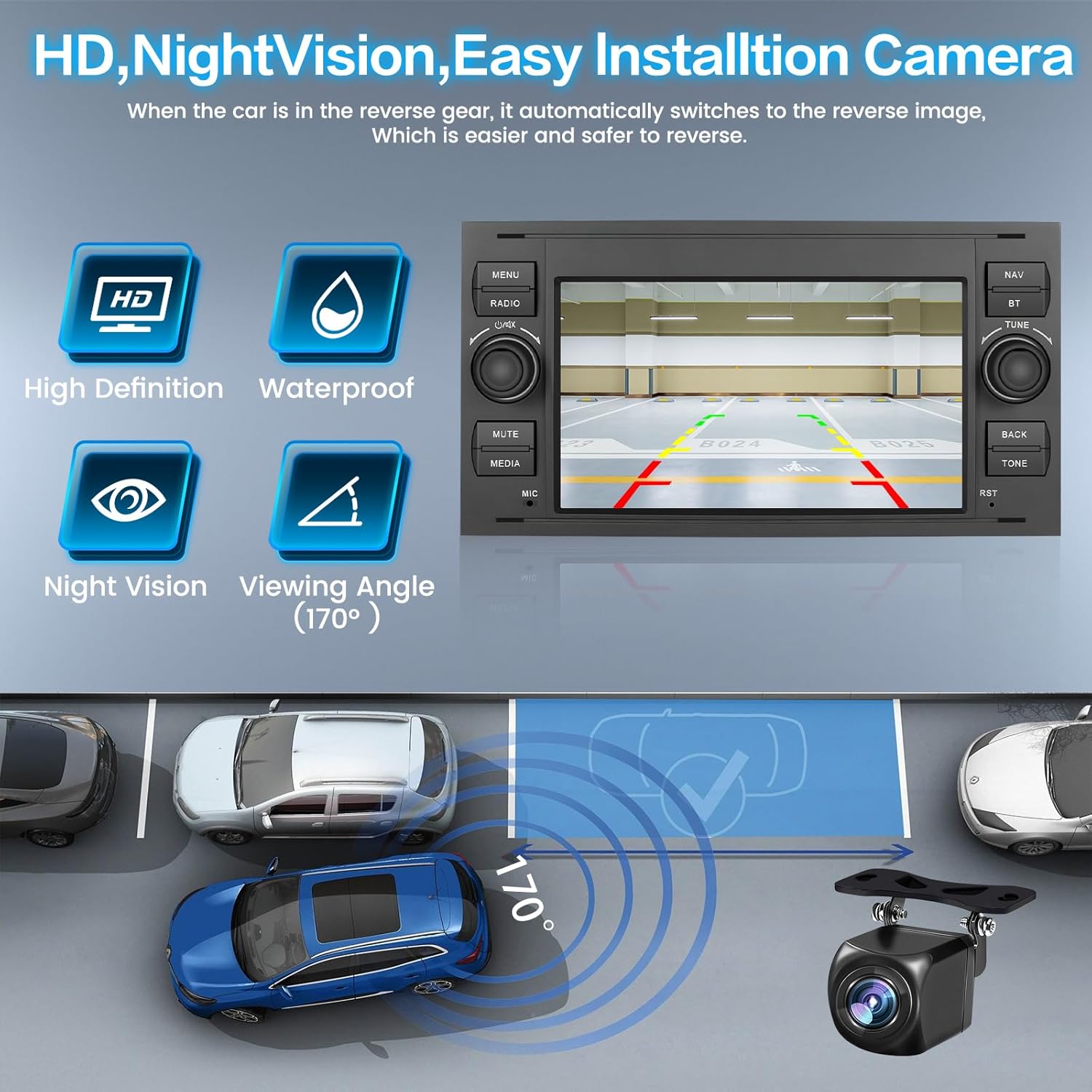
This image illustrates the features of the compatible rear camera, including high definition, waterproof design, night vision, and a 170-degree viewing angle. It also shows how the camera feed is displayed on the car radio screen when reversing.
Especificacions
| Característica | Detall |
|---|---|
| Marca | Inefala |
| Número de model | Inefala-A3718BKA4MI2-EU60 |
| Sistema | Android 13 |
| Chipset | 8227L |
| Mida de la pantalla | 7 polzades |
| Memòria (RAM) | 2 GB |
| Emmagatzematge (ROM) | 64 GB |
| Resolució de pantalla | 1024 x 600 |
| Xip de ràdio | MTK |
| Potència de sortida | 4x45 W |
| Temperatura de treball | -20 ℃ a 75 ℃ |
| Poder AmpXip lificador | TDA7388 |
| Banda de ràdio | FM/RDS |
| Sortida de vídeo | Admet |
| Entrada inversa | AHD/CVBS |
| Micròfon extern | Admet |
| Pantalla dividida | Admet |
| WiFi | Admet |
| Interfície USB | USB dual |
| Formats d'àudio | APE/FLAC/WAV/MP3/WMA, etc. |
| Formats de vídeo | MKV/RMVB/AVI/MP4/MDV, etc. |
| Formats d'imatge | PNG/JPEG/JPG/GIF/WBMP/BNP, etc. |
| Paraula clau de configuració de fàbrica | 1234 |
| Idiomes admesos | Xinès/Anglès/Francès/Italià/Coreà/Japonès/Àrab/Espanyol/Portuguès/Rus/Turc/Vietnamita/Hebreu/Polonès/Alemany |
| Dimensions del producte (L x A x A) | 22.9 x 10.8 x 12 cm |
| Pes | 1.5 quilograms |
| Ports USB totals | 2 |
Manteniment
To ensure the longevity and optimal performance of your Inefala Car Radio, follow these maintenance guidelines:
- Neteja de la pantalla: Feu servir un drap suau i sense borrissol per netejar suaument la pantalla tàctil. Per a taques difícils, fregueu lleugerament.ampen the cloth with water or a screen-cleaning solution. Avoid abrasive cleaners or harsh chemicals.
- Neteja general: Mantingueu la unitat neta de pols i deixalles. Feu servir un raspall suau o aire comprimit per netejar les reixetes de ventilació i les zones dels botons.
- Actualitzacions de programari: Periodically check for software updates provided by Inefala to ensure you have the latest features and bug fixes. Updates can usually be performed via WiFi.
- Eviteu temperatures extremes: No exposeu la unitat a temperatures extremes de calor o fred durant períodes prolongats, ja que això pot afectar els seus components electrònics.
- Gestió de cables: Ensure all cables are properly routed and secured to prevent damage from vibration or snagging.
Resolució de problemes
If you encounter issues with your Inefala Car Radio, refer to the following common problems and solutions:
| Problema | Possible solució |
|---|---|
| La unitat no s'encén. | Check power connections and vehicle's fuse box. Ensure the ignition is on. |
| Sense so. | Verify speaker connections. Check volume level and mute settings. Ensure correct audio source is selected. |
| La pantalla tàctil no respon. | Restart the unit. If problem persists, perform a factory reset (keyword: 1234). |
| El CarPlay/Android Auto no es connecta. | Ensure Bluetooth and Wi-Fi are enabled on your phone and the car radio. Try re-pairing the devices. Use a different USB cable for wired connection. Update phone OS. |
| Senyal GPS feble o imprecis. | Ensure the GPS antenna is installed correctly and has a clear view of the sky. Update map data. |
| La càmera posterior no es mostra. | Check camera power and video signal connections. Ensure the vehicle is in reverse gear. |
| Problemes d'emparellament per Bluetooth. | Ensure both devices are in pairing mode. Delete previous pairings and try again. |
If these solutions do not resolve the issue, please contact Inefala customer support.
Garantia i Suport
Your Inefala Car Radio comes with a manufacturer's warranty of 24 mesos. For any warranty claims or technical assistance, please contact Inefala customer support. Online consultation is available, with responses typically provided within 24 hours.
For further support, refer to the official Inefala website or contact details provided with your purchase.

This image highlights Inefala's commitment to customer satisfaction, featuring a futuristic car on a digital highway and text promoting 24 months quality assurance, 30 days free return, and online support with replies within 24 hours.
Contingut del paquet
The following items are included in your Inefala Car Radio package:
- 1 x Ford Car Radio Unit
- 2 x cable d'alimentació
- 1 x Antena GPS
- 1 x Reverse Camera Input Cable
- 2 x cable USB
- 1 x cable RCA
- 4 x Brackets de muntatge
- 1 adaptador d'antena
- 1 x Manual d'usuari
- 1 x micròfon extern
- 1 x càmera posterior


