Introducció
This manual provides detailed instructions for the setup, operation, and maintenance of your Nulea KM75 Advanced Ergonomic Wireless Keyboard and Mouse Combo. Please read this manual thoroughly before using the product to ensure optimal performance and longevity.
Contingut del paquet
- Nulea KM75 Ergonomic Wireless Keyboard
- Nulea Ergonomic Wireless Mouse
- 2.4G USB Receiver (shared for keyboard and mouse)
- Cable de càrrega USB-C
- Manual d'usuari (aquest document)
Producte acabatview
Característiques del teclat
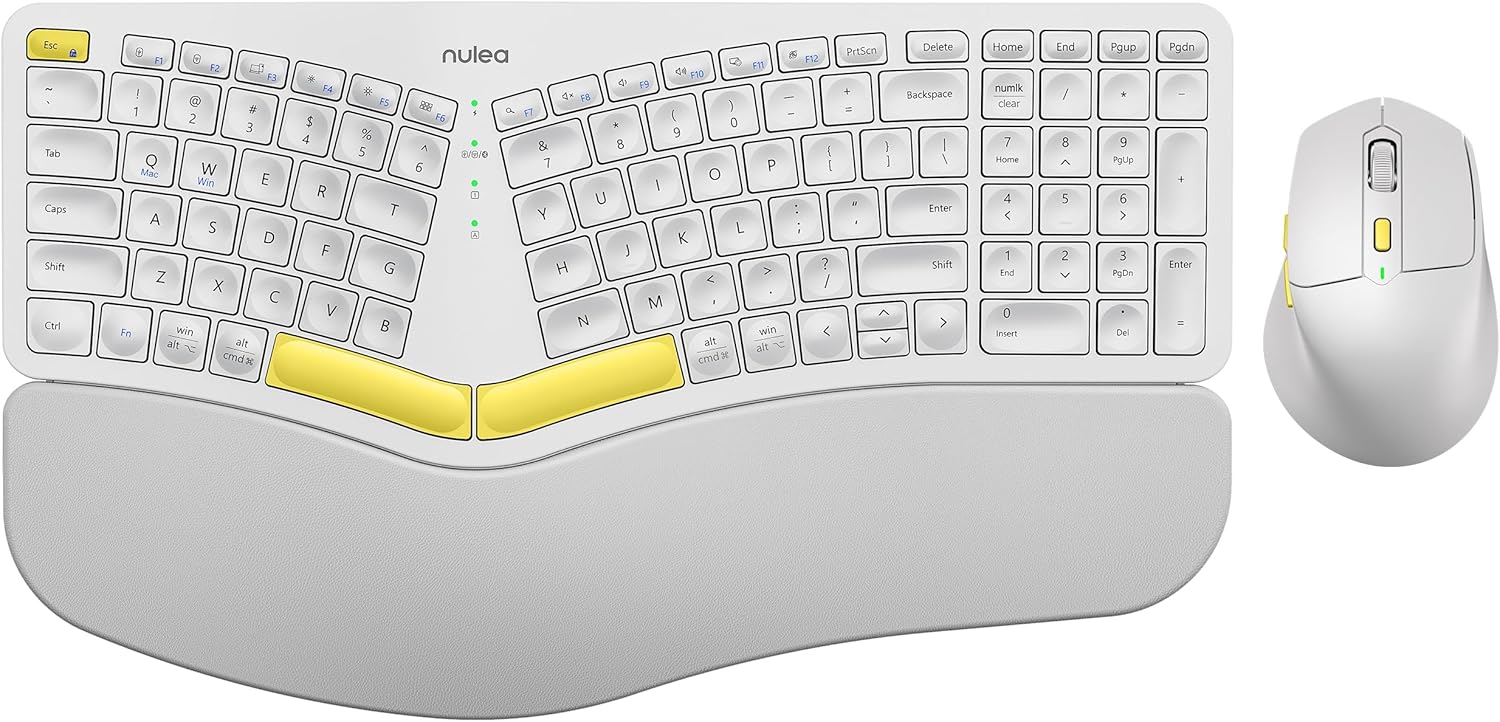
Image: The Nulea KM75 ergonomic keyboard and mouse combo. The keyboard features a curved and split layout with an integrated palm rest, and the mouse is sculpted for comfort. Both are white with yellow accents.
- Ergonomic Curved and Split Key-frame: Designed to position wrists and forearms naturally.
- Reposa-palms integrat: Features a soft memory foam layer for wrist support.
- Adjustable Tilt Design: Allows for optimal keyboard positioning.
- Connectivitat multidispositiu: Supports USB cable, 2.4G USB receiver, and Bluetooth.
- Bateria recarregable: 500mAh capacity with USB-C charging.
- Mode de repòs automàtic: Conserves power after 30 minutes of inactivity.
Funcions del ratolí

Image: A close-up of the Nulea ergonomic mouse, showing its sculpted design for a natural hand posture with integrated palm and thumb rests. The mouse is white with yellow accents.
- Ergonomic Sculpted Design: Integrated palm and thumb rests for natural hand position.
- Configuració de DPI ajustable: Per a un control precís del cursor.
- Botons Endavant/Enrere: Per a més comoditat web navegació.
- Connectivitat multidispositiu: Supports 2.4G USB receiver and Bluetooth.
- Bateria recarregable: 300mAh capacity with USB-C charging.
- Mode de repòs automàtic: Conserves power after 30 minutes of inactivity.
Configuració
1. Càrrega dels dispositius
Before initial use, fully charge both the keyboard and mouse using the provided USB-C cable. Connect the USB-C end to the device and the USB-A end to a power source (e.g., computer USB port, USB wall adapter).

Image: Illustration showing the keyboard and mouse connected via USB-C cables for charging. The keyboard has a 500mAh battery and the mouse has a 300mAh battery.
The indicator lights will show charging status and turn off when fully charged. A full charge provides approximately two months of operation.
2. Connexió mitjançant un receptor USB de 2.4G
- Locate the 2.4G USB receiver. It is typically stored in a compartment on the underside of the mouse.
- Inseriu el receptor USB en un port USB-A disponible de l'ordinador.
- Engegueu el teclat i el ratolí utilitzant els seus respectius interruptors d'alimentació.
- For the keyboard, press Fn + F2 to select 2.4G mode.
- For the mouse, switch the mode selector on the bottom to 2.4G.
- The devices should connect automatically.

Image: A close-up of the underside of the mouse, showing the storage compartment for the 2.4G USB receiver.
3. Connexió mitjançant Bluetooth
- Enceneu el teclat i el ratolí.
- For the keyboard, press Fn + F3 to select Bluetooth mode. The indicator light will blink, indicating pairing mode.
- For the mouse, switch the mode selector on the bottom to Bluetooth. The indicator light will blink.
- Al dispositiu (ordinador, tauleta, telèfon intel·ligent), activeu el Bluetooth i cerqueu dispositius nous.
- Select "Nulea Keyboard" and "Nulea Mouse" from the list of available devices to pair.
- Seguiu les indicacions de la pantalla per completar el procés de vinculació.
4. Connexió mitjançant el mode amb cable
- Connect the USB-C charging cable to the keyboard or mouse and the USB-A end to your computer.
- For the keyboard, press Fn + F1 to select wired mode.
- For the mouse, switch the mode selector on the bottom to wired mode.
- The devices will function as wired peripherals.

Image: Diagram illustrating the simple connectivity options for the Nulea KM75. Pressing Fn+F1 connects via wired, Fn+F2 via 2.4G, and Fn+F3 via Bluetooth, allowing connection to multiple devices like PCs, laptops, and mobile devices.
5. Canviar entre dispositius
The Nulea KM75 combo supports multi-device connectivity. You can switch between up to three connected devices (one wired, one 2.4G, one Bluetooth) by pressing the corresponding function keys on the keyboard (Fn + F1/F2/F3) and adjusting the mode selector on the mouse.
Instruccions de funcionament
Ús del teclat
- Disseny ergonòmic: The curved and split key-frame is designed for natural hand and wrist positioning. Allow some time to adapt to this layout for optimal comfort.
- Potes inclinables ajustables: Located on the underside of the keyboard, these legs allow you to adjust the typing angle for personalized comfort.

Image: A user demonstrating the adjustable tilt legs of the Nulea KM75 keyboard, showing how to customize the typing angle for ergonomic comfort.
- Tecles de funció (Fn): Many keys have secondary functions accessible by holding down the Fn key and pressing the desired function key (e.g., media controls, volume). Refer to the keycap legends for specific functions.
Ús del ratolí
- Ajust de DPI: Use the DPI switch button, usually located near the scroll wheel, to cycle through different sensitivity levels (DPI). This allows for precise control or faster cursor movement.

Image: A close-up of the Nulea ergonomic mouse, highlighting the DPI switch key and indicator light for adjusting cursor sensitivity.
- Botons laterals: The side buttons (typically on the left for right-handed users) are often pre-programmed for forward and backward navigation in web navegadors o file exploradors.
Manteniment
- Neteja: Feu servir un drap suau i sec per netejar les superfícies del teclat i el ratolí. Per a la brutícia persistent, netegeu lleugerament.amp cloth with mild soap can be used, ensuring no liquid enters the device. Avoid harsh chemicals or abrasive materials.
- Cura de la bateria: To prolong battery life, avoid fully discharging the devices frequently. Recharge when the low battery indicator appears. Store in a cool, dry place if not used for extended periods.
- Emmagatzematge: When not in use, store the USB receiver in its designated compartment on the mouse to prevent loss.
Resolució de problemes
- El dispositiu no es connecta:
- Assegureu-vos que tant el teclat com el ratolí estiguin encesos.
- Verify the correct connection mode (2.4G, Bluetooth, Wired) is selected on both devices and your computer.
- For 2.4G, ensure the USB receiver is securely plugged into a working USB port.
- For Bluetooth, ensure Bluetooth is enabled on your device and the devices are in pairing mode. Try re-pairing if necessary.
- Ensure the devices are charged.
- Try restarting your computer and the devices.
- Connexió amb retard o intermitent:
- Move the devices closer to the USB receiver or your computer to reduce interference.
- Avoid placing the receiver near other wireless devices or large metal objects.
- Assegureu-vos que les bateries estiguin prou carregades.
- Keys not responding or mouse not moving:
- Comproveu els nivells de la bateria i recarregueu-la si cal.
- Ensure the devices are properly connected (see "Device not connecting" above).
- Clean any debris from around the keys or mouse sensor.
Especificacions
| Característica | Detall |
|---|---|
| Marca | Nulea |
| Model | KM75 |
| Connectivitat | Bluetooth, 2.4G USB, Wired (USB-C) |
| Bateria del teclat | 500 mAh de liti |
| Bateria del ratolí | 300 mAh de liti |
| Sistema operatiu compatible | Windows, Mac OS, Android |
| Característiques especials | Ergonomic design, Curved/Split key-frame, Integrated palm rest, Adjustable tilt, Adjustable mouse DPI |
| Pes de l'article | 4.2 lliures (combinades) |
| Dimensions del paquet | 16.97 x 11.69 x 2.05 polzades |
Garantia i Suport
Nulea products are designed for reliability and performance. For warranty information, technical support, or customer service inquiries, please refer to the contact details provided on the Nulea official weblloc web o la documentació de compra. Si us plau, conserveu el comprovant de compra per a reclamacions de garantia.


