Introducció
Thank you for choosing the Mesqool CR1025 Digital Alarm Clock Radio. This device combines multiple functions including a digital alarm clock, Bluetooth 5.0 speaker, FM radio, night light, and dual USB charging ports. This manual provides detailed instructions to help you set up and operate your new device effectively.
Contingut del paquet
- Mesqool CR1025 Digital Alarm Clock Radio
- Adaptador d'alimentació
- Manual d'usuari
- C Battery (for backup)
Producte acabatview
Familiarize yourself with the components and controls of your Mesqool CR1025 Digital Alarm Clock Radio.
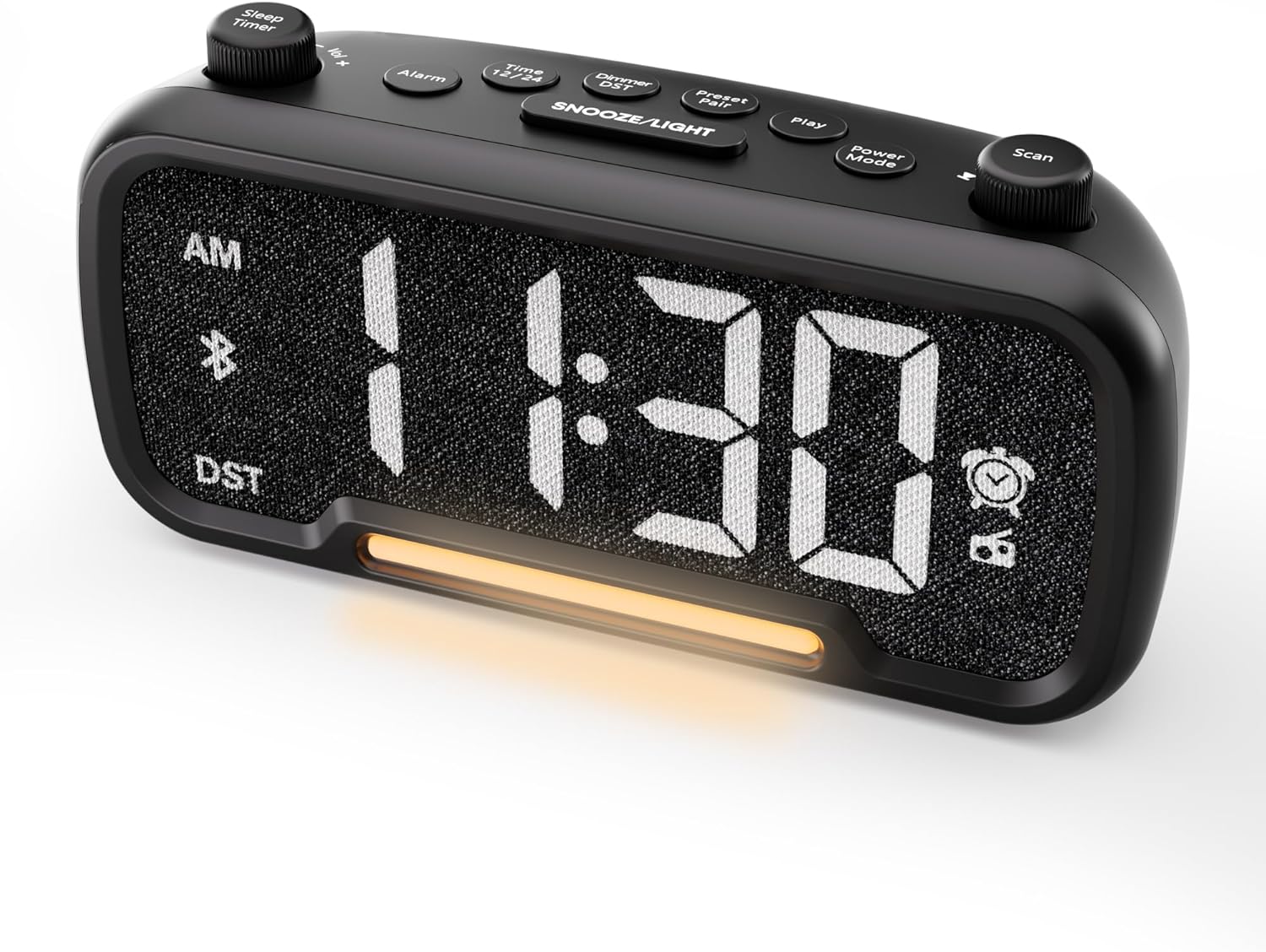

Control Buttons and Knobs:
- Sleep Timer / Vol +/- Knob (Left): Adjusts volume, sets sleep timer duration.
- Botó d'alarma: Sets and activates/deactivates alarms.
- Time 12/24 Button: Switches between 12-hour and 24-hour time formats.
- Dimmer / DST Button: Adjusts display brightness, activates/deactivates Daylight Saving Time (DST).
- Preset / Pair Button: Saves FM radio presets, initiates Bluetooth pairing.
- Botó de reproducció: Plays/pauses media in Bluetooth mode.
- Botó de mode d'alimentació: Cycles through operating modes (FM, Bluetooth, AUX).
- Scan / TU +/- Knob (Right): Scans FM radio stations, manually tunes FM frequency.
- Botó SNOOZE/LLUM: Activates snooze function, turns night light on/off.

Configuració
1. Engegada inicial
Connect the provided power adapter to the DC 5V IN port on the back of the alarm clock and plug it into a standard wall outlet. The display will light up. Ensure the C battery is installed for backup in case of power outage.

2. Configuració del temps
- Manteniu premut el botó Hora 12/24 button for 2 seconds. The hour digits will begin to flash.
- Gira el Vol +/- knob (left knob) to adjust the hour.
- Premeu el botó Hora 12/24 de nou. Els dígits dels minuts començaran a parpellejar.
- Gira el Vol +/- botó per ajustar el minut.
- Premeu el botó Hora 12/24 premeu el botó una vegada més per confirmar la configuració de l'hora.
Video demonstrating how to set the time on the Mesqool Digital Alarm Clock Radio.
3. Format horari 12/24 hores
To switch between 12-hour and 24-hour time formats, short press the Hora 12/24 button. The display will change accordingly.
4. Ajust de l'horari d'estiu (DST)
To activate or deactivate DST, press and hold the Dimmer / DST button for 2 seconds. The time will adjust by one hour forward or backward, and the DST indicator will appear or disappear on the display.
Instruccions de funcionament
1. Configuració de l'alarma
- Manteniu premut el botó Alarma durant 2 segons. Els dígits de les hores parpellejaran.
- Gira el Vol +/- knob to adjust the desired alarm hour.
- Premeu el botó Alarma de nou. Els dígits dels minuts parpellejaran.
- Gira el Vol +/- knob to adjust the desired alarm minute.
- Premeu el botó Alarma button again. The alarm sound selection will flash (bell icon for buzzer, radio icon for FM radio). Rotate the Vol +/- knob to choose between buzzer or FM radio as the alarm sound.
- If FM radio is selected, press the Alarma button again. The volume level will flash (L01-L16). Rotate the Vol +/- knob to set the desired alarm volume.
- Premeu el botó Alarma Premeu el botó una vegada més per confirmar i activar l'alarma. La icona de l'alarma apareixerà a la pantalla.
To deactivate the alarm, short press the Alarma button. The alarm icon will disappear from the display.

Funció de posposar:
Quan soni l'alarma, premeu el botó SNOOZE / LIGHT button to activate the snooze function for 9 minutes. The alarm will sound again after 9 minutes. To turn off the alarm completely, press any other button except SNOOZE / LIGHT.

2. Funcionament de la ràdio FM
- Premeu el botó Mode d'alimentació repetidament fins que la icona de la ràdio s'il·lumini a la pantalla, cosa que indica el mode de ràdio FM.
- Auto-Scan and Save Presets: Premeu el botó Scan / TU +/- knob (right knob) to automatically search for available FM stations and save them as presets (up to 20 stations). The display will show "P01", "P02", etc., as stations are saved.
- Sintonització manual: Gira el Scan / TU +/- knob to manually browse frequencies.
- Recuperació de presets: Premeu breument Preestablert / Parella per anar passant per les emissores predefinides desades.
- Ajustar el volum: Gira el Vol +/- knob (left knob) to adjust the radio volume (L01-L16).

Video demonstrating how to set the FM radio alarm on the Mesqool Digital Alarm Clock Radio.
3. Funcionament de l'altaveu Bluetooth
- Premeu el botó Mode d'alimentació button repeatedly until the Bluetooth icon (bt) starts flashing on the display, indicating pairing mode.
- On your mobile device, enable Bluetooth and search for "CR1025" in the list of available devices.
- Select "CR1025" to pair. Once connected, the Bluetooth icon will stop flashing and remain solid.
- Ara pots reproduir àudio des del dispositiu a través de l'altaveu del despertador.
- Utilitza el Vol +/- knob on the alarm clock or your mobile device to adjust the volume.
- Premeu el botó Jugar botó per reproduir o posar en pausa l'àudio.

Video demonstrating how to set up Bluetooth on the Mesqool Digital Alarm Clock Radio.
4. Night Light Operation
The alarm clock features a gentle night light. To turn the night light on or off, short press the SNOOZE / LIGHT botó.

5. Dimmer Setting
La brillantor de la pantalla es pot ajustar a 5 nivells. Premeu breument el botó Dimmer / DST button to cycle through the brightness levels (L01-L05). Select the level that best suits your environment.

6. Configuració del temporitzador de son
The sleep timer allows you to set a duration for the FM radio or Bluetooth speaker to play before automatically turning off. This is useful for falling asleep to music or podcasts.
- While in FM radio or Bluetooth mode, press the Temporitzador de dormir button. The display will show the current sleep timer duration (e.g., "30" for 30 minutes).
- Gira el Sleep Timer / Vol +/- knob to select the desired duration: 15, 30, 60, 90, or 120 minutes. You can also select "OFF" to disable the sleep timer.
- The timer will start counting down, and the device will automatically turn off after the selected duration.
7. Ports de càrrega USB
The alarm clock is equipped with two USB charging ports (Type-C and USB-A) on the back, each providing 5V/1A output. These ports can be used to conveniently charge your smartphone, tablet, or other USB-powered devices.

Resolució de problemes
| Problema | Possible solució |
|---|---|
| La pantalla del rellotge està en blanc. | Ensure the power adapter is securely connected to both the clock and a working power outlet. Check if the power outlet is functional. |
| L'alarma no sona. | Verify that the alarm is set and activated (alarm icon visible on display). Check the alarm volume level. Ensure the correct alarm sound (buzzer or FM radio) is selected. |
| Mala recepció de ràdio FM. | Extend the FM antenna fully. Try repositioning the antenna or the clock for better signal. Perform an auto-scan again to find stronger stations. |
| No es pot emparellar el dispositiu Bluetooth. | Ensure the clock is in Bluetooth pairing mode (flashing 'bt' icon). Make sure Bluetooth is enabled on your mobile device and it is within range. Forget "CR1025" from your device's Bluetooth list and try pairing again. |
| USB charging ports not working. | Confirm the alarm clock is powered on. Ensure the charging cables are properly connected to both the clock and your device. Try a different USB cable or device to rule out cable/device issues. |
Especificacions
| Característica | Detall |
|---|---|
| Marca | Mesqool |
| Número de model | CR1025 |
| Color | Negre |
| Tipus de visualització | LED digital |
| Dimensions del producte | 6.61 cm de llargada x 3.31 cm d'amplada x 2.32 cm d'alçada |
| Font d'alimentació | Elèctric amb cable (adaptador de corrent altern inclòs) |
| Còpia de seguretat de la bateria | 1 pila C (inclosa) |
| Versió Bluetooth | V5.0 |
| Freqüència de ràdio FM | 87.5-108 MHz |
| Presets FM | Up to 20 stations |
| Dimmer de la pantalla | 5 nivells |
| Sons d'alarma | Buzzer, FM Radio |
| Durada de la posposar | 9 minuts |
| Sortida de càrrega USB | Type-C & USB-A, 5V/1A each |
| Material | Plàstic |
| Pes de l'article | 0.48 lliures (aproximadament 7.7 unces) |
Manteniment
- Netegeu el dispositiu amb un drap suau i sec. No utilitzeu netejadors líquids ni materials abrasius.
- Keep the device away from direct sunlight, extreme temperatures, and high humidity.
- Assegureu-vos una ventilació adequada al voltant del dispositiu per evitar el sobreescalfament.
- If the device will not be used for an extended period, remove the backup battery.
Informació de seguretat
- No exposeu el dispositiu a l'aigua ni a la humitat.
- No intenteu desmuntar ni reparar el dispositiu vosaltres mateixos. Poseu-vos en contacte amb personal de servei qualificat.
- Mantingueu el dispositiu fora de l'abast dels nens.
- Feu servir només l'adaptador de corrent proporcionat. L'ús d'adaptadors no autoritzats pot fer malbé el dispositiu i anul·lar la garantia.
- Avoid placing the device near heat sources or open flames.
Garantia i Suport
Specific warranty details are not provided in the product information. For warranty claims, technical support, or further assistance, please contact Mesqool customer service through their official website or the retailer where the product was purchased. Please retain your proof of purchase for any warranty-related inquiries.
Visit the Mesqool Store for more information: Mesqool Official Store


