1. Producte acabatview
The Ovsuqu Raycus MOPA 60W Fiber Laser Engraver Machine, Model FL-60W, is a high-precision laser marking and engraving system designed for a wide range of materials. It features a powerful 60W Raycus laser source and is equipped with a red dot pointer for accurate positioning. This machine is suitable for detailed engraving on various metals and certain non-metal materials.
Característiques principals:
- Classe làser 4: 60,000mW Output Power, FDA Accession Number: 2420799-000.
- Raycus Laser Source: RFL-P60MX, 60W rated output power, 1064 ± 5nm center wavelength.
- Aplicació versàtil: Ideal for metal surface processing, peeling coating, aluminum black marking, semiconductor and electronics industry applications, large area engraving, and excellent marking on plastic or other sensitive materials. Capable of black and color marking on stainless steel.
- Compatibilitat de materials: Engraves on Gold, Silver, Aluminum, Stainless Steel, Brass, Copper, and non-metals such as nylon, light button, ABS, PVC, PES.
- EZCAD Lite Software: Compatible with Windows XP/Vista/7/8/10/11, supporting Coreldraw, AutoCAD, Photoshop, PLT, PCX, DXF, BMP, SHX, TTF fonts, and automatic encoding for serial numbers, batch numbers, production dates, barcodes, and QR codes.
2. Instruccions de configuració
Follow these steps to set up your Ovsuqu Raycus MOPA 60W Fiber Laser Engraver Machine. Ensure all components are present and undamaged before proceeding.
2.1 Desembalatge i identificació de components
Carefully unpack all items from the shipping crate. Identify the main unit, laser head, F-theta scan lens, power supply, and any included accessories.

Imatge: The main unit of the Ovsuqu Raycus MOPA 60W Fiber Laser Engraver Machine, showing the laser head and adjustable column.

Imatge: The BJJCZ main board, which comes with EZCAD Lite software, and a screenshot of the EZCAD software working page.
Imatge: Details of the F-theta Scan Lens (Mount: M85, Wavelength: 1064nm) and the Mean Well Power Supply, highlighting its high efficiency and stability.
2.2 Muntatge
Assemble the laser engraver according to the following general steps. Refer to the setup video for a visual guide.
- Place the main base plate on a stable, level surface.
- Attach the vertical column to the base plate, ensuring it is securely fastened.
- Mount the laser head assembly onto the vertical column.
- Install the F-theta scan lens onto the laser head.
- Connect the necessary cables: power cord, USB cable to your computer, and the cable from the main unit to the laser head.
- If using a rotary axis, connect it to the designated port on the main unit.
Vídeo: A detailed guide on how to set up the OMTech fiber laser engraver, demonstrating the assembly process and initial connections.

Imatge: The Ovsuqu Raycus MOPA 60W Fiber Laser Engraver Machine shown with an optional rotary axis attached, ready for engraving cylindrical objects.
3. Instruccions de funcionament
This section outlines the basic steps for operating your fiber laser engraver. Always ensure proper safety precautions are followed, including wearing appropriate laser safety glasses.
3.1 Instal·lació i configuració del programari
Install the EZCAD Lite software on your Windows computer. Follow the on-screen instructions. Once installed, launch the software and configure the laser parameters according to your material and desired engraving effect.
Imatge: The EZCAD software working page, showing design area and marking parameters. This software is used to control the laser engraver.
3.2 Procés de gravat
- Encès: Turn on the main power switch on the laser unit.
- Col·locació del material: Place the material to be engraved on the work platform. Use the red dot pointer to preview the engraving area and adjust the material position as needed.
- Ajust del focus: Adjust the height of the laser head until the red dot pointers converge into a single, sharp point on the material surface. This ensures optimal focus.
- Importació de disseny: In EZCAD Lite, import or create your desired design.
- Configuració de paràmetres: Set the appropriate laser parameters (power, speed, frequency, pulse width) based on the material type and desired engraving depth/effect. Refer to the software manual for detailed parameter guidance.
- Comença el gravat: Initiate the engraving process from the EZCAD Lite software. Monitor the process closely.
The MOPA laser source allows for various marking effects, including deep carving, black marking on aluminum, and color marking on stainless steel by adjusting pulse width and frequency.
3.3 Choosing the Right Lens and Laser Source
Selecting the correct lens and laser source is crucial for achieving desired results:
- Mida de la lent: A larger lens provides a larger engraving area but may result in weaker light intensity. A smaller lens offers deeper engraving but with a smaller working area.
- Font làser: Raycus and MAX sources are effective for deep carving, hollow designs, and cutting. JPT sources are known for delicate touch carving. For metal cutting, a Raycus or MAX source with a smaller lens is recommended. For faster working or deeper results, consider higher power JPT 100W or 200W options.

Imatge: Informational graphic explaining how to choose the appropriate laser source (Raycus, MAX, JPT) and F-theta scan lens based on desired engraving depth and work area.
4. Manteniment
Un manteniment regular garanteix la longevitat i el rendiment òptim del vostre gravador làser.
- Neteja de lents: Periodically clean the F-theta scan lens with a lens cleaning solution and a soft, lint-free cloth to maintain laser beam quality.
- Work Area Cleanliness: Keep the work platform and surrounding area free of debris and dust, which can interfere with engraving or damage components.
- Inspecció del cable: Regularly check all cables for signs of wear or damage. Ensure all connections are secure.
- Ventilació: Ensure the machine's ventilation openings are clear and unobstructed to prevent overheating of internal components.
- Actualitzacions de programari: Keep your EZCAD Lite software updated to the latest version for improved performance and features.
5. Solució De Problemes
Si teniu problemes amb el gravador làser, consulteu els passos habituals següents per a la resolució de problemes:
- Sense energia: Check the power cord connection, ensure the main power switch is on, and verify the power outlet is functional.
- El làser no dispara: Confirm the laser is enabled in the software, check the emergency stop button is disengaged, and ensure all safety interlocks are correctly closed.
- Mala qualitat del gravat:
- Verify the laser focus is correctly set.
- Adjust laser parameters (power, speed, frequency) for the specific material.
- Clean the F-theta scan lens.
- Assegureu-vos que el material estigui pla i ben col·locat.
- Problemes de connexió de programari: Ensure the USB cable is securely connected to both the machine and the computer. Restart the software and the machine if necessary. Check device manager for proper driver installation.
Si els problemes persisteixen després d'intentar aquests passos, poseu-vos en contacte amb l'atenció al client per obtenir més ajuda.
6. Especificacions tècniques
| Característica | Especificació |
|---|---|
| Número de model | FL-60W |
| Font làser | Raycus RFL-P60MX |
| Potència de sortida nominal | 60W |
| Longitud d'ona central | 1064 ± 5 nm |
| Repetition Frequency Range | 1-2000 kHz |
| Estabilitat de potència de sortida | <5% |
| Output Spot Diameter | 7 ± 1 mm |
| M² Factor | <1.6 |
| Amplada del pols | 10-350ns |
| Maximum Single Pulse Energy | 1.5 mJ |
| Classe làser | 4 |
| FDA Accession Number | 2420799-000 |
| Dimensions del producte | 30.31 x 18.9 x 22.44 polzades |
| Àrea de gravat (estàndard) | 6.89 x 6.89 polzades (175 x 175 mm) |
| Programari | EZCAD Lite |
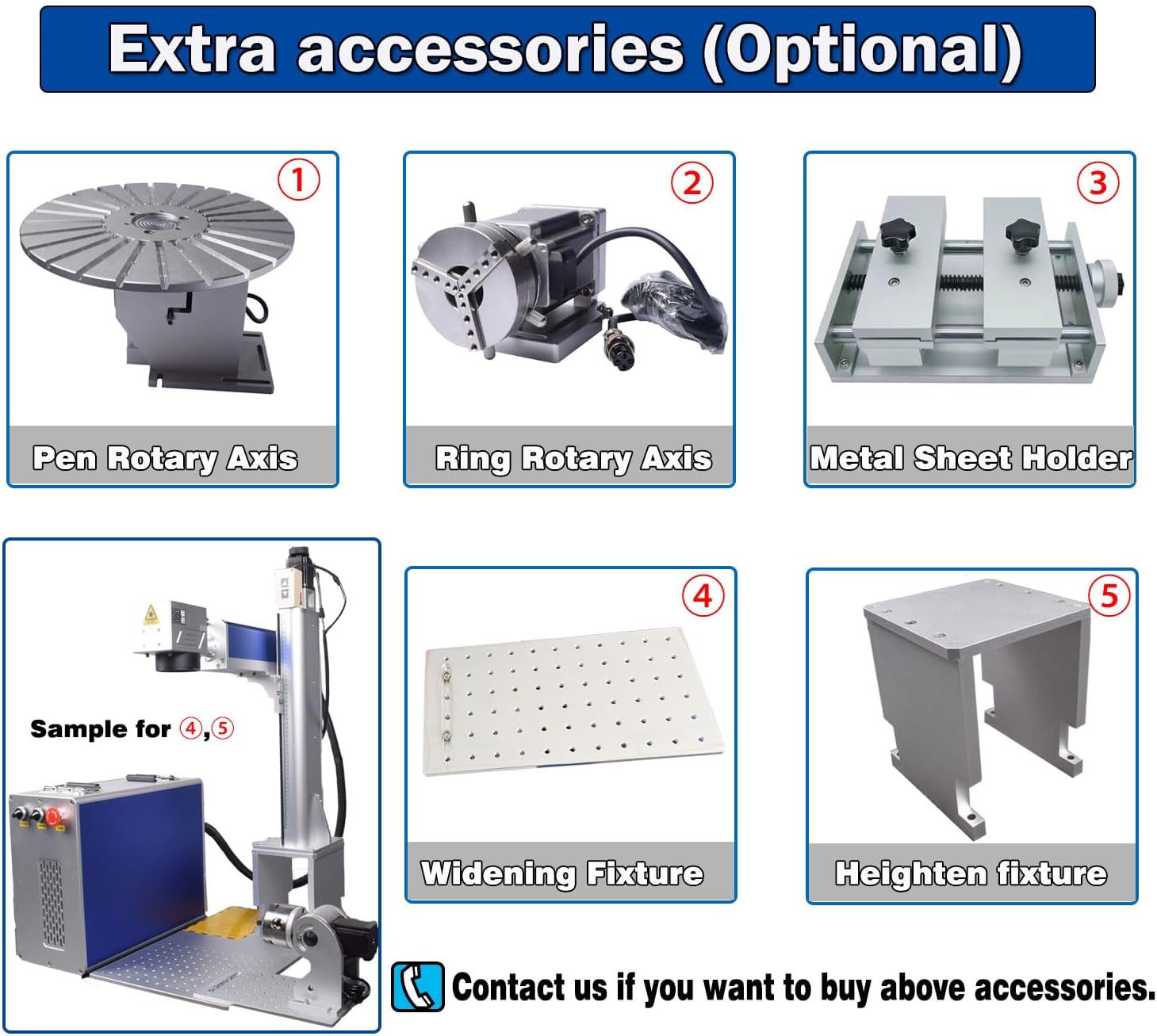
7. Accessoris opcionals
Enhance the functionality of your laser engraver with these optional accessories:

Imatge: A visual representation of various optional accessories: Pen Rotary Axis, Ring Rotary Axis, Metal Sheet Holder, Widening Fixture, and Heighten Fixture.
- Pen Rotary Axis: For engraving cylindrical objects like pens.
- Ring Rotary Axis: Specialized for engraving rings and other small circular items.
- Metal Sheet Holder: Provides secure clamping for flat metal sheets during engraving.
- Widening Fixture: Expands the work area for larger items.
- Heighten Fixture: Increases the working height for taller objects.
Contact your supplier if you wish to purchase any of these accessories.
8. Garantia i Suport
For any technical assistance, operational queries, or warranty-related concerns, please contact Ovsuqu customer support. The manufacturer, ChinaCNCzone, provides support for machine operation if needed.
Consulteu la documentació de compra per conèixer els termes específics de la garantia i la informació de contacte.


