1. Introducció
This manual provides detailed instructions for the setup, operation, and maintenance of your BenQ RD320UA 32-inch 4K Programming Monitor. Please read this manual thoroughly before using the product to ensure proper functionality and to maximize your user experience. Keep this manual for future reference.

Figura 1.1: Frontal view of the BenQ RD320UA monitor displaying programming code.
2. Contingut del paquet
Verify that all items listed below are included in your package. If any items are missing or damaged, contact your retailer or BenQ customer support.
- BenQ RD320UA Monitor
- Suport ergonòmic (base i braç)
- Cable d'alimentació
- Cable HDMI
- DisplayPort Cable (Recommended for full resolution at 60Hz)
- Cable USB-C (per a vídeo, dades i subministrament d'alimentació)
- Cable USB-B a USB-A (per a la funcionalitat de concentrador USB)
- Guia d'inici ràpid
- Targeta de garantia
3. Configuració i instal·lació
3.1 Muntatge físic
Follow these steps to assemble the monitor stand and attach it to the display panel.
- Traieu amb cura tots els components de l'embalatge.
- Attach the ergonomic arm to the stand base. Ensure it is securely fastened.
- Attach the assembled stand to the back of the monitor panel. Ensure the connection clicks into place or is secured with screws as indicated in the quick start guide.
- Col·loqueu el monitor en una superfície plana i estable.

Figura 3.1: lateral view of the BenQ RD320UA monitor with the ergonomic stand.
3.2 Connexió del monitor
Connect the necessary cables to your monitor and computer.
- Connexió d'alimentació: Connecteu el cable d'alimentació a l'entrada d'alimentació del monitor i després a una presa de corrent.
- Entrada de vídeo:
- USB-C: Connect the USB-C cable from your computer to the monitor's USB-C port for video, data, and 90W power delivery.
- DisplayPort (DP 1.4): Connect a DisplayPort cable from your computer to the monitor's DP port for optimal 4K resolution at 60Hz.
- HDMI (HDMI 2.0): Connect an HDMI cable from your computer to one of the monitor's HDMI ports. Note that HDMI 2.0 may have bandwidth limitations for full 4K resolution at 60Hz.
- Hub USB: To enable the monitor's USB 3.2 Gen2 Type-A downstream ports, connect the USB 3.2 Gen1 Type-B upstream cable from your computer to the monitor.

Figura 3.2: posterior view of the monitor highlighting various input and output ports.
4. Funcionament del monitor
4.1 Encès/Apagat
Press the power button, typically located on the bottom bezel or rear of the monitor, to turn the monitor on or off. The power indicator light will illuminate when the monitor is active.
4.2 Navegació en pantalla (OSD)
The OSD menu allows you to adjust various monitor settings. Use the control buttons or joystick, usually located on the bottom bezel, to navigate the menu:
- Press a button to activate the OSD menu.
- Use directional buttons to move through options.
- Press the select button to confirm a selection.
- Use the back/exit button to return to the previous menu or exit the OSD.
4.3 Ajustaments ergonòmics
The ergonomic stand allows for flexible positioning to enhance comfort and productivity.
- Ajust d'alçada: Empenyeu o estireu suaument el monitor verticalment per ajustar-ne l'alçada.
- Inclinació: Tilt the screen forwards or backwards to find your preferred viewangle de ing.
- Girar: Gireu el monitor horitzontalment sobre la base.
- Pivot: Gireu la pantalla 90 graus per canviar entre l'orientació horitzontal i vertical.
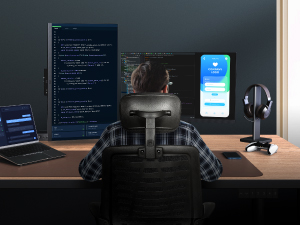
Figure 4.1: Illustration of the monitor's ergonomic adjustment capabilities.
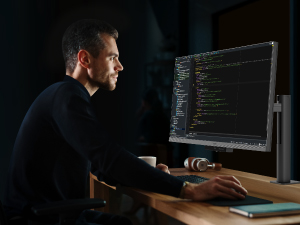
Figure 4.2: Monitor in portrait mode, suitable for coding or document review.
4.4 Característiques clau
- Panell Nano Mat: This panel features a low reflection surface designed to minimize glare and distractions, providing clear visibility for extended periods.
- Advanced Coding Modes (Dark Theme and Light Theme): Optimized display settings that enhance font clarity and code differentiation, reducing eye strain during programming tasks. These modes can be accessed via the OSD menu.
- Night Hours Protection: This feature adjusts the monitor's brightness to a minimum level, providing enhanced eye protection during low-light conditions or night-time use.
- MoonHalo Backlight: A customizable backlight feature that allows adjustment of color temperature, brightness, and light modes. This helps in creating an optimal viewing environment and reducing eye fatigue.
- Lliurament d'alimentació USB-C de 90 W: The USB-C port supports up to 90W power delivery, allowing you to charge compatible laptops and devices directly through the monitor while simultaneously receiving video and data signals.

Figure 4.3: Nano Matte Panel reducing reflections compared to a standard display.

Figure 4.4: Advanced Coding Modes for improved readability.

Figure 4.5: MoonHalo Backlight providing ambient illumination.
5. Manteniment
Un manteniment adequat garanteix la longevitat i el rendiment òptim del monitor.
- Neteja de la pantalla: Netegeu suaument la pantalla amb un drap suau i sense borrissol. Per a marques difícils, netegeu suaument.ampen the cloth with water. Avoid using alcohol-based cleaners or harsh chemicals, as these can damage the screen's finish.
- Neteja de la Casing: Feu servir un drap suau i sec per netejar el monitor casing.
- Gestió de cables: Utilize the integrated cable management features of the ergonomic stand to keep cables organized and prevent damage.

Figure 5.1: Cable management system on the ergonomic stand.
6. Solució De Problemes
Si teniu problemes amb el monitor, consulteu les solucions habituals següents:
| Problema | Possible causa/solució |
|---|---|
| No hi ha imatge a la pantalla |
|
| Image is blurry or incorrect resolution |
|
| Els ports USB no funcionen |
|
| Monitor shakes slightly |
|
| Display Pilot 2 software issues |
|
7. Especificacions
| Característica | Detall |
|---|---|
| Marca | BenQ |
| Model | RD320UA |
| Mida de la pantalla | 32 polzades |
| Resolució | 3840 x 2160 (4K UHD) |
| Resolució de pantalla màxima | 3840 x 2160 píxels |
| Relació d'aspecte | 16:9 |
| Superfície de la pantalla | Nano Matte |
| Relació de contrast | 2000:1 (nadiu) |
| Tipus de panell | IPS |
| Connectivitat | HDMI 2.0, DisplayPort 1.4, USB 3.2 Gen2 Type-C (PD90W, DP Alt Mode, Data), USB 3.2 Gen1 Type-B (Upstream), USB 3.2 Gen2 Type-A (Downstream) x2, USB 3.2 Gen2 Type-C (Downstream) |
| Color | Gris metall |
| Pes de l'article | 34.2 lliures |
| Dimensions del producte (LxWxH) | 28 x 23 x 18 polzades |
| Fabricant | BenQ |
| Primer disponible | 27 d'agost de 2024 |
8. Garantia i Suport
BenQ products are designed for reliability and performance. For information regarding your product's warranty, please refer to the warranty card included in your package or visit the official BenQ website. For technical support, driver downloads, or further assistance, please visit www.benq.com and navigate to the support section for your specific model.


