Introducció
Benvingut a la vostra nova caixa forta biomètrica ignífuga Povanje. Aquest manual proporciona instruccions detallades per a la configuració, el funcionament i el manteniment de la caixa forta per garantir una seguretat i una longevitat òptimes per als vostres documents valuosos, joies, diners i altres objectes importants. Llegiu atentament aquest manual abans d'utilitzar la caixa forta.
Informació important de seguretat
- Guardeu sempre les claus d'emergència en un lloc segur, separat de la caixa forta, i assegureu-vos que només persones de confiança hi tinguin accés.
- No guardeu la caixa d'alimentació d'emergència externa de tipus C dins de la caixa forta.
- Assegureu-vos que la caixa forta estigui ben fixada a la paret o al terra amb els accessoris proporcionats per evitar que es pugui treure o robar sense autorització.
- Mantingueu la caixa forta fora de l'abast dels nens i de les persones no autoritzades per evitar l'accés accidental o lesions.
- Aquesta caixa forta està dissenyada per ser ignífuga, però és no resistent a l'aiguaPer a una protecció addicional dels documents sensibles contra els danys causats per l'aigua, utilitzeu la bossa per a documents A4 ignífuga i impermeable inclosa.
Contingut del paquet
Si us plau, verifiqueu que tots els elements que s'enumeren a continuació estiguin inclosos al vostre paquet:
- 1 x Caixa forta biomètrica ignífuga extra gran per a la llar
- 1 x Manual d'usuari
- 4 cargols de muntatge (perns d'expansió)
- 1 x Bossa ignífuga impermeable per a documents A4
- 2 claus d'emergència
- 1 x Caixa d'alimentació d'emergència externa tipus C
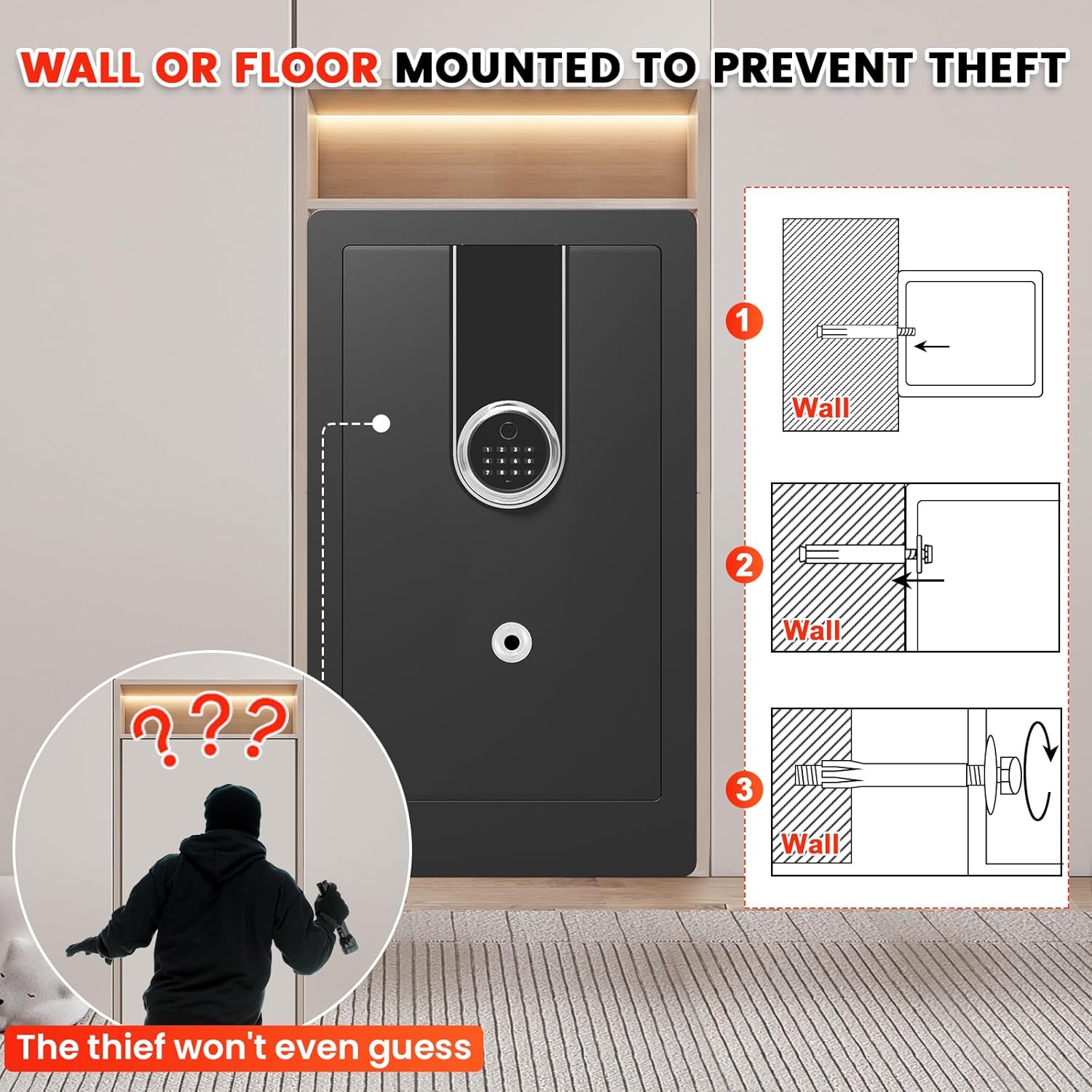
Figura 1: Accessoris inclosos per a la caixa forta Povanje. Aquesta imatge mostra tots els components que haurien d'estar presents al paquet, incloent-hi el manual d'usuari, els accessoris de muntatge, la bossa ignífuga per a documents, les claus d'emergència i la caixa d'alimentació d'emergència externa.
Especificacions del producte
| Marca | Povanje |
| Dimensions del producte (P x A x A) | 15.7 "P x 14.6" W x 27.6" H |
| Tipus de bloqueig | Biomètric, pany electrònic de combinació, clau |
| Color | Negre |
| Capacitat | 6.5 peus cúbics |
| Material | Acer baix en carboni |
| Característiques especials | Empremta digital biomètrica, sensor de llum, antirobatori, prestatge extraïble, resistent al foc |
| Tipus de muntatge | Muntatge a la paret i al terra |
| Tipus de control | Biomètric |
| Pes de l'article | 54 lliures |
| Alarma | Vibració i Audible |
| Nivell de resistència a l'aigua | No resistent a l'aigua |
| Profunditat de cambra | 14.37 polzades |
| Alçada de la cambra | 27.16 polzades |
| Amplada de la cambra | 16.14 polzades |
| Número de model de l'article | Caixes fortes domèstiques resistents a l'aigua i al foc 70ZQ |
| Necessites piles? | Sí (piles no incloses) |

Figura 2: Dimensions exteriors de la caixa forta. Aquesta imatge il·lustra la mida total de la caixa forta, destacant el seu disseny espaiós.

Figura 3: Configuració interior amb prestatges extraïbles. Aquesta imatge mostra l'espai interior versàtil i mostra com es poden utilitzar els dos prestatges extraïbles per organitzar diferents tipus d'objectes de valor.

Figura 4: Construcció de metall gruixut millorada. Aquesta imatge destaca la construcció robusta de la caixa forta, amb capacitats antiperforació i antipalanca, juntament amb forrellats sòlids i resistents per a una major seguretat.
Configuració i instal·lació
1. Desembalatge
Traieu amb cura la caixa forta del seu embalatge. Inspeccioneu la caixa forta per detectar qualsevol signe de danys durant el transport. Conserveu els materials d'embalatge per a futurs transports o si cal retornar-la.
2. Instal·lació de la bateria
Localitzeu el compartiment de les piles, que normalment es troba a l'interior de la porta de la caixa forta. Introduïu les piles necessàries (per exemple, 4 piles AA, no incloses) assegurant-vos de la polaritat correcta. La caixa forta no funcionarà sense alimentació.
3. Accés inicial (amb clau d'emergència)
Per obrir la caixa forta per primera vegada, o si oblideu el vostre codi/empremta digital, feu servir una de les claus d'emergència proporcionades. El forat del pany normalment està ocult. Introduïu la clau i gireu-la per obrir la porta de la caixa forta.
4. Muntatge de la caixa forta
Per maximitzar la seguretat i evitar robatoris, es recomana muntar la caixa forta de manera segura a la paret o al terra mitjançant els accessoris de muntatge inclosos.
- Trieu una ubicació: Seleccioneu un lloc discret i segur per a la vostra caixa forta, preferiblement a prop d'una biga estructural o d'un terra sòlid.
- Marca els punts de perforació: Amb la caixa forta a la posició desitjada, utilitzeu els forats pretallats a la part posterior o inferior de la caixa forta com a plantilla per marcar els punts de perforació a la paret o al terra.
- Perforar forats pilot: Perforeu forats pilot als llocs marcats utilitzant una broca de mida adequada per als cargols d'expansió.
- Assegura la caixa forta: Alineeu la caixa forta amb els forats perforats. Introduïu els cargols de muntatge (perns d'expansió) a través dels forats de la caixa forta i a la paret/terra. Estrenyeu-los fermament per ancorar fermament la caixa forta.

Figura 5: Muntatge a la paret o al terra per a sistemes antirobatori. Aquesta imatge mostra el procés de fixació de la caixa forta a una paret o al terra mitjançant els cargols d'expansió proporcionats, cosa que redueix significativament el risc de robatori.
Funcionament de la caixa forta
Mètodes de desbloqueig
La caixa forta de Povanje ofereix quatre maneres pràctiques d'accedir als vostres objectes de valor:
1. Desbloqueig d'empremta digital biomètrica
La caixa forta admet un accés ràpid (0.1 s) mitjançant empremtes dactilars registrades. Es poden emmagatzemar fins a 29 empremtes dactilars diferents.
- Col·loca el dit registrat fermament sobre el sensor d'empremtes dactilars.
- La caixa forta es desbloquejarà si es reconeix l'empremta digital.
2. Desbloqueig del teclat digital
Fes servir el teu codi personal per desbloquejar la caixa forta.
- Introduïu el vostre codi personal de 3 a 8 dígits al teclat numèric.
- Premeu la tecla "#" per confirmar.
3. Desbloqueig de clau d'emergència
En situacions en què les piles s'han esgotat o heu oblidat el codi/empremta digital, les claus d'emergència proporcionen accés directe.
- Localitza el forat del pany amagat a la caixa forta.
- Introduïu i gireu la clau d'emergència per obrir la porta de la caixa forta.
4. Caixa d'alimentació d'emergència externa
Si les bateries internes de la caixa forta estan completament esgotades i no teniu accés a les claus d'emergència, podeu fer servir la caixa d'alimentació d'emergència externa tipus C.
- Connecteu el cable tipus C de la caixa d'alimentació d'emergència al port d'emergència del teclat numèric de la caixa forta.
- Un cop connectada a l'alimentació, podeu utilitzar el teclat numèric per introduir el vostre codi personal i obrir la caixa forta.

Figura 6: Mètodes d'accés sense esforç. Aquesta imatge il·lustra les quatre maneres pràctiques de desbloquejar la caixa forta, oferint múltiples opcions per a un accés ràpid i fiable.
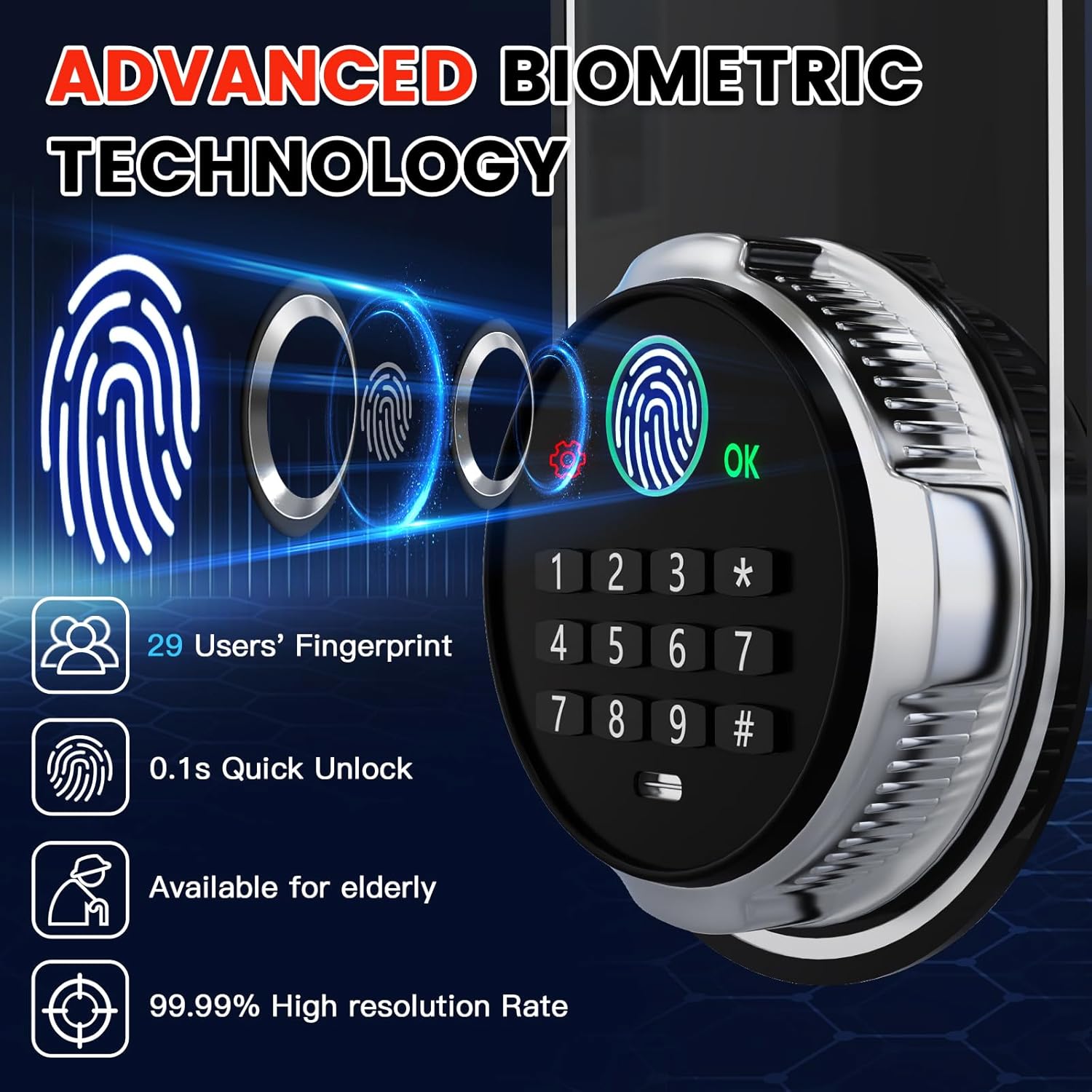
Figura 7: Tecnologia biomètrica avançada. Aquesta imatge detalla les capacitats del sistema biomètric de la caixa forta, incloent-hi la seva velocitat i precisió.

Figura 8: Port USB-C d'emergència. Aquesta imatge mostra la ubicació i la funció del port USB-C d'emergència, que proporciona una opció d'alimentació de reserva crucial.
Configuració de contrasenyes i empremtes dactilars
El codi inicial de fàbrica de la caixa forta és 1234#Es recomana canviar-ho immediatament després del primer ús.
Configuració de la contrasenya personal
- Premeu el botó vermell de reinici que es troba darrere de la porta de la caixa forta (a l'interior).
- Introduïu el codi personal de 3 a 8 dígits que vulgueu al teclat numèric i premeu "#" per confirmar.
- Torneu a introduir el mateix codi personal i premeu "#" de nou per confirmar i desar.
Addició d’empremtes digitals
- Premeu el botó vermell de reinici que es troba darrere de la porta de la caixa forta.
- Col·loca el dit sobre el sensor d'empremtes dactilars i aixeca'l, repetint aquesta acció 3 vegades seguides.
- Un cop registrat correctament, obriu la porta amb l'empremta digital recentment afegida per verificar-ho.

Figura 9: Configuració de la contrasenya i l'empremta digital. Aquesta imatge proporciona una guia visual per programar el vostre codi d'accés personal i registrar les empremtes digitals.
Sistema d'alerta antirobatori
La teva caixa forta està equipada amb un sistema d'alerta intel·ligent dual dissenyat per dissuadir l'accés no autoritzat:
- Entrada incorrecta contínua: Si s'introdueix una contrasenya o empremta digital incorrecta 6 vegades consecutives, l'alarma s'activarà.
- Vibració violenta: Qualsevol intent de vibració violenta oampTocar amb la caixa forta activarà l'alarma.
Quan s'activa, l'alarma sonarà per alertar-vos d'una possible activitat no autoritzada.
Figura 10: Alerta intel·ligent dual antirobatori. Aquesta imatge mostra l'alerta visual del sistema d'alarma de la caixa forta quan s'activa per intents no autoritzats.
Mode de silenci
Per fer funcionar la caixa forta en silenci i evitar molestar els altres, podeu activar el mode silenci.
- Premeu "3#" al teclat numèric per alternar entre els modes de so i silenci.

Figura 11: Característiques interiors. Aquesta imatge destaca característiques internes pràctiques com ara butxaques per a pistoles, ganxos per a claus i el folre protector de vellut.
Llum interior i pantalla d'alimentació
- La caixa forta té una llum LED interior que s'il·lumina quan s'obre, proporcionant una visibilitat clara del contingut.
- El teclat numèric inclou una pantalla que indica el nivell actual de la bateria, cosa que permet substituir-la abans que s'esgoti completament.
Vídeo 1: Caixa forta per a documents biomètrics de gran resistènciaviewAquest vídeo ofereix una visió completa deview de les característiques de la caixa forta, com ara l'accés biomètric, la construcció robusta, les alertes antirobatori i l'interior espaiós.
Manteniment
Un manteniment adequat garantirà el rendiment a llarg termini i la seguretat de la vostra caixa forta a Povanje:
- Substitució de la bateria: Comproveu regularment l'indicador del nivell de bateria del teclat numèric. Substituïu totes les piles immediatament quan estiguin baixes per evitar que es bloquegin.
- Neteja del sensor d'empremtes dactilars: Mantingueu el sensor d'empremtes dactilars net i sec. Feu servir un drap suau i sense borrissol per netejar suaument la pols o les taques per obtenir un rendiment de reconeixement òptim.
- Neteja exterior: Netegeu l'exterior de la caixa forta amb un drap suauamp drap. Eviteu utilitzar netejadors abrasius, dissolvents o productes químics agressius, ja que poden danyar l'acabat.
- Segells de portes: Inspeccioneu periòdicament les juntes de les portes per detectar qualsevol residu o dany. Assegureu-vos que estiguin netes i intactes per mantenir les propietats resistents al foc de la caixa forta.
- Organització interna: Utilitzeu els prestatges extraïbles i les butxaques interiors per mantenir els vostres objectes de valor organitzats i evitar que els objectes obstrueixin el mecanisme de bloqueig.
Resolució de problemes
Si teniu algun problema amb la vostra caixa forta, consulteu la taula següent per veure els problemes més comuns i les seves solucions:
| Problema | Causa possible | Solució |
|---|---|---|
| La caixa forta no s'obre amb l'empremta digital. | Empremta digital no registrada, sensor brut o col·locació incorrecta del dit. | Torneu a registrar l'empremta digital, netegeu el sensor amb un drap suau o proveu amb un altre dit registrat. Assegureu-vos que el dit cobreixi completament el sensor. |
| La caixa forta no s'obre amb codi personal. | Codi introduït incorrecte, piles baixes/descarregades. | Torneu a introduir el codi correcte amb cura. Canvieu les piles o feu servir la caixa d'alimentació d'emergència externa tipus C. |
| L'alarma sona inesperadament. | Tampintent d'ering o vibració forta accidental. | Comproveu si hi ha signes d'entrada per força. Si hi ha una falsa alarma, assegureu-vos que la caixa forta estigui estable i no estigui subjecta a impactes accidentals. |
| El teclat no respon. | Les piles estan completament mortes. | Feu servir les claus d'emergència per obrir la caixa forta o connecteu la caixa d'alimentació d'emergència externa tipus C per alimentar el teclat numèric. |
| La llum interior no funciona. | Piles baixes/descarregades o problema amb el LED. | Substituïu les piles. Si el problema persisteix després de substituir la bateria, poseu-vos en contacte amb el servei d'atenció al client. |
Garantia i assistència al client
Povanje es compromet a oferir productes d'alta qualitat i un excel·lent servei al client. La caixa forta Povanje inclou el següent:
- 5 any de garantia: Oferim una garantia de devolució o canvi de 5 anys a partir de la data de compra.
- Suport tècnic de tota la vida: Gaudeix d'assistència tècnica de per vida per a qualsevol consulta operativa o tècnica que puguis tenir.
- Substitució de peces gratuïta: Totes les peces es poden substituir gratuïtament si cal.
- Política de substitució per incendis: En cas desafortunat d'incendi, podeu rebre una caixa forta nova gratuïta si proporcioneu el número de comanda i fotos de la caixa forta danyada.
Per a qualsevol pregunta, dubte o assistència tècnica, no dubteu a contactar amb nosaltres. Estem aquí per ajudar-vos.

Figura 12: Promesa de servei al client de Povanje. Aquesta imatge descriu el nostre compromís amb la satisfacció del client, incloent-hi temps de resposta ràpids, devolucions flexibles i assistència contínua.


