1. Introducció
This manual provides detailed instructions for the installation, operation, and maintenance of the Aigo B760L D4 Motherboard. Please read this manual thoroughly before installing or using the product to ensure proper functionality and to prevent damage.
2. Informació de seguretat
Observeu sempre les precaucions de seguretat següents:
- Disconnect power before installing or removing any components.
- Manegeu la placa base per les vores per evitar tocar els components sensibles.
- Use an anti-static wrist strap to prevent electrostatic discharge (ESD) damage.
- Assegureu-vos que hi hagi una ventilació adequada dins de la carcassa de l'ordinador per evitar el sobreescalfament.
- No exposeu la placa base a la humitat ni a temperatures extremes.
3. Contingut del paquet
Verifiqueu que tots els elements siguin presents al paquet:
- Aigo B760L D4 Motherboard
- Manual d'usuari (aquest document)
- Cables SATA (la quantitat pot variar)
- Escut d'E / S
- CD/USB de controladors (si s'inclou)
4. Producte acabatview
The Aigo B760L D4 is an M-ATX motherboard designed for Intel LGA 1700 processors, featuring the Intel B760 chipset. It supports DDR4 memory and offers a range of connectivity options.
4.1 Disseny de la placa base
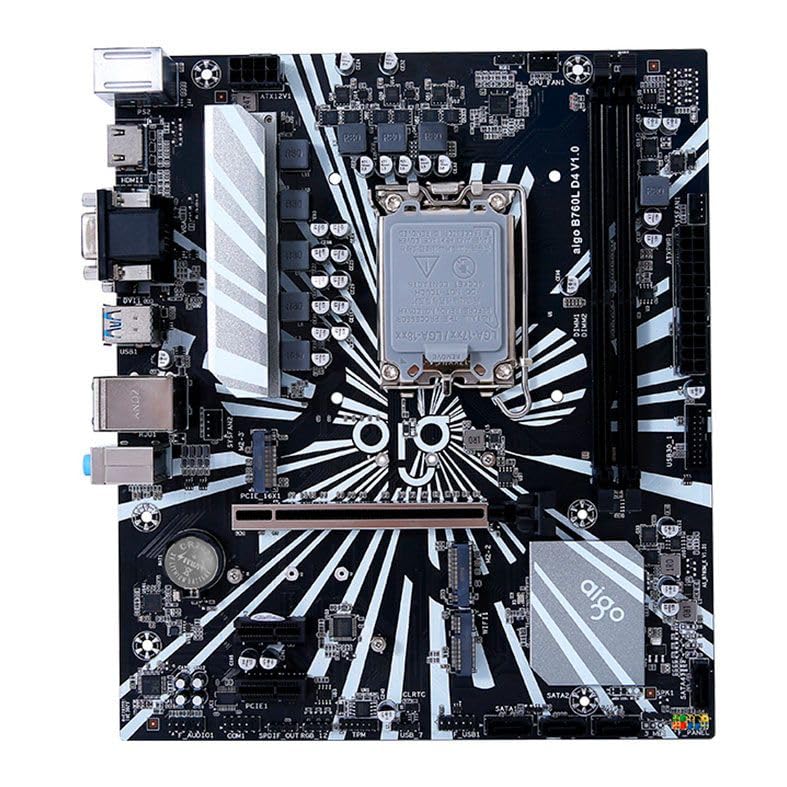
Figura 1: Mésview of the Aigo B760L D4 Motherboard alongside its retail packaging.

Figura 2: De dalt a baix view of the Aigo B760L D4 Motherboard, highlighting component placement.

Figura 3: Angle view of the Aigo B760L D4 Motherboard, showing the CPU socket and memory slots.
4.2 Panell d'E/S posterior

Figure 4: Rear I/O panel of the Aigo B760L D4 Motherboard, displaying various connectivity ports.
El panell d'E/S posterior inclou:
- 1 x PS/2 Keyboard and Mouse port
- 2 x ports USB 2.0
- 4 x ports USB 3.0
- 1 x port HDMI
- 2 x DVI ports
- 1 x port VGA
- 1 x RJ45 LAN port
- Audio jacks (Line In, Line Out, Mic In)
5. Configuració
5.1 Instal·lació de la CPU
- Localitza el sòcol de la CPU LGA 1700 a la placa base.
- Obriu la palanca del sòcol de la CPU i aixequeu la placa de càrrega.
- Alineeu amb cura la CPU amb el sòcol, assegurant-vos que la marca triangular de la CPU coincideixi amb la marca del sòcol.
- Col·loca suaument la CPU al sòcol sense forçar-la.
- Tanqueu la placa de càrrega i assegureu-la amb la palanca.
5.2 Installing DDR4 Memory
The motherboard supports up to 64GB of DDR4 memory across two slots, with speeds from 2133 MHz to 3200 MHz in dual-channel configuration.
- Obriu els clips dels dos extrems de la ranura DIMM.
- Alineeu el mòdul de memòria amb la ranura, assegurant-vos que l'osca del mòdul coincideixi amb la clau de la ranura.
- Premeu fermament els dos extrems del mòdul de memòria fins que els clips encaixin al seu lloc.
5.3 Instal·lació de dispositius d'emmagatzematge
The motherboard features 4 x SATA 3.0 ports and 2 x M.2 NVME Dual-Protocol slots.
5.3.1 SATA Drives
- Connecteu un extrem d'un cable de dades SATA a un port SATA de la placa base.
- Connecteu l'altre extrem del cable de dades SATA al disc dur SATA o SSD.
- Connecteu un cable d'alimentació SATA de la font d'alimentació a la unitat.
5.3.2 M.2 NVME Drives
- Locate an M.2 slot on the motherboard.
- Traieu el cargol del separador M.2.
- Insert the M.2 NVME drive into the slot at a 30-degree angle.
- Gently push the drive down and secure it with the standoff screw.
5.4 Connexió de potència
Connect the 24-pin ATX power connector and the 8-pin ATX 12V power connector from your power supply to the corresponding ports on the motherboard.
5.5 Installing Expansion Cards
The motherboard includes 1 x PCIe x16 slot and 1 x PCIe x1 slot.
- Align your expansion card (e.g., graphics card) with the appropriate PCIe slot.
- Press down firmly until the card is seated correctly in the slot.
- Secure the card with a screw to the computer case.
6. Funcionament
6.1 Primer arrencada i configuració de la BIOS
After assembling your system, connect a monitor, keyboard, and mouse. Power on the system. During startup, press the designated key (usually DEL or F2) to enter the BIOS/UEFI setup utility. Here you can configure boot order, system time, and other advanced settings.
6.2 Instal·lació del sistema operatiu
The Aigo B760L D4 Motherboard supports Windows 10 and Windows 11 operating systems. Insert your OS installation media (USB drive or DVD) and follow the on-screen instructions to install the operating system.
6.3 Instal·lació del controlador
After OS installation, install the necessary drivers for the chipset, audio, LAN, and other integrated components. These drivers are typically provided on a CD/USB with the motherboard or can be downloaded from the manufacturer's weblloc.
7. Manteniment
- Mantingueu-lo net: Regularly clean dust from inside your computer case using compressed air. Dust accumulation can lead to overheating.
- Actualitzacions de la BIOS: Reviseu periòdicament el fabricant website for BIOS/UEFI updates. Updates can improve stability, compatibility, and performance. Follow update instructions carefully.
- Actualitzacions de controladors: Mantingueu els controladors actualitzats per garantir un rendiment òptim i la compatibilitat amb el programari i el maquinari nous.
- Control ambiental: Operate the system in a cool, dry, and well-ventilated environment.
8. Solució De Problemes
8.1 Sense poder
- Ensure the power supply is connected correctly to the motherboard (24-pin and 8-pin ATX 12V).
- Check if the power supply switch is in the "ON" position.
- Verify that the power button on the case is correctly connected to the motherboard's front panel header.
8.2 Sense pantalla
- Ensure the monitor is connected to the correct video output (either integrated graphics or a dedicated graphics card).
- Torneu a col·locar la targeta gràfica i els mòduls de memòria.
- Try booting with only one memory module installed.
8.3 Inestabilitat / Fallades del sistema
- Comproveu les temperatures de la CPU i la GPU per assegurar-vos que no s'estan sobreescalfant.
- Verify that all power connectors are securely attached.
- Executeu eines de diagnòstic de memòria per comprovar si hi ha defectes a la memòria RAM.
- Ensure BIOS is updated to the latest stable version.
9. Especificacions
| Característica | Especificació |
|---|---|
| Marca | Aigo |
| Model | AIGO-B760L-D4 |
| Chipset | Intel B760 |
| Socket de CPU | LGA 1700 |
| Ranures de memòria | 2 x ranures DIMM DDR4 |
| Capacitat màxima de memòria | 64 GB |
| Memory Speed Support | 2133 ~ 3200 MHz (Dual Channel) |
| Interfície d'àudio | 1 x HDMI, 2 x DVI, 1 x VGA |
| Ranures SATA | 4 SATA 3.0 |
| M.2 Ranures | 2 x M.2 NVME Dual-Protocol |
| Ports USB (posteriors) | 2x USB 2.0, 4x USB 3.0 |
| Ranures d'expansió | 1 x PCIe x1, 1 x PCIe x16 |
| Suport del sistema operatiu | Windows 10/11 |
| Port PS/2 | 1 x PS/2 Keyboard and Mouse |
| Power Phase | 8 fases |
| Connectors d'alimentació | 1 x 24-pin ATX, 1 x 8-pin ATX 12V |
| Interfície WiFi | 1 x WiFi interface (PCIe compatible) |
| Port LAN | 1 x RJ45 |
| Dimensions | 24.4 x 21 cm (M-ATX) |
10. Garantia i Suport
For warranty information and technical support, please refer to the documentation provided with your purchase or visit the official Aigo weblloc web. Conserveu el comprovant de compra per a reclamacions de garantia.


