Introducció
The RadioShack Dual-Mode Wireless Bluetooth Mouse offers versatile connectivity and ergonomic comfort for various computing needs. This manual provides instructions for setting up, operating, and maintaining your mouse to ensure optimal performance.

Figura 1: Part frontal view of the RadioShack Dual-Mode Wireless Bluetooth Mouse.
Contingut del paquet
- RadioShack Dual-Mode Wireless Bluetooth Mouse
- USB Receiver (stored in the mouse)
- Cable de càrrega USB
- Manual d'usuari (aquest document)
Configuració
1. Càrrega del ratolí
The mouse features a built-in rechargeable battery. Before first use, or when the battery is low, connect the mouse to a USB power source using the provided USB charging cable. The charging port is located on the front side of the mouse.

Figura 2: lateral view of the mouse highlighting the USB charging port.

Figure 3: The mouse being charged via a USB connection to a laptop.
2. Connectar el ratolí
The mouse supports dual-mode connectivity: 2.4G Wireless (via USB receiver) and Bluetooth 3.0. You can switch between these modes using the switch on the bottom of the mouse.
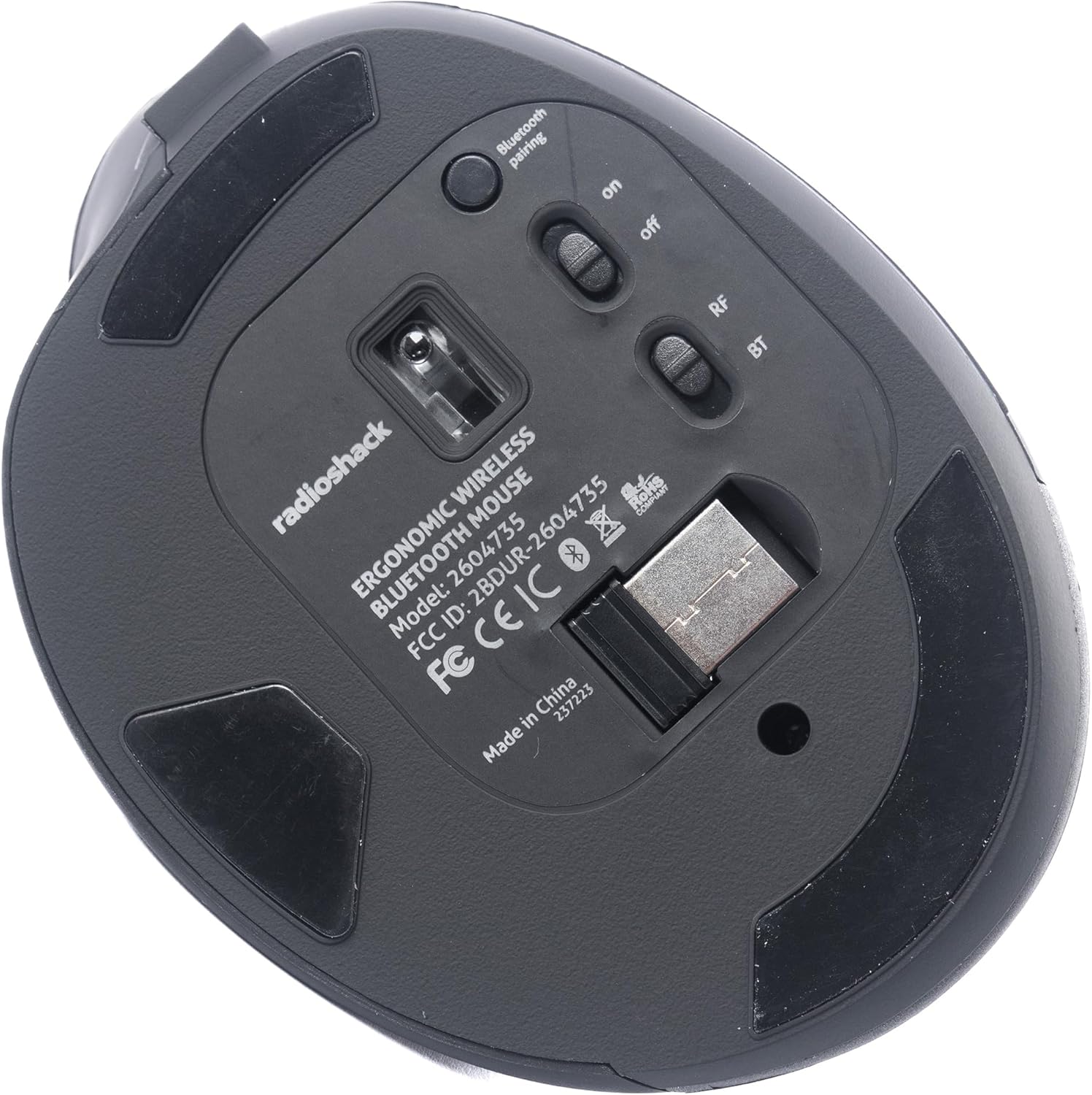
Figura 4: A baix view of the mouse, indicating the power switch, mode switch (RF/BT), and USB receiver compartment.
2.1. 2.4G Wireless Mode (USB Receiver)
- Localitzeu el receptor USB que es troba al compartiment de la part inferior del ratolí.
- Inseriu el receptor USB en un port USB disponible de l'ordinador.
- Slide the mode switch on the bottom of the mouse to the "RF" position.
- Turn on the mouse using the ON/OFF switch. The mouse should connect automatically.
2.2. Mode Bluetooth
- Feu lliscar el commutador de mode a la part inferior del ratolí fins a la posició "BT".
- Engegueu el ratolí amb l'interruptor ON/OFF.
- Press and hold the Bluetooth pairing button (usually located near the mode switch) for 3-5 seconds until the indicator light flashes, indicating it is in pairing mode.
- A l'ordinador o dispositiu, vés a la configuració de Bluetooth i cerca dispositius nous.
- Select "RadioShack Mouse" (or similar name) from the list of available devices to pair.
- Un cop emparellat, l'indicador lluminós deixarà de parpellejar.

Figure 5: The mouse positioned wirelessly next to a laptop, ready for use.
Funcionament del ratolí
Funcions bàsiques
- Botó esquerre: Funció de clic principal.
- Botó dret: Funció de clic secundari (menú contextual).
- Roda de desplaçament: Scroll up/down, and can also function as a middle click button.
- Botons Endavant/Enrere: Situats al lateral, aquests botons permeten una navegació ràpida web navegadors i file exploradors.
Canvi entre modes
To switch between 2.4G Wireless and Bluetooth modes, simply slide the mode switch on the bottom of the mouse to the desired position (RF for 2.4G, BT for Bluetooth).
Disseny ergonòmic
The mouse is designed with a contoured shape and rubber grips to provide comfortable support for your hand and wrist, reducing strain during extended use.

Figure 6: A hand demonstrating the ergonomic grip on the mouse.
Manteniment
Neteja
- Apagueu el ratolí abans de netejar-lo.
- Feu servir un drap suau i sec per netejar la superfície del ratolí.
- Per a la brutícia persistent, lleugerament dampen the cloth with water or a mild cleaning solution, then wipe dry immediately.
- Eviteu utilitzar productes químics o materials abrasius.
Cura de la bateria
- Carregueu el ratolí regularment per mantenir la bateria en bon estat.
- Eviteu descarregar completament la bateria amb freqüència.
- If storing the mouse for an extended period, charge it to about 50% capacity.
Resolució de problemes
- El ratolí no respon:
- Assegureu-vos que el ratolí estigui encès.
- Comproveu el nivell de la bateria i carregueu si cal.
- For 2.4G mode, ensure the USB receiver is securely plugged into the computer and the mode switch is set to "RF".
- For Bluetooth mode, ensure Bluetooth is enabled on your device, the mouse is in "BT" mode, and it is properly paired. Try re-pairing if necessary.
- Try connecting the mouse to a different USB port or a different device to rule out port or device issues.
- El moviment del cursor és erràtic o lent:
- Ensure the mouse sensor is clean and free from obstructions.
- Feu servir el ratolí sobre una superfície neta i no reflectant.
- Comproveu si hi ha interferències d'altres dispositius sense fil.
- El ratolí no carrega:
- Ensure the charging cable is securely connected to both the mouse and the power source.
- Prova un altre cable de càrrega USB o adaptador de corrent.
- Assegureu-vos que la font d'alimentació estigui activa.
Especificacions
| Característica | Detall |
|---|---|
| Número de model | 2604735 |
| Tecnologia de connectivitat | 2.4G Wireless, Bluetooth 3.0 (Dual-Mode) |
| Tecnologia de detecció de moviment | Òptic |
| Color | Negre i gris |
| Font d'alimentació | Bateria de ions de liti recarregable (inclosa) |
| Pes de l'article | 9.1 unces |
| Dimensions del paquet | 8.66 x 6.3 x 2.95 polzades |
| Fabricant | RadioShack |
Garantia i Suport
For warranty information and customer support, please refer to the official RadioShack weblloc web o contacteu directament amb el seu servei d'atenció al client. Normalment, podeu trobar detalls sobre el registre del producte, les reclamacions de garantia i l'assistència tècnica a les pàgines d'assistència del fabricant.


