1. Introducció
This manual provides detailed instructions for the installation, setup, and operation of your ATOTO S8 PN Android Car Stereo. This unit is specifically designed for BMW 3 Series E90, E91, E92, and E93 models manufactured between 2008 and 2012, equipped with the original CIC 4 PIN LVDS system. It integrates advanced features while retaining the original vehicle functionalities.
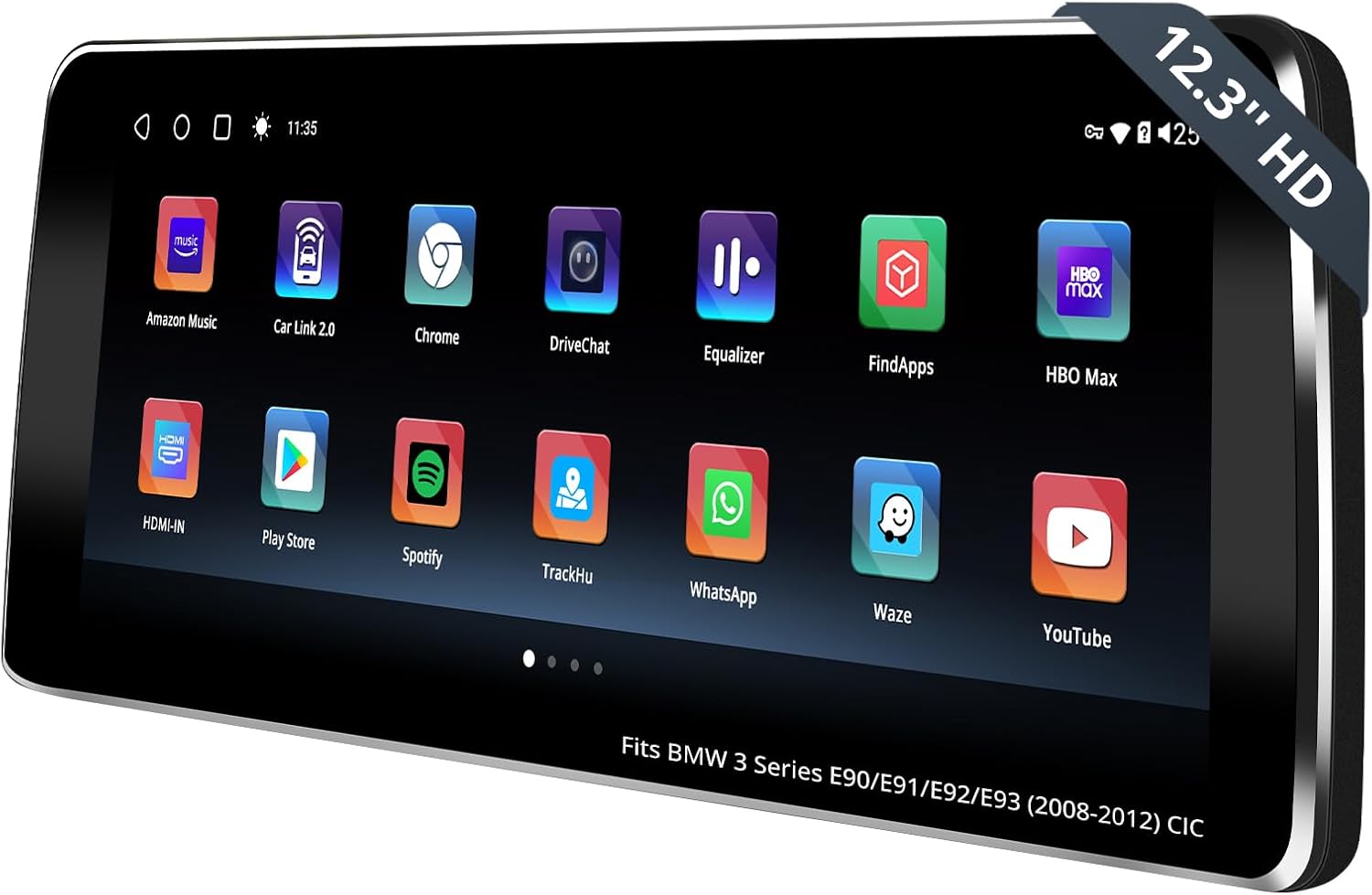
The ATOTO S8 PN Android Car Stereo seamlessly integrated into a BMW 3 Series dashboard.
1.1 Comprovació de compatibilitat
Ensure your vehicle is compatible with the ATOTO S8 PN unit. This unit is compatible only with BMW 3 Series E90, E91, E92, E93 models from 2008-2012 that have the CIC original 4 PIN LVDS system. Please verify the following three features in your vehicle before installation:
- iDrive UI: Confirm your iDrive user interface matches the CIC system.
- Interruptor d'inici/aturada: Verify the type of Start/Stop switch in your vehicle.
- LVDS Connector: Check for a 4-pin LVDS connector at the rear of your OEM display.
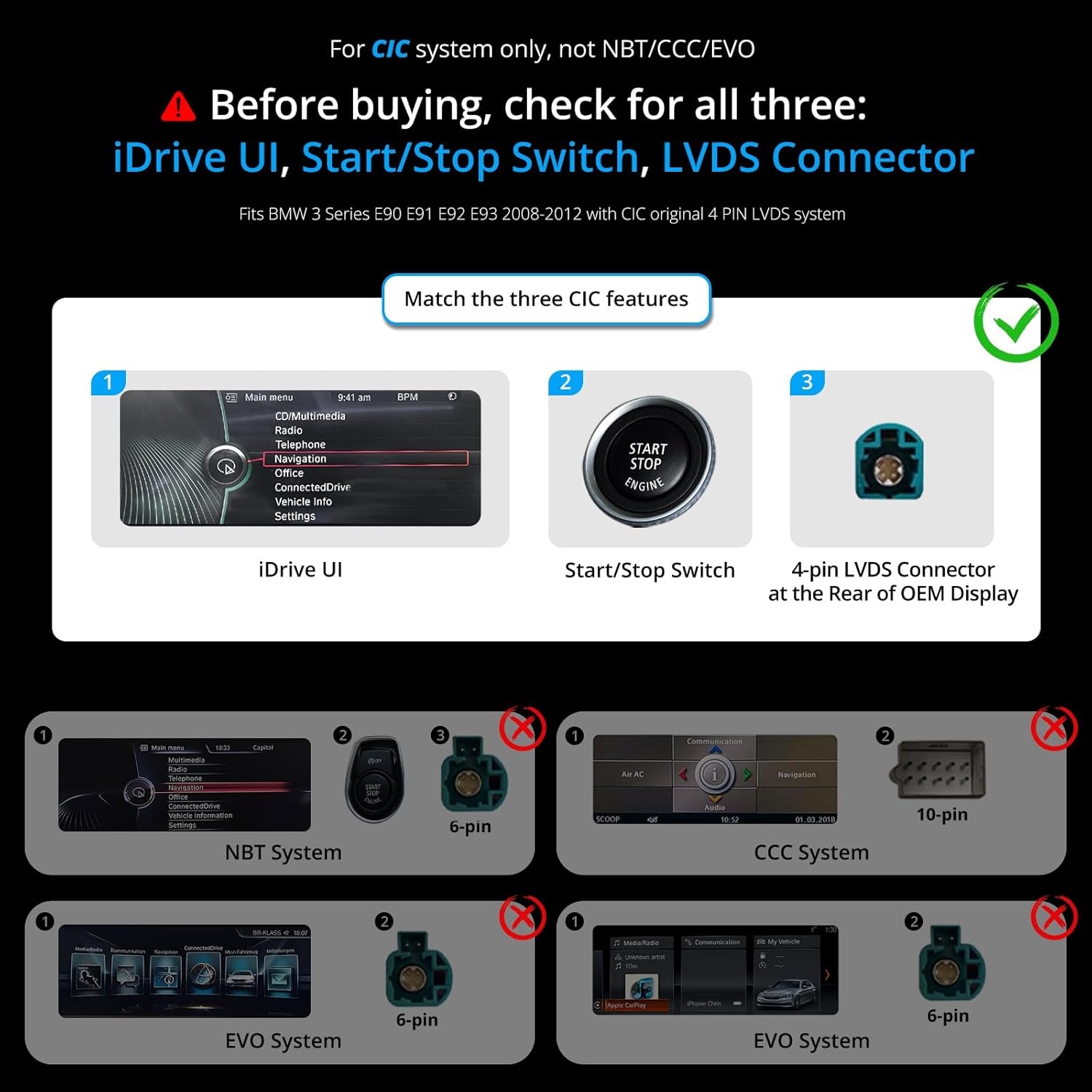
Visual guide for identifying the correct CIC system features for compatibility.
2. Característiques clau
- Original System Retention: Designed to integrate with your BMW's original system, preserving all factory functions including iDrive, steering wheel controls, and audio.
- 12.3-inch HD IPS Screen: Features a high-definition 1920x720p IPS touchscreen for clear visuals and responsive interaction.
- Connectivitat sense fils: Supports wireless Apple CarPlay and Android Auto for seamless smartphone integration.
- DriveChat AI Co-Pilot: An AI assistant powered by ChatGPT for hands-free assistance and information while driving.
- Multiple Internet Options: Offers 4G LTE, Wi-Fi, USB tethering, and Bluetooth for versatile internet access.
- Bluetooth dual: Allows for simultaneous connection of multiple Bluetooth devices.
- GPS Tracking (TrackHU): Real-time GPS tracking with a 5-second refresh rate, OsmAnd's 4-satellite positioning, track playback, and geofence alerts.
- Digital Sound Processor (DSP): Enhances audio experience with DTS functionality and a 32-band equalizer for sound customization.
- Funcionalitat de pantalla dividida: Enables multitasking by displaying two applications simultaneously.
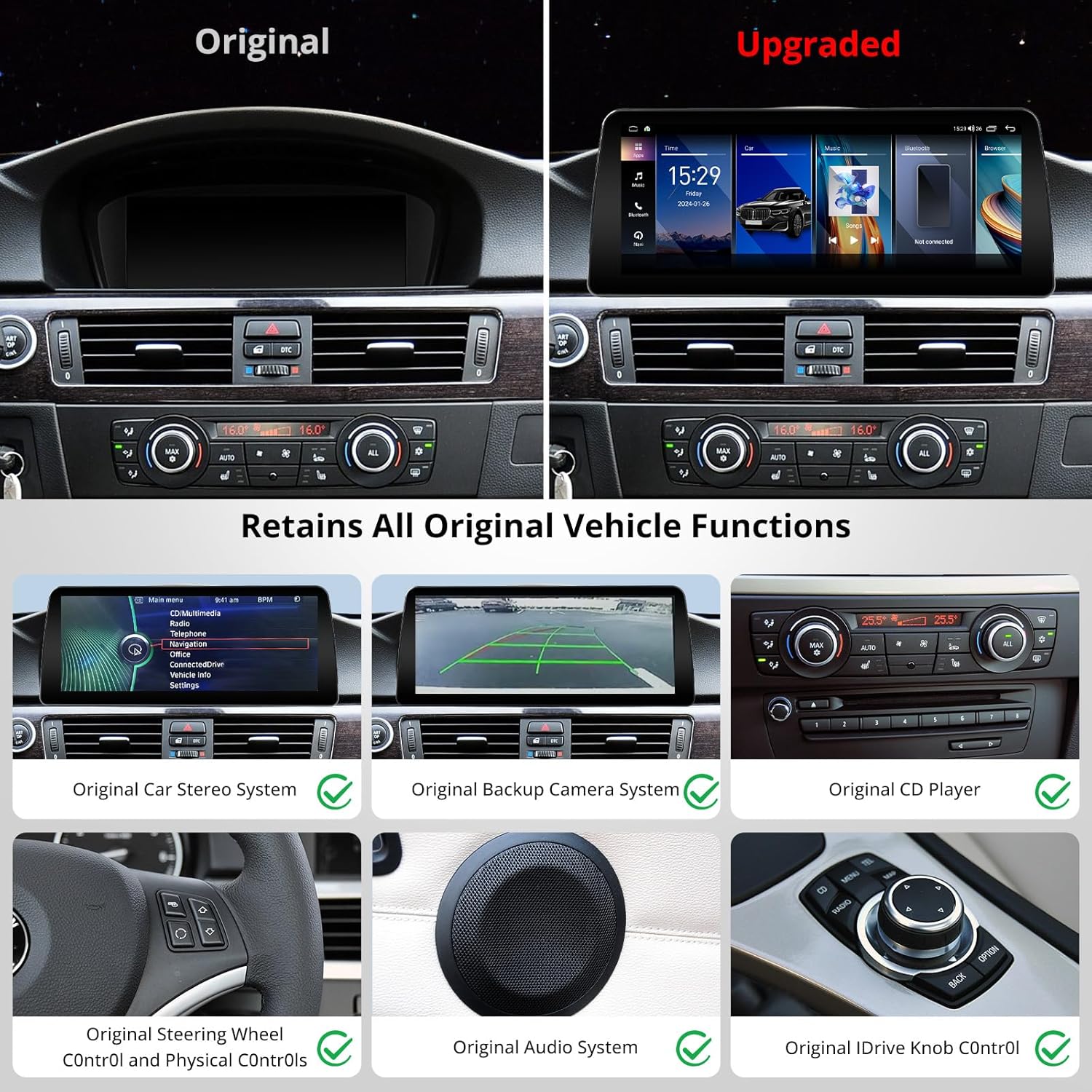
The ATOTO S8 PN unit retains all original vehicle functions after installation.

Easily switch between the Android system and your original iDrive system, and customize themes.

DriveChat AI Co-Pilot provides conversational assistance for various tasks and information.
3. Contingut del paquet
The following items are included in your ATOTO S8 PN package:

Detallada view of the ATOTO S8 PN unit and its included accessories.
- 12.3-inch Display Unit
- BMW Power Cable Harness
- Suport de muntatge
- Suports de bloqueig
- Cargols de muntatge
- CAN Bus Decoder (for CCC/CIC)
- Petit orador
- Antena GPS
- Antena 4G
- USB to 4 Pin Cable
- USB to 6 Pin Cable
- Cable RCA
- PosteriorView Cable de la càmera
- 9.84 FT/3M Lavalier Microphone
- Guia ràpida de recursos en línia
- Product Care Online Support Information
4. Guia d'instal·lació
The installation process involves removing original components, connecting the new wiring harness, and securing the ATOTO S8 PN unit. It is recommended to consult a professional if you are unsure about any steps.
4.1 Esquema de cablejat
Refer to the following diagram for proper wiring connections. Ensure all cables are securely connected to their respective ports.

Comprehensive wiring diagram for the ATOTO S8 PN unit, showing connections for antennas, cameras, and audio outputs.
4.2 Instal·lació pas a pas
Watch the official installation video for a visual guide. The video demonstrates the process of removing original components, connecting the new unit, and reinstalling parts.
Official installation guide video for the ATOTO BMW 3 Series CIC system (2008-2012).
- Treure els components originals: Carefully remove the air conditioning vents, climate control module, original CD player, and original car display using a pry bar and appropriate tools. Disconnect all power connectors and LVDS cables.
- Connecteu el cablejat: Connect the 2P green fiber optic cable from the original ISO wire head to the Android ISO female end. Connect the ISO plug from the original host to the male connector of the Android ISO harness.
- Reinstall Original Host: Reinstall the original host, ensuring it is properly seated, then lock and secure it in place.
- Reconnect Plugs: Reconnect the plugs on the back of the panel and the climate control module, then reinstall them in their original positions.
- Instal·leu la coberta lateral: Install the side cover of the storage box after tucking the excess harness into the gap above the storage box.
- Install ATOTO S8 PN: Align the four clips on the back of the S8 PN with the four clip slots on the mounting bracket and press down gently to secure the unit.
5. Configuració inicial
5.1 Screen Resolution Setup
After installation, set the screen resolution to ensure proper display. Navigate to Vehicle Settings and select the appropriate screen resolution for your iDrive system.
Video guide for setting the screen resolution on the ATOTO car stereo.

Visual steps for configuring screen resolution, sound, and camera settings.
5.2 Sound Setup
To ensure the Android system audio plays through your car's original speakers, adjust the sound settings. Switch to manual mode, enter the original iDrive system, select 'Multimedia' then 'External Devices', and choose 'AUX front'. Ensure the volume is turned up in the AUX Front menu.
5.3 Configuració de la càmera
If your car is equipped with an original backup camera, turn off the 'Local Reverse Switch' to enable the factory camera. If installing an aftermarket backup camera, you may not need to change this setting.
Video demonstrating how to switch reverse video settings for optimal camera display.
6. Instruccions de funcionament
6.1 Canvi entre sistemes
You can switch between the Android system and the original car system by tapping the "Car" icon on the touchscreen or by long-pressing the physical button on your iDrive controller.
Video demonstrating how to switch between the Android system and the original car system.
6.2 Wireless Connectivity (CarPlay & Android Auto)
Connect your smartphone wirelessly to enjoy Apple CarPlay or Android Auto. This allows access to navigation, music, calls, and messages directly from the car stereo display.

Enjoy seamless wireless connectivity with Apple CarPlay and Android Auto.
6.3 DriveChat AI Co-Pilot
Utilize DriveChat, your AI co-pilot powered by ChatGPT, for hands-free assistance. Ask questions, get directions, or control features without taking your hands off the wheel.
6.4 Internet Options & Dual Bluetooth
The unit offers multiple ways to connect to the internet: 4G LTE (with SIM card), Wi-Fi, USB tethering, and Bluetooth. Dual Bluetooth allows for simultaneous connection of your phone for calls/streaming (BT1) and other Bluetooth devices like gamepads or OBD2 scanners (BT2).

Dual Bluetooth enables versatile connectivity for various devices and functions.

Choose from four internet options to stay connected on the go.
Processador de so digital 6.5 (DSP)
Customize your audio experience with the built-in DSP. Utilize DTS functionality and the 32-band equalizer to tailor sound output to your preferences, creating an immersive audio environment.

The Digital Sound Processor allows for precise audio customization.
6.6 GPS Tracking (TrackHU)
The TrackHU app provides real-time GPS tracking with a 5-second refresh rate, 4-satellite positioning, track playback with speed control, detailed reports, and geofence alerts.

TrackHU provides comprehensive GPS tracking and monitoring features.
6.7 Funcionalitat de pantalla dividida
Manage multiple tasks efficiently with the split-screen feature, allowing you to view two applications simultaneously without switching between them.

Utilize split screen to multitask with ease, such as navigation and music playback.
7. Accessoris opcionals
Enhance your driving experience with these optional ATOTO accessories (not included in the standard package):

A range of optional accessories are available to expand the functionality of your ATOTO S8 PN.
- AC-FCR04W Front View Càmera: Provides HD front view imaging to help spot obstacles and navigate tight spaces.
- AC-RCR04W Rear View Càmera: Assists with reversing and parking by providing a clear rear view.
- AC-AHV68 USB to HDMI Video Out Adaptor: Connects to external displays for an immersive viewexperiència.
- AC-HBV86 HDMI-to-USB Adapter: Connects various HDMI devices like TV boxes, Chromecast, or gaming consoles.
- AC-UTP1 USB TPMS: Tire Pressure Monitoring System.
- AC-44P2 1080P USB DVR On-Dash Camera: For recording driving footage.
- AC-44F5 Watchband Style Wireless Remote Control: Per a un control convenient.
- CA-AEC03 Class D Compact Digital Car Ampmés viu: For enhanced audio output.
8. Product Care & Support
ATOTO is committed to providing excellent product support and care.

Details on product care, online resources, and firmware updates.
8.1 Garantia
Your ATOTO S8 PN unit includes a 12-month warranty from the date of purchase. You can extend this to 18 months by following the instructions in the online resource quick guide.
8.2 Online Resources & Firmware
Access the online resource quick guide and product guide in multiple languages by scanning the QR code on the box or visiting the ATOTO website. ATOTO regularly updates system firmware; users can obtain the latest firmware for a smooth user experience.
8.3 Atenció al client
Our customer care team is available around the clock on workdays. Contact information can be found in the package details or through your order center.
9. Especificacions
| Característica | Detall |
|---|---|
| Número de model | S8 PN |
| Mida de la pantalla | 12.3 polzades |
| Resolució de pantalla | 1920x720p |
| Sistema operatiu | Android |
| Processador | 12nm SoC, ARM Cortex Octa-Core |
| Capacitat d'emmagatzematge de memòria | 64 GB |
| Tecnologia de connectivitat | Wireless, Bluetooth, Auxiliary, 4G LTE, Wi-Fi |
| Característiques especials | Android Auto, Apple CarPlay, Screen Mirroring, Built-In Bluetooth, Built-In Wi-Fi, GPS Navigation, Hands-Free Calling, Digital Display Screen, Touchscreen, DSP, Multi Color Illumination, Keep Original System, AI DriveChat, Dual Bluetooth, Voice Control, Volume Control |
| Pes de l'article | 5.6 lliures |
| Dimensions del paquet | 14.7 x 9.4 x 6.8 polzades |


