1. Introducció
This manual provides essential information for the installation, operation, and maintenance of your ZOTAC GAMING GeForce RTX 4070 Ti SUPER SOLID OC 16GB graphics card. Please read this manual thoroughly before installation to ensure proper functionality and to prevent damage.

Image 1.1: ZOTAC GAMING GeForce RTX 4070 Ti SUPER SOLID OC 16GB Graphics Card and its retail packaging.
2. Contingut del paquet
Verifiqueu que tots els elements siguin presents al paquet:
- ZOTAC GAMING GeForce RTX 4070 Ti SUPER SOLID OC 16GB Graphics Card
- Suport de GPU
- Guia de l'usuari (aquest document)
- Power Adapter Cable (if applicable, check your specific model)
3. Requisits del sistema
- Placa base compatible amb PCI Express amb una ranura gràfica x16 de doble amplada
- Minimum 750W power supply with three available 8-pin PCIe power connectors (or equivalent 12VHPWR connector)
- Minimum 16GB system memory
- Microsoft Windows 10/11 64-bit or Linux 64-bit operating system
- Internet connection for driver installation
4. Guia d'instal·lació
4.1. Preparació
- Apagueu l'ordinador i desconnecteu el cable d'alimentació.
- Obriu la caixa de l'ordinador.
- Connecteu-vos a terra per descarregar qualsevol electricitat estàtica.
4.2. Installing the Graphics Card
- Localitza una ranura PCI Express x16 disponible a la placa base.
- Traieu les cobertes de les ranures d'expansió necessàries de la caixa de l'ordinador.
- Carefully insert the graphics card into the PCIe x16 slot until it is fully seated. Ensure the retention clip locks into place.
- Fixeu la targeta gràfica a la carcassa amb cargols.
- Connect the required power cables from your power supply to the graphics card. This model typically requires three 8-pin PCIe power connectors or a single 12VHPWR connector. Ensure all connections are secure.
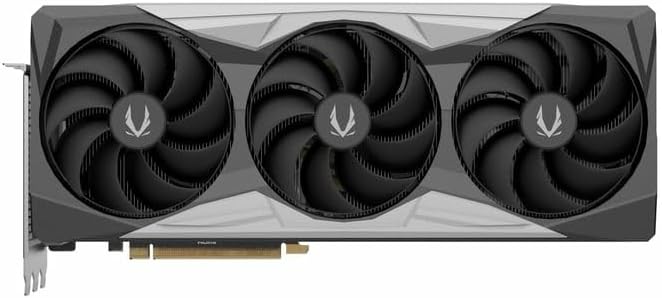
Imatge 4.1: Frontal view of the graphics card, showing the triple fan design.
4.3. Installing the GPU Support Stand
The included GPU support stand helps prevent sag and provides additional stability for the graphics card. Follow the instructions provided with the stand for proper installation within your PC case.
4.4. Closing the Case and Connecting Peripherals
- Tanqueu la funda de l'ordinador.
- Connect your monitor(s) to the display outputs on the graphics card (DisplayPort or HDMI).
- Reconnect the power cable and other peripherals to your computer.

Imatge 4.2: posterior view of the graphics card, showing three DisplayPort outputs and one HDMI output.
5. Instruccions de funcionament
5.1. Instal·lació del controlador
- Enceneu l'ordinador.
- Once the operating system loads, download the latest graphics drivers from the official NVIDIA weblloc (www.nvidia.com/drivers) or the ZOTAC weblloc (www.zotac.com/support).
- Seguiu les instruccions que apareixen a la pantalla per completar la instal·lació del controlador. Pot ser necessari reiniciar el sistema.
5.2. Utilitats de programari
ZOTAC provides utilities such as FireStorm for monitoring and adjusting graphics card settings, including fan speed control (Active Fan Control, FREEZE Fan Stop) and performance profiles. These can be downloaded from the ZOTAC weblloc.
6. Manteniment
- Eliminació de pols: Periodically clean dust from the graphics card fans and heatsink using compressed air. Ensure the computer is powered off and unplugged before cleaning.
- Actualitzacions de controladors: Keep your graphics drivers updated to ensure optimal performance and compatibility.
- Monitorització de la temperatura: Use monitoring software to keep track of the graphics card's temperature during operation. Excessive temperatures can indicate poor airflow or dust buildup.

Imatge 6.1: Anglesa view of the graphics card, highlighting its robust cooling solution.
7. Solució De Problemes
- Sense sortida de pantalla:
- Assegureu-vos que el cable del monitor estigui connectat correctament a la targeta gràfica i al monitor.
- Verifiqueu que la targeta gràfica estigui completament col·locada a la ranura PCIe.
- Check that all power cables are properly connected to the graphics card.
- Prova amb un altre monitor o cable si és possible.
- Inestabilitat o errors del sistema:
- Ensure graphics drivers are correctly installed and up to date.
- Check for adequate power supply capacity.
- Controleu les temperatures per evitar el sobreescalfament.
- Verify system memory (RAM) stability.
- Fan Noise or Malfunction:
- Netegeu la pols dels ventiladors i del dissipador de calor.
- Assegureu-vos que no hi hagi cables que obstrueixin la rotació del ventilador.
- Use ZOTAC FireStorm utility to check fan speed settings.
8. Especificacions
| Característica | Detall |
|---|---|
| Número de model | ZT-D40730R-10P |
| Processador gràfic | NVIDIA GeForce RTX 4070 Ti SUPER |
| Memòria de vídeo | 16 GB GDDR6X |
| Interfície de memòria | 256 bits |
| Rellotge de memòria | 21000 MHz (Effective) |
| Rellotge del motor | Augment: 2640 MHz |
| Sortides de visualització | 3 x DisplayPort 1.4a, 1 x HDMI 2.1a |
| Suport HDCP | Sí |
| Resolució digital màxima | Up to 4K (7680x4320 @60Hz) |
| PCI Express | PCI Express 4.0 x16 |
| Font d'alimentació recomanada | 750W |
| Connectors d'alimentació | 1 x 12VHPWR (or 3 x 8-pin PCIe via adapter) |
| Dimensions (LxWxH) | 16.73 x 11.54 x 3.94 polzades (aprox.) |
| Pes | 2.2 lliures (aprox.) |
| Sistema de refrigeració | IceStorm 2.0 Advanced Cooling, Triple 100mm Fans, FREEZE Fan Stop, Active Fan Control |
| Característiques | NVIDIA DLSS 3.5, Ray Tracing, Metal Backplate, GPU Support Stand |
9. Garantia i Suport
For detailed warranty information, please refer to the warranty card included with your product or visit the official ZOTAC website's support section. ZOTAC provides technical support and resources for their products.
- Suport de ZOTAC Weblloc: www.zotac.com/support
- Registre de productes: Register your product on the ZOTAC website to activate your warranty and receive product updates.


