1. Introducció
The 1Mii SafeFly Min+ is a versatile 2-in-1 Bluetooth audio adapter designed to enhance your audio experience. It functions as both a Bluetooth transmitter (TX) and a Bluetooth receiver (RX), allowing you to wirelessly stream audio from non-Bluetooth devices to Bluetooth headphones/speakers, or to connect your Bluetooth-enabled phone/tablet to wired audio systems.
This manual provides detailed instructions for setting up, operating, and maintaining your SafeFly Min+ device. Please read it carefully before use.

Image: The 1Mii SafeFly Min+ device.
2. Contingut del paquet
Verifiqueu que tots els elements siguin presents al vostre paquet:
- 1Mii SafeFly Min+ Bluetooth Transmitter Receiver
- 3.5mm to 3.5mm Female Adapter
- Dual Prong Airplane Adapter
- Cable de càrrega USB
- Manual d'usuari

Imatge: Tots els articles inclosos al paquet del producte.
3. Producte acabatview
Familiaritzeu-vos amb els components i els controls del dispositiu:

Image: Labeled diagram of the SafeFly Min+ device and its accessories.
- Connexió d'àudio de 3.5 mm: Integrated audio jack for connecting to source/destination devices.
- Pantalla OLED: Displays connection status, volume, and mode.
- Volume Down (<): Disminueix el volum.
- Multi-function Button (OK/Power/Play/Pause/Pairing): Powers on/off, plays/pauses audio, and initiates pairing.
- Volume Up (>): Augmenta el volum.
- TX/RX Switching: Slide switch to select Transmitter or Receiver mode.
- Botó de restabliment: Independent button to resolve connection issues.
- Type C Charging Port: Per carregar la bateria interna.
4. Primers passos
4.1. Càrrega del dispositiu
Before first use, fully charge the SafeFly Min+ using the provided USB charging cable. Connect the USB-C end to the device's charging port and the USB-A end to a standard USB power adapter (not included) or a computer's USB port.
- Una càrrega completa triga aproximadament 2 hores.
- The device offers up to 25 hours of playtime on a single charge.
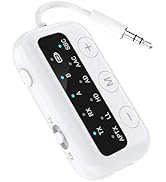
Image: Charging the SafeFly Min+ device.
4.2. Encendre/apagar
- Encès: Press and hold the Multi-function (OK) button for 3 seconds. The OLED screen will light up.
- Apagar: Press and hold the Multi-function (OK) button for 3 seconds. The OLED screen will turn off.
4.3. Switching Modes (Transmitter TX / Receiver RX)
The SafeFly Min+ features a slide switch on the side to toggle between Transmitter (TX) and Receiver (RX) modes. Ensure the device is in the correct mode for your intended use.

Image: Visual representation of TX and RX modes.
5. Transmitter (TX) Mode Operation
In TX mode, the SafeFly Min+ transmits audio from a non-Bluetooth source to your Bluetooth headphones or speakers.
5.1. Connecting to an Audio Source
- Feu lliscar l'interruptor cap a TX posició.
- Connect the 3.5mm audio jack of the SafeFly Min+ to the audio output port of your device (e.g., airplane entertainment system, TV, gym equipment).
- For airplane use, if the audio jack is a dual-prong type, use the included Dual Prong Airplane Adapter.

Image: SafeFly Min+ in use on an airplane.

Image: SafeFly Min+ connected to a TV for wireless audio.
5.2. Pairing with Bluetooth Headphones/Speakers
- Ensure the SafeFly Min+ is in TX mode and powered on. The OLED screen will display "Searching...".
- Put your Bluetooth headphones or speaker into pairing mode. Refer to your audio device's manual for specific instructions.
- The SafeFly Min+ will automatically search for and connect to nearby Bluetooth devices. The OLED screen will show the connected device's name (e.g., "BT Headphone 1").
- If multiple devices are found, use the < and > buttons to navigate and the OK button to select your desired device.
5.3. Dual Link Functionality
The SafeFly Min+ supports connecting to two Bluetooth headphones/speakers simultaneously.
- After successfully pairing the first device (e.g., "BT Headphone 1"), put your second Bluetooth device into pairing mode.
- Press the Multi-function (OK) button twice quickly on the SafeFly Min+ to initiate pairing for the second device. The OLED screen will show "Searching B...".
- Once connected, the OLED screen will display both connected devices (e.g., "BT Headphone 1" and "BT Headphone 2").
6. Receiver (RX) Mode Operation
In RX mode, the SafeFly Min+ receives audio from your Bluetooth-enabled phone/tablet and outputs it to a wired audio system.
6.1. Connecting to a Wired Audio System
- Feu lliscar l'interruptor cap a RX posició.
- Connect the 3.5mm audio jack of the SafeFly Min+ to the AUX input port of your wired audio system (e.g., car stereo, home stereo, wired headphones/speakers).
- If your wired system has a female 3.5mm input, use the included 3.5mm to 3.5mm Female Adapter.

Image: SafeFly Min+ in use with a wired speaker and car stereo.
Video: Demonstrates the 1Mii SafeFly Min+ in Receiver Mode, connecting a phone to a car stereo via the AUX input.
6.2. Pairing with a Bluetooth Device (Phone/Tablet)
- Ensure the SafeFly Min+ is in RX mode and powered on. The OLED screen will display "Searching...".
- On your phone or tablet, enable Bluetooth and search for new devices.
- Select "1Mii SafeFly Min+" from the list of available devices to pair.
- Once connected, the OLED screen will display the name of your paired device (e.g., "A: Phone").
7. Volume Control and Reset Function
7.1. Ajust de volum
- Utilitza el < botó per baixar el volum.
- Utilitza el > botó per augmentar el volum.
- The OLED screen will display the current volume level.
7.2. Funció de restabliment
If you encounter connection issues or unexpected behavior, use the independent "RESET" button. Pressing this button will clear all previous pairing records and restart the device, often resolving compatibility or reconnection problems.
8. Especificacions
| Característica | Descripció |
|---|---|
| Model | SafeFly Min+ |
| Versió Bluetooth | 5.3 |
| Còdecs d'àudio | aptX Low Latency, aptX HD, aptX Adaptive (device must also support) |
| Modes de funcionament | Transmissor (TX), Receptor (RX) |
| Dual Link Support | Connects up to two Bluetooth headphones/speakers in TX mode |
| Interfície d'àudio | Conector d'àudio AUX de 3.5 mm |
| Mostra | Pantalla OLED |
| Durada de la bateria | Fins a 25 hores de joc |
| Temps de càrrega | Aprox. 2 hores |
| Port de càrrega | USB tipus C |
| Dimensions (LxWxH) | 1.38 x 0.59 x 1.97 polzades |
| Pes | 0.705 unces (20 g) |

Image: Dimensions and weight of the SafeFly Min+.
9. Informació de seguretat
To ensure safe operation and prolong the life of your device, please observe the following:
- Use only authorized chargers and batteries.
- Manteniu el dispositiu allunyat de l'aigua, la humitat i les temperatures extremes.
- Do not open, disassemble, or attempt to repair the device yourself. This may void the warranty and pose safety risks.
- Eviteu deixar caure o sotmetre el dispositiu a forts impactes.
10. Solució De Problemes
If you encounter issues with your SafeFly Min+, try the following solutions:
- El dispositiu no s'encén: Ensure the device is fully charged. Connect it to a power source using the USB charging cable.
- No es pot emparellar amb un dispositiu Bluetooth:
- Ensure the SafeFly Min+ is in the correct mode (TX for transmitting, RX for receiving).
- Make sure your target Bluetooth device (headphones/speaker/phone) is in pairing mode.
- Bring the devices closer together.
- Press the "RESET" button on the SafeFly Min+ to clear previous connections and try pairing again.
- Restart both the SafeFly Min+ and your Bluetooth device.
- Sense àudio o mala qualitat d'àudio:
- Check that the 3.5mm audio cable is securely connected to both the SafeFly Min+ and the audio source/system.
- Adjust the volume on both the SafeFly Min+ and the connected audio device/source.
- Ensure there are no obstructions between the SafeFly Min+ and your Bluetooth headphones/speakers.
- Verify that your Bluetooth headphones/speakers support the aptX codecs if you expect high-quality audio.
- Battery level display inaccuracy: The battery icon may not always reflect precise percentages. It is recommended to charge the device when the indicator shows a low level to avoid unexpected power off.
11. Atenció al client
For further assistance, technical support, or warranty inquiries, please visit the official 1Mii website or contact their customer service directly. Contact information can typically be found on the 1Mii product packaging or their official weblloc.


