Introducció
This manual provides detailed instructions for the setup, operation, and maintenance of your Canyon MW-04 Wireless Mouse. Please read this manual thoroughly before using the device to ensure optimal performance and longevity.
Contingut del paquet
Verifiqueu que tots els elements siguin presents al paquet:
- Canyon MW-04 Wireless Mouse
- Bateria alcalina AA
- Manual d'usuari (aquest document)

Image: Retail packaging for the Canyon MW-04 Wireless Mouse, showing the mouse and branding.
Producte acabatview
Familiarize yourself with the components of your Canyon MW-04 Wireless Mouse.
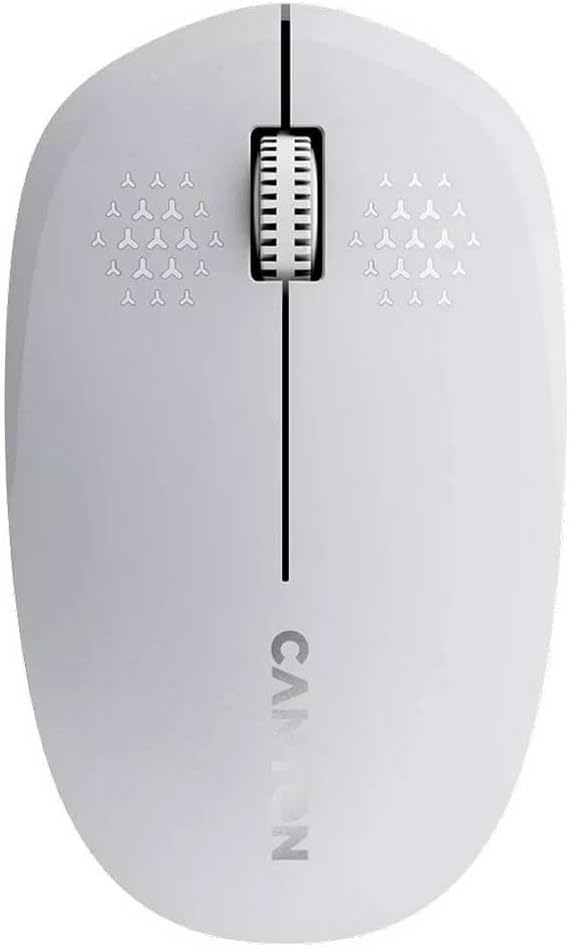
Imatge: Superior view of the Canyon MW-04 Wireless Mouse, highlighting the left button, right button, and scroll wheel.
- Botó esquerre de clic: Selecció i activació primàries.
- Botó dret: Accedeix als menús contextuals.
- Scroll Wheel / Middle Click Button: Documents en rotllana i web pages vertically; can also be pressed for middle-click functionality.
- Sensor òptic: Located on the underside for tracking movement.
- Compartiment de la bateria: Located on the underside for battery installation.
- Interruptor d'alimentació: Located on the underside to turn the mouse on/off.
Configuració
1. Instal·lació de la bateria
- Localitzeu el compartiment de la bateria a la part inferior del ratolí.
- Obriu la tapa del compartiment de la bateria.
- Inseriu una pila alcalina AA, assegurant-vos de la polaritat correcta (+/-).
- Tanqueu bé la tapa del compartiment de la bateria.

Imatge: Part inferior view of the Canyon MW-04 Wireless Mouse, showing the battery compartment and optical sensor.
2. Connexió mitjançant Bluetooth
- Enceneu el ratolí amb l'interruptor d'encesa situat a la part inferior.
- A l'ordinador o dispositiu, navega fins a la configuració de Bluetooth.
- Activa el Bluetooth i cerca dispositius nous.
- Select "Canyon MW-04" from the list of available devices to pair.
- Once paired, the mouse is ready for use.
The Canyon MW-04 uses Bluetooth 5.0 for connection, offering stable and efficient wireless communication.
Funcionament del ratolí
Funcions bàsiques
- Clic esquerre: S'utilitza per seleccionar elements, obrir files, i activant funcions.
- Clic dret: Displays context-sensitive menus for various options.
- Roda de desplaçament: Gireu per desplaçar-vos verticalment pels documents i web pages. Pressing the scroll wheel often acts as a middle-click, which can have various functions depending on the application.
DPI (punts per polzada)
The Canyon MW-04 features a 1200 DPI optical sensor, providing precise and responsive cursor control. This DPI setting is fixed and optimized for general productivity and navigation.
Disseny ambidiestro
The ergonomic design of the Canyon MW-04 mouse ensures comfortable use for both left-handed and right-handed users.

Imatge: Anglesa view of the Canyon MW-04 Wireless Mouse, showcasing its symmetrical design suitable for both left and right hands.
Manteniment
Neteja
- Disconnect the mouse from your device and turn it off.
- Feu servir un drap suau i sec per netejar la superfície del ratolí.
- Per a la brutícia tossuda, lleugerament dampRenta el drap amb aigua. Evita productes químics agressius o materials abrasius.
- Clean the optical sensor area gently with a cotton swab if tracking issues occur.
Canvi de bateria
When the mouse performance degrades or it stops responding, it may be time to replace the battery. Follow the "Battery Installation" steps in the Setup section.
Resolució de problemes
El ratolí no respon
- Ensure the mouse is turned on using the power switch.
- Check the battery. Replace it with a fresh AA alkaline battery if necessary.
- Verify the Bluetooth connection on your computer or device. Try re-pairing the mouse if it's disconnected.
- Acosta el ratolí al dispositiu per descartar problemes d'abast.
- Try connecting the mouse to a different device to determine if the issue is with the mouse or the original device.
Moviment erràtic del cursor
- Clean the optical sensor on the underside of the mouse with a soft, dry cloth or cotton swab.
- Ensure you are using the mouse on a suitable surface. Avoid highly reflective, transparent, or uneven surfaces. A mouse pad is recommended for optimal performance.
Especificacions
| Característica | Detall |
|---|---|
| Model | MW-04 |
| Connectivitat | Bluetooth 5.0 |
| Tipus de sensor | Òptic |
| DPI | 1200 |
| Botons | 3 (Left, Right, Scroll Wheel/Middle) |
| Tipus de bateria | 1 x AA alcalí |
| Durabilitat | 3 milions de clics |
| Disseny | Ambidextrous, Lightweight, Compact |
| Sistema operatiu compatible | Windows, macOS, Linux |
Garantia i Suport
The Canyon MW-04 Wireless Mouse comes with a standard manufacturer's warranty. For detailed warranty information, please refer to the warranty card included with your product or visit the official Canyon weblloc.
For technical support, troubleshooting assistance, or to inquire about spare parts, please contact Canyon customer service through their official weblloc o centres de servei autoritzats.
Oficial Weblloc: https://canyon.eu


