Introducció
This manual provides comprehensive instructions for the installation, operation, and maintenance of your URANT 82Ft (25m) Quick-Connect Drip Irrigation System Kit. This system is designed to provide efficient and automatic watering for various applications, including lawns, gardens, greenhouses, and raised beds. Please read this manual thoroughly before installation and use to ensure proper function and longevity of your irrigation system.
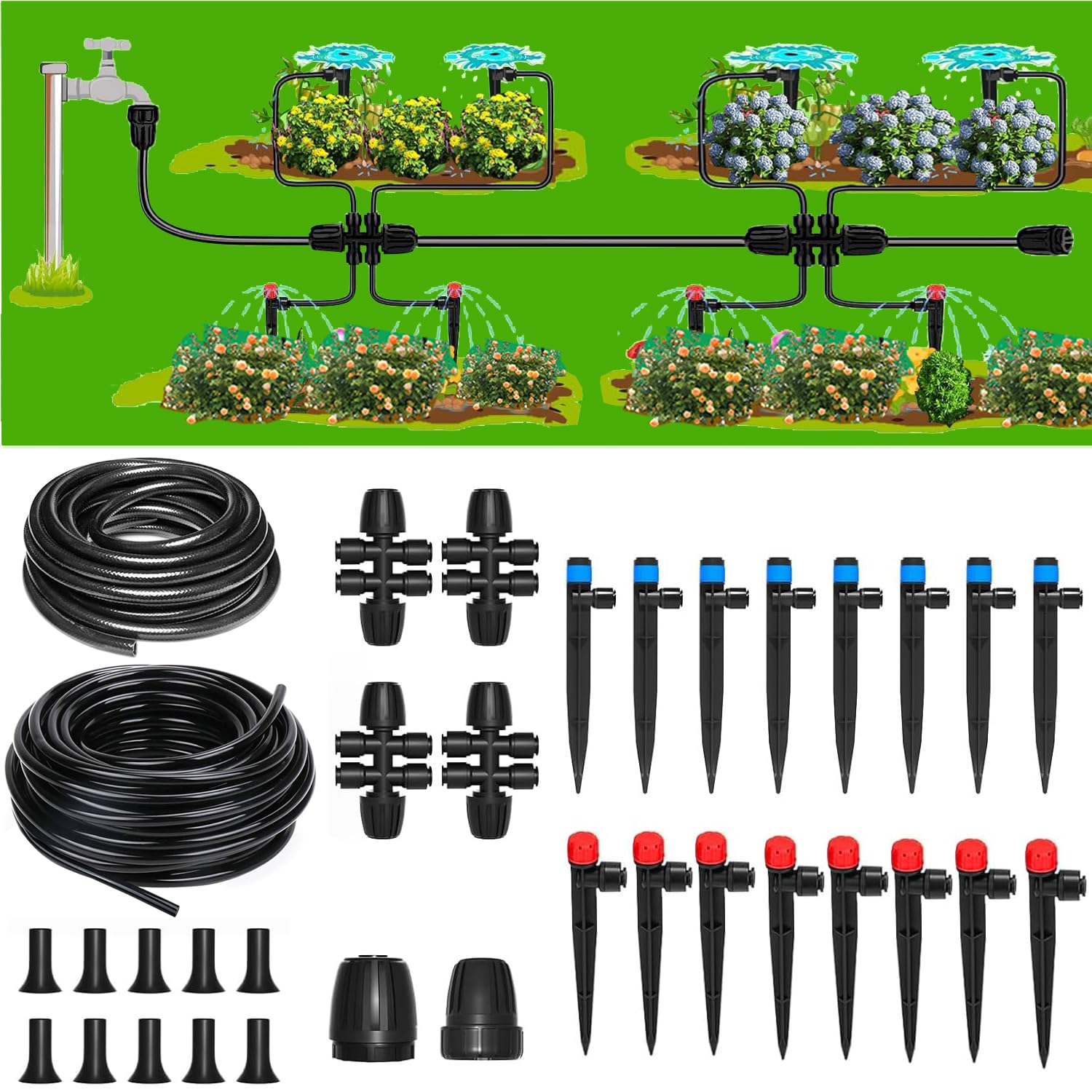
Imatge: Més deview of the URANT Drip Irrigation System showing main lines, distribution lines, and emitters watering various plants.
Informació de seguretat
Per garantir un funcionament segur i evitar danys, observeu les següents pautes de seguretat:
- Connect the kit to a suitable water source.
- Always check for leaks after installation and before leaving the system unattended to prevent water damage.
- Secure the system components properly to avoid accidental disconnections or movement.
- Set the appropriate water pressure to avoid damage to components. Excessive pressure can cause leaks or burst tubing.
- Handle all parts, especially plastic components, with care to prevent damage or injury during assembly and adjustment.
Contingut del paquet
Your URANT Drip Irrigation System Kit includes the following components:

Imatge: Una imatge detallada view of all components included in the URANT Drip Irrigation System Kit, laid out for identification.
- 1 x 65 foot (19.8m) 1/4 inch Irrigation Pipe (Distribution Line)
- 1 x 16 foot (4.9m) 1/2 inch Irrigation Pipe (Main Line, inner diameter 13mm, outer diameter 16mm)
- 4 x Barb Tee Connectors (1/2 inch to 1/4 inch)
- 8 x Stream Emitters
- 8 x Vortex Emitters
- 1 x 4/6 Faucet Connector
- 1 x Mainline End Plug (1/2 inch)
- 10 x 1/4 inch End Plugs
- 1 x 1/2 inch Tubing Connector
Instruccions de configuració
Follow these steps to set up your drip irrigation system:
- Planifica el teu disseny: Determine the optimal placement for your main line and distribution lines to reach all plants. Consider the water requirements of different plants.
- Connecteu-vos a la font d'aigua: Attach the 4/6 faucet connector to your outdoor faucet. Connect the 1/2 inch main line to the faucet connector.
- Lay the Main Line: Run the 1/2 inch main line through your garden area, ensuring it passes near the plants you intend to water. The upgraded tubing design supports higher water pressure.
- Install Barb Tee Connectors: At points where you need to branch off to water specific areas or plants, insert the 1/2 inch to 1/4 inch barb tee connectors into the 1/2 inch main line. These connectors feature a new fast connection design, allowing for easy, plug-and-play installation without the need for heat or softening.
- Attach Distribution Lines: Connect the 1/4 inch distribution pipe to the smaller outlets of the barb tee connectors. Run these lines to individual plants or groups of plants.
- Insert Emitters: At the end of each 1/4 inch distribution line, or at specific points along the line, insert the desired emitters (stream or vortex). The new drip emitters are designed for easy, one-step installation.
- Secure and Cap Ends: Use the 1/2 inch end plug to cap the end of the main line. Use the 1/4 inch end plugs to cap the ends of any unused 1/4 inch distribution lines. Secure tubing with stakes if necessary (stakes not included).
- Prova el sistema: Turn on the water supply slowly and check for any leaks. Adjust connections as needed. Observe the water flow from each emitter.

Imatge: Primer pla view of the quick-connect barb tee connector and emitter, highlighting the built-in steel claw fixture for anti-fall and anti-leakage.

Image: Comparison showing the ease of use of the new drip emitter (1 step, 1 second) versus older emitters requiring hot water softening, squeezing, and screwing.
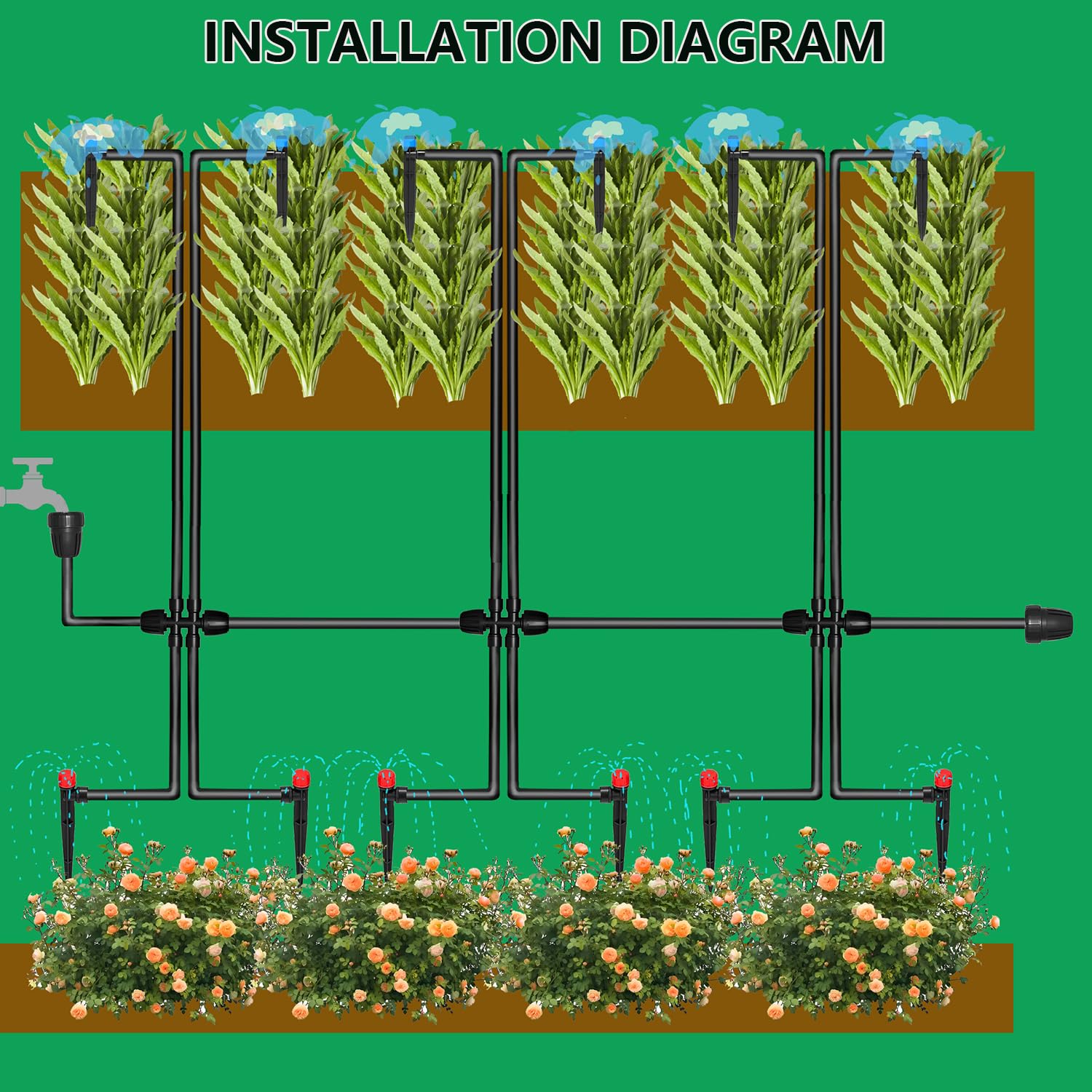
Image: Diagram illustrating a typical installation layout for the drip irrigation system, showing main lines, branch lines, and emitters watering plants.
Instruccions de funcionament
Once installed, operating your URANT Drip Irrigation System is straightforward:
- Subministrament d'aigua: Turn on your water faucet to activate the system. The system will begin delivering water directly to your plants.
- Adjusting Emitters: Both stream and vortex emitters are adjustable. Rotate the cap of the emitter to increase or decrease the water flow, allowing you to customize the watering for individual plants or areas.
- Durada del reg: Monitor your plants and soil moisture to determine the appropriate watering duration. You may use a timer (not included) for automatic scheduling.
- Expansió del sistema: The system can be expanded by purchasing additional URANT drip irrigation components if your gardening needs grow.
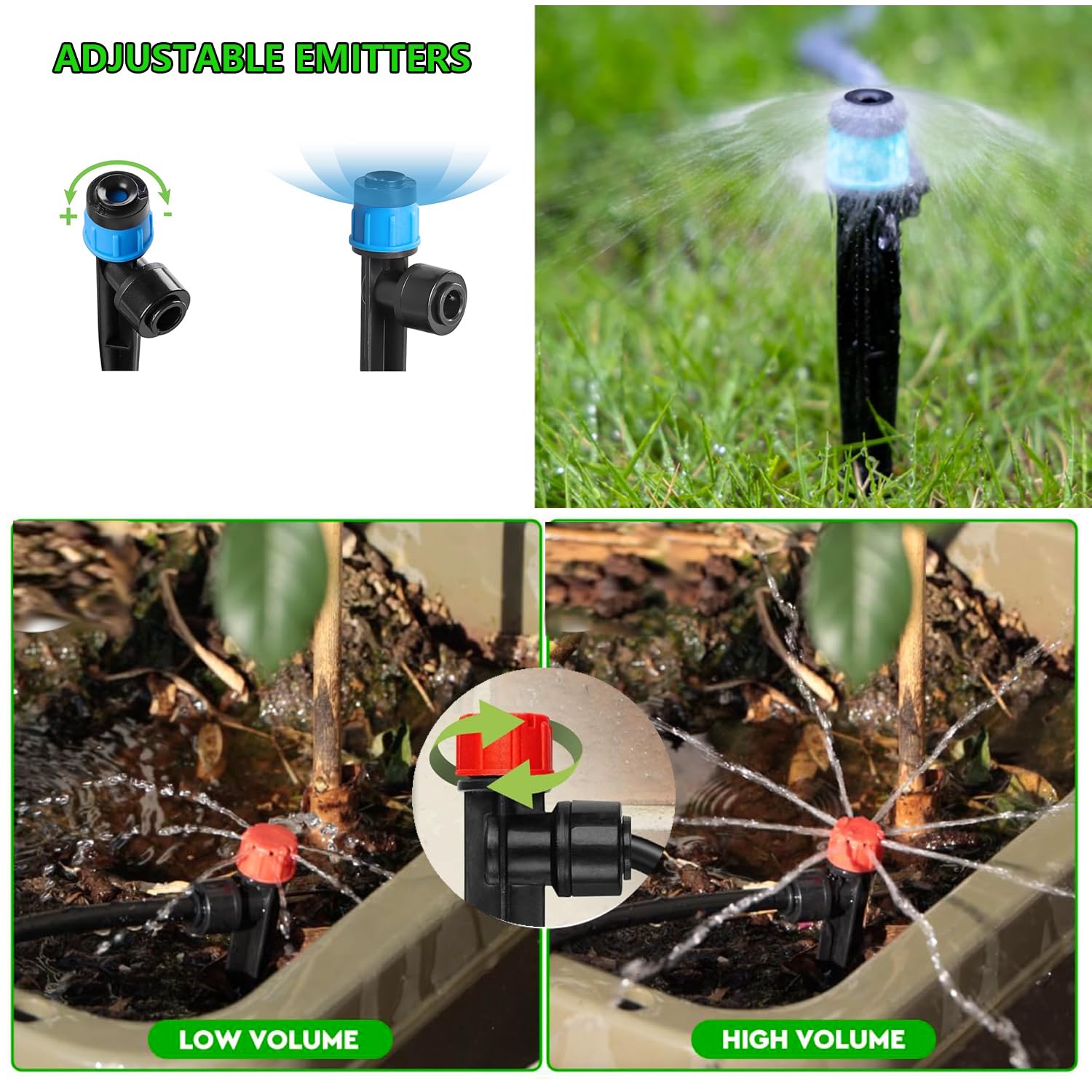
Image: Visual demonstration of how to adjust the water flow on both vortex (blue) and stream (red) emitters, showing low and high volume settings.
Manteniment
Regular maintenance helps ensure the efficiency and longevity of your drip irrigation system:
- Inspeccionar si hi ha fuites: Periodically check all connections and tubing for leaks. Tighten or replace components as necessary.
- Emissors nets: Emitters can become clogged with sediment or mineral deposits over time. If you notice reduced flow, carefully remove and clean the emitters.
- Flush Lines: Occasionally, remove the end plugs and flush the main and distribution lines to clear out any accumulated debris.
- Hivernació (per a climes freds): Before the first frost, disconnect the system from the water source, drain all water from the tubing and emitters, and store components in a dry, protected area to prevent freezing damage.
- Protegir de les plagues: Ensure tubing is not chewed by rodents or other pests. Consider burying lines slightly or using protective covers in vulnerable areas.
Resolució de problemes
If you encounter issues with your drip irrigation system, refer to the following common problems and solutions:
- No Water Flow or Low Pressure:
- Ensure the water source is fully open.
- Check for kinks or blockages in the main line or distribution lines.
- Verify that all connections are secure and not leaking.
- Clean any clogged emitters.
- Ensure the system is not over-extended beyond its capacity, leading to insufficient water flow at the ends.
- Fuites a les connexions:
- Estrènyer les connexions.
- Ensure tubing is cut cleanly and inserted fully into connectors.
- Inspect O-rings or seals within connectors for damage and replace if necessary.
- Reg desigual:
- Adjust individual emitters to balance water output.
- Check for partially clogged emitters.
- Ensure the main line has adequate pressure distribution.
- Emitters Not Functioning Properly:
- Some users have reported issues with emitter functionality. If an emitter is not working, try cleaning it thoroughly. If it remains non-functional, it may need replacement.
Especificacions
| Número de model | SGPJ-12 |
| Marca | URANT |
| Main Line Length | 16 peus (4.9 m) |
| Distribution Line Length | 65 peus (19.8 m) |
| Main Line Diameter | 1/2 inch (inner 13mm, outer 16mm) |
| Distribution Line Diameter | 1/4 polzada |
| Material | Plàstic |
| Pes de l'article | 3 lliures (1.36 kg) |
| Dimensions del paquet | 9.3 x 8.35 x 5.13 polzades (23.6 x 21.2 x 13 cm) |
Garantia i Suport
Specific warranty details for the URANT 82Ft (25m) Quick-Connect Drip Irrigation System Kit are not provided in the product information. For warranty inquiries, technical support, or replacement parts, please contact the seller or manufacturer directly through your purchase platform. Retain your proof of purchase for any warranty claims.


