1. Introducció
Gràcies per la compraasing the LIECTROUX M7S Pro Robot Vacuum Cleaner. This manual provides essential information for the safe operation, maintenance, and troubleshooting of your device. Please read this manual thoroughly before using the product and retain it for future reference.
Instruccions de seguretat
- Assegureu-vos que el robot estigui completament carregat abans del primer ús.
- No feu funcionar el robot en ambients humits ni a prop de líquids.
- Mantingueu els cables solts, les cortines i els objectes petits fora del camí del robot per evitar que s'hi enredin.
- Superviseu els nens i les mascotes mentre el robot està en funcionament.
- No feu servir el robot per recollir deixalles grans, objectes punxeguts o materials en flames.
- Feu servir només la base de càrrega i l'adaptador d'alimentació originals que s'inclouen amb el robot.
- Turn off the robot and unplug it from the charging dock before performing any maintenance.
2. Contingut del paquet
Verifiqueu que tots els elements siguin presents al paquet:
- LIECTROUX M7S Pro Robot Vacuum Cleaner
- Base de càrrega
- Adaptador d'alimentació
- Raspalls laterals (conjunt)
- Filtre HEPA (preinstal·lat o de recanvi)
- Eina de neteja
- Control remot
- Manual d'usuari
3. Producte acabatview
Familiarize yourself with the components of your LIECTROUX M7S Pro robot vacuum cleaner.

Figura 3.1: The LIECTROUX M7S Pro robot vacuum cleaner, showcasing its sleek black design, along with its remote control and a smartphone displaying the cleaning map via the app.
Components principals:
- Tauler superior: Power button, Wi-Fi indicator, charging indicator.
- Para-xocs davanter: Obstacle detection sensors.
- Raspalls laterals: Collect dust and debris from edges and corners.
- Rodes motrius: Allow movement across various floor types.
- Polvorí: Collects dry debris.
- Dipòsit d'aigua (per fregar): Holds water for wet cleaning.
- Contactes de càrrega: Es connecta amb la base de càrrega.
- Sensors de penya-segats: Detects drops and prevents falls.
4. Configuració
4.1 Col·locació de la base de càrrega
Col·loca la base de càrrega contra una paret en una zona oberta, assegurant-te que no hi hagi obstacles a menys d'1 metre (3 peus) als costats i a 2 metres (6 peus) davant de la base. Connecta l'adaptador de corrent a la base de càrrega i endolla'l a una presa de corrent.
4.2 Càrrega inicial
Place the robot onto the charging dock, ensuring the charging contacts align. The robot will begin charging automatically. For first use, allow the robot to charge completely (approximately 4-5 hours) before operation.

Figura 4.1: The robot vacuum cleaner automatically returning to its charging dock when its battery is low, ensuring it is always ready for the next cleaning cycle.
4.3 App Connection (TUYA App)
- Download the "TUYA Smart" app from your smartphone's app store (iOS or Android).
- Register or log in to your TUYA account.
- Ensure your robot is charged and powered on.
- Follow the in-app instructions to add your LIECTROUX M7S Pro robot vacuum cleaner. This typically involves pressing and holding a button on the robot to enter pairing mode and connecting to your home Wi-Fi network.
- Un cop connectat, podeu controlar el robot, view netejar mapes i configurar horaris a través de l'aplicació.
4.4 Integració de l'assistent de veu
The LIECTROUX M7S Pro supports voice control via Amazon Alexa and Google Home. Refer to the respective app (Alexa app or Google Home app) for instructions on how to link your TUYA Smart account and control your robot with voice commands.
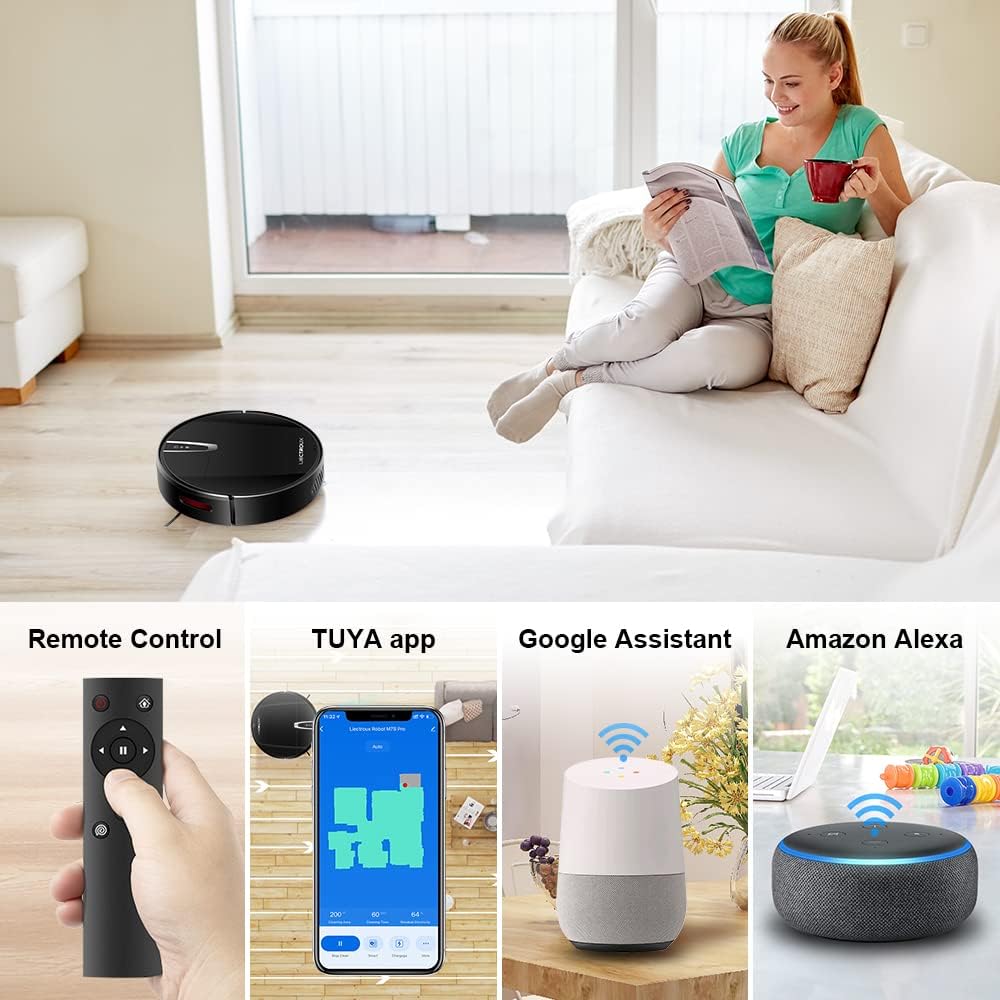
Figura 4.2: Various control methods for the robot vacuum, including a physical remote control, the TUYA smartphone application displaying a cleaning map, and integration with voice assistants like Google Assistant and Amazon Alexa.
5. Instruccions de funcionament
5.1 modes de neteja
The robot offers multiple cleaning modes to suit different needs, accessible via the app, remote control, or voice commands:
- Neteja automàtica: El robot navega i neteja intel·ligentment tota la superfície del terra.
- Neteja de punts: Se centra en una zona bruta específica, netejant en espiral.
- Neteja de vores: Neteja les parets i les vores dels mobles.
- Mode de fregat: For wet cleaning, attach the water tank and mopping cloth.

Figura 5.1: The robot vacuum cleaner operating on a floor with scattered debris, illustrating its powerful suction and various cleaning modes: Scheduled Cleaning, Auto Cleaning, Edge Cleaning, and Spot Cleaning.
5.2 Navegació i cartografia
The M7S Pro utilizes smart gyroscope navigation to create a 2D map of your environment, allowing for precise positioning and efficient route planning. This ensures comprehensive coverage and minimizes missed spots.

Figura 5.2: The robot vacuum cleaner navigating a room, with a grid overlay illustrating its smart gyroscope navigation system for precise positioning and thorough cleaning.

Figura 5.3: A visual comparison showing the efficient, systematic cleaning path generated by the LIECTROUX M7S Pro's gyroscope navigation versus a less organized common route planning method, highlighting intelligent route planning.
5.3 Recàrrega automàtica
When the battery level is low or a cleaning task is complete, the robot will automatically return to its charging dock to recharge. Ensure the charging dock is always powered on and accessible.
5.4 Anti-Drop System
The robot is equipped with cliff sensors to detect stairs and elevated surfaces, preventing it from falling. It also intelligently detects different floor types and adjusts its direction within 10 milliseconds.
6. Manteniment
Un manteniment regular garanteix un rendiment òptim i allarga la vida útil del teu robot aspirador.
6.1 Buidar el contenidor d'escombraries
Empty the dustbin after each cleaning cycle or when the 'full' indicator appears. Open the top cover, remove the dustbin, and dispose of the collected debris.
6.2 Neteja del filtre
The HEPA filter should be cleaned regularly (e.g., weekly) using the provided cleaning tool or a soft brush. Replace the HEPA filter every 3-6 months, depending on usage, to maintain suction efficiency.
6.3 Neteja dels raspalls laterals
Inspect and clean the side brushes regularly. Remove any tangled hair or debris. If brushes are worn or damaged, replace them with new ones.
6.4 Neteja dels sensors i els contactes de càrrega
Wipe the cliff sensors and charging contacts on both the robot and the charging dock with a clean, dry cloth to ensure proper function and charging.
6.5 Brush-less Suction Nozzle
The M7S Pro features an advanced brush-less suction nozzle designed to minimize hair entanglement, reducing the frequency of cleaning the main suction path.

Figura 6.1: An illustration of the robot vacuum's underside, highlighting the advanced brush-less suction nozzle designed to prevent hair entanglement and ensure consistent cleaning performance.
7. Solució De Problemes
Si teniu problemes amb el vostre robot aspirador, consulteu els següents problemes i solucions habituals:
| Problema | Causa possible | Solució |
|---|---|---|
| El robot no s'encén. | Bateria baixa; interruptor apagat. | Charge the robot; ensure the main power switch is on. |
| El robot no es carrega. | Charging contacts dirty; charging dock not powered. | Clean charging contacts; ensure charging dock is plugged in. |
| El robot es queda encallat sovint. | Obstacles (cables, rugs); narrow spaces. | Clear the cleaning area; use virtual walls if available. |
| Mal rendiment de neteja. | Cubell de les escombraries ple; filtre obstruït; raspalls enredats. | Empty dustbin; clean/replace filter; clean brushes. |
| Problemes de connexió de l'aplicació. | Contrasenya Wi-Fi incorrecta; el robot no està en mode d'emparellament; xarxa Wi-Fi de 5 GHz. | Verify Wi-Fi details; re-enter pairing mode; ensure 2.4GHz Wi-Fi is used. |
8. Especificacions
| Característica | Detall |
|---|---|
| Marca | LIECTROUX |
| Nom del model | M7S PRO |
| Color | Negre |
| Dimensions del producte | 32L x 32W x 7.8H cm |
| Pes de l'article | 4 quilos |
| Potència d'aspiració màxima | 4000 Pa |
| Capacitat de la bateria | 2500mAh Ió de liti |
| Temps d'execució | Fins a 120 minuts |
| Tipus de filtre | HEPA |
| Tipus de controlador | App Control, Touchpad Control, Voice Control |
| Compatibilitat de l'Assistent de veu | Google Home, Amazon Alexa |
| Tipus de navegació | Gyroscope Navigation (2D Map) |
| Característica especial | Anti-drop system, Brush-less suction nozzle |
| Recomanació de superfície | Low-pile carpet, hard floors, ceramic tiles |
9. Garantia i Suport
The LIECTROUX M7S Pro Robot Vacuum Cleaner comes with a standard manufacturer's warranty. Please refer to the warranty card included in your package for specific terms and conditions, including the warranty period and coverage details.
For technical support, troubleshooting assistance, or warranty claims, please contact the seller or LIECTROUX customer service. Contact information can typically be found on the product packaging, the seller's website, or within the TUYA Smart app.
When contacting support, please have your product model number (M7S Pro) and purchase details readily available.


