1. Producte acabatview
This manual provides essential information for the installation, operation, and maintenance of your navycrest Q7 Dash Cam Rear Camera. This product is designed to seamlessly integrate with your existing navycrest Q7 Dash Cam system, offering enhanced surveillance and recording capabilities for the rear of your vehicle.
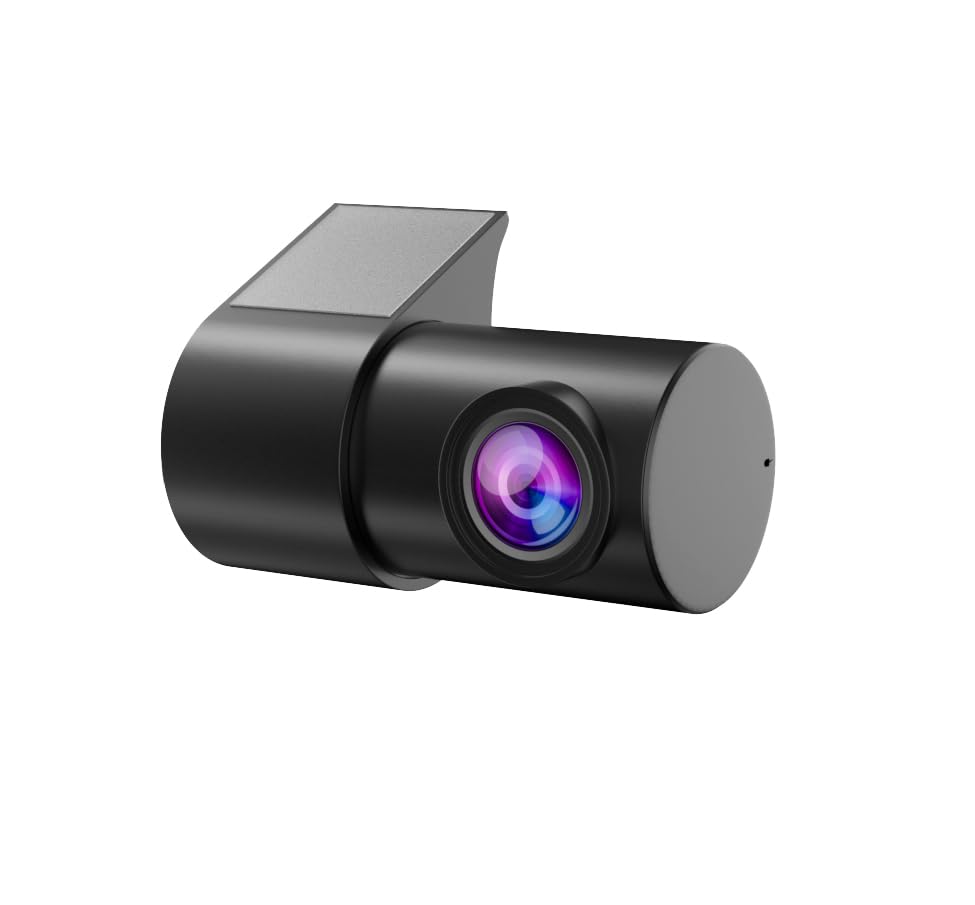
Figure 1: navycrest Q7 Dash Cam Rear Camera. This compact camera is designed for discreet installation and provides a wide-angle view de l'entorn posterior.
Característiques principals:
- Designed specifically for the navycrest Q7 Dash Cam.
- Surface Mount Installation.
- Wide Angle Lens for broad rear coverage.
- RCA Connector for reliable video signal transmission.
2. Configuració i instal·lació
Proper installation of the Rear Camera is crucial for optimal performance. This camera is intended for surface mounting and connects to your main Q7 Dash Cam unit.
2.1 Instal·lació física
- Trieu una ubicació de muntatge: Select a suitable flat surface at the rear of your vehicle that provides an unobstructed view. Common locations include above the license plate or on the rear window.
- Netegeu la superfície: Thoroughly clean the chosen mounting area to ensure it is free of dust, dirt, and moisture. Use an alcohol wipe if necessary and allow it to dry completely.
- Apply Electrostatic Film (Optional): If desired, apply the provided electrostatic film to the mounting surface before attaching the camera. This can help protect your vehicle's surface and make removal easier.
- Adjuntar la càmera: Remove the protective backing from the 3M adhesive on the camera's mounting bracket. Carefully position the camera and press firmly onto the cleaned surface for at least 30 seconds to ensure a strong bond.
2.2 Connecting to the Q7 Dash Cam
- Encamina el cable: Carefully route the camera's RCA connector cable from the rear mounting location to the main navycrest Q7 Dash Cam unit. Ensure the cable is tucked away neatly and does not interfere with vehicle operations or safety features. Avoid sharp bends or pinching the cable.
- Connect the RCA Plug: Locate the dedicated RCA input port on your navycrest Q7 Dash Cam. This port is typically yellow. Insert the yellow RCA plug from the rear camera cable firmly into this port.
- Connexió d'alimentació: Ensure your main navycrest Q7 Dash Cam is properly powered (e.g., via the cigarette lighter adapter or hardwire kit). The rear camera draws power directly from the main unit.
2.3 Software Installation (for Android Car Navigation)
If your main Q7 Dash Cam is connected to an Android car navigation system, you may need to install specific software for full functionality. Refer to the video below for a general guide on this process.
Video 1: Installation operation method. This video demonstrates the process of connecting a USB cable, opening the file manager on an Android car navigation system, finding and installing an APK file, allowing necessary permissions, and checking for updates to enable dash cam functions.
3. Instruccions de funcionament
The navycrest Q7 Dash Cam Rear Camera operates in conjunction with your main Q7 Dash Cam unit. All recording, settings, and viewing functions for the rear camera are managed through the main dash cam's interface or its dedicated mobile application.
- Activació automàtica: The rear camera will typically activate automatically when the main Q7 Dash Cam is powered on and begins recording.
- Viewing Footage: Viu view i menjar gravattage from the rear camera can be accessed via the main Q7 Dash Cam's display or its connected mobile application. Consult your Q7 Dash Cam's manual for specific navigation steps.
- Configuració: Any settings related to video quality, loop recording duration, time stamps, collision sensing, or automatic screen off time for the rear camera are controlled through the main Q7 Dash Cam's settings menu or mobile app.
4. Manteniment
To ensure clear and reliable footage from your Rear Camera, follow these simple maintenance tips:
- Netegeu la lent: Regularly wipe the camera lens with a soft, lint-free cloth to remove dust, dirt, or water spots. Avoid abrasive materials that could scratch the lens.
- Comproveu les connexions: Periodically inspect the RCA cable connection to ensure it is secure and free from damage.
- Muntatge del monitor: Ensure the camera remains firmly attached to its mounting surface. Reapply adhesive if necessary.
5. Solució De Problemes
If you encounter issues with your navycrest Q7 Dash Cam Rear Camera, refer to the following common problems and solutions:
- No Rear Image Displayed:
- Ensure the RCA cable is securely connected to both the rear camera and the main Q7 Dash Cam.
- Verify that the main Q7 Dash Cam is powered on and functioning correctly.
- Check the settings on your main Q7 Dash Cam to ensure the rear camera input is enabled and selected.
- Poca qualitat de vídeo:
- Clean the camera lens thoroughly.
- Assegureu-vos que la càmera estigui ben muntada i que no vibri.
- Check the video resolution settings on your main Q7 Dash Cam.
- Connexió intermitent:
- Inspect the RCA cable for any signs of damage (kinks, cuts, loose connectors). Replace if necessary.
- Ensure the cable routing does not cause stress on the connectors.
6. Especificacions
| Característica | Detall |
|---|---|
| Dimensions del producte | 1 x 1 x 1 polzades |
| Pes de l'article | 4.8 unces |
| ASIN | B0DG5JTPXX |
| Tecnologies de connectivitat | Powerline (via main dash cam) |
| Característiques especials | Loop Recording (controlled by main dash cam) |
| Altres funcions de visualització | Wireless (via main dash cam) |
| Color | Negre |
| Fabricant | navycrest |
| Dispositius compatibles | Monitor (via main dash cam) |
| Tipus d'instal·lació | Muntatge en superfície |
| Tecnologia de sensors òptics | CMOS |
| Tipus de lent | Gran Angular |
| Angle real de View | 170 graus |
| Tipus de connector | RCA |
| Mida del sensor òptic | 1/2.5 polzada |
| Camp de View | 170 graus |
7. Garantia i Suport
Your navycrest Q7 Dash Cam Rear Camera comes with a 12-month warranty from the date of purchase. Please retain your proof of purchase for warranty claims.
For technical support, troubleshooting assistance, or warranty inquiries, please contact navycrest customer service through the contact information provided with your main Q7 Dash Cam or on the official navycrest weblloc.


