Producte acabatview
The TONGOU Wi-Fi Smart Circuit Breaker is an intelligent device designed for remote control, energy monitoring, and protection against short circuits. It integrates seamlessly into your smart home system via Wi-Fi, offering convenience and enhanced electrical management.

Figura 1: Frontal view of the TONGOU Wi-Fi Smart Circuit Breaker, showing the manual switch and Wi-Fi module.

Figura 2: Mésview of the TONGOU Wi-Fi Smart Circuit Breaker, highlighting available current ratings (10A, 16A, 25A, 32A) and its DIN-rail mount design.
Configuració i instal·lació
1. Desembalatge i contingut del paquet
Carefully unpack the product and verify all contents. The package should include:
- 1 x TONGOU Wi-Fi Smart Circuit Breaker
- 1 x Manual d'usuari
2. Informació de seguretat
ADVERTIMENT: Electrical installation should only be performed by a qualified electrician. Ensure the main power supply is disconnected before any installation work to prevent electric shock. This device is not a substitute for a standard circuit breaker and should be installed in line with existing protective devices.
- Desconnecteu sempre l'alimentació a l'interruptor principal abans de la instal·lació o el manteniment.
- Ensure proper wiring according to local electrical codes.
- Do not exceed the rated current of the device.
- Mantingueu el dispositiu allunyat de l'aigua i de la humitat excessiva.
3. Passos d'instal·lació
The TONGOU Wi-Fi Smart Circuit Breaker is designed for 35mm DIN rail mounting.
- Muntatge: Securely attach the device to a standard 35mm DIN rail in your electrical distribution box. It occupies two positions on the main switch box.
- Cablejat:
- Connect the live wire (L) to the "Power L" terminal and the neutral wire (N) to the "Power N" terminal at the top of the device.
- Connect the load's live wire (L) to the "Load L" terminal and the load's neutral wire (N) to the "Load N" terminal at the bottom of the device.
- Ensure all connections are tight and secure. The wiring capacity is 1-10mm².
- Encès: Once wiring is complete and verified, restore power to the main circuit.

Figura 3: Angle view of the device, illustrating the input and output terminals for wiring.

Figure 4: Diagram showing the dimensions of the device and its wiring capacity (1-10mm²).
Instruccions de funcionament
1. Manual Operation and Status Indicators
The device features a manual ON/OFF switch. The visualization window indicates the status:
- Vermell: Indicates the device is ON (lighting state).
- Negre: Indicates the device is OFF (lights out).
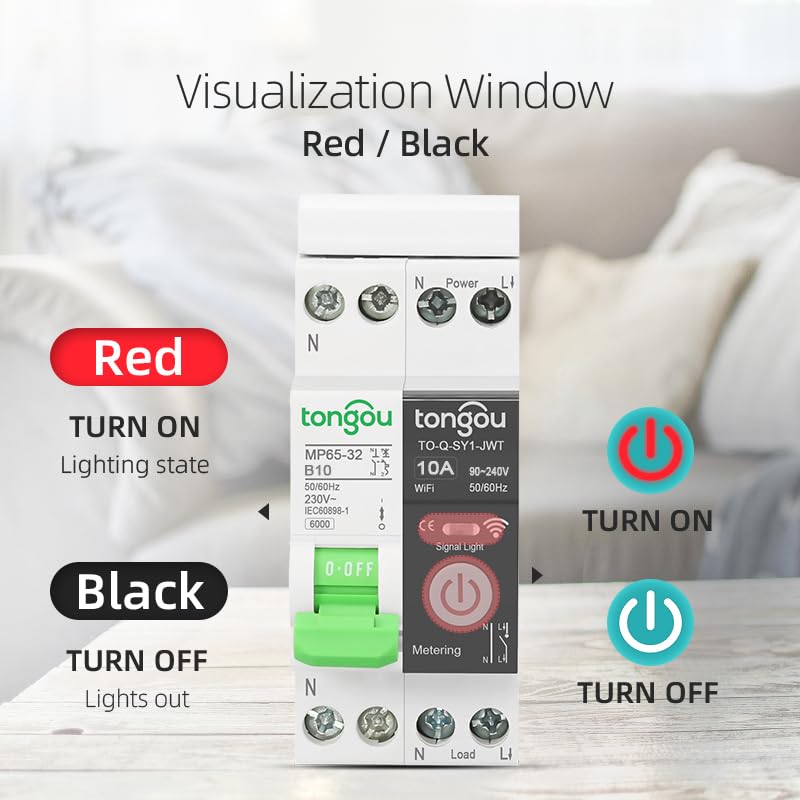
Figure 5: Illustration of the red (ON) and black (OFF) status indicators on the device.
2. App Pairing (Tuya / Smart Life)
To unlock smart features, pair the device with the Tuya or Smart Life app.
- Descarregar l'aplicació: Download and install the "Tuya Smart" or "Smart Life" app from your mobile app store. Register or log in to your account.
- Introduïu el mode de vinculació: Ensure the device is powered on. Press and hold the power button on the Wi-Fi module for 5-10 seconds until the blue Wi-Fi indicator light starts blinking rapidly. This indicates it's in pairing mode.
- Afegeix un dispositiu a l'aplicació: Open the app, tap the "+" icon (usually in the top right corner) to add a device. The app should automatically discover the "Wi-Fi Din Rail Switch".
- Confirm and Connect: Follow the on-screen prompts to confirm the device and connect it to your 2.4GHz Wi-Fi network.

Figure 6: Step-by-step guide for pairing the device with the Tuya/Smart Life app, showing the blue Wi-Fi indicator and app interface.
3. Funcions intel·ligents a través de l'aplicació
Once paired, you can utilize various smart functions:
- Comandament a distància: Turn the device ON/OFF from anywhere using your smartphone.
- Control de veu: Compatible amb Alexa i Google Assistant per a un funcionament amb mans lliures.
- Monitorització energètica: Track electricity consumption in KWh (hourly, daily, monthly, yearly). The single-phase meter measures positive consumption only.
- Funcions del temporitzador:
- ON/OFF automàtic: Schedule specific times for the device to turn on or off.
- Sortida / posta de sol: Automate operations based on local sunrise and sunset times.
- Compte enrere: Set a countdown timer for the device to turn off after a specified duration.
- Loop Timing: Create repetitive ON/OFF cycles.
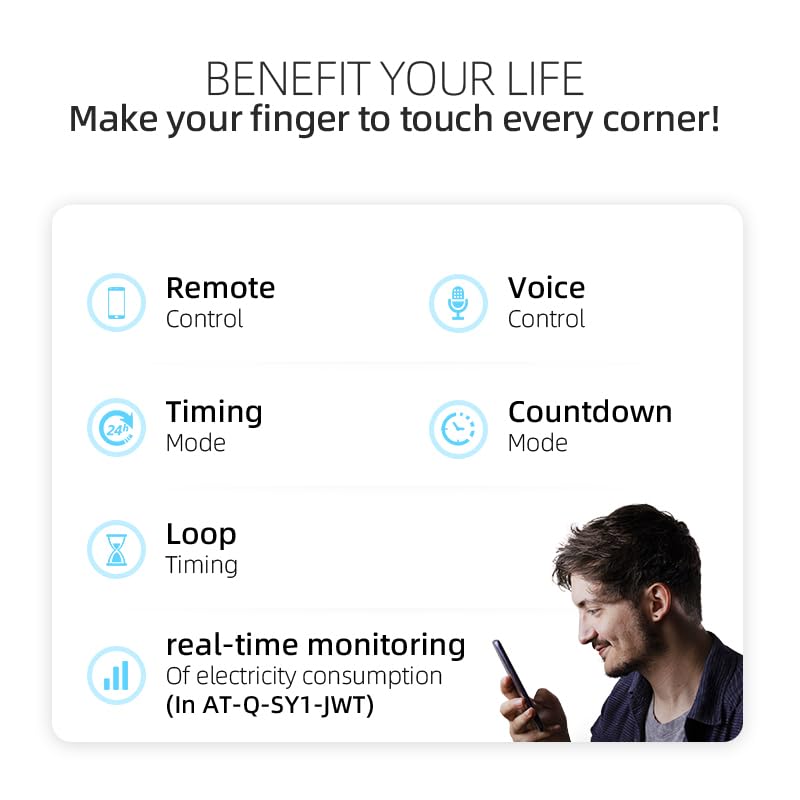
Figure 7: Key benefits of the smart circuit breaker, including remote control, voice control, timing modes, countdown, loop timing, and real-time energy monitoring.

Figura 8: Example of the energy consumption monitoring interface within the app, showing KWh usage over time.

Figura 9: Exemple visualamples of timer functions, including scheduled ON/OFF, countdown for power cutoff, and loop timing for applications like pool circulation.

Figura 10: Example of the sunrise/sunset automation feature, allowing lights to turn on or off relative to dawn and dusk.

Figure 11: Illustration of voice control functionality, demonstrating integration with smart assistants like Alexa.
Manteniment
The TONGOU Wi-Fi Smart Circuit Breaker requires minimal maintenance.
- Neteja: Periodically wipe the device with a dry, soft cloth. Do not use liquid cleaners or solvents.
- Actualitzacions de firmware: The app may prompt you for firmware updates. It is recommended to keep the device's firmware updated for optimal performance and security. Follow the in-app instructions for any updates.
- Comprovació de la connexió: De tant en tant, comproveu les connexions del cablejat per assegurar-vos que estiguin ben fixades.
Resolució de problemes
| Problema | Causa possible | Solució |
|---|---|---|
| El dispositiu no s'encén. | No power supply; incorrect wiring; internal fault. | Check main circuit breaker. Verify wiring connections. If problem persists, contact support. |
| No es pot connectar a la Wi-Fi. | Incorrect Wi-Fi password; device too far from router; 5GHz Wi-Fi network; device not in pairing mode. | Ensure correct 2.4GHz Wi-Fi password. Move device closer to router. Put device into pairing mode (blinking blue light). |
| L'aplicació mostra el dispositiu fora de línia. | Wi-Fi signal loss; device powered off; router issues. | Check Wi-Fi signal strength. Ensure device is powered on. Restart your Wi-Fi router. |
| El comandament a distància no funciona. | No internet connection on phone or device; app issues. | Verify internet connectivity. Restart the app. Re-pair the device if necessary. |
Especificacions
| Característica | Detall |
|---|---|
| Número de model | MP65-SY1 |
| Marca | TONGOU |
| Valoració actual | 10A (also available in 16A, 25A, 32A variants) |
| Voltage | 90~230VAC |
| Freqüència | 50 ~ 60HZ |
| Nombre de pols | 1P+N (simultaneously cuts live and neutral wires) |
| Tipus de muntatge | Muntatge en carril DIN de 35 mm |
| Dimensions del producte (L x A x A) | 5 x 3.6 x 8.5 cm (50P x 36l x 85H millimeters) |
| Pes | 200 grams |
| Connectivitat sense fil | Wi-Fi (només 2.4 GHz) |
| Compatibilitat d'aplicacions | Tuya Smart / Smart Life |
| Compatibilitat de l'Assistent de veu | Amazon Alexa, Google Assistant |
Garantia i Suport
TONGOU products are manufactured to high quality standards. For warranty information and technical support, please refer to the documentation provided with your purchase or visit the official TONGOU brand store.
TONGOU Brand Store: Visita la botiga


