1. Introducció
The TESmart 4x4 Seamless HDMI Matrix Switch HMA404-ES23-USBK allows you to connect up to four HDMI input sources to four HDMI displays. This device supports seamless switching between sources in less than 50 milliseconds, ensuring a smooth transition without screen interruption. It also features audio separation, preview mode, and multiple control options including front panel buttons, IR remote, RS-232, and LAN.

Image 1.1: The TESmart 4x4 Seamless HDMI Matrix Switch, showing the main unit, remote control, and rack-mount ears.
2. Contingut del paquet
Please verify that all items listed below are included in your package. If any components are missing or damaged, please contact TESmart support.
- 1 x 4x4 HDMI Matrix Switch (HMA404-ES23-USBK)
- 1 control remot IR
- 1 x IR Extension Cable
- 1 x 3 Pins Connector (for RS-232)
- 1 x adaptador d'alimentació DC 12V
- 2 x Rack-ears
- 1 x Manual d'usuari

Image 2.1: All components included in the TESmart 4x4 HDMI Matrix Switch package.
3. Producte acabatview
3.1 Tauler frontal
The front panel provides direct control and status indication for the matrix switch.
- LCD Preview Mode: Displays real-time video thumbnails of each port.
- Marca: For navigation and selection within the OSD menu.
- Teclat: Buttons for direct input/output selection and menu control.
- Interruptor d'alimentació: Per encendre o apagar el dispositiu.
3.2 Panell posterior
The rear panel houses all input and output connections, along with control ports.
- CC 12V: Port d'entrada d'alimentació.
- Senyals IR: Port for the IR extension cable to receive remote control signals.
- Port RS-232: For serial communication and control via PC.
- E/S d'àudio: Ports for independent audio separation.
- Port LAN: For network control via PC.
- HDMI Inputs (In 1-4): Connect your HDMI source devices.
- HDMI Outputs (Out A-D): Connect to your HDMI displays.
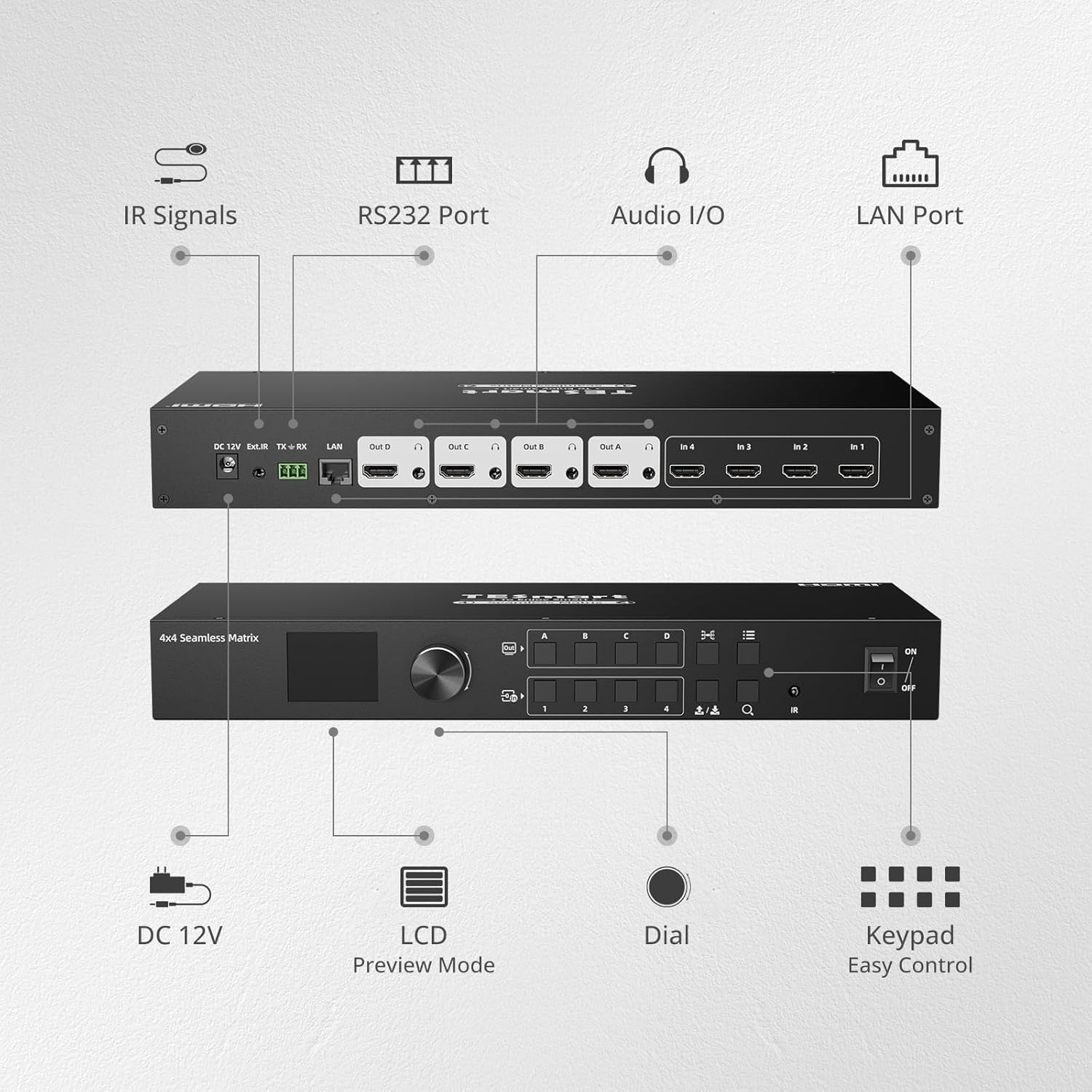
Image 3.1: Front and rear panel layout of the TESmart 4x4 HDMI Matrix Switch with labeled components.
4. Configuració i instal·lació
- Apagueu els dispositius: Assegureu-vos que tots els dispositius i pantalles de font HDMI estiguin apagats abans de fer connexions.
- Connectar fonts HDMI: Connect your HDMI source devices (e.g., gaming console, laptop, camera) to the HDMI Input ports (In 1-4) on the rear panel of the matrix switch using high-quality HDMI cables.
- Connecteu pantalles HDMI: Connect your HDMI displays (e.g., monitors, projectors) to the HDMI Output ports (Out A-D) on the rear panel of the matrix switch using high-quality HDMI cables.
- Connectar l'alimentació: Plug the DC 12V power adapter into the matrix switch and then into a power outlet.
- Connexions opcionals:
- Extensió IR: If using the IR remote control from a distance or obstructed view, connect the IR extension cable to the IR port and position the receiver in a visible location.
- Sortida d'àudio: If using audio separation, connect external audio devices to the Audio I/O ports.
- LAN/RS-232: For PC control, connect an Ethernet cable to the LAN port or use the 3-pin connector for RS-232 serial connection.
- Encès: Power on the matrix switch, then power on your HDMI displays, and finally your HDMI source devices.
5. Funcionament
5.1 Canvi sense problemes
The TESmart matrix switch provides seamless switching between input sources, occurring in less than 50 milliseconds. This eliminates black screens or delays during transitions.
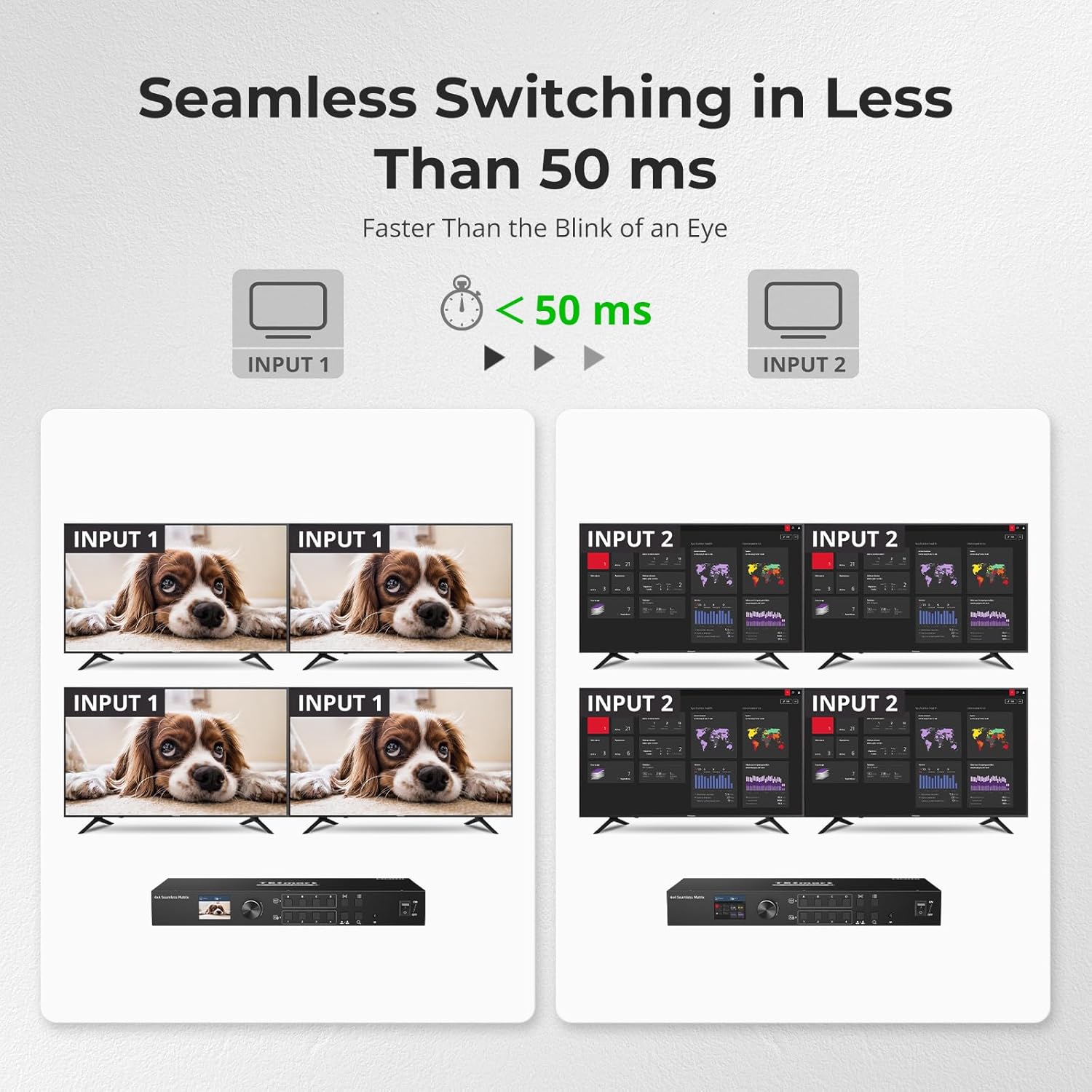
Image 5.1: Seamless switching in action, demonstrating rapid transitions between input sources.
5.2 Mètodes de control
The matrix switch can be controlled using various methods:
- Botons del tauler frontal: Directly select inputs and outputs using the buttons on the front panel.
- Marca: Use the dial to navigate through the On-Screen Display (OSD) menu and make selections.
- Control remot IR: Use the included IR remote for convenient wireless control. Ensure the IR receiver (or extension cable) has a clear line of sight.
- Control LAN: Connect the device to your network and use PC software for advanced control. Refer to the software manual for detailed instructions.
- Connexió RS-232: Connect to a PC via RS-232 for serial command control. Refer to the RS-232 command set documentation for details.

Imatge 5.2: acabatview of the five control methods for the matrix switch.
5.3 Separació d'àudio
The matrix switch supports independent audio separation, allowing you to extract audio from any HDMI output and route it to a separate audio system. This enables playing audio independently corresponding to the HDMI output port.

Image 5.3: Real-time audio separation setup, demonstrating independent sound output.
5.4 Preview Mode and Custom Port Naming
The integrated LCD on the front panel provides a preview mode, allowing real-time viewing of the screen content on each port. This is particularly useful for quickly checking display status, especially when displays are far from the matrix.
You can also customize the names of each input and output port through the OSD menu, making it easier to identify sources and destinations.
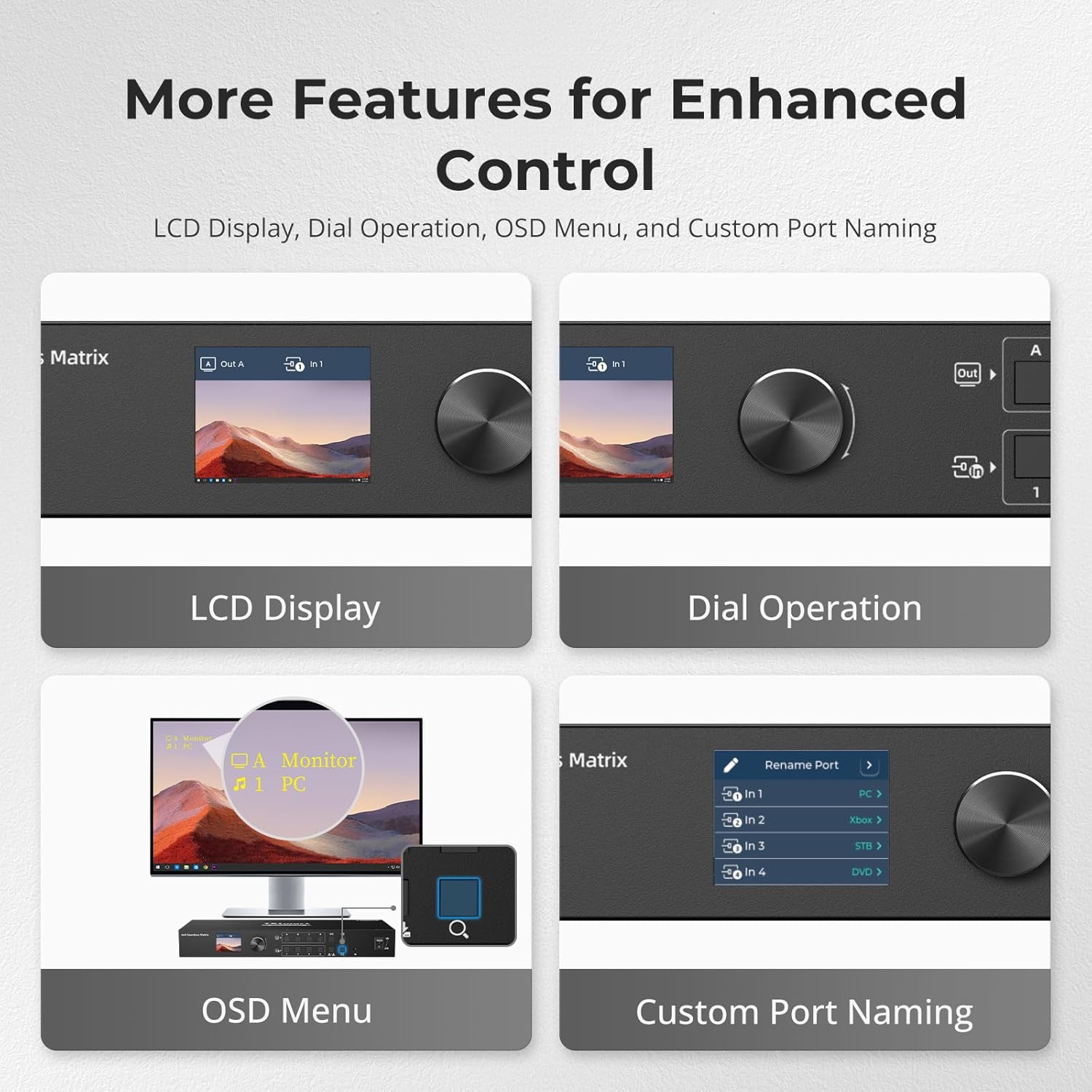
Image 5.4: Features for enhanced control, including LCD preview and custom port naming.
6. Manteniment
- Neteja: Feu servir un drap suau i sec per netejar l'exterior del dispositiu. Eviteu netejadors líquids o materials abrasius.
- Ventilació: Ensure the device has adequate ventilation to prevent overheating. Do not block ventilation openings.
- Gestió de cables: Mantingueu els cables organitzats i lliures de doblegaments o doblegaments excessius per evitar danys.
- Actualitzacions de firmware: Periodically check the TESmart weblloc web per a qualsevol actualització de firmware disponible per garantir un rendiment òptim i l'accés a noves funcions.
7. Solució De Problemes
| Problema | Causa possible | Solució |
|---|---|---|
| No hi ha sortida de vídeo a la pantalla. | Loose HDMI cable connections. Incorrect input selected. Power issue. | Check all HDMI cable connections. Ensure the correct input is selected for the output. Verify the matrix switch and display are powered on. Try a different HDMI cable. |
| Sense sortida d'àudio. | Audio separation not configured correctly. Display audio settings. | Check audio separation settings on the matrix switch. Ensure your display's audio is not muted or set to an incorrect output. |
| El comandament a distància no funciona. | Batteries low/dead. IR receiver obstructed. | Replace remote control batteries. Ensure the IR receiver has a clear line of sight to the remote. Use the IR extension cable if needed. |
| Intermittent signal. | Poor quality HDMI cables. Cable length too long. | Use certified high-speed HDMI cables. Ensure cable lengths are within recommended limits for your resolution. |
| Device not responding to LAN/RS-232 commands. | Incorrect network settings. Wrong serial port configuration. | Verify network connectivity and IP address settings. Check RS-232 port settings (baud rate, data bits, parity, stop bits) against the documentation. |
8. Especificacions
| Característica | Detall |
|---|---|
| Número de model | HMA404-ES23-USBK |
| Dimensions del producte | 13.78 x 5.91 x 1.77 polzades |
| Pes de l'article | 4.63 lliures |
| Resolució màxima | 1920x1080 a 60 Hz |
| Velocitat de commutació | Less than 50 ms (seamless) |
| Mètodes de control | Front Panel Buttons, Dial, IR Remote, RS-232, LAN |
| Característiques especials | Audio Separation, Preview Mode, Custom Port Naming, Power-down Memory |
| Dispositius compatibles | Camera, Gaming Console, Laptop, Projector, VCR |
| Tipus de connector | HDMI |
| Font d'alimentació | DC 12V |
9. Garantia i Suport
9.1 Garantia del producte
This TESmart product is covered by a 1-year standard warranty, with an additional 2-year extended warranty available upon registration, totaling up to 3 years of coverage. Please refer to the warranty card included in your package or visit the official TESmart weblloc per obtenir els termes i condicions detallats.
9.2 Suport tècnic
TESmart offers 24/7 technical support to assist you with any questions or issues regarding your product. For assistance, please visit the TESmart official website or contact our support team directly through the contact information provided on our weblloc.


