1. Introducció
The Xiaomi 5-in-1 Type-C Hub is designed to expand the connectivity of your USB-C enabled devices. It converts a single Type-C port into multiple essential ports, including three USB 3.0 ports, one Type-C port with Power Delivery (PD100W) for charging, and one HDMI port supporting 4K UHD resolution. This hub provides a versatile solution for connecting various peripherals, external displays, and charging your device simultaneously.
2. Contingut del paquet
Si us plau, verifiqueu que tots els elements siguin presents al paquet:
- Xiaomi 5-in-1 Type-C Hub (Model BHR8804GL)
- Cable USB-C integrat
- Manual d'usuari (aquest document)
3. Producte acabatview
Familiarize yourself with the ports and features of your Xiaomi 5-in-1 Type-C Hub.

Imatge 3.1: Davant view of the Xiaomi 5-in-1 Type-C Hub, highlighting the HDMI port, three USB 3.0 ports, and the USB-C Power Delivery port.
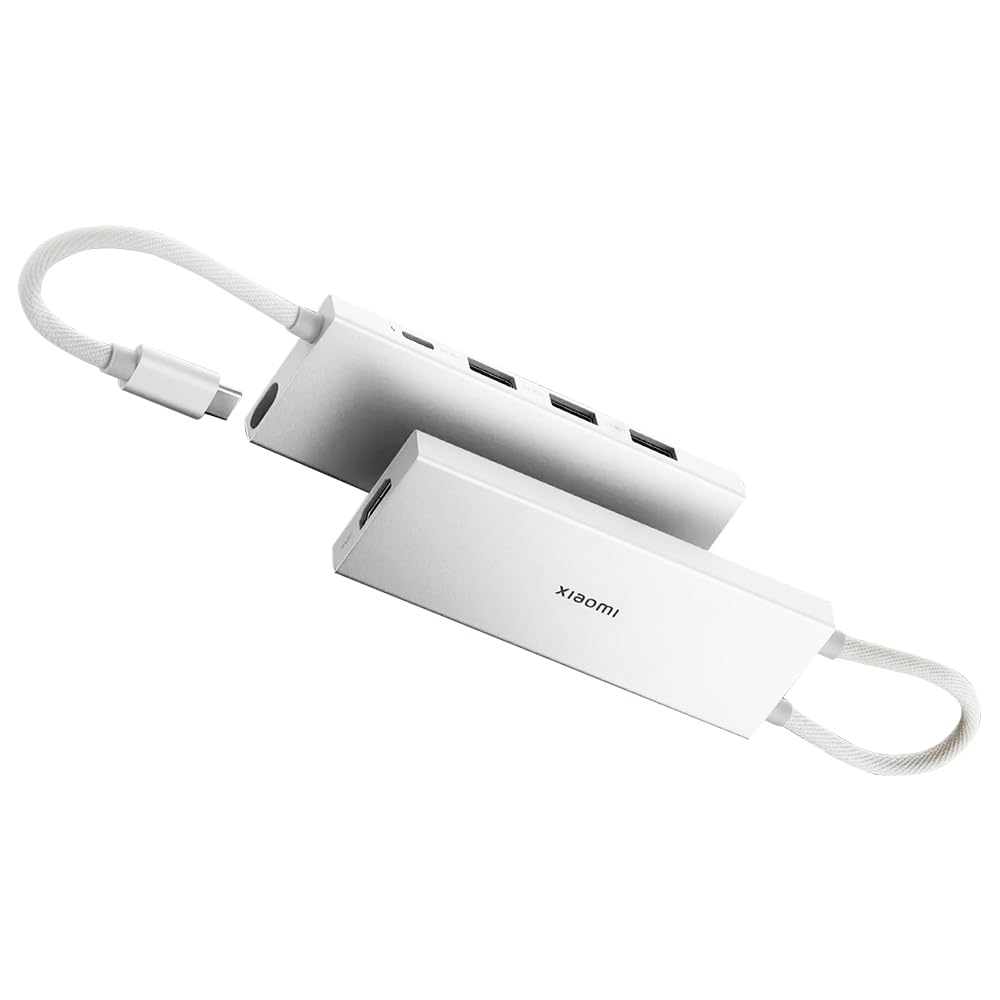
Imatge 3.2: The Xiaomi 5-in-1 Type-C Hub with its physical dimensions: 112.5mm length, 10.4mm height, and 39mm width.
Descripcions del port:
- Cable d'entrada USB-C: Connects the hub to your host device (laptop, tablet, smartphone).
- Port HDMI: Connects to an external display, monitor, or TV for video and audio output. Supports up to 4K@60Hz resolution.
- Ports USB 3.0 (x3): Connect USB peripherals such as keyboards, mice, flash drives, or external hard drives. Supports data transfer speeds up to 5 Gbps.
- Type-C PD Port: Connect a USB-C power adapter to charge your host device through the hub. Supports Power Delivery up to 100W.
4. Instruccions de configuració
Follow these steps to set up your Xiaomi 5-in-1 Type-C Hub:
- Connecteu el concentrador al vostre dispositiu: Plug the integrated USB-C cable of the hub into an available USB-C port on your laptop, tablet, or smartphone. Ensure the USB-C port on your device supports video output (DisplayPort Alternate Mode) for HDMI functionality and Power Delivery for charging.
- Connecteu els perifèrics:
- For external displays, connect an HDMI cable from the hub's HDMI port to your monitor or TV.
- For USB devices, plug your USB 3.0 or USB 2.0 peripherals (e.g., mouse, keyboard, USB drive) into the USB 3.0 ports on the hub.
- Connexió d'alimentació (opcional): If your host device requires charging, connect a USB-C power adapter (not included) to the Type-C PD port on the hub. The hub will pass through power to charge your device.

Imatge 4.1: The Xiaomi 5-in-1 Type-C Hub connected to a laptop, demonstrating its compact design and ease of integration with portable devices.
5. Instruccions de funcionament
5.1. Data Transfer via USB 3.0 Ports
The three USB 3.0 ports support high-speed data transfer up to 5 Gbps. This allows for quick transfer of large files, such as 1 GB of data in approximately 3 seconds, when connected to compatible USB 3.0 devices.

Imatge 5.1: The hub connected to various USB devices, including a USB flash drive and a wireless receiver, demonstrating its expandability.
5.2. Power Delivery (PD100W) Charging
The dedicated Type-C PD port allows you to charge your host device while using the hub. Connect a USB-C power adapter to this port to provide up to 100W of power to your laptop or other compatible device. This enables simultaneous data transfer and rapid charging.

Imatge 5.2: A visual representation indicating the simultaneous data transfer and charging capabilities of the Type-C port on the hub.
5.3. 4K UHD HDMI Video Output
Connect an HDMI-enabled display to the hub's HDMI port to extend or mirror your device's screen. The hub supports video output resolutions up to 4K Ultra High Definition (3840x2160) at 60Hz, providing clear visuals for presentations, movies, or gaming.

Imatge 5.3: The hub connected to an external monitor, demonstrating its capability to extend display functionality.
5.4. Compatibilitat del sistema
The Xiaomi 5-in-1 Type-C Hub is compatible with a wide range of operating systems, including:
- SO Windows
- SO Android
- macOS
- Linux OS
It supports hot-swap connection, allowing you to plug and unplug devices without needing to restart your system.
6. Manteniment
To ensure the longevity and optimal performance of your Xiaomi 5-in-1 Type-C Hub, follow these maintenance guidelines:
- Neteja: Use a soft, dry cloth to wipe the surface of the hub. Avoid using liquid cleaners, aerosols, or solvents.
- Emmagatzematge: Guardeu el concentrador en un lloc fresc i sec, allunyat de la llum solar directa i de temperatures extremes.
- Manipulació: Eviteu deixar caure el concentrador ni sotmetre'l a impactes forts. No doblegueu ni estireu excessivament el cable USB-C integrat.
- Humitat: Keep the hub away from water and other liquids.
7. Solució De Problemes
If you encounter issues with your Xiaomi 5-in-1 Type-C Hub, refer to the following common problems and solutions:
| Problema | Possible solució |
|---|---|
| Sense sortida de vídeo via HDMI. |
|
| No es reconeixen els dispositius USB. |
|
| Host device is not charging or charging slowly. |
|
| El centre de control s'escalfa durant el funcionament. | It is normal for the hub to become warm during heavy use, especially when charging or outputting video at high resolutions. If it becomes excessively hot, disconnect it and allow it to cool down. |
8. Especificacions
| Característica | Detall |
|---|---|
| Número de model | BHR8804GL |
| Ports | 3 x USB 3.0, 1 x HDMI, 1 x USB Type-C (PD) |
| Resolució HDMI | Up to 4K UHD (3840x2160) @ 60Hz |
| Velocitat de transferència de dades USB 3.0 | Fins a 5 Gbps |
| Entrega d'alimentació USB tipus C | Fins a 100 W |
| Sistemes operatius compatibles | Windows, Android, macOS, Linux |
| Dimensions (LxWxH) | 4.43 x 1.54 x 0.41 polzades (112.5 x 39 x 10.4 mm) |
| Pes | 3.52 unces (100 grams) |
| Interfície del maquinari | HDMI, USB 3.0, USB Type C |
| Dispositius compatibles | Smartphones, Tablets, TVs, Desktop PCs, Monitors, Laptop PCs |
9. Garantia i Suport
Per obtenir informació sobre la garantia i assistència tècnica, consulteu la pàgina oficial de Xiaomi. weblloc web o poseu-vos en contacte amb el servei d'atenció al client. Conserveu el rebut de compra per a reclamacions de garantia.
Xiaomi oficial Weblloc: www.mi.com


