Producte acabatview
The Bluesound Node ICON is a high-resolution wireless music streamer designed to deliver an exceptional audio experience across multiple rooms. It features a meticulously crafted Dual-Mono DAC design with two ESS SABRE ES9039Q2M DACs, ensuring unparalleled dynamic range, ultra-low distortion, and superior resolution. The device integrates advanced technologies like MQA Labs' QRONO d2a for precise digital-to-analogue conversion and THX AAA for lifelike headphone listening. Its sleek design, intuitive controls, and comprehensive connectivity options make it a versatile centerpiece for any modern audio setup.

Davant view of the Bluesound Node ICON, showcasing its sleek black finish and integrated display.
Guia de configuració
1. Desembalatge i col·locació inicial
Carefully remove all components from the packaging. Ensure the Node ICON is placed on a stable, flat surface with adequate ventilation. Avoid placing it near heat sources or in direct sunlight.
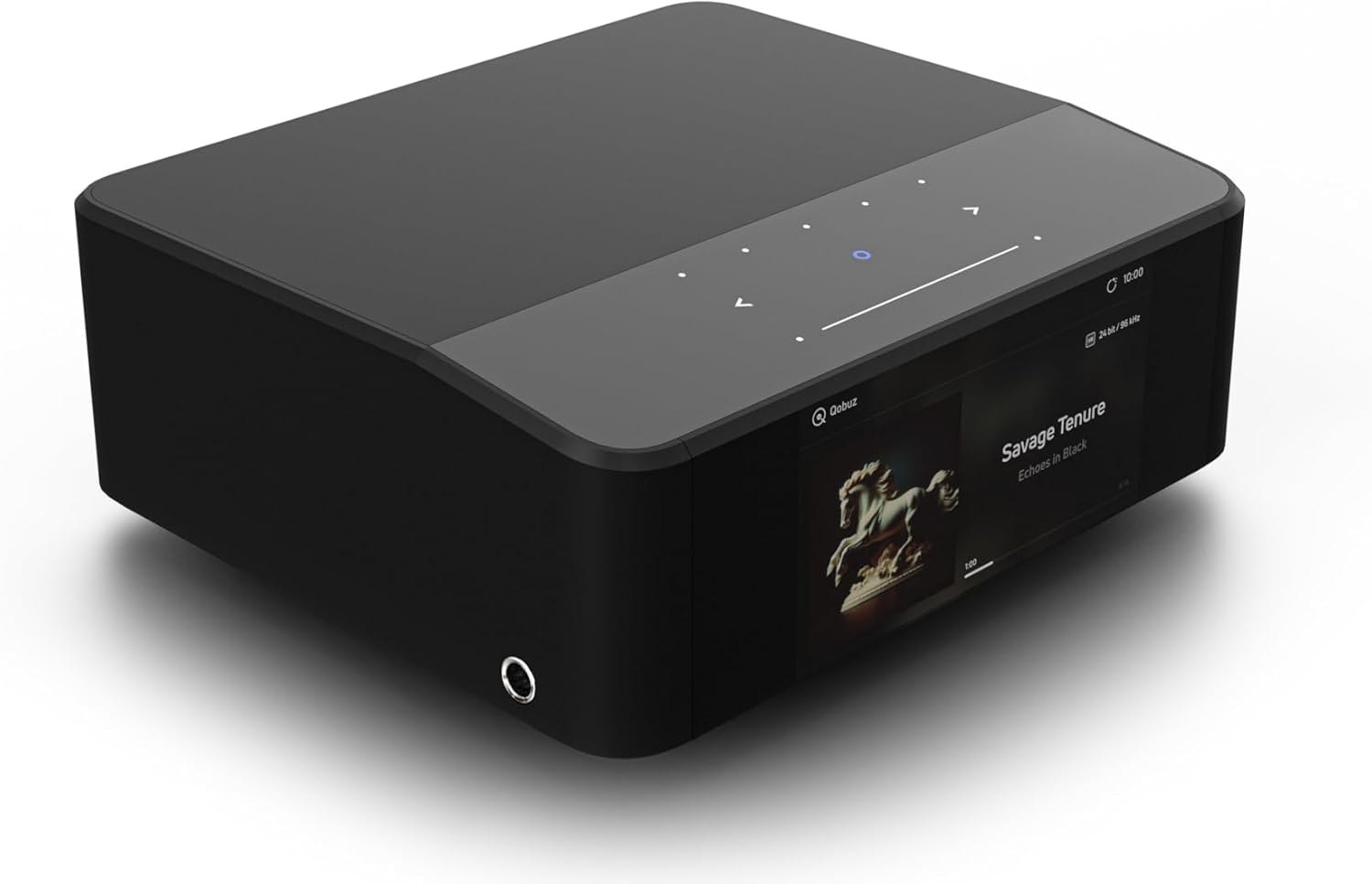
En angle view of the Node ICON, highlighting its compact and modern design.
2. Connexió a l'alimentació
Connect the provided 120V or 230V AC power cord to the AC Power input on the rear panel of the Node ICON. Plug the other end into a wall outlet.
3. Connexions d'àudio
The Node ICON offers various audio output options:
- Analog Audio Out (RCA): Use the provided Stereo RCA to RCA cable to connect to your amplifier or receiver's analog input.
- Balanced Audio Out (XLR): For professional-grade connections, use XLR cables to connect to compatible ampaixecadors.
- Coaxial Out: Connect to a digital coaxial input on your DAC or ampmés viu.
- Sortida òptica: Connect to a digital optical input on your DAC or ampmés viu.
- Sortida del subwoofer: Connect to a powered subwoofer for enhanced bass.
For audio input, the Node ICON features:
- Analog In (RCA): Connect external analog sources like a turntable (with a phono preamp) or CD player.
- Entrada òptica: Connect digital optical sources.
- USB-C (Audio In): Connect a computer or other USB audio source.
- EARC HDMI: Connect to your TV's HDMI eARC port for high-resolution TV audio.
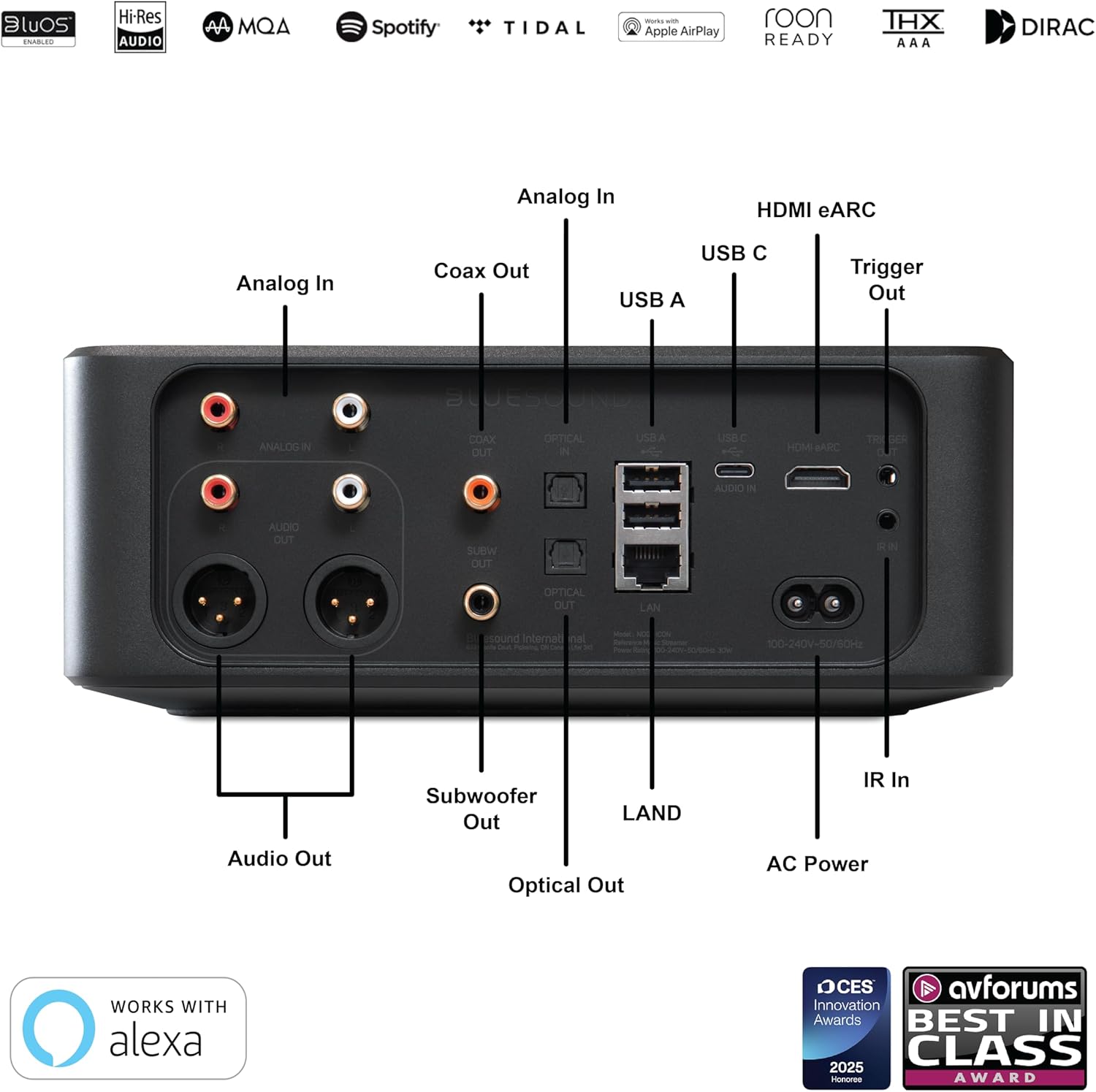
Detallada view of the rear panel connections, including analog, digital, and network ports.
4. Connexió a la xarxa
The Node ICON can connect to your network via Wi-Fi or Ethernet.
- Wi-Fi: The device supports dual-band Wi-Fi for stable wireless streaming. Follow the on-screen prompts or BluOS app instructions for Wi-Fi setup.
- Ethernet (LAN): For the most stable connection, use the provided Ethernet cable to connect the Node ICON to your router or network switch.
Instruccions de funcionament
1. BluOS Controller App
The primary method for controlling your Node ICON is through the BluOS Controller app, available for iOS, Android, Windows, and macOS. Download the app from your device's app store or the Bluesound weblloc.
- Inicieu l'aplicació: Open the BluOS Controller app on your smartphone, tablet, or computer.
- Discover Player: The app will automatically search for available Bluesound players on your network. Select your Node ICON.
- Ajudant de configuració: Follow the on-screen setup wizard to configure network settings, add music services, and customize your preferences.
- Transmissió de música: Access popular streaming services (e.g., Spotify Connect, Tidal Connect, Qobuz), internet radio, and your personal digital music libraries directly from the app.
- Àudio multi-habitació: Group multiple Bluesound players together to create a seamless multi-room music system, playing the same music everywhere or different music in different rooms.

The BluOS Controller app interface, demonstrating multi-room control and music playback.
2. On-Device Controls and Display
The Node ICON features a 5-inch full-color HD display and touch-sensitive controls on its top panel for basic operations.
- Visualització: Shows album art, track information, time, and device status.
- Panell tàctil: Control playback (play/pause, skip tracks), adjust volume, and navigate menus directly on the device. The panel is motion-activated.

The Node ICON's front display showing album art and track information during playback.
3. Headphone Listening
Connect your high-performance headphones to the 1/4" headphone jack located on the side of the unit. The integrated THX AAA technology ensures a lifelike and high-fidelity listening experience with remarkably low noise and distortion.

The Node ICON with headphones connected, ready for a personal listening session.
4. Dirac Live Room Correction (Optional Upgrade)
The Node ICON is compatible with Dirac Live room correction software, available as an upgrade directly from Dirac. This technology helps to optimize your audio system's performance by correcting acoustic imperfections in your listening environment. A calibration kit with a high-sensitivity microphone is required for this feature.
Manteniment
To ensure the longevity and optimal performance of your Bluesound Node ICON, follow these maintenance guidelines:
- Neteja: Use a soft, dry cloth to clean the exterior surfaces. For the display, use a microfiber cloth specifically designed for electronics. Avoid abrasive cleaners, solvents, or spray directly onto the unit.
- Ventilació: Assegureu-vos que les obertures de ventilació no estiguin bloquejades. Un flux d'aire adequat és crucial per evitar el sobreescalfament.
- Apagar: Si no heu d'utilitzar la unitat durant un període prolongat, desconnecteu-la de la presa de corrent.
- Actualitzacions de programari: Regularly check for and install software updates via the BluOS app to ensure the best performance and access to new features.
Resolució de problemes
If you encounter issues with your Node ICON, refer to the following common troubleshooting steps:
| Problema | Possible causa/solució |
|---|---|
| Sense alimentació / La unitat no respon |
|
| Sense sortida de so |
|
| No em puc connectar a la Wi-Fi / Problemes de xarxa |
|
| BluOS app not finding player |
|
Especificacions
| Característica | Detall |
|---|---|
| Marca | So blau |
| Nom del model | ICONA DEL NODE |
| Pes de l'article | 6.61 lliures (3000 grams) |
| Dimensions del producte | 8.7 x 7.6 x 3.3 polzades |
| Color | Negre |
| Tecnologia de connectivitat | Bluetooth, Wi-Fi, USB, Ethernet, HDMI |
| Tipus de connectors | HDMI eARC, Toslink Optical, RCA Analog, USB Type C (PC input) |
| Resolució | 1080p (for display) |
| Serveis d'Internet compatibles | Spotify Connect, Tidal Connect, Dirac Live Ready, Roon Ready |
| Tipus de controlador | Control d'aplicacions, control de botons |
| DAC | Dual-Mono ESS SABRE ES9039Q2M DACs |
| Headphone Technology | THX AAA |
| Reproducció DSD | Supported (via ES9826 SABRE ADC) |
Què hi ha a la caixa
The Bluesound Node ICON package includes the following items:
- Bluesound Node ICON Streamer
- Cable d'alimentació de 120 V CA.
- Cable d'alimentació de 230 V CA.
- Cable Ethernet
- Cable RCA estèreo a RCA
- Guia de configuració ràpida
Vídeos oficials de productes
Un funcionari acabatview video from Bluesound US, showcasing the key features and design of the Node ICON Reference Multi-Room Music Streamer.
Garantia i Suport
For warranty information, product registration, and technical support, please visit the official Bluesound weblloc web o poseu-vos en contacte amb el servei d'atenció al client. Conserveu el comprovant de compra per a reclamacions de garantia.
Recursos en línia: www.bluesound.com
Atenció al client: Refer to the contact information provided in your product's quick setup guide or on the Bluesound weblloc.


