1. Introducció
Welcome to the EazeID P780BT Label Maker instruction manual. This document provides detailed guidance on how to set up, operate, maintain, and troubleshoot your new label maker. Please read this manual thoroughly to ensure proper use and to maximize the performance and longevity of your device.
The EazeID P780BT is a versatile label maker designed for various labeling tasks, supporting labels up to 24mm wide. It features Bluetooth connectivity for smartphones and computers, a Type-C charging port, and a durable internal battery.
Contingut del paquet:
- 1 x EazeID P780BT Label Maker
- 1 x Starter Laminated White Tape - 0.94" (24mm) x 13.1' (4m) (pre-installed)
- 2 x Laminated Black on White Tape - 0.94" (24mm) x 26.2' (8m)
- 1 x cable USB tipus C
- 1 x Guia d'inici ràpid

Image 1.1: EazeID P780BT Label Maker and included tape rolls.
2. Configuració
2.1. Càrrega del dispositiu
Before initial use, fully charge the EazeID P780BT Label Maker. Connect the provided USB Type-C cable to the label maker's charging port and to a compatible USB power adapter (not included) or computer USB port. The device features a 1200 mAh battery, providing up to 4 hours of continuous printing on a single charge. A full charge typically takes approximately 2 hours.

Image 2.1: Charging the P780BT Label Maker via USB Type-C.
2.2. Installing Label Tape
The P780BT Label Maker is compatible with various label tape widths, including 9mm, 12mm, 18mm, and up to 24mm (1 inch). To install or replace a label tape cassette:
- Ensure the label maker is powered off.
- Obriu la tapa del compartiment de la cinta.
- Insert the label tape cassette firmly into the compartment, ensuring it clicks into place. The tape should feed smoothly through the output slot.
- Tanqueu la tapa del compartiment de la cinta.
The label maker features chip recognition technology to automatically identify label specifications, which helps prevent label jams and ensures clearer printing.

Image 2.2: Label tape installation with chip recognition feature.
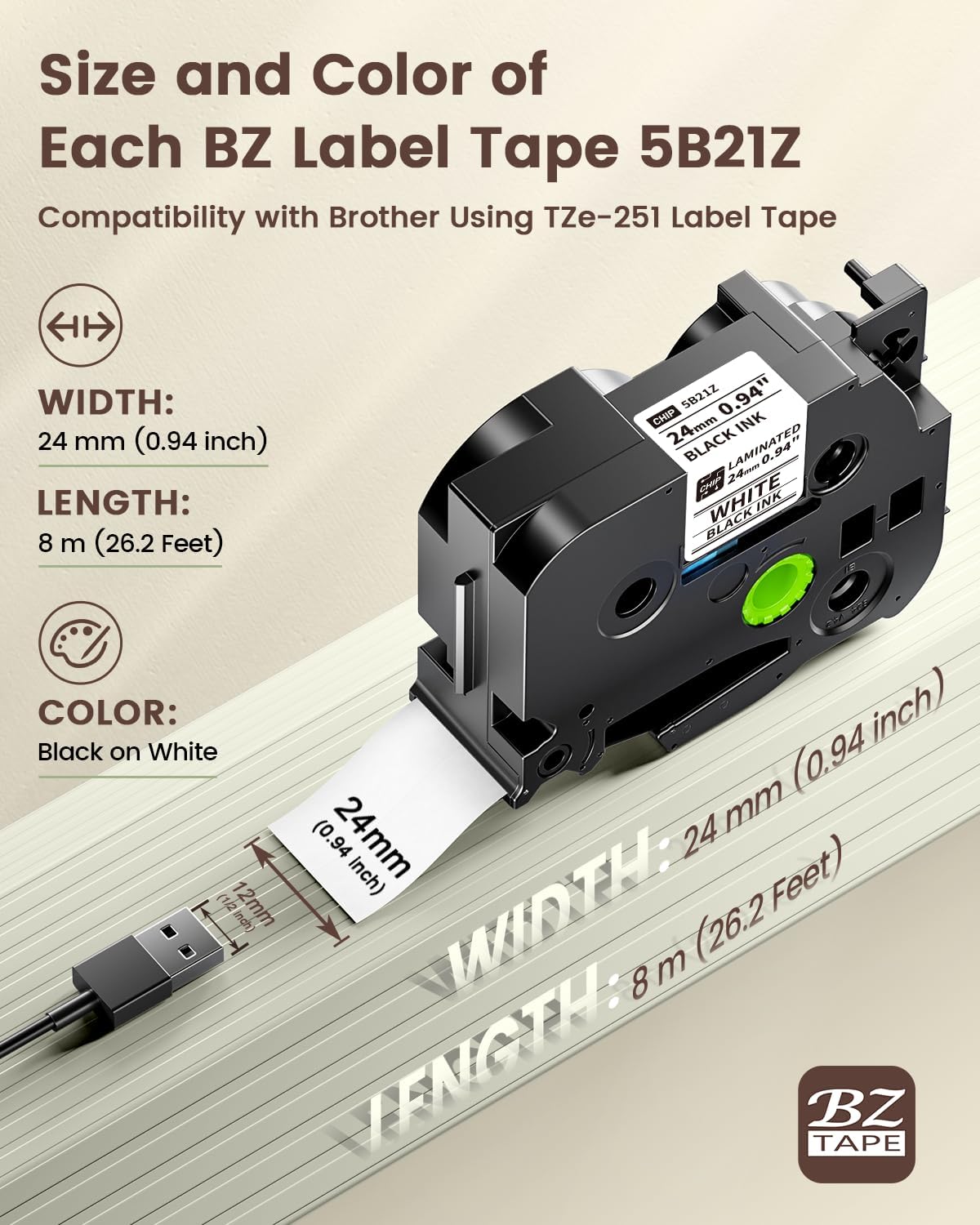
Image 2.3: Label tape dimensions and specifications.

Image 2.4: BZ Label Tapes with integrated chip for automatic detection.
2.3. Instal·lació de programari
To operate the P780BT Label Maker, you will need to install the companion software:
- For PC users: Download and install the Labelife programari.
- For smartphone users (Android/iOS): Download and install the Print Master aplicació des de la botiga d'aplicacions del dispositiu.
These applications provide a user-friendly interface for designing and printing labels.

Image 2.5: User-friendly apps for label creation.
3. Instruccions de funcionament
3.1. Connexió al vostre dispositiu
The P780BT Label Maker offers versatile connectivity options:
- Connexió Bluetooth: The device supports Bluetooth 4.2 for stable connections with both smartphones (Android, iOS, iPad) and computers (Mac OS, Windows). Ensure Bluetooth is enabled on your device and pair with the P780BT.
- Connexió USB: For computers, the P780BT also supports a direct USB connection using the provided Type-C cable.

Image 3.1: Bluetooth and USB connectivity options.
3.2. Creació i impressió d'etiquetes
Once connected to the Labelife software or Print Master app:
- Open the application and select your P780BT label maker.
- Design your label using the available text, fonts, symbols, and templates.
- Preview your label to ensure accuracy.
- Initiate the print command from the application. The label maker features an auto-cutting function for convenience.
3.3. Label Tape Compatibility
The EazeID P780BT is designed for compatibility with a wide range of TZe-style label tapes, including those used by Brother P-Touch label makers. This ensures a broad selection of tape types and colors for your labeling needs.

Image 3.2: Compatibility with TZe-style label tapes.
4. Manteniment
4.1. Neteja del capçal d'impressió
To maintain optimal print quality, periodically clean the print head. Use a soft, lint-free cloth lightly dampened with isopropyl alcohol. Gently wipe the print head to remove any dust or adhesive residue. Ensure the device is powered off and completely dry before use.
4.2. Storing the Device
Store the label maker in a cool, dry place away from direct sunlight and extreme temperatures. When not in use for extended periods, ensure the battery is partially charged (around 50%) to preserve its lifespan.
4.3. Tape Storage
EazeID laminated tapes are designed for durability. They are water-resistant, abrasion-proof, heat-proof, and corrosion-proof, ensuring labels remain legible for over 10 years. Store tape cassettes in their original packaging or a clean, dry environment to protect them from dust and damage.

Image 4.1: Durable laminated tape features.
5. Solució De Problemes
If you encounter issues with your EazeID P780BT Label Maker, refer to the following common problems and solutions:
- Sense energia: Ensure the device is charged. Connect it to a power source using the USB Type-C cable.
- No es pot connectar per Bluetooth: Verify Bluetooth is enabled on both the label maker and your device. Ensure the label maker is within range and not paired with another device. Try restarting both devices.
- Mala qualitat d'impressió: Clean the print head as described in the Maintenance section. Ensure the label tape is correctly installed and not damaged. Check the tape type and settings in the app/software.
- Etiquetes de melmelades: Ensure the label tape is inserted correctly and that the tape compartment is closed properly. The P780BT's chip recognition helps prevent jams, but improper installation can still cause issues. Remove the tape, clear any obstructions, and reinsert.
- Problemes amb l'aplicació/programari: Ensure your Labelife software or Print Master app is updated to the latest version. Restart the application or your device if it becomes unresponsive.
6. Especificacions tècniques
- Marca: EazeID
- Model: P780BT
- Tecnologia de connectivitat: Bluetooth 4.2, USB tipus C
- Característica especial: Portable, Chip Recognition, Auto-Cutting
- Sortida de la impressora: Monochrome (Thermal Transfer)
- Bateria: 1200 mAh (up to 4 hours continuous printing)
- Temps de càrrega: Aproximadament 2 hores
- Compatible Label Widths: 9mm, 12mm, 18mm, 24mm (1 inch)
- Compatible Tapes: TZe-style laminated tapes
7. Garantia i Suport
EazeID products are manufactured to high-quality standards. For information regarding warranty coverage, please refer to the warranty card included with your product or visit the official EazeID website. For technical assistance or customer support, please contact EazeID's professional support team through the contact information provided in your quick start guide or on the EazeID brand store.
Podeu visitar el EazeID Store per obtenir informació addicional sobre el producte i recursos d'assistència.


