1. Introducció
Thank you for choosing the EvoFox Ronin Wired Mechanical Gaming Keyboard. This manual provides detailed instructions for setting up, operating, and maintaining your keyboard to ensure optimal performance and longevity. The EvoFox Ronin is designed for a superior typing and gaming experience, featuring advanced sound dampening, customizable switches, and dynamic RGB lighting.

Image 1.1: EvoFox Ronin Wired Mechanical Gaming Keyboard (Black)
Característiques principals:
- 9-Layer Gasket Structure: Advanced design for reduced noise, improved stability, and enhanced tactile feedback.
- Hot-Swappable Outemu Red Silent Switches: Customizable, durable, and smooth typing experience with included switch puller.
- Per-Key RGB Backlighting: 21 effects and Audio Sync Mode for personalized and immersive lighting.
- Dedicated Volume Knob: Convenient control over audio levels.
- Powerful Windows Software: Program keys, create macros, control backlighting, and manage profiles with onboard memory.
- Compatibilitat entre plataformes: Easily switch between Windows and Mac modes.
- Detachable Braided USB-C Cable: Robust 1.5m cable with EMI ring for reliable connection and portability.
2. Contingut del paquet
Si us plau, verifiqueu que tots els elements siguin presents al vostre paquet:
- 1 x EvoFox Ronin Mechanical Gaming Keyboard
- 1 x extractor de tecles
- 4 x Outemu Red Switches (Spare)
- 1 x Manual d'usuari
3. Producte acabatview
3.1 Gasket Structure
The EvoFox Ronin features an advanced 9-layer gasket structure. This design incorporates silicone gaskets, a mounting plate, and multiple layers of vibration and sound dampening materials to provide a stable, quiet, and comfortable typing experience by minimizing unwanted noise and resonance.
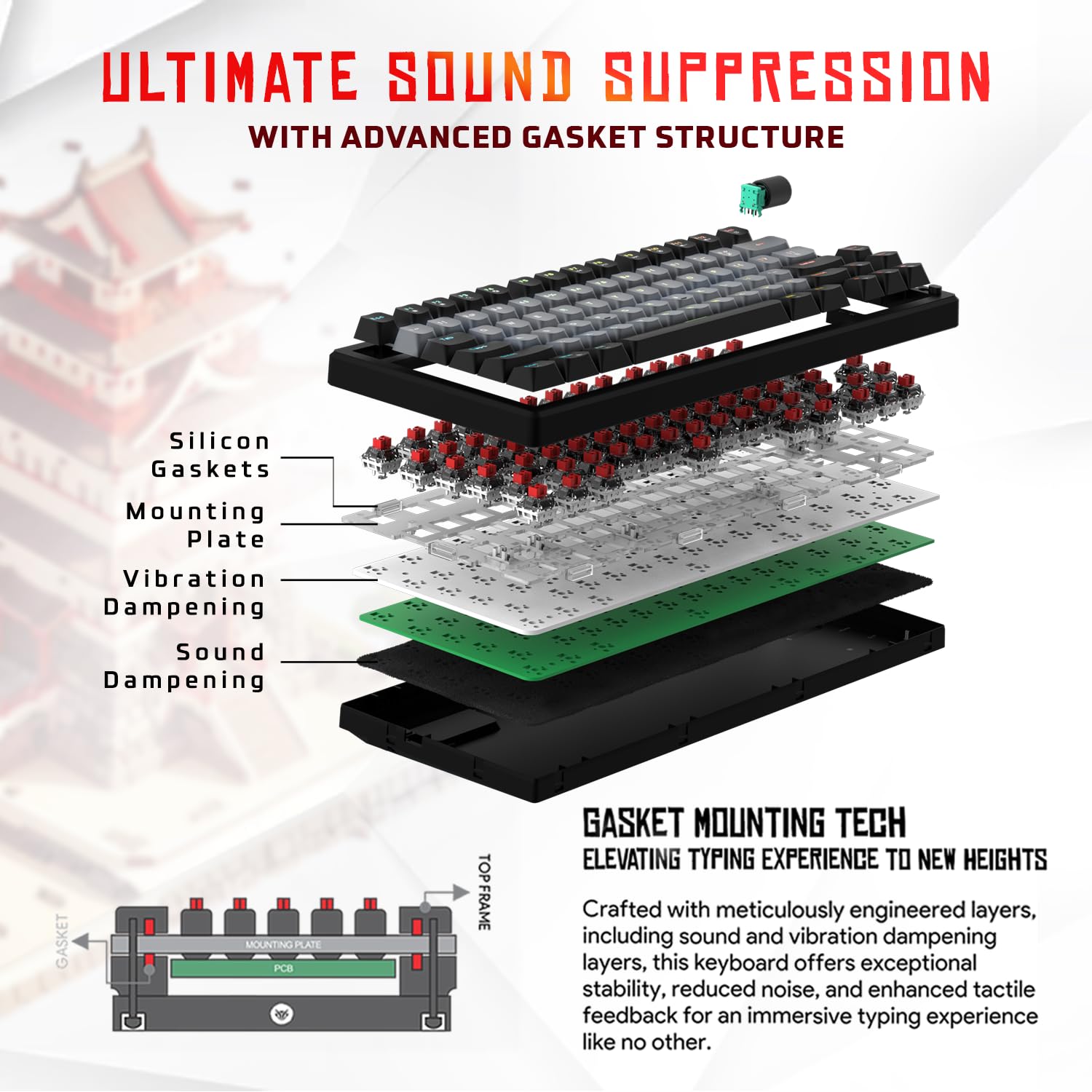
Imatge 3.1: Desplegada view of the 9-layer gasket structure, showing silicone gaskets, mounting plate, and dampcapes d'envergadura.
3.2 Outemu Red Silent Switches
The keyboard is equipped with Outemu Red Dust Proof Switches, known for their linear and silent operation. These switches are hot-swappable, allowing users to easily replace them with other compatible 3-pin mechanical switches without soldering, enabling full customization of the typing feel.

Image 3.2: Close-up of Outemu Red switches and the included switch puller, demonstrating hot-swappable functionality.
3.3 Per-Key RGB Backlighting
Each key on the EvoFox Ronin features individual RGB backlighting, offering 16 million colors and 21 pre-set lighting effects. The lighting can be customized directly on the keyboard or through the dedicated software, including an Audio Sync Mode that reacts to sound.

Image 3.3: The EvoFox Ronin keyboard showcasing its customizable per-key RGB backlighting.
3.4 Dedicated Volume Knob
A metal volume knob is integrated into the keyboard for quick and precise audio adjustments. Rotate to change volume, and press to mute/unmute.
3.5 Detachable USB-C Cable
The keyboard connects via a robust 1.5-meter braided USB-C cable, which is detachable for easy portability and storage. The cable includes an EMI ring to minimize signal interference.

Image 3.4: Features of the EvoFox Ronin, including the volume knob, detachable USB-C cable, and double-height adjustable legs.
4. Instruccions de configuració
Follow these steps to set up your EvoFox Ronin keyboard:
- Descomprimir el teclat: Traieu amb cura el teclat i tots els accessoris de l'embalatge.
- Connecteu el cable USB-C: Insert the USB-C end of the provided cable into the port on the back of the keyboard.
- Connexió a l'ordinador: Plug the USB-A end of the cable into an available USB port on your computer (PC or Mac).
- Instal·lació del controlador: El teclat és plug-and-play. El sistema operatiu hauria de detectar i instal·lar automàticament els controladors necessaris.
- Instal·lació de programari opcional: For advanced customization, download the dedicated Windows software from the official EvoFox weblloc.
5. Instruccions de funcionament
5.1 Funcions bàsiques de les tecles
The EvoFox Ronin functions as a standard TKL (Tenkeyless) keyboard. All keys perform their labeled functions. The keyboard supports N-Key Rollover, ensuring every key press is registered accurately, even during rapid input.
5.2 Tecles multimèdia i de funció
Access multimedia and additional functions by pressing the Fn key in combination with the designated F-keys or other keys. Refer to the keycap legends for specific functions (e.g., Fn + F1 for media player, Fn + F2 for volume down).
5.3 Control d'il·luminació RGB
You can control the RGB lighting directly from the keyboard:
- Efectes del canvi: Ús Fn + \| per alternar entre 21 efectes d'il·luminació diferents.
- Ajusta la brillantor: Ús Fn + Fletxa amunt per augmentar la brillantor i Fn + Fletxa avall per disminuir la brillantor.
- Ajustar velocitat: Ús Fn + Fletxa esquerra per disminuir la velocitat de l'efecte i Fn + Fletxa dreta per augmentar la velocitat de l'efecte.
- Audio Sync Mode: Activate specific modes that react to audio input.
5.4 Personalització del programari
The dedicated Windows software allows for comprehensive customization:
- Programació clau: Remap any key to a different function.
- Creació de macros: Record and assign complex key sequences to a single key.
- Backlighting Effects: Fine-tune RGB colors, effects, brightness, and speed.
- Profile Gestió: Crea i desa diversos professionalsfiles per a diferents aplicacions o jocs.
- Taxa de votació: Adjust the polling rate up to 1000Hz.

Image 5.1: Screenshot of the EvoFox Ronin's dedicated software, showing options for light settings, button settings, and macro management.
5.5 Cross-Platform Compatibility
The keyboard supports both Windows and Mac operating systems. Use the designated key combination (typically Fn + Win or similar, refer to keycap legends) to switch between modes, ensuring correct key mapping for your OS.
6. Manteniment
6.1 Neteja del teclat
Per mantenir l'aspecte i la funcionalitat del teclat:
- Desconnecteu el teclat de l'ordinador abans de netejar-lo.
- Feu servir una llauna d'aire comprimit per eliminar la pols i les restes que hi ha entre les tecles.
- Netegeu les tecles i la superfície del teclat amb un drap suau i lleugerament dryamp drap. Eviteu la humitat excessiva.
- No utilitzeu productes químics ni productes de neteja abrasius.
6.2 Substitució d'interruptors
The EvoFox Ronin features hot-swappable switches, allowing for easy replacement without soldering:
- Desconnecta el teclat de l'ordinador.
- Feu servir l'extractor de tecles inclòs per treure suaument la tecla desitjada.
- Use the included switch puller to carefully grip the top and bottom clips of the switch and pull it straight up.
- Align the pins of the new switch with the holes on the PCB and gently press it down until it clicks into place. Ensure the pins are not bent.
- Substitueix la tapa de les tecles.

Image 6.1: A keycap being removed from the keyboard using a keycap puller.
7. Solució De Problemes
If you encounter issues with your EvoFox Ronin keyboard, refer to the following common solutions:
- El teclat no respon:
- Assegureu-vos que el cable USB-C estigui connectat correctament tant al teclat com a l'ordinador.
- Prova de connectar el teclat a un port USB diferent de l'ordinador.
- Prova el teclat en un altre ordinador per descartar un problema específic de l'ordinador.
- Reinicieu l'ordinador.
- Il·luminació RGB no funciona/incorrecta:
- Check the on-board lighting controls (Fn key combinations) to ensure brightness is not set to zero or an effect is not disabled.
- If using the software, ensure it is running and the correct profile està actiu.
- Reinstall the keyboard software if issues persist.
- Claus que no es registren:
- Ensure no debris is lodged under the keycap or switch.
- If a specific key is not working, try replacing its switch (refer to Section 6.2).
- Check for bent pins on the switch if you recently replaced one.
- Software Issues (e.g., Antivirus Flagging):
- Ensure you download the software from the official EvoFox website to avoid unofficial versions.
- If your antivirus flags the software, you may need to add an exception for the software's executable file. Proceed with caution and only if you trust the source.
- Contact EvoFox support for the latest software version or assistance.
8. Especificacions
| Característica | Detall |
|---|---|
| Marca | EvoFox |
| Nom del model | EvoFox Ronin TKL Wired |
| Descripció del teclat | Mecànica |
| Tecnologia de connectivitat | USB-C (amb cable) |
| Interruptors | Outemu Red Silent Dust Proof Switches (Hot-Swappable) |
| Il·luminació de fons | Per-Key RGB (16 Million Colors, 21 Effects, Audio Sync Mode) |
| Taxa de votació | Fins a 1000 Hz |
| Rollover de claus | N-Key Rollover (All Anti-Ghosting Keys) |
| Característiques especials | Advanced Gasket Structure, Compact TKL Design, Multimedia Keys, Pro Mod Hotswap Module, Powerful Windows Software, Dedicated Volume Controller |
| Dispositius compatibles | Portàtil, PC |
| Plataforma de maquinari | PC/Mac/Linux/Unix |
| Longitud del cable | 1.5m Detachable Braided Type-C with EMI Ring |
| Material | Plàstic |
| Dimensions del producte | 32 x 13.5 x 2.6 cm |
| Pes de l'article | 640 g |
| País d'origen | Xina |
9. Garantia i Suport
The EvoFox Ronin Mechanical Gaming Keyboard comes with a standard manufacturer's warranty. Please refer to the warranty card included in your package for specific terms and conditions, including warranty period and coverage details.
For technical support, troubleshooting assistance, or warranty claims, please contact EvoFox customer support. You can find contact information on the official EvoFox website or through the manufacturer, Allied Electronics & Magnetics Private Limited.
Fabricant: Allied Electronics & Magnetics Private Limited
Adreça: C-64/4, Okhla Phase - 2, New Delhi - 110020


