1. Producte acabatview
The iVANKY FusionFinder Smart Tag Wallet Tracker Card is a smart, rechargeable, ultra-thin device designed to help you locate your valuable items. It integrates seamlessly with the Apple Find My network, offering advanced tracking capabilities and alerts.
Característiques principals:
- Disseny prim: The ultra-slim tracker fits easily into any wallet, providing seamless convenience without adding bulk.
- Long-Lasting Wireless Charging: Enjoy up to 365 days of battery life on a single charge with easy wireless charging and LED indicators.
- Bluetooth 5.2 avançat: Features state-of-the-art Bluetooth 5.2 technology for a robust connection within a 20-meter range.
- Audible Assurance: Locate your lost wallet with an 80-decibel alarm that sounds within the connection range.
- Intelligent Alarm System: Receive instant separation alerts on your smartphone if the FusionFinder moves out of the connected range.
2. Instruccions de configuració
Follow these steps to set up your iVANKY FusionFinder Card with your Apple device:
- Encès: Long-press the power button on the card for 3 seconds until you hear a startup prompt tone.
- Obre Cerca la meva aplicació: Ensure Bluetooth is enabled on your iPhone or iPad. Open the Apple Find My app.
- Afegeix un article: In the Find My app, navigate to the 'Items' tab and tap 'Add Item' or 'Add Other Item'.
- Connectar: The app will search for nearby items. Select 'FusionFinder Card' (or similar name) when it appears. Follow the on-screen prompts to connect and register the card to your Apple ID.
- Personalitza: You can name your item and assign an emoji to easily identify it in the app.
Descripció del vídeo: This video demonstrates the simple steps to connect the iVANKY Wallet Tracker Card to the Apple Find My app, showing the process from opening the app to successful pairing.
3. Instruccions de funcionament
Localització del vostre article:
- Ús de l'aplicació Cerca el meu: Open the Find My app on your Apple device. Select your iVANKY FusionFinder Card from the 'Items' list.
- Reproduir so: Tap the 'Play Sound' option in the app to make your card emit an 80-decibel alarm, helping you pinpoint its exact location within Bluetooth range.
- Indicacions: If the card is outside Bluetooth range, the Find My app will show its last known location on a map. You can get directions to this location.
Alertes de separació:
The intelligent alarm system will send instant notifications to your smartphone if your iVANKY FusionFinder Card moves out of the connected Bluetooth range, helping you prevent loss.

Descripció de la imatge: An image showing the iVANKY Wallet Tracker Card integrated with the Apple Find My network, displaying a map with the card's location and a notification indicating the wallet has been left behind.
Descripció del vídeo: Aquest vídeo ofereix una visió generalview of an ultra-thin wallet tracker card, demonstrating its compact size and how it can be used to track items.
4. Càrrega i bateria
The iVANKY FusionFinder Card features a long-lasting rechargeable battery.
- Càrrega sense fils: The card supports wireless charging. Simply place the card on a compatible wireless charger with the side containing the power button facing up.
- Durada de la bateria: A single full charge can provide up to 365 days of usage.
- Indicadors LED: An LED indicator on the card will illuminate to show charging status.
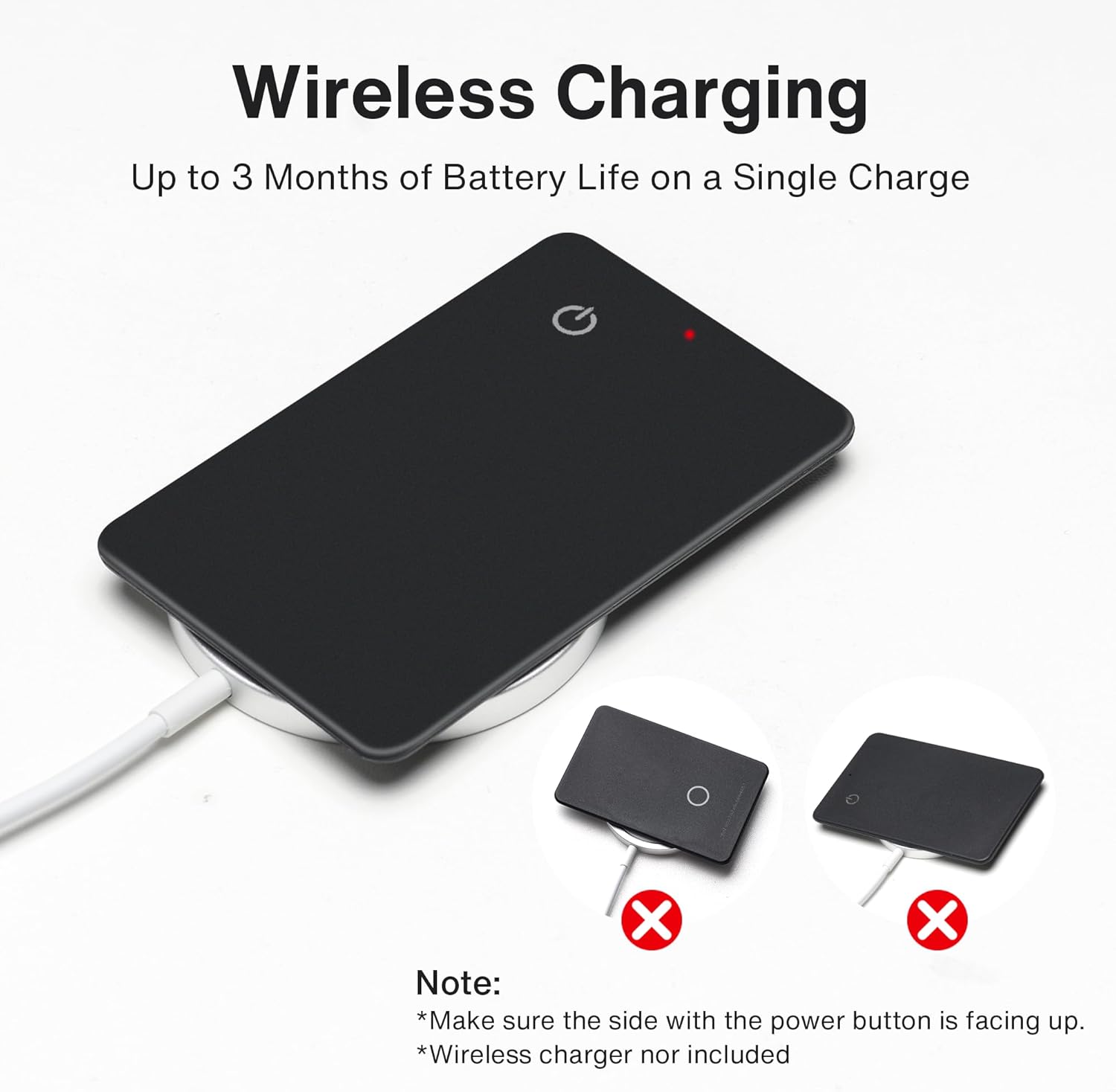
Descripció de la imatge: The iVANKY Wallet Tracker Card is shown on a wireless charging pad, highlighting the wireless charging capability and the importance of correct placement for charging.

Descripció de la imatge: An image emphasizing the 365-day battery life, splash-proof design, and rechargeable nature of the iVANKY Wallet Tracker Card.
5. Manteniment
- Neteja: Wipe the card with a soft, dry cloth. Avoid using harsh chemicals or abrasive materials.
- Emmagatzematge: Store the card in a cool, dry place when not in use for extended periods.
- Resistència a l'aigua: The card is splash-proof, offering protection against minor splashes. Avoid submerging it in water.

Descripció de la imatge: An image illustrating the splash-proof feature of the iVANKY Wallet Tracker Card, with a small spill near it, indicating resistance to minor liquid exposure.
6. Solució De Problemes
- Card Not Connecting:
- Ensure the card is powered on (long-press the power button).
- Verify Bluetooth is active on your Apple device.
- Make sure the card is within the 20-meter Bluetooth range of your device during initial pairing.
- Restart both the card and your Apple device.
- Problemes de càrrega:
- Confirm the card is placed correctly on the wireless charger, with the power button side facing up.
- Ensure your wireless charger is functioning correctly.
- Check the LED indicator for charging status.
- L'alarma no és prou forta:
- The 80-decibel alarm is designed for close-range location. Ensure you are within the effective Bluetooth range.
- Obstructions or thick materials (like a very thick wallet) may slightly muffle the sound.
7. Especificacions
| Característica | Detall |
|---|---|
| Marca | IVANKY |
| Número de model | 2 PCS (Note: This refers to quantity, actual model is FusionFinder Card) |
| Tecnologia de connectivitat | Bluetooth 5.2 |
| Dispositius compatibles | iPhone, iPad (Apple Find My network compatible) |
| Tipus de bateria | 1 bateria de ions de liti (inclosa) |
| Durada de la bateria | Fins a 365 dies |
| Carregant | Sense fil |
| Pes de l'article | 2.82 unces |
| Dimensions del paquet | 4.49 x 3.62 x 0.31 polzades |
8. Garantia i assistència
The iVANKY FusionFinder Card typically comes with a 1-year warranty. Please refer to the packaging or the manufacturer's official website for the most accurate and up-to-date warranty information and support contacts.
For further assistance, please visit the official IVANKY Store or contact customer support.


