Introducció
This manual provides comprehensive instructions for the setup, operation, and maintenance of your Yesker 18-inch LED Ring Light. Please read this manual carefully before use to ensure proper functionality and to maximize the lifespan of your product. This ring light is designed to provide adjustable and consistent illumination for various applications, including live streaming, makeup tutorials, photography, and video recording.
Contingut del paquet
Si us plau, verifiqueu que tots els elements que s'enumeren a continuació estiguin inclosos al vostre paquet:
- 1 x 18 inch Ring Light
- 1 x Height-adjustable Light Stand (31.5" to 71")
- 1 x Bluetooth Shutter Remote
- 1 x Hot Shoe Adapter
- 1 x Suport per a telèfon
- 1 x Power Adapter with Plug
- 1 x bossa de transport
- 1 x Manual d'instruccions (aquest document)

Image: Complete Yesker 18-inch LED Ring Light kit, including the ring light, adjustable tripod stand, Bluetooth remote, phone holder, and carrying bag.
Instruccions de configuració
1. Assembling the Tripod Stand
- Unfold the tripod legs outwards until they are fully extended.
- To ensure optimal stability and safety, widen the tripod legs to their maximum spread.
- Loosen the height adjustment knobs on the stand and extend the central column to your desired height. Securely tighten the knobs. The stand is adjustable from 31.5 inches (80 cm) to 71 inches (180 cm).
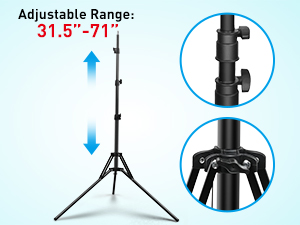
Image: Illustration of the adjustable height range of the tripod stand, showing the locking mechanisms.
2. Attaching the Ring Light
- Locate the mounting screw on top of the tripod stand.
- Align the ring light's mounting hole with the tripod screw and gently screw the ring light onto the stand until it is secure.
- The ring light features a 360° rotatable Hot Shoe Adapter. Adjust the angle of the ring light as needed by loosening the angle knob, positioning the light, and then tightening the knob to secure it.
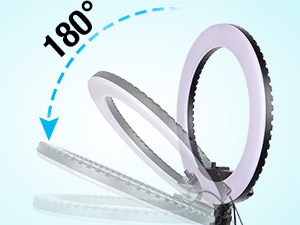
Image: Diagram illustrating the 180-degree tilt capability of the ring light on its mount.
3. Installing the Phone Holder
- Insert the phone holder into the hot shoe slot located in the center of the ring light.
- Tighten the locking screw on the hot shoe adapter to secure the phone holder.
- Adjust the phone holder to accommodate your smartphone. It can adjust from 2.2 inches (5.6 cm) to 3.7 inches (9.4 cm) wide.
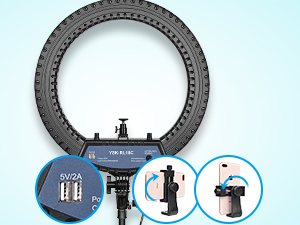
Imatge: Primer pla view of the ring light's USB charging port and the adjustable phone holder.
Instruccions de funcionament
1. Encès / apagat
Connect the power adapter to the ring light's power input port and plug it into a standard electrical outlet. The ring light will power on. To turn off, simply unplug the power adapter.
2. Adjusting Color Temperature and Brightness
The Yesker 18-inch ring light offers three color temperatures and a wide dimming range:
- Temperatures de color: White (6000K), Warm White (4200K), and Warm Yellow (3200K). Use the dedicated knobs on the ring light's control panel to adjust between these temperatures.
- Ajust de brillantor: The brightness can be dimmed from 1% to 100%. Rotate the brightness control knobs to achieve your desired illumination level.

Image: Visual representation of the ring light's adjustable color temperatures (3200K, 4200K, 6000K) and brightness levels (100%, 80%, 50%, 20%).
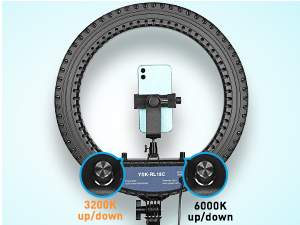
Image: Close-up of the ring light's control panel, highlighting the knobs for adjusting 3200K and 6000K brightness.
3. Using the Bluetooth Shutter Remote
The included Bluetooth shutter remote allows for convenient remote control of your smartphone's camera, enabling you to capture photos and videos without touching your phone.
- Assegureu-vos que el Bluetooth del vostre telèfon intel·ligent estigui activat.
- Turn on the Bluetooth remote. It will enter pairing mode.
- On your smartphone, search for available Bluetooth devices and select the remote (usually named 'AB Shutter3' or similar).
- Once paired, open your camera app. Press the corresponding button on the remote to trigger the shutter.
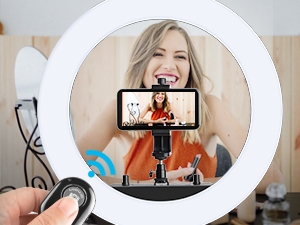
Image: Hand holding the Bluetooth shutter remote, with the ring light and a smartphone visible in the background, indicating remote control functionality.
4. Port de càrrega USB
The ring light features a convenient USB port (5V/2A) on the back. This port allows you to charge your cell phone directly from the ring light, which is particularly useful during extended live streaming sessions or video recording when your phone's battery may drain quickly.
Manteniment
1. Neteja
To clean the ring light and stand, use a soft, dry cloth. Do not use abrasive cleaners or solvents, as these may damage the surface or electronic components. Ensure the device is unplugged before cleaning.
2. Emmagatzematge
When not in use, disassemble the ring light and tripod stand. Store all components, including the power adapter and accessories, in the provided carrying bag. Store in a cool, dry place away from direct sunlight and extreme temperatures to prolong the product's life.

Image: A person carrying the Yesker ring light in its dedicated black carrying bag, demonstrating its portability and ease of storage.
Resolució de problemes
La llum no s'encén
- Ensure the power adapter is securely connected to both the ring light and a working electrical outlet.
- Comproveu si la presa de corrent funciona connectant-hi un altre dispositiu.
- Verify that the power cable is not damaged.
Il·luminació desigual o parpelleig
- Ensure the power supply is stable and meets the product's requirements.
- Comproveu si hi ha connexions soltes.
- Si el problema persisteix, poseu-vos en contacte amb el servei d'atenció al client.
Bluetooth Remote Not Connecting
- Make sure the remote's battery is not depleted.
- Ensure Bluetooth is enabled on your smartphone and the remote is in pairing mode.
- Try unpairing and re-pairing the remote with your device.
- Assegureu-vos que cap altre dispositiu Bluetooth interfereixi amb la connexió.
Especificacions
| Característica | Detall |
|---|---|
| Número de model | 021 |
| Diàmetre de la llum anell | 18 polzades (45 cm) |
| Temperatura de color | 3200K - 6000K (Warm Yellow, Warm White, White) |
| Rang de regulació | 1% - 100% |
| Índex de reproducció del color (CRI) | >90 |
| Potència de sortida | 55W |
| Entrada Voltage | AC100-240V 50 / 60Hz |
| Vol. De sortidatage | DC28V |
| Port de càrrega USB | 5V/2A |
| Alçada del suport del trípode | Adjustable from 31.5 inches (80 cm) to 71 inches (180 cm) |
| Phone Holder Adjustment | de 5.6 cm (2.2 polzades) a 9.4 cm (3.7 polzades) |
| Pes de l'article | 6.44 lliures |
| Dimensions del paquet | 21.2 x 20.1 x 4 polzades |
| Tecnologia de connectivitat | USB |
| Interfície del maquinari | USB |
| Funció de temporitzador automàtic | No (via ring light unit, remote provides external control) |
Garantia i Suport
Your Yesker 18-inch LED Ring Light is designed for reliability and performance. If you encounter any issues with your product, please do not hesitate to contact our customer support team. We are committed to assisting you and will do our best to help resolve any problems you may experience.
For support, please refer to the contact information provided on the product packaging or the official Yesker weblloc.


