1. Introducció
This manual provides comprehensive instructions for the safe and effective operation of your OMMO Laser Level. Please read this manual thoroughly before initial use and retain it for future reference. The OMMO Laser Level is designed for precise leveling and alignment tasks in various indoor and outdoor applications, featuring 3 x 360° green laser lines, a touch panel interface, and multiple operating modes.
2. Informació de seguretat
ADVERTÈNCIA: RADIACIÓ LÀSER
- No mireu directament el raig làser.
- Eviteu l'exposició directa dels ulls al raig làser.
- This device is a Class II laser product with a power output of <1mW.
- Do not disassemble the laser level. Repairs should only be performed by authorized personnel.
- Mantingueu el dispositiu fora de l'abast dels nens.
- Use only the original charger for the battery.
- No curtcircuiteu els terminals de la bateria.
- Do not put the battery into fire.
Always operate the laser level in a safe environment, ensuring stable placement and clear surroundings.
3. Contingut del paquet
Verifiqueu que tots els elements que s'enumeren a continuació s'inclouen al vostre paquet:
- 1 x OMMO Laser Level (Model: OM-LL17)
- 1 x bossa de transport
- 1 x L-Shaped Magnetic Bracket
- 1 x 3600mAh Lithium Battery
- 1 x comandament a distància
- 1 x cable de càrrega tipus C

Image: Contents of the OMMO Laser Level package, including the laser level unit, carrying bag, L-shaped magnetic bracket, lithium battery, remote controller, and Type-C charging cable.
4. Configuració
4.1. Instal·lació i càrrega de la bateria
- Locate the battery compartment on the laser level.
- Insert the 3600mAh lithium battery, ensuring correct polarity.
- Tanqueu el compartiment de la bateria de manera segura.
- To charge the battery, connect the Type-C charging cable to the laser level's charging port and a suitable power source. The battery can be used continuously for approximately 5 hours on a full charge.
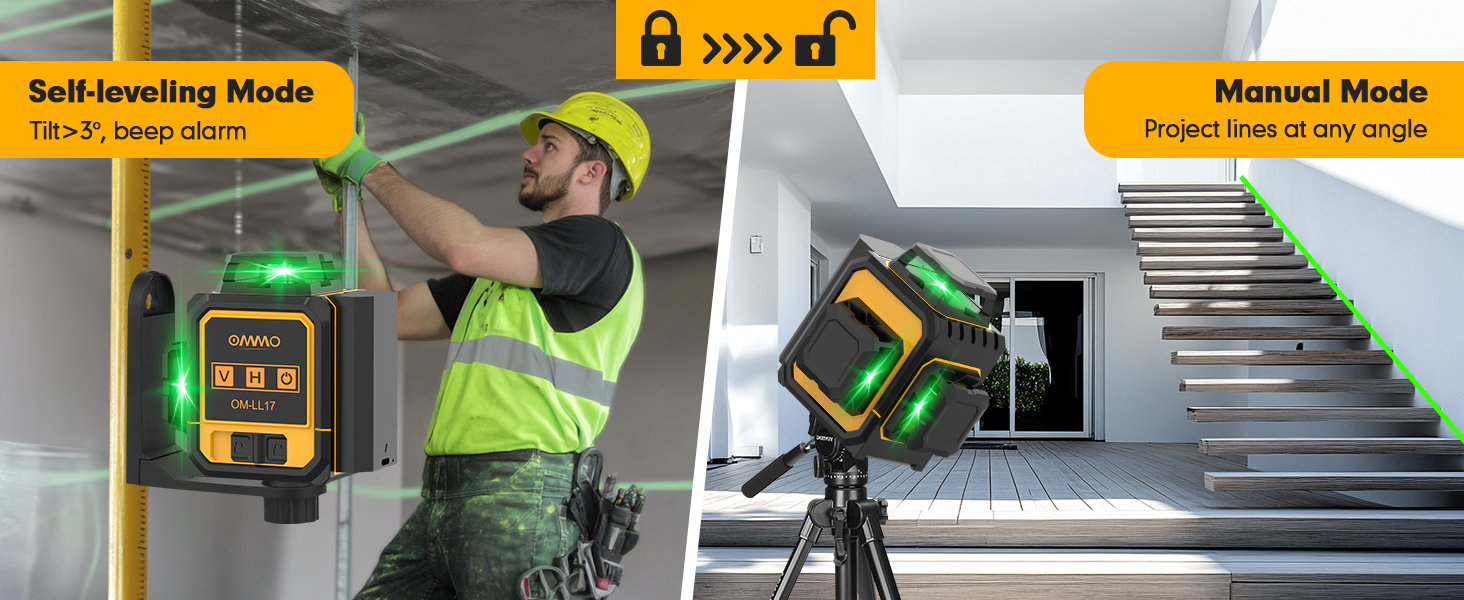
Image: The OMMO Laser Level highlighting its 3600mAh rechargeable lithium battery and Type-C charging port, indicating long working and charging times.
4.2. Mounting the Laser Level
The OMMO Laser Level offers versatile mounting options:
- L-Shaped Magnetic Bracket: Attach the laser level to the L-shaped magnetic bracket. The strong magnets on the bracket allow for secure attachment to metal surfaces.
- 1/4"-20 Mount Thread: The laser level features a 1/4"-20 mount thread on its base, compatible with standard tripods or other mounting accessories.

Image: The OMMO Laser Level demonstrating its L-shaped magnetic bracket for attaching to metal surfaces and its 1/4"-20 mount thread for tripod compatibility.
5. Operating the Laser Level
5.1. Engegada/Apagada i Selecció de Mode
The OMMO Laser Level features a smart touch panel for intuitive control.

Image: Close-up of the OMMO Laser Level's smart touch panel, showing the Vertical (V), Horizontal (H), and Power/Brightness Adjustment buttons.
- Per encendre: Slide the lock switch on the side of the unit to the unlocked position. The laser level will automatically enter Self-Leveling Mode.
- Mode d'autonivell: In this mode, the laser level will automatically self-level within a ±3° range. If the tilt exceeds 3°, an audible beep will sound, and the laser lines will flash, indicating it is out of level. Place the device on a flat surface to stop the alarm.
- Mode manual: To activate Manual Mode (for projecting lines at any angle), keep the lock switch in the locked position. Then, touch the Power On/Off icon on the touch panel to turn on the laser. In this mode, the device will not self-level, and you can project tilt lines without an alarm.
- Per apagar: Slide the lock switch to the locked position.

Image: Visual representation of the OMMO Laser Level operating in Self-Leveling Mode (automatically leveling) and Manual Mode (projecting lines at an angle).
5.2. Laser Line Selection
Use the touch panel buttons to select desired laser lines:
- Touch the "V" icon to activate or deactivate vertical laser lines. The unit features two 360° vertical lines.
- Touch the "H" icon to activate or deactivate the 360° horizontal laser line.
- Lines can be used simultaneously or individually.

Image: Diagrams illustrating the 360° horizontal line, 360° vertical line, and two 360° vertical lines projected by the OMMO Laser Level.
5.3. Ajust de la brillantor
The laser level offers three adjustable brightness levels for optimal visibility in various lighting conditions. Touch the Power On/Off icon repeatedly to cycle through the brightness settings.
5.4. Operació de control remot
The included remote controller allows for convenient operation from a distance (up to 160ft), reducing the need to constantly approach the unit.
- Vertical Line (V): Press the 'V' button on the remote to toggle vertical lines.
- Horizontal Line (H): Press the 'H' button on the remote to toggle the horizontal line.
- Power/Brightness Adjustment: Press the Power/Brightness button on the remote to turn the unit on/off or adjust laser brightness.

Image: The OMMO Laser Level being operated by its remote control, showing the convenience of adjusting settings from a distance.
6. Aplicacions típiques
The OMMO Laser Level is suitable for a wide range of tasks, including but not limited to:
- Installing floor and ceiling tiles.
- Aligning wall decorations and pictures.
- Setting cabinets and shelves.
- Framing and drywall installation.
- Electrical outlet and switch alignment.
- General construction and renovation projects.

Image: Collage showing the OMMO Laser Level being used for installing kitchen cabinets, laying flooring, and aligning stairs, demonstrating its versatility.
7. Manteniment
- Neteja: Netegeu el dispositiu amb un suau, damp tela. No utilitzeu netejadors abrasius ni dissolvents.
- Emmagatzematge: Store the laser level in its carrying bag in a cool, dry place when not in use. Avoid extreme temperatures and direct sunlight.
- Cura de la bateria: For prolonged storage, charge the battery to approximately 50% and recharge every few months to maintain battery health.
- Durabilitat: The device is IP54 rated, offering dustproof and waterproof protection against splashes. However, avoid submerging the unit in water.

Image: The OMMO Laser Level shown in a dusty and wet environment, illustrating its IP54 dustproof and waterproof capabilities.
8. Solució De Problemes
| Problema | Causa possible | Solució |
|---|---|---|
| Les línies làser són tènues o no visibles. | Low battery; Bright ambient light; Incorrect brightness setting. | Charge the battery; Use in lower light conditions or with a laser detector; Adjust brightness using the Power/Brightness button. |
| Laser level beeps and flashes in Self-Leveling Mode. | Unit is tilted beyond its self-leveling range (±3°). | Place the laser level on a more level surface. |
| El comandament a distància no respon. | Remote battery low; Obstruction between remote and unit; Out of range. | Replace remote battery; Ensure clear line of sight; Move closer to the unit. |
| Les línies làser no són rectes ni precises. | Unit is not in Self-Leveling Mode; Unit has been dropped or damaged. | Ensure the lock switch is in the unlocked position for self-leveling; Contact customer support for repair if damaged. |
9. Especificacions
| Característica | Detall |
|---|---|
| Marca | OMMO |
| Número de model | OM-LL17 |
| Classe làser | Classe II, <1 mW |
| Línies làser | 3 x 360° Green Lines (1 Horizontal, 2 Vertical) |
| Rang d'autolivellament | ±3° |
| Modes de funcionament | Self-leveling Mode, Manual Mode |
| Tipus de bateria | Ió de liti de 3600 mAh (inclosa) |
| Temps de treball continu | Aprox. 5 hores |
| Font d'alimentació | Funciona amb bateria |
| Voltage | 3.7 Volts |
| Dimensions del producte | 7.55" de llargada x 3.6" d'amplada |
| Pes de l'article | 1.38 lliures |
| Material | Plàstic |
| Classificació IP | IP54 (Dustproof, Waterproof) |
10. Garantia i Suport
For warranty information or technical support, please refer to the contact details provided on the product packaging or visit the official OMMO weblloc web. Conserveu el rebut de compra com a comprovant de compra per a reclamacions de garantia.
Fabricant: OMMO


