1. Introducció
This manual provides essential information for the proper use and maintenance of your EBTOOLS 8-Inch 2-in-1 Pocket PC Computer. Please read this guide thoroughly before operating the device to ensure optimal performance and longevity. This compact and versatile device features an 8-inch touchscreen, a 360-degree rotating design, and runs on Windows 11 Pro.

Image: The EBTOOLS 8-Inch 2-in-1 Pocket PC shown in its tablet configuration, with a scenic road displayed on the screen.
2. Contingut del paquet
Verifiqueu que tots els elements que s'enumeren a continuació s'inclouen al paquet del producte:
- 1 x EBTOOLS 8-Inch 2-in-1 Laptop
- 1 x cable d'alimentació
- 1 x adaptador d'alimentació (endoll dels EUA)
- 2 x User Manuals (this document is one of them)

Image: The EBTOOLS 8-Inch 2-in-1 Pocket PC, its power supply cord, and the US plug adapter, laid out as they would appear in the package.
3. Producte acabatview
The EBTOOLS 8-Inch 2-in-1 Pocket PC is designed for portability and versatility. It features a compact form factor and a 360-degree rotating display, allowing it to function as both a laptop and a tablet.
Característiques principals:
- Processador: N100 CPU, capable of up to 3.4GHz frequency.
- Memòria: 12 GB de memòria RAM LPDDR5.
- Emmagatzematge: 512GB M.2 SSD, expandable up to 2TB.
- Visualització: 8-inch touchscreen with 360-degree rotation.
- Connectivitat: WiFi6 (2.4G/5G band) and Bluetooth 5.2.
- Càmera: 2MP 30 Frame HD built-in front camera for video calls.
- Teclat: Edge-less full-size QWERTY keyboard with integrated touchpad.
- Bateria: Built-in 5000mAh polymer lithium battery, providing 4-6 hours of use.
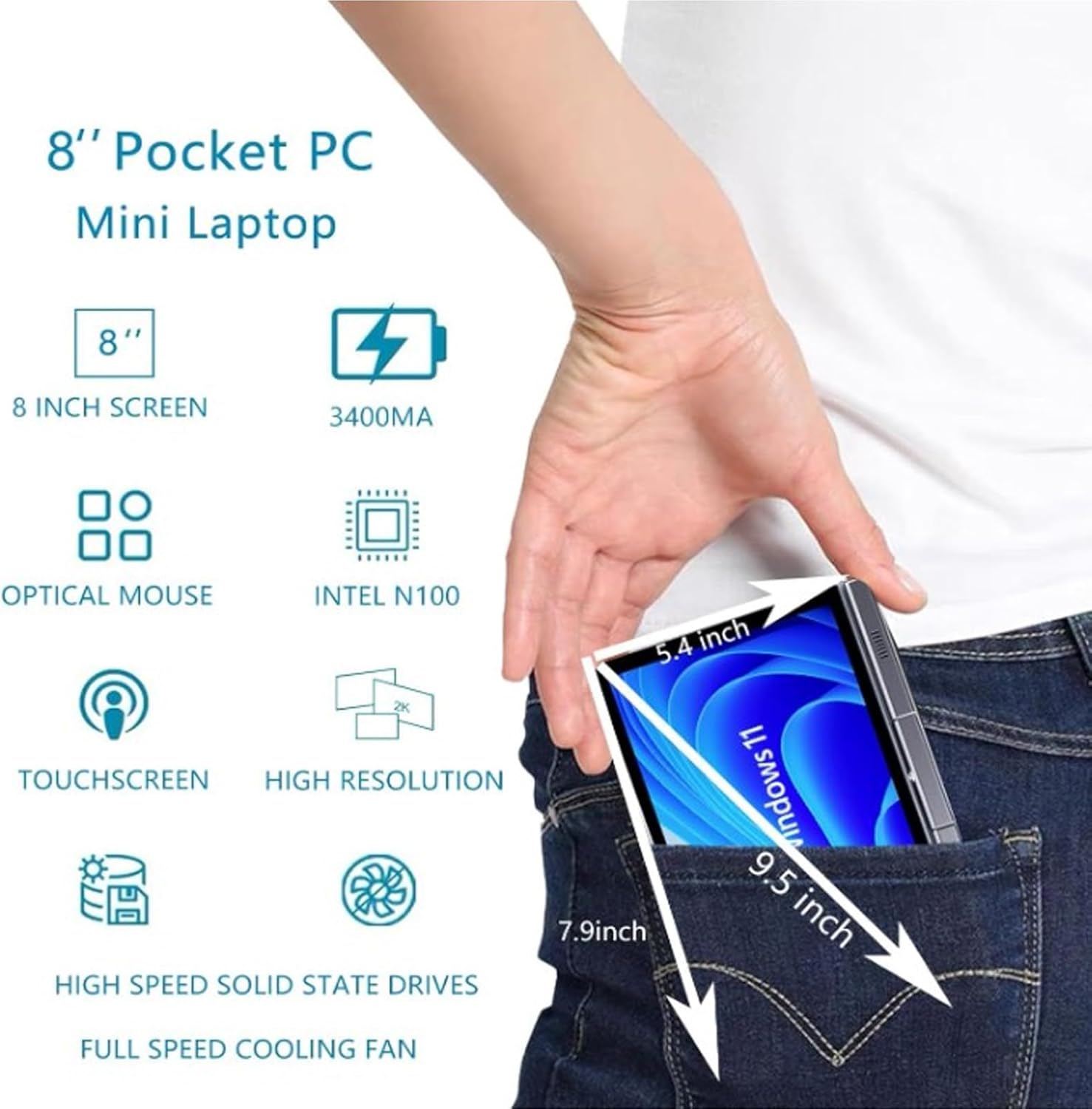
Image: A visual representation of the 8-inch Pocket PC's compact dimensions, demonstrating its portability by showing it fitting into a standard pocket.

Image: A labeled diagram highlighting the various ports (USB 3.0, Type-C, Audio, RJ45) and keyboard components (Front Camera, Speaker, Power Light, Power Button, Left/Right/Middle Mouse Buttons) of the EBTOOLS 8-Inch 2-in-1 Pocket PC.
4. Configuració
4.1 Engegada i càrrega inicials
- Carregueu el dispositiu: Before first use, connect the power adapter to the Type-C port on the device and plug it into a power outlet. Allow the device to charge fully. The power light indicator will show charging status.
- Encès: Press and hold the Power Button located on the keyboard deck until the screen illuminates.
- Configuració inicial: Follow the on-screen instructions to complete the Windows 11 Pro setup process, including language selection, network connection, and user account creation.
The device is designed for immediate use upon completion of the initial Windows setup.
5. Instruccions de funcionament
5.1 Teclat i touchpad
- The device features an edge-less full-size QWERTY keyboard for typing.
- The integrated touchpad supports standard mouse functions, including moving the pointer, scrolling, and left/right clicks. The left, right, and middle mouse buttons are clearly indicated on the diagram.
5.2 Funcionament de la pantalla tàctil
- The 8-inch display is a multi-touch screen. Use gestures such as tap, swipe, pinch-to-zoom, and rotate for navigation and interaction with applications.
5.3 360-Degree Rotation
- The display can be rotated 360 degrees to switch between laptop mode (traditional clamshell) and tablet mode (screen folded back against the base).
- When in tablet mode, the keyboard is automatically disabled to prevent accidental input.
5.4 Connexió de perifèrics
- USB 3.0: Connect external devices such as USB drives, mice, or keyboards to the USB 3.0 port.
- Tipus C: S'utilitza per carregar i transferir dades.
- High Definition Multimedia Interface (HDMI): Connect an external monitor or projector using an HDMI cable for extended display.
- 3.5mm Standard Headphone Jack: Connecteu auriculars o altaveus externs.
- Port de xarxa RJ45: Connecteu un cable Ethernet per a una connexió a Internet per cable.
5.5 Connectivitat sense fil
- WiFi 6: Access wireless networks (2.4G and 5G bands) for internet connectivity. Enable Wi-Fi through Windows settings.
- Bluetooth 5.2: Pair with Bluetooth-enabled devices such as headphones, speakers, or other peripherals. Enable Bluetooth through Windows settings.
6. Manteniment
6.1 Neteja
- Use a soft, lint-free cloth to clean the screen and exterior surfaces. For stubborn marks, slightly dampNetegeu el drap amb aigua o una solució netejadora de pantalles.
- Eviteu utilitzar productes químics agressius, netejadors abrasius o aerosols directament sobre el dispositiu.
- Assegureu-vos que el dispositiu estigui apagat i desconnectat abans de netejar-lo.
6.2 Emmagatzematge
- Guardeu el dispositiu en un lloc fresc i sec, allunyat de la llum solar directa i de temperatures extremes.
- If storing for an extended period, ensure the battery is charged to approximately 50% to preserve battery health.
7. Solució De Problemes
This section addresses common issues you might encounter with your EBTOOLS 8-Inch 2-in-1 Pocket PC.
7.1 El dispositiu no s'encén
- Assegureu-vos que el dispositiu estigui completament carregat. Connecteu l'adaptador de corrent i espereu uns minuts abans d'intentar tornar-lo a engegar.
- Verify the power adapter and cable are securely connected and the power outlet is functional.
- Prova de mantenir premut el botó d'engegada durant 10-15 segons per fer un restabliment complet.
7.2 Problemes de connectivitat Wi-Fi o Bluetooth
- Comproveu si el Wi-Fi o el Bluetooth estan activats a la configuració de Windows.
- Restart the device and your wireless router/Bluetooth device.
- Ensure you are within range of the Wi-Fi network or Bluetooth device.
- Update wireless drivers if available.
7.3 La pantalla tàctil no respon
- Reinicieu el dispositiu.
- Assegureu-vos que la pantalla estigui neta i lliure de residus.
- Check for any system updates that might include touchscreen driver fixes.
7.4 Durada curta de la bateria
- Ajusteu la configuració d'energia a Windows per optimitzar l'ús de la bateria.
- Tanca les aplicacions innecessàries que s'executen en segon pla.
- Redueix la brillantor de la pantalla.
- Ensure the device is not running resource-intensive tasks continuously.
8. Especificacions
| Característica | Especificació |
|---|---|
| Sistema operatiu | Windows 11 Pro |
| Mida de la pantalla | 8 polzades |
| Processador | N100 CPU (up to 3.4GHz) |
| RAM | 12 GB LPDDR5 |
| Emmagatzematge | 512GB M.2 SSD (supports up to 2TB) |
| Càmera frontal | 2MP 30 Frame HD Built-In Camera |
| Bluetooth | BT 5.2 |
| Wireless Fidelity Type | 2.4G / 5G Band (WiFi6) |
| Interfícies | 1 x USB3.0, 1 x 3.5mm Standard Headphone Jack, 1 x High Definition Multimedia Interface Port, 1 x Type-C, 1 x RJ45 Network Port |
| Tipus de bateria | Bateria de liti de polímer de 5000 mAh integrada |
| Durada de la bateria | 4-6 hours (typical use) |
| Pes de l'article | 2.68 lliures (aprox. 1.22 kg) |
| Dimensions del paquet | 9.45 x 7.09 x 2.36 polzades |
9. Garantia i Suport
9.1 Garantia del producte
Specific warranty details for your EBTOOLS 8-Inch 2-in-1 Pocket PC are typically provided with your purchase documentation or on the manufacturer's official website. Please refer to these resources for information regarding warranty coverage, duration, and terms.
9.2 Atenció al client
For technical assistance, troubleshooting beyond this manual, or warranty claims, please contact EBTOOLS customer support. Contact information can usually be found on the product packaging, the manufacturer's weblloc web o a través del vostre distribuïdor.
When contacting support, please have your product model number (EBTOOLS9pxf4058ch-12) and purchase information readily available.


