1. Producte acabatview
The CYSSJF AS-2000C+HH3-1+20 Nurse Call System is designed for efficient multi-room management in various care environments such as hospitals, nursing homes, and residences. This system allows for quick identification of the room where assistance is required, displaying the call number on the screen. It helps caregivers respond promptly to patient or resident needs without searching from room to room.
Les característiques clau inclouen:
- Multi-Room Management: Ideal for facilities requiring efficient oversight of multiple rooms.
- Rapid Location Identification: The display screen immediately shows the room number of the caller, eliminating the need for manual searching.
- Pantalla digital clara: The screen clearly indicates the room number, enabling timely intervention.
- Aplicacions versàtils: Suitable for hospitals, nursing homes, and hotels to streamline assistance requests.
- Interfície fàcil d'utilitzar: Intuitive design allows staff to quickly identify and respond to calls.



2. Contingut del paquet
En desembalar-lo, comproveu que tots els components siguin presents i no estiguin danyats:
- 1 x Display Unit
- 20 x Waterproof Wall-Mountable Call Buttons (with built-in CR2032 batteries)
3. Instruccions de configuració
3.1 Display Unit Installation
- Connect the power adapter to the display unit's power input port.
- Route the power cable through the designated channel on the back of the display unit.
- Attach the battery cover (if applicable) and the wall-mount bracket to the back of the display unit.
- The display unit can be placed on a flat surface using its integrated stand or mounted on a wall using the bracket.
3.2 Call Button Placement
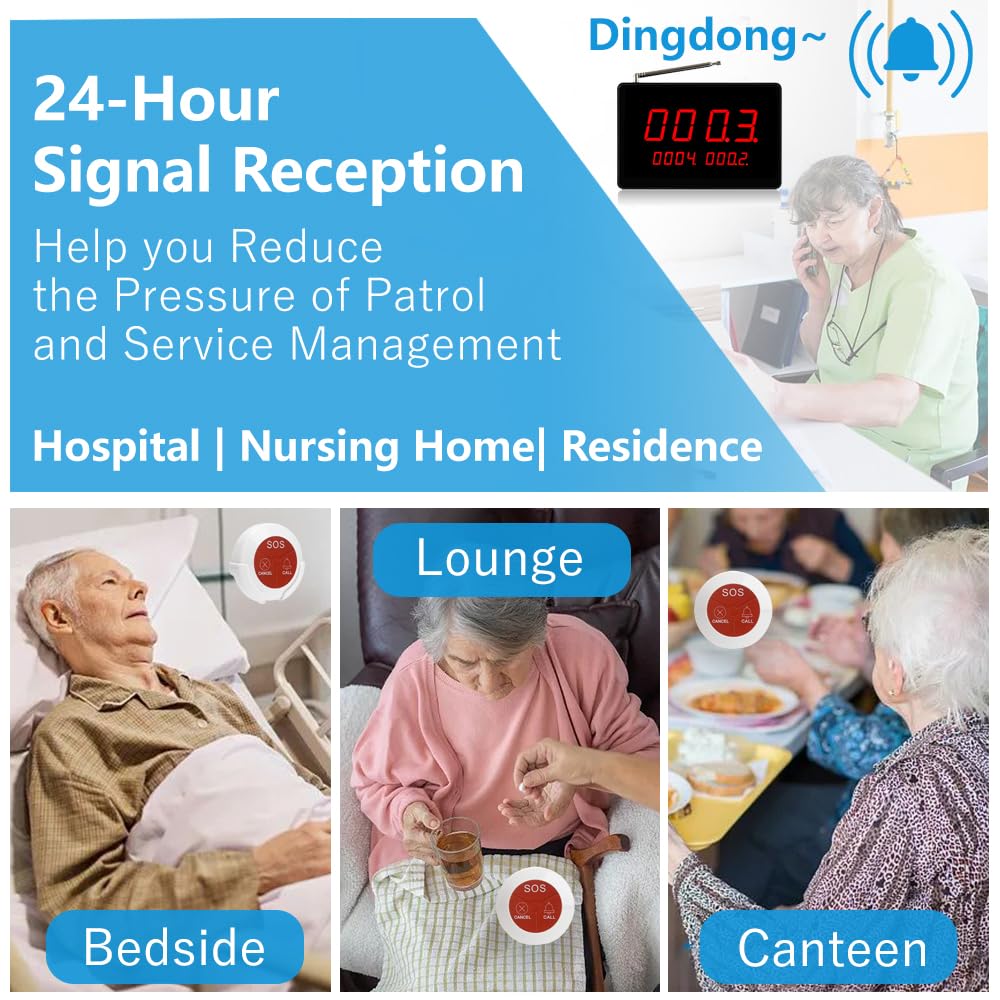
The call buttons are designed to be wall-mountable and waterproof. Place them in strategic locations where assistance might be needed, such as:
- Next to beds in patient rooms.
- In lounge areas or common rooms.
- Within bathrooms or washrooms.
- In dining areas or canteens.
Ensure buttons are within easy reach of individuals who may need to use them.


4. Instruccions de funcionament
4.1 Fer una trucada
Each call button features three distinct functions:
- Botó SOS: Press the "SOS" button for emergency situations. This will trigger an emergency alert on the display unit.
- Botó TRUCAR: Press the "CALL" button for general assistance. This will send a standard call alert to the display unit.
- Botó CANCEL·LA: Press the "CANCEL" button to clear an active call from the display unit.
When a call button is pressed, its corresponding number will appear on the display unit, often accompanied by an audible alert.
4.2 Responding to Calls
Upon receiving a call, the display unit will show the number of the room or button that initiated the call. Caregivers should proceed to the indicated location to provide assistance.
To clear a call from the display unit:
- Press the "CANCEL" button on the specific call button that initiated the alert.
- Alternatively, use the "Enter" button on the side of the display screen to clear the top-most displayed number. This action removes the call from the active queue on the display.
5. Manteniment
5.1 Neteja
Regularly clean the display unit and call buttons with a soft, damp cloth. Avoid using abrasive cleaners or solvents, as these can damage the surfaces. Ensure the devices are dry before use.
5.2 Battery Replacement (Call Buttons)
The call buttons are equipped with built-in CR2032 batteries. When a button's battery is low, its signal strength may decrease, or it may stop functioning. To replace the battery:
- Carefully open the back cover of the call button.
- Traieu la bateria CR2032 antiga.
- Inseriu una nova bateria CR2032, assegurant la polaritat correcta.
- Tanqueu de manera segura la coberta posterior.
Note: 4 x CR2032 batteries are built-in before shipment.
6. Solució De Problemes
If you encounter issues with your CYSSJF Nurse Call System, please refer to the following common problems and solutions:
| Problema | Causa possible | Solució |
|---|---|---|
| La unitat de visualització no s'encén. | No hi ha font d'alimentació o l'adaptador és defectuós. | Check if the power adapter is securely plugged into both the unit and a working power outlet. Ensure the power outlet is functional. |
| Call button not registering on display. | Low battery in call button, out of range, or signal interference. | Replace the CR2032 battery in the call button. Move the call button closer to the display unit. Ensure no large metal objects or thick walls are obstructing the signal. |
| Display unit shows incorrect time/date. | Time/date not set or reset after power loss. | Refer to the display unit's specific settings menu (usually accessed via side buttons) to adjust the time and date. |
| Audible alert not working. | Volume too low or mute function activated. | Check the volume settings on the display unit. Ensure it is not muted. |
7. Especificacions
| Característica | Detall |
|---|---|
| Número de model | AS-2000C+HH3-1+20 |
| Marca | CYSSJF |
| Display Unit Dimensions | 19.5 cm x 13.5 cm (7.68 polzades x 5.30 polzades) |
| Call Button Dimensions | 7 cm x 7 cm (2.75 polzades x 2.75 polzades) |
| Call Button Battery Type | CR2032 (4 batteries included per button, built-in) |
| Abast sense fil (interior) | 50-150 metres |
| Distància sense fil (a l'aire lliure) | Fins a 500 metres (sense obstacles) |
| Waterproof Rating (Call Buttons) | IP55 |
| País d'origen | Xina |
| Fabricant | Quanzhou Shuojiang Electronic Commerce Co., Ltd. |
8. Garantia i Suport
For warranty information and technical support, please refer to the documentation provided with your purchase or contact CYSSJF customer service directly. Details are typically available on the manufacturer's official weblloc web o a través del vostre distribuïdor.
Conserveu el vostre comprovant de compra per a reclamacions de garantia.


