1. Introducció
Thank you for choosing the Xiaomi Robot Vacuum S20+. This intelligent cleaning device is designed to provide efficient and thorough cleaning for your home, combining powerful suction with advanced mopping capabilities. Please read this manual carefully before use and retain it for future reference.
2. Informació important de seguretat
To reduce the risk of injury or damage, read and follow all safety precautions below:
- Aquest aparell el poden utilitzar nens a partir de 8 anys i persones amb capacitats físiques, sensorials o mentals reduïdes o amb manca d'experiència i coneixements si han rebut supervisió o instruccions sobre l'ús de l'aparell de manera segura i entenen els perills. implicats.
- Els nens no jugaran amb l'aparell. La neteja i el manteniment dels usuaris no els han de fer els nens sense supervisió.
- No utilitzeu el robot aspirador en ambients humits ni a prop de l'aigua.
- Ensure the charging base is placed on a level surface against a wall, with no obstacles within 0.5 meters on either side.
- Before cleaning, remove loose cables, small objects, or anything that could entangle the brushes.
- Do not use the robot vacuum to pick up large debris, sharp objects, or liquids.
- Only use the original charging adapter and base provided with the product.
- No intenteu reparar ni modificar el robot aspirador vosaltres mateixos. Poseu-vos en contacte amb el personal de servei autoritzat per obtenir ajuda.
3. Contingut del paquet
Desembaleu la caixa amb cura i assegureu-vos que hi hagi tots els elements:
- 1 x Xiaomi Robot Vacuum S20+ (White)
- 1 x Dustbin + Water Tank (pre-mounted)
- 2 coixinets de fregona
- 1 raspalls laterals
- 1 x Base de càrrega
- 1 x Manual d'usuari
- 1 x adaptador de càrrega
4. Producte acabatview
4.1 Robot Aspirador

Figura 4.1: superior view of the Xiaomi Robot Vacuum S20+, highlighting the main control buttons and the laser navigation dome.
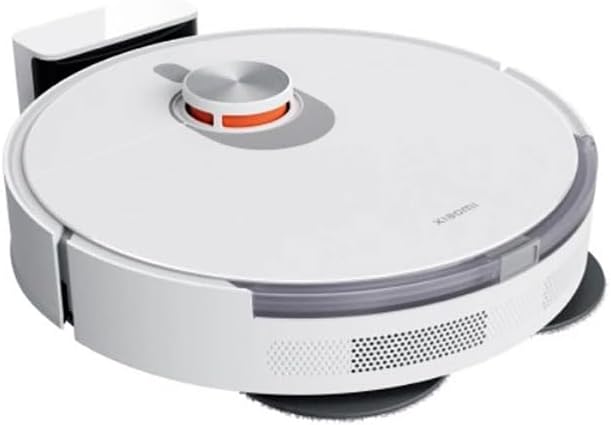
Figura 4.2: lateral view of the Xiaomi Robot Vacuum S20+, illustrating the dual rotating mop pads and the side brush for edge cleaning.
- Navegació làser SUD: Per a una cartografia i navegació precises.
- Botó d'encesa/neteja: Press to start/pause cleaning, press and hold to power on/off.
- Botó d'inici: Press to send the robot back to the charging base.
- Cubell d'escombraries i dipòsit d'aigua: Integrated compartment for dry debris and water for mopping.
- Coixinets de fregona giratoris dobles: For effective scrubbing and mopping.
- Raspall lateral: Escombra les restes de les vores i les cantonades cap a la trajectòria principal del raspall.
- Pinzell principal: Recull la pols i les deixalles del terra.
- Sensors: Cliff sensors, wall sensors, and obstacle avoidance sensors.
4.2 Base de càrrega

Figure 4.3: The Xiaomi Robot Vacuum S20+ docked with its charging base, ready for charging.
The charging base provides power to the robot vacuum and serves as its home station. It features charging contacts and an indicator light.
5. Configuració
5.1 Col·locació de la base de càrrega
Place the charging base on a hard, level surface against a wall. Ensure there is at least 0.5 meters of clear space on both sides of the charging base and 1.5 meters in front of it. Connect the power adapter to the charging base and plug it into a wall outlet. The indicator light on the charging base will illuminate.
5.2 Càrrega inicial
Place the robot vacuum onto the charging base. Ensure the charging contacts on the robot align with those on the base. The robot will automatically power on and begin charging. For first-time use, it is recommended to fully charge the robot before its initial cleaning cycle.
5.3 Connecting to the Mi Home/Xiaomi Home App
For full functionality and smart features, connect your robot vacuum to the Mi Home/Xiaomi Home app:
- Baixeu l'aplicació "Mi Home" o "Xiaomi Home" des de la vostra botiga d'aplicacions (Google Play Store o Apple App Store).
- Obre l'aplicació i crea o inicia la sessió al teu compte Xiaomi.
- Toqueu la icona "+" a la cantonada superior dreta per afegir un dispositiu.
- Select the Xiaomi Robot Vacuum S20+ from the list of available devices or allow the app to scan for nearby devices.
- Follow the on-screen instructions to connect the robot to your Wi-Fi network. Ensure your phone is connected to a 2.4GHz Wi-Fi network during the setup process.
- Once connected, you can name your robot and access its features.
6. Instruccions de funcionament
6.1 Inici d'un cicle de neteja
- Del robot: Press the Power/Clean button once to start a full cleaning cycle.
- Des de l'aplicació: Open the Mi Home/Xiaomi Home app, select your robot, and tap "Clean" or "Start Cleaning".
The robot will automatically map your home using its LDS laser navigation and plan an efficient cleaning path. It will return to the charging base when cleaning is complete or when the battery is low.
6.2 modes de neteja
The Xiaomi Robot Vacuum S20+ supports various cleaning functions:
- Sweep & Suction: The robot uses its side brush and main brush to sweep debris and then vacuums it into the dustbin.
- Fregar: The dual rotating mop pads scrub the floor while the robot dispenses water from the water tank.
- Sweep, Suction & Mopping: The robot performs all functions simultaneously for a comprehensive clean.
You can select and customize cleaning modes, suction power, and water flow levels via the Mi Home/Xiaomi Home app.
6.3 Using the Mi Home/Xiaomi Home App
The app provides advanced control and customization:
- Cartografia en temps real: View the robot's cleaning path and mapped areas.
- Neteja de zones: Defineix zones específiques perquè el robot les netegi.
- Murs virtuals i zones prohibides: Set boundaries to prevent the robot from entering certain areas.
- Neteja programada: Establir horaris de neteja diaris o setmanals.
- Comandament a distància: Manually control the robot's movement.
- Historial de neteja: Review registres de neteja anteriors.
- Consumable Status: Monitor the lifespan of brushes and filters.
6.4 Control de veu
The Xiaomi Robot Vacuum S20+ supports voice control via Amazon Alexa and Google Assistant. Link your Mi Home/Xiaomi Home account to your voice assistant app and use commands like "Alexa, start cleaning with Robot Vacuum" or "Hey Google, tell Robot Vacuum to go home."
7. Manteniment
Un manteniment regular garanteix un rendiment òptim i allarga la vida útil del teu robot aspirador.
7.1 Cleaning the Dustbin and Water Tank
- Press the release button to remove the integrated dustbin and water tank.
- Open the dustbin cover and empty the debris.
- Remove the filter and tap it gently to remove dust. Do not wash the filter with water.
- Rinse the dustbin and water tank with clean water. Allow them to air dry completely before reinserting.
- Refill the water tank with clean water before mopping. Do not add detergents or cleaning solutions to the water tank as this may cause blockages.
7.2 Neteja del raspall principal
- Flip the robot over and press the clips to remove the main brush cover.
- Lift out the main brush. Use the cleaning tool (if provided) to remove hair and debris tangled around the brush.
- Torneu a instal·lar el raspall principal i la coberta.
7.3 Neteja del raspall lateral
- Unscrew the side brush.
- Remove any hair or debris. If the bristles are bent, you can soak them in warm water for a few minutes to reshape them.
- Reattach the side brush.
7.4 Cleaning the Mop Pads
- Remove the mop pads from the robot.
- Wash the mop pads with water and mild detergent.
- Allow them to air dry completely before reattaching.
7.5 Neteja dels sensors i els contactes de càrrega
- Wipe the cliff sensors, wall sensors, and charging contacts on both the robot and the charging base with a soft, dry cloth.
- Ensure no dust or debris obstructs the sensors.
8. Solució De Problemes
Si teniu problemes amb el vostre robot aspirador, consulteu la taula següent per veure els problemes i les solucions més habituals.
| Problema | Causa possible | Solució |
|---|---|---|
| El robot no s'encén. | Low battery; not on charging base. | Place the robot on the charging base and ensure it is charging. |
| El robot no pot trobar la base de càrrega. | Charging base obstructed; robot too far. | Ensure clear space around the charging base. Manually place the robot closer to the base. |
| Mal rendiment de neteja. | Cubell de pols ple; raspalls enredats; filtre brut. | Buidar el contenidor de pols. Netejar el raspall principal i el raspall lateral. Netejar o substituir el filtre. |
| El robot es queda encallat sovint. | Obstacles; sensors bruts. | Clear obstacles from the cleaning path. Clean all sensors. |
| La funció de fregar no funciona. | Empty water tank; clogged water outlet; dry mop pads. | Refill water tank. Check for clogs. Moisten mop pads before use. |
| Problemes de connexió de l'aplicació. | Incorrect Wi-Fi password; 5GHz Wi-Fi; robot offline. | Ensure 2.4GHz Wi-Fi. Re-enter password. Restart robot and router. Try re-pairing. |
9. Especificacions
| Paràmetre | Detall |
|---|---|
| Model | S20+ (BHR8159EU) |
| Marca | XIAOMI |
| Color | Blanc |
| Funcions | Sweep, Suction, Mop, Scrub |
| Sistema de navegació | Navegació làser SUD |
| Max Suction Level | 6000 Pa |
| Capacitat de la bateria | 5200 mAh |
| Capacitat de la paperera | 450 ml |
| Capacitat del dipòsit d'aigua | 290 ml |
| Aplicació mòbil | Mi Home / Xiaomi Home |
| Control de veu | Amazon Alexa, Google Assistant |
| Font d'alimentació | Funciona amb bateria |
| Voltage | 230 Volts |
| Dimensions (paquet) | 50.6 x 44.2 x 15 cm |
10. Garantia i Suport
Xiaomi products are manufactured to high quality standards. In the unlikely event of a defect, your product is covered by a limited warranty from the date of purchase. Please refer to the warranty card included in your package for specific terms and conditions.
For technical support, troubleshooting assistance, or warranty claims, please contact Xiaomi customer service or visit the official Xiaomi website for your region. Have your product model number (S20+ / BHR8159EU) and proof of purchase ready when contacting support.
Assistència en línia: Visita Suport global de Xiaomi


