1. Introducció
Thank you for choosing the OHAYO Portable Bluetooth Speaker. This manual provides essential information for setting up, operating, and maintaining your speaker to ensure optimal performance. Designed for both indoor and outdoor use, this speaker delivers exceptional audio quality with its 15W loud stereo sound, IPX7 waterproof rating, and versatile connectivity options.
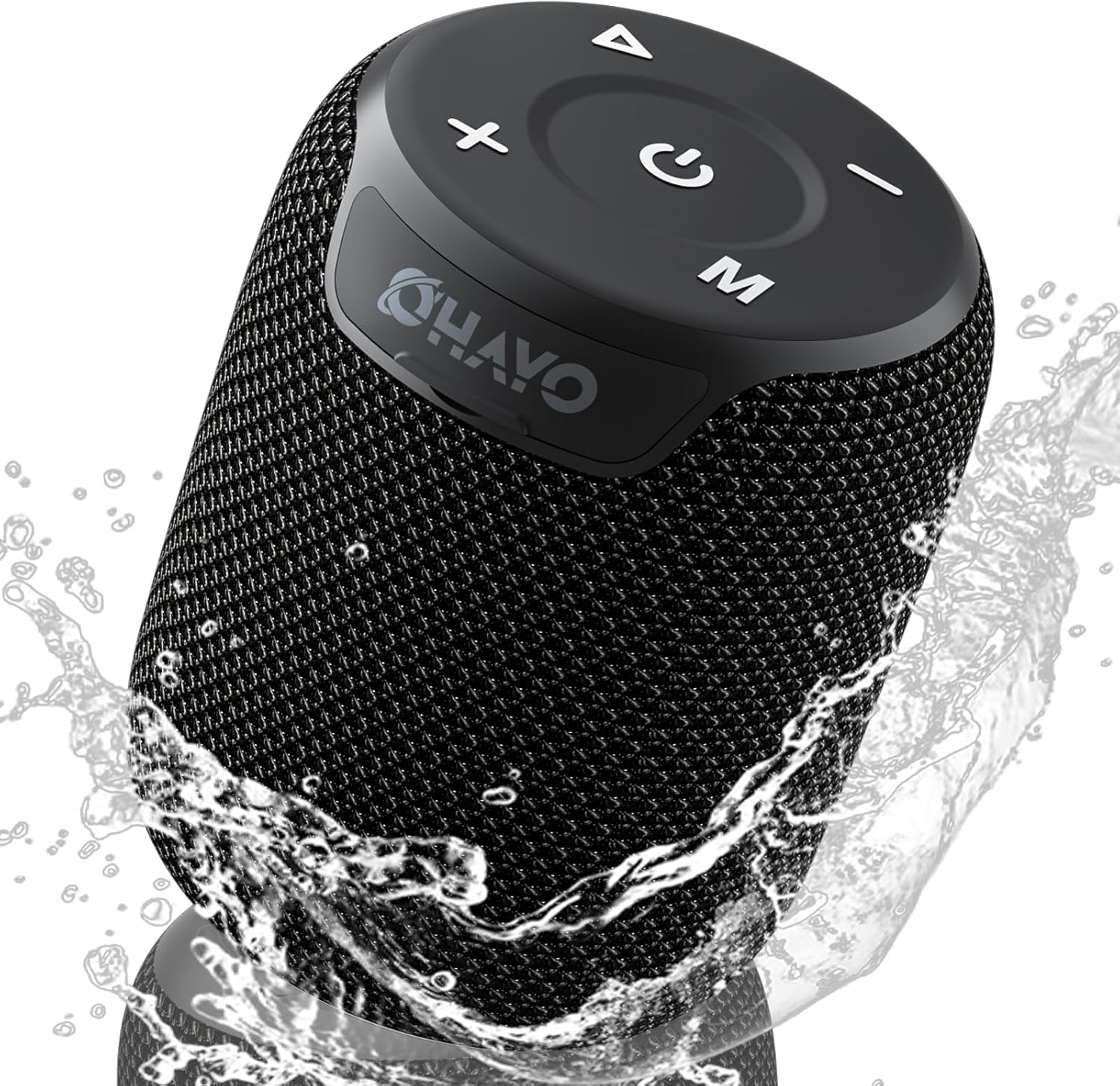
Image: The OHAYO Portable Bluetooth Speaker, showcasing its compact design and IPX7 waterproof capability with water splashing around it.
2. Producte acabatview
2.1 Característiques clau
- Exceptional Audio Performance: Features a 60mm mid-high speaker and a 65mm bass diaphragm for clear treble and rich bass.
- IPX7 Impermeable: Fully submersible up to 3 feet for 30 minutes, resistant to rain, dust, snow, and spills.
- Bluetooth V5.3: Ensures quick pairing and stable connection with automatic re-connection.
- Emparellament TWS: Connect two speakers for synchronized, immersive stereo sound.
- Reproducció versàtil: Supports Bluetooth, TF cards, and 3.5mm AUX input.
- Temps de joc llarg: Fins a 18 hores de reproducció de música amb una sola càrrega.
- Micròfon integrat: For high-quality, hands-free calls.
- Disseny portàtil: Compact, lightweight, and includes a handy lanyard for easy carrying.

Imatge: Una explosió view of the speaker's internal components highlighting the 60mm mid-high speaker and 65mm bass diaphragm, alongside icons representing key features like Aux-in, HD Mic, Hand-free Call, IPX7 Waterproof, Bluetooth 5.3, Micro SD support, and 16 hours of playtime.
2.2 Controls i ports
The OHAYO speaker features intuitive controls located on the top panel and essential ports for connectivity.

Imatge: Una imatge detallada view of the speaker's top panel, showcasing the sleek black design with bold white buttons for power, volume control, mode selection, and track navigation.
- Botó d'encesa: Manteniu premut per encendre/apagar.
- Puja el volum (+): Augmenta el volum.
- Baixar el volum (-): Disminuir el volum.
- Botó Reproduir/Pausa: Reprodueix o posa en pausa l'àudio.
- Botó Mode (M): Switch between Bluetooth, AUX, and TF Card modes.
- Port de càrrega USB-C: Per carregar l'altaveu.
- Port d'entrada AUX: Per a connexió d'àudio amb cable.
- Ranura per a targetes TF: Per reproduir música directament des d'una targeta Micro SD.
3. Primers passos
3.1 Càrrega de l'altaveu
Before first use, fully charge the speaker. Use the provided Type-C charging cable.
- Connect the Type-C end of the cable to the speaker's charging port.
- Connecteu l'extrem USB-A a un adaptador de corrent USB compatible (no inclòs) o al port USB d'un ordinador.
- L'indicador lluminós de càrrega s'il·luminarà. La càrrega completa triga aproximadament 3 hores.
- El llum indicador canviarà o s'apagarà un cop finalitzada la càrrega.

Image: The OHAYO speaker connected to a USB-C charging cable, illustrating its fast charging capability and long battery life.
3.2 Engegada/apagada
- Per encendre: Premeu i manteniu premut el botó d'engegada durant 2 o 3 segons fins que sentiu un missatge audible i l'indicador lluminós s'encengui.
- Per apagar: Premeu i manteniu premut el botó d'engegada durant 2 o 3 segons fins que sentiu un missatge audible i l'indicador lluminós s'apagui.
4. Connectivitat
4.1 Vinculació Bluetooth
L'altaveu entrarà automàticament en mode d'emparellament Bluetooth quan s'engegui per primera vegada o si no hi ha cap dispositiu connectat.
- Ensure the speaker is powered on and in Bluetooth mode (blue indicator light blinking).
- Al dispositiu (telèfon intel·ligent, tauleta, ordinador portàtil), activeu el Bluetooth i cerqueu els dispositius disponibles.
- Select "OHAYO X2" from the list of devices.
- Once connected, the speaker will emit a confirmation sound, and the blue indicator light will remain solid.
- L'altaveu es tornarà a connectar automàticament al darrer dispositiu emparellat quan s'engegui, si el Bluetooth del dispositiu està actiu i dins del seu abast.
4.2 Emparellatge estèreo sense fil veritable (TWS)
You can pair two OHAYO X2 speakers together for a true stereo sound experience.
- Ensure both OHAYO X2 speakers are powered on and not connected to any Bluetooth device.
- En un altaveu (aquest serà l'altaveu principal), premeu dues vegades el botó d'engegada. Sentireu un missatge que indica el mode d'emparellament TWS.
- Els dos altaveus es cercaran i es connectaran automàticament. Un cop connectats, sentireu un so de confirmació.
- Now, connect your device to the primary speaker via Bluetooth as described in Section 4.1. The audio will play through both speakers in stereo.

Image: Two OHAYO Portable Bluetooth Speakers wirelessly connected to a laptop, demonstrating the True Wireless Stereo (TWS) pairing feature for an immersive audio experience.
4.3 Mode d'entrada auxiliar
Use the 3.5mm AUX input for wired connection to devices without Bluetooth.
- Connect one end of a 3.5mm audio cable (not included) to the speaker's AUX-in port.
- Connecteu l'altre extrem a la presa de sortida d'àudio del vostre dispositiu.
- The speaker will automatically switch to AUX mode. If not, press the 'M' (Mode) button to select AUX mode.
4.4 Mode de targeta TF
Play music directly from a Micro SD (TF) card.
- Insert a Micro SD (TF) card with MP3 audio files a la ranura de la targeta TF.
- The speaker will automatically switch to TF Card mode and begin playing music. If not, press the 'M' (Mode) button to select TF Card mode.
5. Funcionament de l'altaveu
5.1 Reproducció de música
- Reproduir/pausa: Premeu el botó Reproduir/Pausa una vegada.
- Pista següent: Premeu i manteniu premut el botó de pujar el volum (+).
- Pista anterior: Premeu i manteniu premut el botó per baixar el volum (-).
- Control de volum: Premeu breument els botons de pujar el volum (+) o baixar el volum (-).
5.2 Trucades de mans lliures
When connected via Bluetooth, you can use the speaker for hands-free calls.
- Respon a la trucada: Premeu el botó Reproduir/Pausa una vegada.
- Finalitzar la trucada: Premeu el botó Reprodueix/Pausa una vegada durant una trucada.
- Rebutja la trucada: Manteniu premut el botó Reproduir/Pausa durant 2 segons.
- Torna a marcar l'últim número: Premeu dues vegades el botó Reproduir/Pausa.
6. Cura i Manteniment
Proper care ensures the longevity of your OHAYO Portable Bluetooth Speaker.
6.1 Impermeabilització (IPX7)
The speaker is IPX7 waterproof, meaning it can be submerged in water up to 1 meter (3 feet) for up to 30 minutes. Ensure the charging port cover is securely closed before exposing the speaker to water.

Image: A person submerged in water, holding the OHAYO speaker, demonstrating its fully IPX7 waterproof capability and seamless, enclosed design.
6.2 Neteja
- Netegeu l'altaveu amb un suau, damp tela.
- No utilitzeu netejadors abrasius, alcohol ni dissolvents químics.
- Assegureu-vos que l'altaveu estigui sec abans de carregar-lo.
6.3 Emmagatzematge
- Guardeu l'altaveu en un lloc fresc i sec, allunyat de temperatures extremes.
- Eviteu l'exposició prolongada a la llum solar directa.
7. Solució De Problemes
If you encounter issues with your speaker, please refer to the following common problems and solutions.
| Problema | Causa possible | Solució |
|---|---|---|
| L'altaveu no s'encén. | Bateria baixa; el botó d'engegada no s'ha premut prou estona. | Carregueu l'altaveu completament. Premeu i manteniu premut el botó d'engegada durant 2 o 3 segons. |
| No es pot emparellar per Bluetooth. | L'altaveu no està en mode d'emparellament; el Bluetooth del dispositiu està desactivat; massa lluny de l'altaveu. | Ensure speaker is in Bluetooth pairing mode (blinking blue light). Turn on Bluetooth on your device. Move device closer to speaker (within 33 feet/10 meters). |
| Sense so. | Volum massa baix; Mode incorrecte seleccionat; El dispositiu no reprodueix àudio. | Increase speaker and device volume. Press 'M' button to select correct mode (Bluetooth, AUX, TF Card). Ensure audio is playing on your device. |
| L'emparellament TWS ha fallat. | Speakers already connected to another device; Incorrect pairing steps. | Disconnect both speakers from any Bluetooth devices. Follow TWS pairing steps carefully (Section 4.2). |
| Mala qualitat de so. | Low battery; Obstructions between speaker and device; Source audio quality. | Charge the speaker. Reduce distance or remove obstructions. Try a different audio source. |
8. Especificacions
Detailed technical specifications for the OHAYO Portable Bluetooth Speaker.
| Característica | Detall |
|---|---|
| Nom del model | X2 |
| Marca | OHAYO |
| Tipus d'altaveu | A l'aire lliure |
| Tecnologia de connectivitat | Bluetooth |
| Tecnologia de comunicació sense fils | Bluetooth V5.3 |
| Potència de sortida màxima dels altaveus | 15 watts |
| Tipus de controlador d'àudio | Dynamic Driver (60mm mid-high, 65mm bass diaphragm) |
| Resposta de freqüència | 20 KHz (typical range for portable speakers) |
| Mode de sortida d'àudio | Estèreo (amb emparellament TWS) |
| Classificació impermeable | IPX7 |
| Durada de la bateria | Fins a 16-18 hores |
| Capacitat de la bateria | 3300 mAh |
| Temps de càrrega | Aprox. 3 hores |
| Font d'alimentació | Funciona amb bateria |
| Dimensions del producte | 3.97 "P x 3.97" W x 4.8" H |
| Pes de l'article | 14.9 unces |
| Mètode de control | Touch (buttons on top) |
| Dispositius compatibles | Ordinador portàtil, telèfon intel·ligent, tauleta, televisió |
| Material | Other (durable mesh and plastic) |
9. Garantia i Suport
9.1 Informació de la garantia
The OHAYO Portable Bluetooth Speaker comes with a Garantia limitada. Please retain your proof of purchase for warranty claims. For specific terms and conditions, refer to the warranty card included in your product packaging or contact customer support.
9.2 Atenció al client
For any questions, technical assistance, or warranty inquiries, please contact OHAYO customer support. We offer 24-hour customer support and easy, hassle-free returns & replacements. Support Extended Term of Service is also available.
Informació de contacte: Please refer to the contact details provided on the product packaging or the official OHAYO weblloc.


