Introducció
This manual provides detailed instructions for the Fantech Tamago WHG01 Wireless Headphones. It covers product features, setup, operation, maintenance, and troubleshooting to ensure optimal performance and user experience. The WHG01 offers tri-mode connectivity (StrikeSpeed 2.4GHz wireless, Bluetooth 5.2, and wired Type-C) and a detachable microphone, designed for versatile audio needs.
Què hi ha a la caixa
Verifiqueu que tots els elements que s'enumeren a continuació s'inclouen al vostre paquet:
- Fantech Tamago WHG01 Headset
- USB Receiver (for StrikeSpeed 2.4GHz wireless)
- Cable de càrrega tipus C.
- Detachable Omnidirectional Microphone
- Manual d'usuari

Producte acabatview
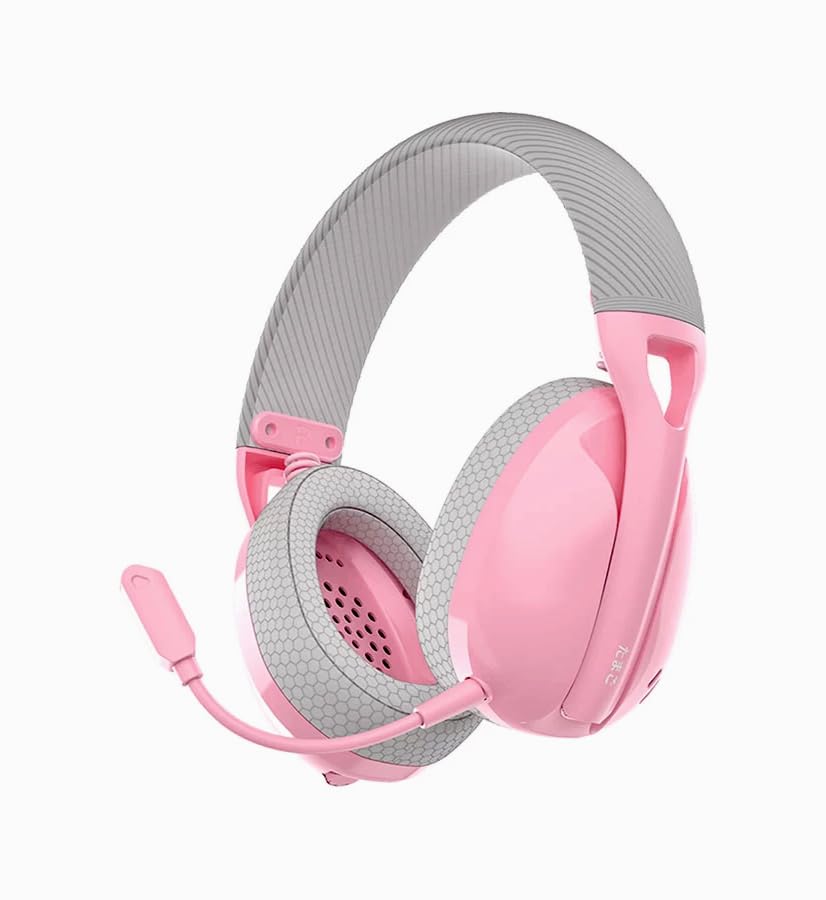
The Fantech Tamago WHG01 headphones are designed for comfort and versatility. Key features include:
- Disseny ultralleuger: Weighing approximately 168g (172g with microphone), ensuring comfort during extended use.
- Coixins transpirables per a les orelles: Fabric-covered ear cushions for enhanced comfort and airflow.
- Micròfon desmuntable: A flexible omnidirectional microphone for clear communication, which can be removed when not needed.
- Controls supraauriculars: Integrated buttons for power, volume adjustment, and microphone mute.

Configuració
1. Càrrega dels auriculars
Before first use, fully charge the headset. A built-in 400mAh battery provides up to 18 hours of playtime.
- Connect the supplied Type-C charging cable to the charging port on the headset.
- Connecteu l'altre extrem del cable a una font d'alimentació USB (per exemple, un port USB de l'ordinador o un adaptador de paret USB).
- L'indicador LED dels auriculars mostrarà l'estat de càrrega (consulteu la secció d'indicadors LED per obtenir més informació).
- Un cop estigui completament carregat, desconnecteu el cable de càrrega.

2. Connectar el micròfon
The WHG01 features a detachable omnidirectional microphone.
- Locate the microphone port on the left ear cup.
- Align the microphone's connector with the port and gently push it in until it clicks into place.
- To detach, gently pull the microphone out of the port.
3. Modes de connectivitat
The headset supports three connectivity modes: StrikeSpeed 2.4GHz Wireless, Bluetooth 5.2, and Wired Type-C.

StrikeSpeed 2.4GHz Wireless Connection
This mode provides low-latency wireless audio, ideal for gaming.
- Insert the USB receiver into an available USB port on your device (PC, laptop, compatible console).
- Power on the headset. The headset will automatically attempt to connect to the USB receiver.
- The LED indicator will confirm successful connection (refer to LED indicator section).
- Ensure the headset is selected as the audio output/input device in your system settings.
Connexió Bluetooth 5.2
For wireless connection to Bluetooth-enabled devices like smartphones, tablets, or laptops.
- Encendre els auriculars.
- Press and hold the mode button (or power button, depending on model specifics - refer to physical controls diagram if available) to enter Bluetooth pairing mode. The LED indicator will flash, indicating it's discoverable.
- On your device, go to Bluetooth settings and search for "Fantech Tamago WHG01" (or similar).
- Select the headset to pair. The LED indicator will change to a solid light upon successful pairing.
Connexió amb cable tipus C
For a direct, stable connection and simultaneous charging.
- Connect the Type-C charging cable to the headset's Type-C port.
- Connect the other end of the cable to a compatible Type-C port on your device.
- The headset will function as a wired audio device.
Instruccions de funcionament
Encès/Apagat
- Per encendre: Press and hold the Power button (usually located on the ear cup) for approximately 3 seconds until the LED indicator lights up.
- Per apagar: Premeu i manteniu premut el botó d'engegada durant aproximadament 5 segons fins que l'indicador LED s'apagui.
Control de volum
- Augmenta el volum: Press the '+' button on the ear cup.
- Disminueix el volum: Press the '-' button on the ear cup.
Silencia / Activa el micròfon
- Silenciar el micròfon: Press the dedicated microphone mute button (or a specific combination, refer to product diagram) on the ear cup.
- Activa el micròfon: Press the microphone mute button again.
Canvi de modes de connectivitat
The headset allows seamless switching between its tri-modes.
- Press the Mode button (if available) to cycle through StrikeSpeed Wireless, Bluetooth, and Wired modes.
- The LED indicator will change to reflect the active mode.
Manteniment
Neteja
- Feu servir un drap suau i sec per netejar les superfícies dels auriculars.
- Per als coixins de les orelles, netegeu suaument amb un drap lleugerament damp un drap i deixar assecar completament a l'aire.
- No utilitzeu productes químics agressius, dissolvents ni netejadors abrasius.
Emmagatzematge
- Guardeu els auriculars en un lloc fresc i sec, allunyat de la llum solar directa i de temperatures extremes.
- Eviteu col·locar objectes pesats sobre els auriculars.
- Si l'emmagatzemeu durant un període prolongat, assegureu-vos que la bateria estigui parcialment carregada (al voltant del 50%) per allargar-ne la vida útil.
Resolució de problemes
- Sense energia: Ensure the headset is charged. Connect the Type-C cable and check if the charging indicator lights up.
- No Sound (Wireless):
- Check if the headset is powered on and connected to the correct device.
- For StrikeSpeed, ensure the USB receiver is properly inserted and recognized by your device.
- For Bluetooth, ensure the headset is paired and selected as the audio output in your device's settings.
- Augmenta el volum tant dels auriculars com del dispositiu connectat.
- El micròfon no funciona:
- Assegureu-vos que el micròfon estigui ben connectat als auriculars.
- Check if the microphone is muted using the headset's controls.
- Verify that the correct microphone input device is selected in your computer's or device's sound settings.
- Problemes de connexió:
- Try restarting both the headset and the connected device.
- Per al Bluetooth, prova de desvincular i tornar a vincular els auriculars.
- Ensure there are no significant obstructions or interference sources between the headset and the wireless receiver/device.
Especificacions
| Model | WHG01 |
| Connectivitat | Tri-mode (StrikeSpeed 2.4GHz Wireless, Bluetooth 5.2, Wired Type-C) |
| Pes | 168g (172g with microphone) |
| Controlador d’altaveus | 40 mm |
| Sensibilitat de l'altaveu | 106 dB ± 3 dB |
| Tipus de micròfon | Detachable Omnidirectional |
| Dimensió del micròfon | ø6 mm * 2.7 mm |
| Sensibilitat del micròfon | -42±3 dB |
| Capacitat de la bateria | 400 mAh |
| Hora de joc | Fins a 18 hores |
| Port de càrrega | USB tipus C |
| Core Construction | ABS |
| Dispositius compatibles | PC, Laptop, Mobile devices |
Garantia i Suport
Per obtenir informació sobre la garantia i assistència tècnica, consulteu la pàgina oficial de Fantech. weblloc web o poseu-vos en contacte amb el vostre distribuïdor local. Conserveu el comprovant de compra per a reclamacions de garantia.
Fabricant: Fantech
Importador/Empacador: MRJ Electronics Ahmedabad Gujarat. electronicsmrj@gmail.com. Contact: 9023265213
Data de primera disponibilitat: 25 de setembre de 2024


