Noorio B210 & CL200

Noorio B210 & CL200 User Manual

La teva guia completa de configuració, funcionament i manteniment.

Introducció

This manual provides detailed instructions for the Noorio B210 2K Wireless Outdoor Security Camera and the Noorio CL200 2-Way Video Calling Indoor Camera. Please read this manual carefully before using the devices to ensure proper operation and to maximize their features.

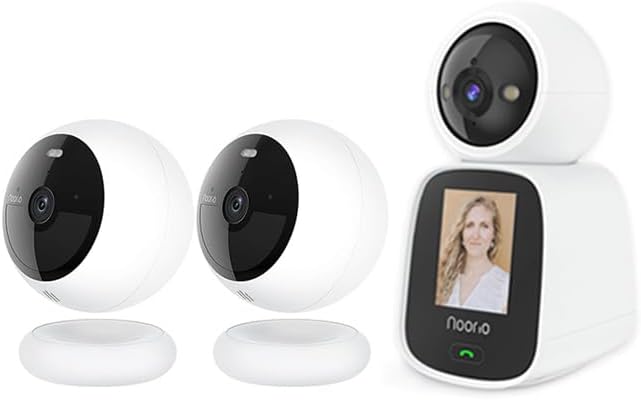
Noorio B210 outdoor camera and CL200 indoor camera side by side

Image: The Noorio B210 wireless outdoor security camera (left) and the Noorio CL200 2-way video calling indoor camera (right).

Producte acabatview

Noorio B210 2K Wireless Outdoor Security Camera

The Noorio B210 is designed for robust outdoor surveillance, offering high-resolution video and advanced detection capabilities.

Característiques principals:

  • 2K Resolution with HDR Video: Provides clear and detailed footage.
  • Two-Way Talk with Audio+: Enables clear communication through the camera.
  • Motion-Activated Spotlights: Deters intruders and enhances color night vision.
  • Visió nocturna en color: Offers full-color video even in low-light conditions.
  • Zones de moviment personalitzables: Allows users to define specific areas for motion detection.
  • 16 GB d'emmagatzematge local: Built-in storage for video clips, no monthly fees required.
  • 2.4G Wi-Fi & Alexa Compatibility: Easy connectivity and smart home integration.
  • 100% Wireless & Battery Powered: Flexible placement without wiring constraints.
  • Muntatge magnètic: Simple and secure installation on iron surfaces.
  • IP66 Weather Resistant: Garanteix un rendiment fiable en diverses condicions meteorològiques.
  • Detecció d'IA: Reduces false alerts by distinguishing between objects.
Noorio B210 camera with icons representing its features

Image: A hand holding the Noorio B210 camera, surrounded by icons illustrating its features: Color Night Vision, 2K QHD, IP66 Waterproof, Magnetic Wireless, Two Way Audio, AI Detection, Battery Powered, and Free Local Storage.

Comparison of regular night vision and color night vision from Noorio B210

Image: A visual comparison demonstrating the clarity of Noorio's Premium Night Vision, showing both regular night vision (monochrome) and enhanced color night vision.

Noorio B210 camera with 16GB eMMC storage chip highlighted

Image: The Noorio B210 camera with an overlay highlighting its 16GB eMMC local storage, capable of recording up to 6000 video clips securely.

Noorio B210 camera in rain, demonstrating IP66 weather resistance

Image: The Noorio B210 camera mounted outdoors, with raindrops on its lens, illustrating its IP66 Weather Resistant rating for reliable performance in wind, rain, or snow.

Noorio CL200 2-Way Video Calling Indoor Camera

The Noorio CL200 is an innovative indoor camera designed for seamless two-way video and voice communication, ideal for families with children or elderly members.

Característiques principals:

  • Two-Way Video & Voice Communication: Facilitates real-time, face-to-face conversations.
  • Built-in 2.4-inch Screen: Provides a clear display for video calls directly on the device.
  • Àudio d'alta qualitat: Features noise reduction and echo cancellation for clear sound.
  • Convenient One-Button Video Call: Simplifies initiating video calls to linked mobile phones.
  • Resolució de 2K a 3MP: Delivers sharp and detailed video quality.
  • Panoràmica i inclinació de 360°: Allows for comprehensive room coverage and remote adjustment.
  • Seguiment automàtic: Automatically follows moving subjects within its field of view.
  • APP Push Notifications: Alerts users to detected activity via the mobile application.
Noorio CL200 camera with icons representing its features

Image: The Noorio CL200 indoor camera with icons illustrating its features: Two-Way Video, Night Vision, Motion Detection, One Click Call, 2K 3MP, 360° Pan&Tilt, Auto Tracking, and APP Push.

Child pressing the one-click call button on Noorio CL200

Image: A child pressing the one-click call button on the Noorio CL200, demonstrating how to instantly connect with loved ones with a single touch.

Noorio CL200 facilitating a two-way video call between a child and an adult

Image: The Noorio CL200 displaying a video call, illustrating its two-way video calling capability for engaging in real-time, face-to-face conversations.

Multiple scenarios showing Noorio CL200 use cases

Image: A collage of images showing the Noorio CL200 in various family settings, highlighting its role as an all-in-one solution for preserving memories and providing constant care for loved ones.

Guia de configuració

Noorio B210 Installation

  1. Carregar la càmera: Before first use, fully charge the B210 camera using the provided USB cable.
  2. Trieu una ubicació: Select an outdoor location with good Wi-Fi signal and a clear view de la zona que voleu controlar.
  3. Muntatge:
    • Muntatge magnètic: Affix the included magnetic bracket to an iron surface (e.g., refrigerator, electrical box). The camera can then be securely mounted onto this bracket without screws.
    • Screw Mounting (Optional): For non-magnetic surfaces, use the provided screws and anchors to secure the bracket to a wall or ceiling, then attach the camera magnetically.
  4. Ajust d'angle: Once mounted, adjust the camera's angle to cover the desired area.

Noorio CL200 Setup

  1. Encès: Place the CL200 on a stable surface indoors and connect it to a power outlet using the provided power adapter.
  2. Arrencada inicial: The camera will power on and display a startup sequence on its screen.

Connecting to the Noorio App (Both Cameras)

  1. Descarrega l'aplicació: Cerca "Noorio" in your mobile device's app store (iOS or Android) and download the official application.
  2. Crea un compte: Open the app and follow the on-screen instructions to create a new Noorio account or log in if you already have one.
  3. Afegeix un dispositiu: Toqueu la icona "+" o el botó "Afegeix dispositiu" a l'aplicació.
  4. Seleccioneu el model: Choose the specific camera model you are setting up (B210 or CL200).
  5. Follow In-App Prompts: The app will guide you through connecting the camera to your 2.4GHz Wi-Fi network. This typically involves scanning a QR code displayed on your phone with the camera's lens or entering Wi-Fi credentials.
  6. Anomena la teva càmera: Assign a name to your camera (e.g., "Front Door B210", "Living Room CL200") for easy identification.

Instruccions de funcionament

Using the Noorio App

B210 Specific Operations

CL200 Specific Operations

Manteniment i cura

Resolució de problemes

ProblemaPossible solució
La càmera no es connecta a la Wi-FiAssegura't que la teva xarxa Wi-Fi sigui de 2.4 GHz. Comprova la contrasenya de la Wi-Fi. Acosta la càmera al router. Reinicia la càmera i el router.
Poca qualitat de vídeoCheck Wi-Fi signal strength. Ensure lens is clean. Adjust camera placement for better lighting.
B210 battery draining fastReduce motion detection sensitivity. Decrease live view usage. Ensure camera is not in an area with constant motion.
CL200 one-button call not workingEnsure the CL200 is connected to Wi-Fi. Verify the linked mobile device is online and has the Noorio app running.
Sense alertes de movimentCheck motion detection settings in the app. Ensure notifications are enabled for the app on your phone. Verify motion zones are correctly set.

Especificacions tècniques

CaracterísticaNoorio B210Noorio CL200
Resolució2K (HDR Video)2K 3MP
Font d'alimentacióFunciona amb bateriaCablejat (adaptador de corrent)
ConnectivitatWi-Fi de 2.4 GWi-Fi de 2.4 G
Emmagatzematge16GB Local Storage (eMMC)Local Storage (details not specified, typically microSD)
Característiques especialsColor Night Vision, Motion-Activated Spotlights, IP66 Weather Resistant, Magnetic Mount2.4-inch Screen, One-Button Video Call, 360° Pan & Tilt, Auto Tracking
Ús recomanatSeguretat exteriorIndoor Security, Baby Monitor, Pet Camera

Informació de la garantia

Noorio products typically come with a limited warranty. Please refer to the warranty card included in your product packaging or visit the official Noorio weblloc web per obtenir informació detallada sobre els termes i condicions de la garantia. Conserveu el rebut de compra com a comprovant de compra per a reclamacions de garantia.

Atenció al client

For any questions, technical assistance, or support, please contact Noorio Customer Service:

Noorio customer service contact information

Image: A graphic showing customer service contact details, including phone number and email address for Noorio support.

You can also visit the official Noorio weblloc web per a preguntes freqüents i recursos addicionals: www.nooriolife.com

Documents relacionats - B210 & CL200

Preview Noorio CL200 2K Indoor 2-Way Camera User Guide
User guide for the Noorio CL200 2K Indoor 2-Way Camera, covering packing, product introduction, setup, Wi-Fi connection, installation, and FAQ. Learn how to connect and use your Noorio camera for video calls and monitoring.
Preview Noorio Smart Hub Quick Start Guide
Concise guide to setting up and using the Noorio Smart Hub, including product features, LED indicators, setup steps, and regulatory information.
Preview Noorio Spotlight Cam Battery Quick Start Guide
Quick start guide for the Noorio Spotlight Cam Battery, covering product overview, setup, LED indications, charging, and customer support. Includes safety and compliance information.
Preview Noorio Spotlight Cam Battery Quick Start Guide
A comprehensive quick start guide for the Noorio Spotlight Cam Battery, detailing product features, setup instructions, LED indicators, charging procedures, and important safety and compliance notices.
Preview Noorio Spotlight Cam Battery Pro Quick Start Guide
A quick start guide for the Noorio Spotlight Cam Battery Pro, covering setup, product overview, LED indications, charging, safety notices, and customer service information.
Preview Noorio Contact Sensor Quick Start Guide
A concise guide to setting up and using the Noorio Contact Sensor, including what's included, product overview, LED indications, battery installation, device setup, and important regulatory information.