1. Introducció
This manual provides instructions for the Miracase Magnetic Wallet with Stand. This accessory is designed to securely attach to MagSafe-compatible iPhones and magnetic cases, offering card storage and a versatile stand function. Please read this manual thoroughly to ensure proper use and care of your product.
2. Característiques del producte
- Forta fixació magnètica: Features 4000g of holding force for secure attachment to your device.
- Suport de telèfon integrat: Converts into a stand for both landscape and portrait viewmodes de funcionament.
- Titular de la targeta: Designed to securely hold 4 to 5 cards.
- Disseny desmuntable: Allows for easy removal to facilitate wireless charging.
- Material premium: Constructed from durable PU leather for a comfortable feel.
- Àmplia compatibilitat: Compatible with iPhone 17 Pro Max/17 Pro/17/Air/16 Pro Max/16 Pro/16 Plus/16/15 Pro Max/15 Pro/15 Plus/15/14 Pro Max/14 Pro/14 Plus/14/13 Pro Max/13 Pro/13/12 Pro Max/12 Pro/12 without a case, or with a magnetic case. No és compatible amb iPhone 13/12 mini.
3. Contingut del paquet
- 1 x Miracase Magnetic Wallet with Stand
4. Configuració i instal·lació
Follow these steps to set up your Miracase Magnetic Wallet with Stand:
- Prepara el teu dispositiu: Ensure your iPhone is a compatible model (iPhone 12-17 series, excluding mini models) and is either without a case or equipped with a MagSafe-compatible magnetic case.
- Attach the Wallet: Align the Miracase Magnetic Wallet with the MagSafe area on the back of your iPhone or magnetic case. The wallet will snap into place securely due to its strong magnets.
- Inserir targetes: Open the wallet to access the card slots. Gently slide your cards (up to 4-5) into the designated slots. Ensure cards are fully inserted to prevent them from falling out.
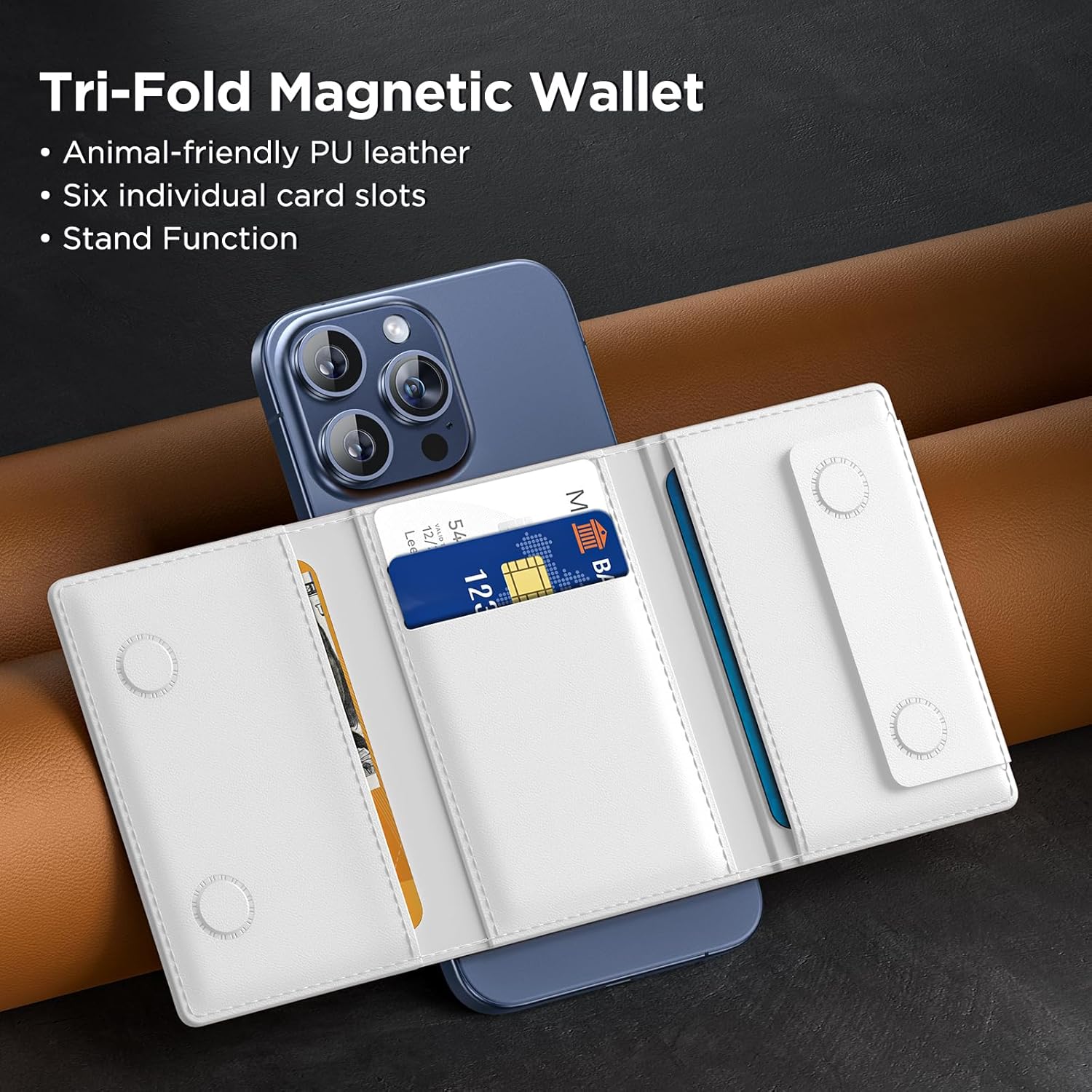
Figure 4.1: Inserting cards into the Miracase Magnetic Wallet.

Figure 4.2: Demonstrating the strong magnetic attraction of the wallet.
5. Instruccions de funcionament
The Miracase Magnetic Wallet offers versatile functionality:
5.1 Using the Stand Function
The wallet can be folded to create a stable stand for your iPhone in both landscape and portrait orientations.
- For Landscape Mode: Fold the wallet outwards along its creases to form a triangular stand. Place your iPhone horizontally on a flat surface with the wallet supporting it.
- For Portrait Mode: Fold the wallet in a similar manner, but position your iPhone vertically. The wallet will provide stable support for upright viewing.
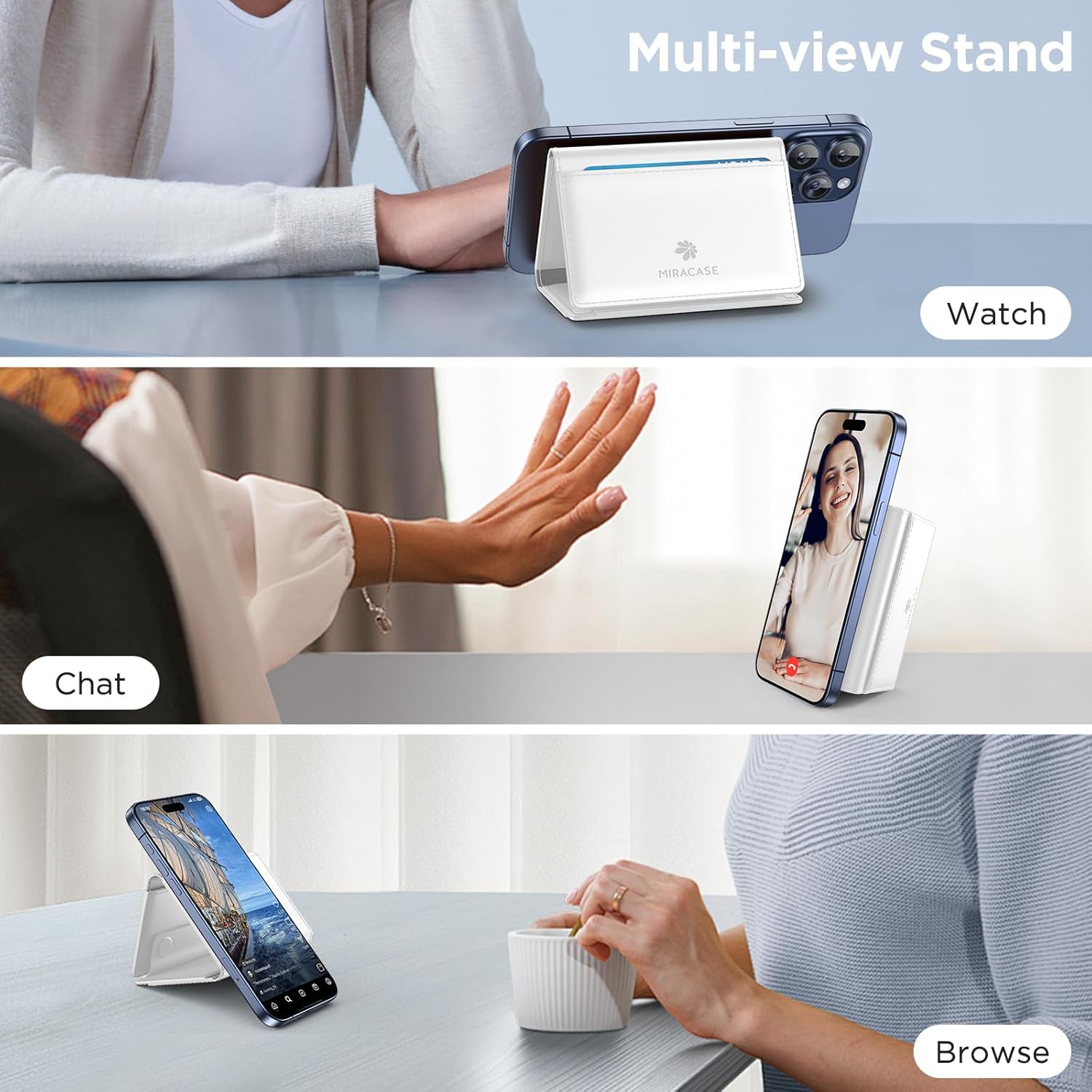
Figure 5.1: Using the multi-view stand function.
5.2 Detaching for Wireless Charging
To use wireless charging, simply detach the magnetic wallet from your iPhone. The strong magnetic connection allows for easy removal and reattachment.
5.3 Card and Cash Storage
The wallet features multiple slots for cards and a dedicated area for folded cash. Ensure items are placed securely within the wallet before closing.
Video 5.1: Demonstration of the Miracase Tri-Fold Magnetic Stand Wallet features, including card and cash storage, and stand functionality.
6. Manteniment
To maintain the appearance and functionality of your Miracase Magnetic Wallet:
- Neteja: Netegeu la superfície de cuir PU amb un drap suau iamp drap. Eviteu productes químics agressius o netejadors abrasius.
- Emmagatzematge: Store the wallet in a cool, dry place away from direct sunlight when not in use.
- Eviteu omplir excessivament: Do not overfill the card slots, as this can stretch the material and affect its ability to hold cards securely over time.
7. Solució De Problemes
If you encounter any issues with your Miracase Magnetic Wallet, refer to the following common solutions:
- Wallet not attaching securely:
- Ensure your iPhone is a MagSafe-compatible model (iPhone 12-17 series, excluding mini models).
- Verify that your phone case, if used, is MagSafe-compatible. Non-magnetic cases will prevent proper attachment.
- Check for any debris or obstructions between the wallet and your phone/case.
- Cards falling out:
- Ensure you are not exceeding the recommended capacity of 4-5 cards.
- Verify that cards are fully inserted into the slots.
- Stand function is unstable:
- Ensure the wallet is fully unfolded into its triangular stand shape.
- Place the phone and wallet on a flat, stable surface.
8. Especificacions
| Característica | Especificació |
|---|---|
| Dimensions del producte | 0.5 x 3.9 x 2.7 polzades |
| Pes de l'article | 2.89 unces |
| Material | Cuir PU |
| Color | D-White |
| Capacitat de la targeta | 4-5 cartes |
| Força magnètica | 4000 Gs |
| Compatibilitat | MagSafe-compatible iPhones (12-17 series, excluding mini models) or magnetic cases |
9. Garantia i Suport
Miracase products are designed for quality and durability. If you encounter any product problems or require assistance, please contact Miracase customer support. We are committed to offering a satisfactory solution for any issues you may experience.
For support, please visit the official Miracase store or contact us through the platform where you purchased the product.


