1. Introducció
This manual provides essential information for the safe and efficient operation of your SKYWORTH 50G6500G 50-inch 4K UHD Google TV. Please read this manual thoroughly before using the television and retain it for future reference.
The SKYWORTH 50G6500G features a 50-inch 4K UHD (3840 x 2160) LED display, Google TV operating system, Chameleon Extreme 2.0 picture processing, HDR10 support, Eye Care 2.0 technology, Game Mode, and DTS Studio Sound. It includes multiple connectivity options such as 3 HDMI ports and 2 USB ports, along with Wi-Fi (2.4G+5G) and Bluetooth.

Imatge 1.1: Frontal view of the SKYWORTH 50G6500G 50-inch TV.
2. Informació de seguretat
Per garantir un funcionament segur i evitar danys, observeu les precaucions següents:
- Font d'alimentació: Connecteu el televisor només a una font d'alimentació de CA dins del rang de volum especificat.tage gamma.
- Ventilació: Assegureu-vos que hi hagi una ventilació adequada al voltant del televisor. No bloquegeu les obertures de ventilació.
- Aigua i humitat: Do not expose the TV to rain, moisture, or excessive humidity.
- Fonts de calor: Keep the TV away from direct sunlight, radiators, heat registers, stoves, or other heat-producing appliances.
- Neteja: Desendolla el televisor abans de netejar-lo. Fes servir un drap suau i sec. Evita els netejadors líquids.
- Muntatge: Follow instructions carefully when mounting the TV on a wall or installing the stand.
- Nens: Superviseu els nens per evitar que s'enfilin al televisor o al suport.
- Manteniment: No intenteu fer la reparació del televisor vosaltres mateixos. Envieu totes les tasques de manteniment a personal de servei qualificat.
3. Contingut del paquet
Verifiqueu que tots els elements estiguin presents a l'embalatge:
- SKYWORTH 50G6500G 50-inch 4K UHD Google TV
- Remote Control (Find-my Remote)
- Cable d'alimentació
- Moble per a TV (2 peces)
- Cargols per a la instal·lació del suport
- Manual d'usuari (aquest document)
- Guia d'inici ràpid
4. Configuració
4.1. Desembalatge
Carefully remove the TV and all accessories from the packaging. It is recommended to retain the original packaging for future transport or servicing needs.
4.2. Instal·lació de l'estand
Si no munteu el televisor a la paret, fixeu-hi els suports inclosos:
- Col·loqueu el televisor cara avall sobre una superfície suau i plana per evitar que la pantalla es faci malbé.
- Alineeu cada suport amb les ranures corresponents de la part inferior del televisor.
- Secure each stand with the provided screws. Ensure they are tightened firmly.
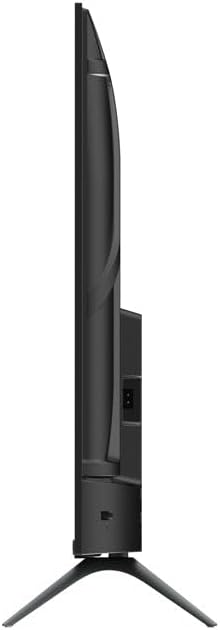
Imatge 4.1: Lateral view of the TV with stand.
4.3. Connexió de dispositius externs
El televisor ofereix diversos ports per connectar dispositius externs:
- HDMI: Connect Blu-ray players, gaming consoles, or set-top boxes to the 3 HDMI ports.
- USB: Connect USB drives for media playback to the 2 USB ports.
- Antena/cable: Connect your antenna or cable TV signal to the DVB-T/T2/S2 input.
- Ethernet: For a stable internet connection, connect an Ethernet cable to the LAN port.
- Sortida d'àudio: Use the digital audio output for external sound systems.

Image 4.2: TV side view amb ports.
4.4. Connexió d'alimentació i configuració inicial
- Connecteu el cable d'alimentació al televisor i després a una presa de corrent.
- Premeu el botó d'engegada del comandament a distància o del televisor per engegar-lo.
- Seguiu les instruccions que apareixen a la pantalla per completar la configuració inicial, inclosa la selecció d'idioma, la connexió de xarxa (Wi-Fi o Ethernet) i l'inici de sessió al compte de Google.
5. Funcionament del televisor
5.1. Control remot
The included remote control allows you to navigate the TV's features. The 'Find-my Remote' function assists in locating the remote if misplaced.
5.2. Interfície de Google TV
Your TV runs on Google TV, providing a personalized home screen with content recommendations from your subscriptions. Use the remote to navigate through apps, movies, shows, and settings.

Imatge 5.1: acabatview of the Google TV ecosystem and interface.
5.3. Característiques clau
- Chameleon Extreme 2.0: This technology enhances picture quality by improving super resolution, contrast, and dynamic noise reduction.
- HDR10: Experience a wider range of colors and contrasts, bringing more depth and realism to compatible content.
- Eye Care 2.0 / Low Blue Light: Designed to reduce eye strain during prolonged viewing by minimizing harmful blue light emissions.
- Mode de joc: Optimizes display settings for gaming, reducing input lag and enhancing responsiveness.
- Mode cineasta: Disables post-processing effects to preserve the original creative intent of films, providing a cinematic experience.
- So d'estudi DTS: Delivers immersive audio quality for an enhanced listening experience.

Image 5.2: Chameleon Extreme 2.0 technology demonstration.

Image 5.3: Low Blue Light feature explanation.

Image 5.4: Filmmaker Mode for cinematic viewing.
6. Manteniment
6.1. Neteja de la pantalla
Netegeu suaument la pantalla amb un drap suau i sense borrissol. Per a marques difícils, netegeu suaument.ampNetegeu el drap amb aigua o un netejador de pantalles especialitzat. No ruixeu líquid directament sobre la pantalla.
6.2. Neteja de l'armari
Wipe the TV cabinet with a soft, dry cloth. Avoid using abrasive cleaners, waxes, or solvents as they can damage the finish.
7. Solució De Problemes
Si teniu problemes amb el televisor, consulteu els problemes i solucions més comuns següents:
| Problema | Possible solució |
|---|---|
| Sense poder | Check if the power cable is securely connected to the TV and the power outlet. Ensure the outlet is functional. |
| No hi ha imatge, però hi ha so | Verifiqueu que s'ha seleccionat la font d'entrada correcta. Comproveu les connexions del dispositiu extern. |
| No hi ha so, però hi ha imatge | Check volume settings and ensure mute is off. Verify external audio connections if applicable. |
| El comandament a distància no funciona | Replace batteries. Ensure no obstructions between the remote and the TV. |
| No es pot connectar a la Wi-Fi | Check router status. Re-enter Wi-Fi password. Try restarting the TV and router. |
8. Especificacions
| Característica | Detall |
|---|---|
| Número de model | 50G6500G |
| Mida de la pantalla | 50 polzades |
| Tecnologia de visualització | LED |
| Resolució | 4K UHD (3840 x 2160) |
| Freqüència d'actualització | 60 Hz |
| Brillantor | 250 nits |
| Sistema operatiu | Google TV |
| Connectivitat | 3x HDMI, 2x USB, Wi-Fi (2.4G+5G), Bluetooth |
| Àudio | 2x 12W Speakers, DTS Studio Sound |
| Característiques especials | Chameleon Extreme 2.0, HDR10, Eye Care 2.0, Game Mode, Filmmaker Mode, Find-my Remote |
| Dimensions del producte (amb suport) | 111W x 64.7H x 25D cm (approx.) |
| Dimensions del producte (sense suport) | 111W x 64.7H x 8D cm (approx.) |
| Pes (amb suport) | 7.9 kg (aprox.) |
| Pes (sense suport) | 7.8 kg (aprox.) |
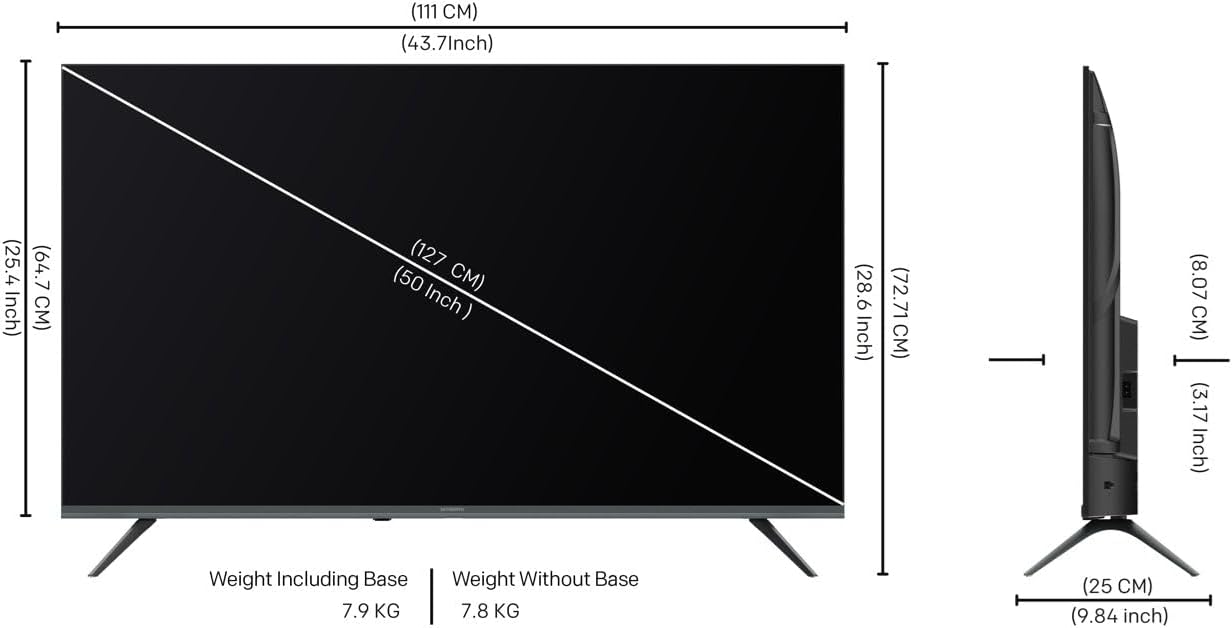
Image 8.1: TV dimensions diagram.
9. Garantia i Suport
9.1. Informació de la garantia
Your SKYWORTH 50G6500G television comes with a 2 any de garantia des de la data de compra. Aquesta garantia cobreix els defectes de fabricació en condicions d'ús normal. Si us plau, conserveu el comprovant de compra per a reclamacions de garantia.
The warranty does not cover damage caused by misuse, accidents, unauthorized modifications, or improper installation.
9.2. Atenció al client
For technical assistance, troubleshooting beyond this manual, or warranty service, please contact SKYWORTH customer support. Refer to the contact information provided with your product packaging or visit the official SKYWORTH weblloc web per obtenir detalls de suport regional.


