1. Introducció
The MAONO MaonoCaster E2 Gen2 is an integrated audio production studio designed for podcasting, streaming, and studio recording. This device offers dual XLR inputs, high-quality preamps, and a range of features to enhance your audio content. It is compatible with computers, smartphones, and tablets, supporting both Mac and Windows operating systems.
2. Contingut del paquet
Verifiqueu que tots els elements que s'enumeren a continuació s'inclouen al vostre paquet:
- 1 x MAONO MaonoCaster E2 Gen2 Audio Interface Mixer
- 1 x USB-A/USB-C to USB-C Cable
- 1 cable d'àudio de 3.5 mm
- 1 x Manual d'usuari

3. Producte acabatview
The MaonoCaster E2 Gen2 features an intuitive layout with various controls and ports for comprehensive audio management.
3.1 Controls del panell frontal
- Microphone Gain Knobs: Adjust input sensitivity for connected microphones.
- 48V Phantom Power Buttons: Activate 48V phantom power for condenser microphones.
- Mute Buttons: Instantly mute microphone inputs.
- Soundpads: 8 customizable pads for triggering sound effects.
- Botó Bluetooth: Initiate Bluetooth pairing for wireless audio input.
- Botó del monitor: Enable or disable self-monitoring of your voice.
- Noise Reducer Button: Activate 2-level intelligent noise reduction.
- Reverb Presets: Select from six preset reverb effects.
- Pitch Changer: Adjust vocal pitch for creative effects.
- SingAlong Mode: Allows monitoring of singing without audience hearing it.
- Botó de bucle invers: Enables simultaneous recording of computer audio and microphone input for live streaming.
- Control de volum de sortida: Controla el volum de sortida general.
3.2 Ports del panell posterior
- DC-5V: Port d'entrada d'alimentació.
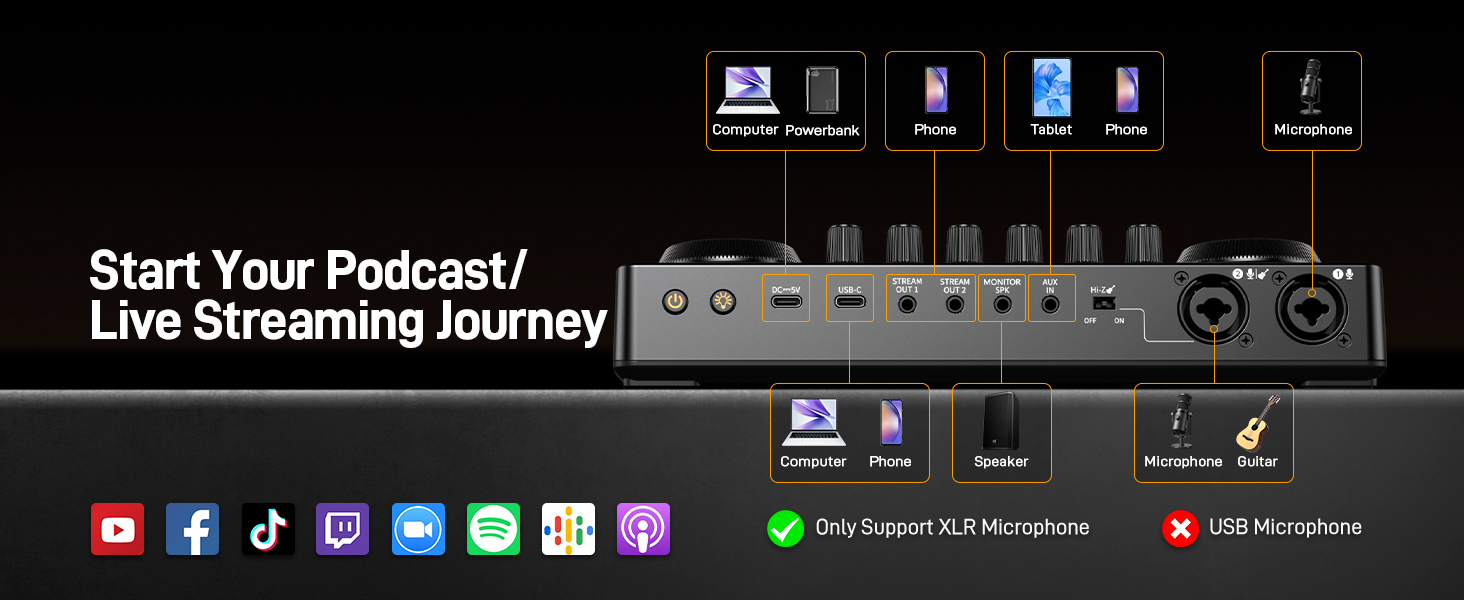
- USB-C: Connects to computers, smartphones, or tablets for audio and power.
- STREAM OUT 1/2: 3.5mm output jacks for connecting to streaming devices.
- MONITOR SPK: 3.5mm output for connecting monitor speakers.
- AUX IN: 3.5mm input for external audio sources.
- Interruptor Hi-Z: For high-impedance instrument input.
- XLR Combo Inputs (1 & 2): Connects XLR microphones or 1/4-inch instrument cables.

4. Guia de configuració
Follow these steps to set up your MaonoCaster E2 Gen2 for optimal performance.
4.1 Connexió d'alimentació
- Connect the provided USB-C cable to the DC-5V port on the rear panel of the MaonoCaster E2 Gen2.
- Connect the other end of the USB-C cable to a power adapter (not included) or a powered USB port.
- The device has a built-in 1500mA battery, offering up to 8 hours of use. Ensure it is charged for portable operation.
4.2 Connexió del micròfon
- Connect your XLR microphones to the XLR Combo Inputs (1 or 2) on the rear panel.
- If using condenser microphones, press the corresponding 48 V button on the front panel to supply phantom power.
- Ajusteu el Guanyar knob for each microphone to achieve an appropriate input level.


4.3 Instrument Connection
- Connect your instrument (e.g., guitar) to one of the XLR Combo Inputs using a 1/4-inch cable.
- Assegureu-vos el Hola-Z switch on the rear panel is set to 'ON' for high-impedance instruments.
4.4 Computer/Smartphone/Tablet Connection
- For digital audio connection, use the USB-C port to connect the MaonoCaster E2 Gen2 to your computer, smartphone, or tablet. The device is plug-and-play for Mac and Windows systems.
- For analog audio input from a phone, use the 3.5mm audio cable to connect your phone to the AUX IN port.
- For streaming output to a phone, connect your phone to the STREAM OUT 1 or STREAM OUT 2 ports using a 3.5mm audio cable.
4.5 Vinculació Bluetooth
- Premeu el botó BT button on the front panel to activate Bluetooth pairing mode. The indicator light will flash.
- On your device (e.g., smartphone), search for available Bluetooth devices and select 'MAONO E2 Gen2'.
- Once paired, the BT indicator light will remain solid. You can now stream background music or audio wirelessly.

5. Instruccions de funcionament
This section details the functions of the MaonoCaster E2 Gen2's controls and features.
5.1 Audio Input Control
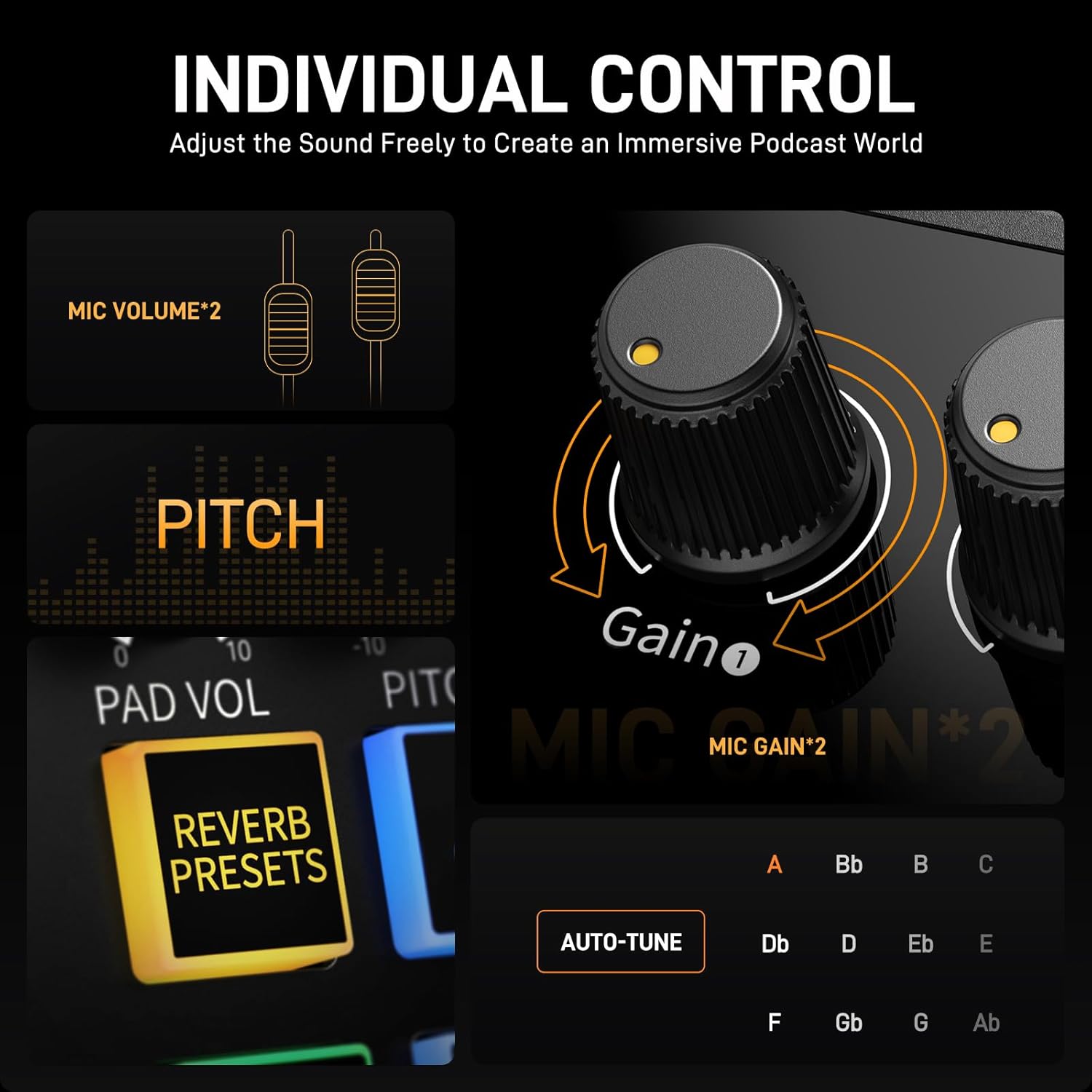
- Botons de guany: Rotate clockwise to increase microphone input sensitivity, counter-clockwise to decrease. Aim for levels that are strong but do not peak into the red.
- Volume Faders: Adjust the individual volume levels for each microphone input.
- Control de volum de música: Controls the volume of background music from Bluetooth or AUX IN.

5.2 Sound Effects and Vocal Enhancements
- Custom Soundpads: The 8 soundpads can be customized with your own audio clips (up to 20 seconds each). To record, press and hold a soundpad button, speak into the microphone, and release to save. To upload pre-recorded sounds, connect your device via Bluetooth or AUX-IN and play the sound while recording to a soundpad. Adjust the volume of each soundpad as needed.
- Pitch Changer: Use the pitch control to modify your vocal tone for various effects or privacy.
- Reverb Presets: Select from six different reverb settings to add depth and atmosphere to your voice.

5.3 Funcions especials
- Botó de silenci: Press the microphone mute button to instantly silence your microphone input. This is useful for handling unexpected interruptions during live sessions.
- Botó del monitor: Premeu el botó MONITOR button to hear your own voice through connected headphones. This provides zero-latency monitoring, essential for accurate performance.
- Funció de bucle: Activa el LOOPBACK button when live streaming from a computer. This function mixes the audio from your computer with your microphone input, sending the combined signal back to the computer for streaming.
- Reducció de soroll: Premeu el botó NOISE REDUCER button to activate the 2-level intelligent noise reduction feature. This helps to minimize unwanted background sounds like fan noise.

6. Manteniment
Proper care ensures the longevity and performance of your MaonoCaster E2 Gen2.
- Neteja: Feu servir un drap suau i sec per netejar l'exterior del dispositiu. Eviteu utilitzar netejadors líquids o dissolvents, ja que poden danyar l'acabat o els components interns.
- Emmagatzematge: Guardeu el dispositiu en un lloc fresc i sec, allunyat de la llum solar directa i de temperatures extremes.
- Manipulació: Eviteu deixar caure o sotmetre el dispositiu a forts impactes.
- Cura de la bateria: For optimal battery life, avoid fully discharging the battery frequently. If storing for extended periods, charge the battery to approximately 50%.
7. Solució De Problemes
If you encounter issues with your MaonoCaster E2 Gen2, refer to the following common solutions.
7.1 Sense so o volum baix
- Comproveu les connexions: Ensure all cables (microphones, headphones, USB-C, AUX) are securely connected.
- Ajustar el volum: Verify that microphone gain knobs, individual volume faders, and the main output volume knob are set to appropriate levels.
- Potència fantasma: If using a condenser microphone, ensure the 48V phantom power button is activated.
- Configuració de l'ordinador: On your computer, check that the MaonoCaster E2 Gen2 is selected as the input and output audio device in your sound settings and recording software.
7.2 Poor Audio Quality (Noise, Distortion)
- Guanyar Staging: Reduce microphone gain if the audio is distorting. Increase gain if the audio is too quiet and noisy.
- Reducció de soroll: Activate the 2-level noise reduction feature to minimize background noise.
- Qualitat del cable: Ensure you are using high-quality, shielded cables to prevent interference.
- Medi ambient: Record in a quiet environment to reduce ambient noise.
7.3 Problemes de connectivitat
- Connexió USB-C: Try a different USB-C port on your computer or a different USB-C cable. Ensure the cable supports data transfer.
- Emparellament Bluetooth: If Bluetooth fails to connect, try unpairing and re-pairing the device. Ensure no other devices are actively connected to the MaonoCaster E2 Gen2 via Bluetooth.
- Problemes del controlador: While plug-and-play, ensure your operating system is up to date.
7.4 Soundpad Issues
- Recording Sounds: To record directly to a soundpad, press and hold the desired pad, speak into your microphone, and release.
- Uploading Pre-recorded Sounds: To upload existing audio files, connect your phone or computer via Bluetooth or the AUX-IN port. Play the desired audio file and simultaneously record it to a soundpad by pressing and holding the pad button.
7.5 Durada de la bateria
- Càrrega: Ensure the device is fully charged before portable use.
- Consum d'energia: Features like 48V phantom power and high output levels can consume more battery.
8. Especificacions
| Característica | Detall |
|---|---|
| Número de model | E2 Gen 2 |
| Pes de l'article | 1.98 lliures |
| Dimensions del producte | 9.64 x 6.18 x 2.16 polzades |
| Tecnologia de connectivitat | Auxiliar, Bluetooth, USB |
| Nombre de canals | 10 |
| Font d'alimentació | Funciona amb bateria |
| Tipus de bateria | Ió de liti (inclòs) |
| Sistema operatiu | Windows, macOS |
| Dispositius compatibles | Ordinador personal, telèfon intel·ligent, tauleta |
| Programari compatible | OBS/Discord/Zoom/Audacity/Youtube/Facebook/TikTok/Twitch |
| Pref. Micròfonamps | 2 (60dB gain) |
9. Garantia i Suport
For warranty information and technical support, please refer to the official MAONO website or contact their customer service directly. Details are typically provided on the product packaging or within the included documentation.


