1. Introducció
The Groov-e Lisbon Portable DAB & FM Digital Radio offers a versatile listening experience with its dual-band radio capabilities and Bluetooth connectivity. Designed for portability, it features an intuitive LCD display, a built-in alarm clock, and a headphone jack for private listening. This manual provides detailed instructions for setup, operation, and maintenance of your Lisbon radio.

Imatge: Més deview of the Groov-e Lisbon radio highlighting its key features like DAB/FM, Bluetooth, LCD display, alarm clock, and headphone socket.
2. Característiques del producte
- DAB/FM Digital Stations & Bluetooth Streaming: This portable digital radio comes with DAB & FM technology, so tune into preset stations with auto-scan and manual tuning. Plus use Bluetooth to turn your radio into a speaker and stream your music on the go.
- Blue LCD Display: The LCD screen features a blue background light that notifies you of the radio station that you're tuned into and can be dimmed or turned off, while the easy front-on buttons are simple to use for easy tuning and navigation.
- Built-In Alarm Clock: The handy built-in alarm clock allows you to set your alarm clock as to when you want it to go off so you can stay organised and also features a snooze and timer function.
- 3.5mm Headphone Input: Thanks to the 3.5mm jack input you can easily plug in your own earphones so you can listen quietly and in peace while the expanding telescopic antenna allows for crystal clear signal.
- Designed to Travel: Portable, sleek, and sized to fit on a shelf or table, this radio can be powered using a USB cable or batteries (not included); a convenient travel companion that can be easily carried or tucked into your backpack or luggage.
3. Contingut del paquet
Si us plau, comproveu que hi hagi tots els elements:
- Groov-e Lisbon Portable DAB & FM Digital Radio
- Cable d'alimentació USB
- Manual d'usuari (aquest document)
4. Controls i pantalla
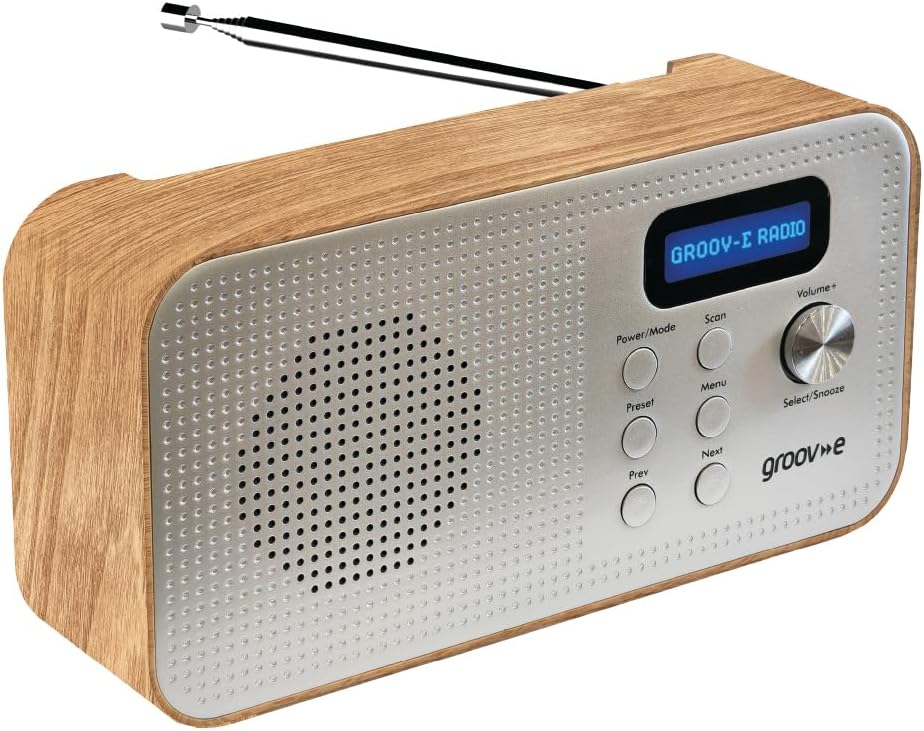
Image: Front panel of the Groov-e Lisbon radio, detailing the layout of buttons, the volume knob, and the LCD screen.
Controls del panell frontal:
- Botó d'alimentació / mode: Press to turn the radio on or off. Press repeatedly to cycle through DAB, FM, and Bluetooth modes.
- Botó d'escaneig: Initiates an auto-scan for available radio stations in DAB or FM mode.
- Botó de menú: Accesses the menu options for the current mode.
- Botó predeterminat: Used to save and recall your favorite radio stations.
- Prev Button: Navigates to the previous station, menu option, or track.
- Botó següent: Navigates to the next station, menu option, or track.
- Volume+ / Select/Snooze Knob: Rotate to adjust volume. Press to select a menu option or to activate the snooze function when an alarm sounds.
Pantalla LCD:
The blue backlit LCD display shows current station information, time, alarm status, and menu options. It can be dimmed or turned off to conserve power or for nighttime use.

Image: A graphic icon symbolizing an LCD display, indicating the presence of a digital screen on the radio.
5. Configuració
Powering Your Radio:
The Groov-e Lisbon radio can be powered in two ways:
- Potència USB: Connect the supplied USB cable to the radio's USB port and plug the other end into a compatible USB power adapter (not included) or a powered USB port.
- Potència de la bateria: For portable use, insert 4 x AA batteries (not included) into the battery compartment located on the back of the unit. Ensure correct polarity.
Antena:
Esteneu completament l'antena telescòpica per a una recepció òptima de ràdio DAB i FM.

Image: A woman enjoying the Groov-e Lisbon radio outdoors, illustrating its portable design and ease of use for travel.
6. Instruccions de funcionament
6.1 Engegada/Apagada i Selecció de Mode
- Per encendre la ràdio, premeu el botó Potència/Mode botó.
- Per apagar la ràdio, manteniu premut el botó Potència/Mode botó.
- To switch between DAB, FM, and Bluetooth modes, press the Potència/Mode botó repetidament.
6.2 Funcionament de la ràdio DAB
- Escaneig automàtic: En mode DAB, premeu el botó Escaneja button to automatically search for and store all available DAB stations.
- Sintonització manual: Utilitza el Anterior or A continuació buttons to browse through available stations.
- Desant els valors predefinits: Sintonitza l'emissora desitjada. Mantén premut el botó Preestablert button until "Preset Store" appears. Use Anterior/Següent per seleccionar un número preestablert (1-20) i, a continuació, premeu Select/Snooze botó per confirmar.
- Recordant presets: Premeu breument Preestablert botó. Ús Anterior/Següent per seleccionar el número preestablert desitjat i, a continuació, premeu Select/Snooze botó per confirmar.
6.3 Funcionament de la ràdio FM
- Escaneig automàtic: En mode FM, premeu el botó Escaneja button to automatically search for and store available FM stations.
- Sintonització manual: Utilitza el Anterior or A continuació botons per ajustar la freqüència.
- Desant els valors predefinits: Sintonitza l'emissora desitjada. Mantén premut el botó Preestablert button until "Preset Store" appears. Use Anterior/Següent per seleccionar un número preestablert (1-20) i, a continuació, premeu Select/Snooze botó per confirmar.
- Recordant presets: Premeu breument Preestablert botó. Ús Anterior/Següent per seleccionar el número preestablert desitjat i, a continuació, premeu Select/Snooze botó per confirmar.

Image: The Groov-e Lisbon radio displayed with text emphasizing its DAB/FM digital station capabilities and Bluetooth streaming functionality.
6.4 Connectivitat Bluetooth
- Switch the radio to Bluetooth mode utilitzant el Potència/Mode button. The display will show "Bluetooth Pairing".
- On your Bluetooth-enabled device (smartphone, tablet, etc.), search for "Groov-e Lisbon" in the Bluetooth settings.
- Select "Groov-e Lisbon" to pair. Once connected, the radio will indicate successful pairing.
- You can now stream audio from your device to the radio. Use the Anterior/Següent buttons on the radio to skip tracks, and the Volum+ botó per ajustar el volum.
6.5 Funció de despertador
- Configuració de l'alarma: Premeu el botó Menú botó i, a continuació, feu servir Anterior/Següent to navigate to "Alarm Setup". Press Select/Snooze to enter. Follow the on-screen prompts to set the alarm time, source (DAB/FM/Buzzer), and volume.
- Dormitar: Quan soni l'alarma, premeu el botó Select/Snooze botó per activar la funció de posposició. L'alarma s'aturarà temporalment i tornarà a sonar després d'un interval establert.
- Aturar l'alarma: Press any other button (except Snooze) to turn off the alarm for the day.
- Temporitzador de son: Premeu el botó Menú button, then navigate to "Sleep Timer". Use Anterior/Següent to set the desired sleep duration (e.g., 15, 30, 60 minutes). The radio will automatically turn off after the set time.

Image: A graphic icon symbolizing an alarm clock, indicating the radio's built-in alarm functionality.
6.6 Ús d'auriculars
- Plug any standard 3.5mm headphones into the headphone jack located on the side or back of the radio.
- The radio's internal speaker will automatically mute when headphones are connected.
- Ajusteu el volum amb el botó Volum+ perilla.

Image: A graphic icon symbolizing headphones, indicating the radio's headphone jack for private listening.
7. Manteniment
- Neteja: Feu servir un drap suau i sec per netejar la superfície de la ràdio. No utilitzeu productes de neteja abrasius ni dissolvents.
- Cura de la bateria: Si feu servir piles, traieu-les si no heu d'utilitzar la ràdio durant un període prolongat per evitar fuites.
- Emmagatzematge: Guardeu la ràdio en un lloc fresc i sec, allunyat de la llum solar directa i de temperatures extremes.
- Antena: Manipuleu l'antena telescòpica amb cura per evitar que es doblegui o es trenqui.
8. Solució De Problemes
| Problema | Causa possible | Solució |
|---|---|---|
| La ràdio no s'encén. | No power, flat batteries, or USB cable not connected properly. | Ensure USB cable is securely connected or replace batteries. |
| Mala recepció de ràdio (DAB/FM). | Antena no estesa, zona de senyal feble o interferències. | Fully extend the telescopic antenna. Try repositioning the radio. Avoid placing near other electronic devices. |
| Sense so. | Volume too low, headphones connected, or incorrect mode. | Increase volume. Disconnect headphones if not needed. Ensure correct mode (DAB/FM/Bluetooth). |
| L'aparellament de Bluetooth falla. | Radio not in pairing mode, device too far, or already paired. | Ensure radio is in Bluetooth mode and "Pairing" is displayed. Move device closer. Unpair from other devices if necessary. |
| L'alarma no sona. | Alarm not set, alarm volume too low, or alarm turned off. | Verify alarm settings (time, source, volume) in the menu. Ensure alarm is enabled. |
9. Especificacions
- Model: Lisbon (5060108299435)
- Dimensions del producte: 18.1 L x 7 W x 10 H centímetres
- Pes: 360 g
- Tecnologia de connectivitat: Bluetooth
- Tecnologia del sintonitzador: DAB, FM
- Font d'alimentació: Battery Powered (4 x AA, not included), AC Adapter (via USB cable)
- Bandes de ràdio admeses: DAB, FM
- Característiques especials: Portable, Headphone Socket, Alarm Clock, Bluetooth Connectivity, LCD Display
- Color: marró
- Fabricant: Rashmian Ltd.
10. Garantia i Suport
For warranty information and technical support, please refer to the documentation provided at the time of purchase or visit the official Groov-e weblloc web. També podeu contactar amb el vostre distribuïdor per obtenir ajuda.
Groov-e Official Weblloc: www.groov-e.co.uk


