1. Introducció
The Cummins Allison JetScan 4062 is a high-speed, bank-grade currency scanner and sorter designed for efficient and accurate processing of banknotes. This device offers advanced features for mixed bill counting and counterfeit detection, making it an essential tool for businesses requiring precise money handling.
This manual provides comprehensive instructions for setting up, operating, maintaining, and troubleshooting your JetScan 4062 to ensure optimal performance and longevity.
2. Informació de seguretat
Please read all safety instructions carefully before operating the device. Failure to follow these guidelines may result in injury or damage to the unit.
- Assegureu-vos que el dispositiu estigui col·locat sobre una superfície estable i anivellada per evitar que bolqui.
- Connect the power cord only to a grounded electrical outlet of the correct voltage (105-130V or 198-253V AC, 50/60 Hz, 1 Phase).
- No utilitzeu el dispositiu amb les mans mullades o en damp ambients.
- Keep fingers, hair, and loose clothing away from moving parts during operation.
- Desendolleu el dispositiu de la presa de corrent abans de netejar-lo o fer-ne cap manteniment.
- No intenteu obrir ni reparar el dispositiu vosaltres mateixos. Encarregueu totes les tasques de manteniment a personal qualificat.
3. Contingut del paquet
Verifiqueu que tots els elements siguin presents al paquet:
- Cummins Allison JetScan 4062 Currency Bill Counter
- Cable d'alimentació
- Manual d'usuari (aquest document)
- Any additional accessories (e.g., cleaning brush, dust cover)
4. Producte acabatview
Familiarize yourself with the main components of the JetScan 4062:

Figura 4.1: Frontal view of the Cummins Allison JetScan 4062 currency counter, showing the hopper, stackers, and control panel, along with the included power cord.

Figura 4.2: Detallada view of the control panel, displaying buttons for Denomination, Mode, Add, Verify, Unit, SD, Density, Clear, Strap, Cont, Day, All Strap, End Sub, Speed, Denom, Set Strap, and End Bat, along with the digital display.
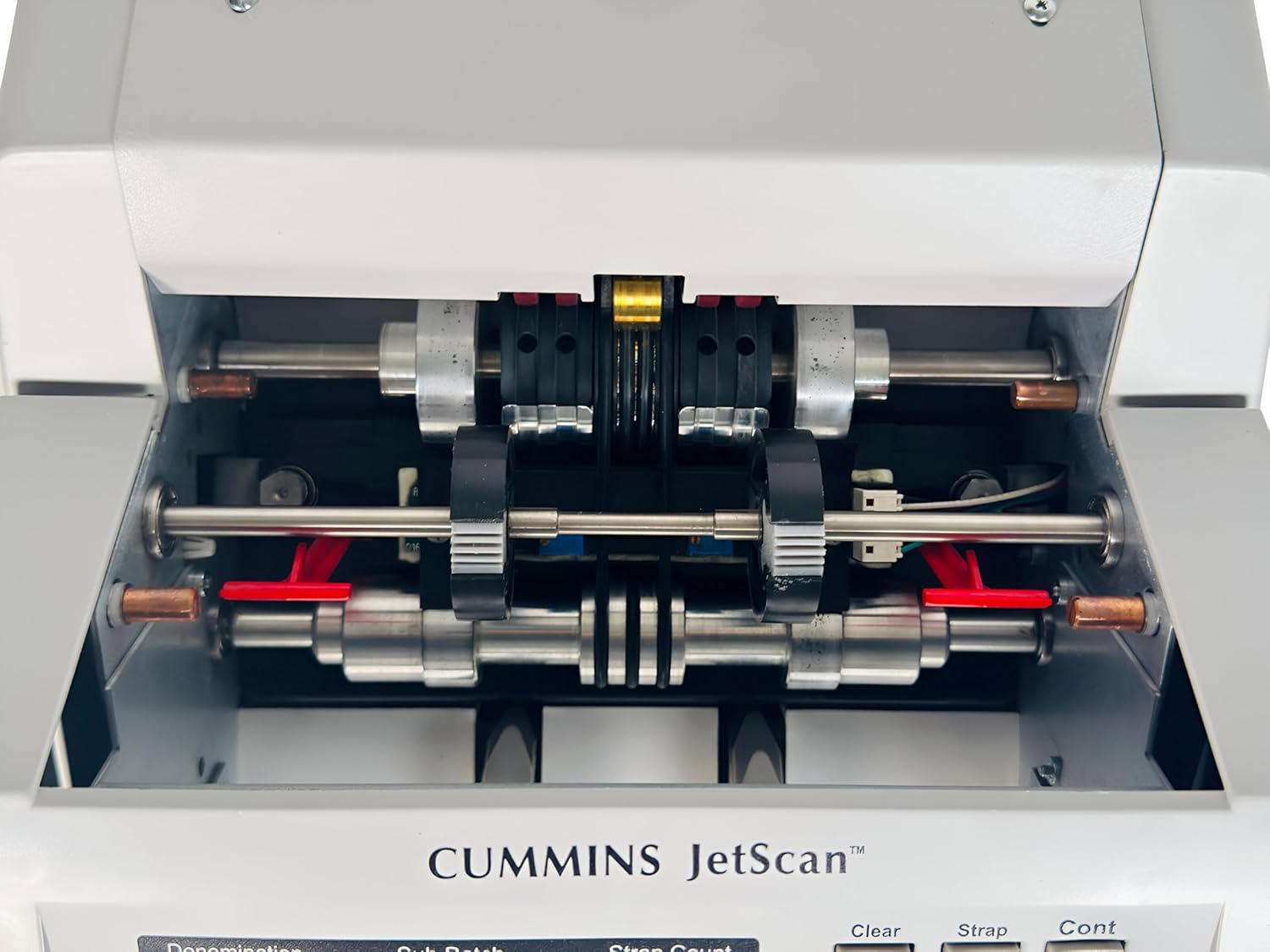
Figura 4.3: View of the internal bill transport and scanning mechanism, highlighting the rollers and sensors responsible for accurate counting and detection.

Figura 4.4: posterior view of the unit, showing the power switch, power input, and the product label with model number 4062, Part Number (PN) 406-9902-00, and Serial Number (SN) 1 4062 3051 13134.
Components clau:
- Tremuja: Where bills are loaded for counting.
- Stackers: Output trays where counted bills are collected.
- Tauler de control: Features a digital display and various buttons for mode selection and operation.
- Sensors: Integrated sensors for accurate counting and counterfeit detection.
- Entrada d'alimentació: Located at the rear for connecting the power cord.
5. Configuració
- Desembalatge: Carefully remove the JetScan 4062 from its packaging. Retain the packaging for future storage or transport.
- Col·locació: Place the unit on a flat, stable, and dry surface with adequate ventilation. Ensure there is enough space around the unit for bill loading and removal.
- Connexió d'alimentació:
- Insert the provided power cord into the power input port at the rear of the unit.
- Connecteu l'altre extrem del cable d'alimentació a una presa de corrent amb connexió a terra.
- Encès: Flip the power switch located at the rear of the unit to the 'ON' position. The display panel should illuminate.
6. Instruccions de funcionament
6.1. Funcionament bàsic
- Càrrega de factures: Neatly stack the bills to be counted in the hopper. Ensure they are aligned and not folded or crumpled.
- Starting Count: The machine will typically start counting automatically once bills are placed in the hopper.
- ViewResultats: The digital display will show the count results, including denomination breakdown if in mixed mode.
- Removing Bills: Once counting is complete, remove the bills from the stackers.
6.2. Funcions del tauler de control
The control panel allows you to select various counting modes and settings:
- Mode: Toggles between different counting modes (e.g., Mixed, Single Denomination).
- Denomination Buttons ($1, $5, $10, $20, $50, $100): Used to select a specific denomination for single-denomination counting or to set batch limits.
- Afegeix: Activates the add function, accumulating counts from multiple batches.
- Verificar: Used to verify the count of a pre-counted stack.
- Lot: Sets the machine to stop counting after a specified number of bills (e.g., 100 for strapping).
- Esborra: Clears the current count or error messages.
- Corretja: Related to strapping functions, often used with batch counting.
- Cont (Continuous): For continuous counting without stopping between batches.
- Velocitat: Adjusts the counting speed.
6.3. Detecció de falsificacions
The JetScan 4062 is equipped with advanced counterfeit detection technology. If a suspicious bill is detected, the machine will typically stop, alert the user, and display an error code or message. Remove the suspicious bill and press 'Clear' or 'Cont' to resume counting.
6.4. Vídeo de demostració del producte
Watch this official product video for a visual demonstration of the Cummins Allison JetScan 4062 in operation, including its counting capabilities.
Video 6.1: An official demonstration video by TeKswamp espectacleasing the Cummins Allison JetScan 4062 currency counter. The video displays the machine from various angles and demonstrates its bill counting functionality with a stack of mixed currency.
7. Manteniment
Regular maintenance ensures the longevity and accuracy of your JetScan 4062.
7.1. Neteja
- Apagar: Desconnecteu sempre el dispositiu abans de netejar-lo.
- Eliminació de pols: Use a soft, dry cloth or a small brush to remove dust and lint from the hopper, stackers, and external surfaces.
- Neteja del sensor: Gently wipe the sensors (refer to the diagram in the product overview for general location) with a lint-free cloth, possibly slightly dampened with isopropyl alcohol if necessary. Ensure sensors are dry before powering on.
- Neteja interior: For internal components, consult a qualified technician or refer to specific cleaning instructions provided by Cummins Allison, if available.
7.2. Emmagatzematge
When not in use for extended periods, store the unit in a cool, dry place, away from direct sunlight and extreme temperatures. Cover the unit to protect it from dust.
8. Solució De Problemes
This section addresses common issues you might encounter with your JetScan 4062.
| Problema | Causa possible | Solució |
|---|---|---|
| La màquina no s'encén. | Cable d'alimentació no connectat; interruptor apagat; no hi ha alimentació de la presa de corrent. | Ensure power cord is securely plugged in. Check power switch. Test outlet with another device. |
| Bills are jamming frequently. | Bills are not neatly stacked; worn or damaged bills; dirty sensors. | Straighten and fan bills before loading. Remove damaged bills. Clean sensors as per maintenance section. |
| Inaccurate counts. | Dirty sensors; bills not properly aligned; machine needs calibration. | Clean sensors. Ensure bills are loaded correctly. If problem persists, contact support for calibration. |
| Counterfeit detection errors. | Dirty sensors; genuine bill flagged incorrectly; actual counterfeit bill. | Clean sensors. Try the bill again. If it's a known genuine bill, it might be worn; if not, it could be counterfeit. |
Si trobeu algun problema que no apareix aquí o si les solucions suggerides no resolen el problema, poseu-vos en contacte amb l'atenció al client.
9. Especificacions
| Característica | Detall |
|---|---|
| Fabricant | Cummins |
| Model | JetScan 4062 Sensor Plus |
| Tipus | Comptador de factures amb detecció de falsificacions |
| Pes de l'article | 9 lliures |
| Número de model de l'article | 4062 |
| Número de peça del fabricant | 406-9902-00 |
| ASIN | B0DJ3HCPGW |
| Número de sèrie (Ex.ample) | 1 4062 3051 13134 |
| Voltage | 105-130V / 198-253V |
| Amps | 0.6A/0.3A |
| Hertz | 50/60 Hz |
| Fase | 1 |
| Característiques | Mixed Bill, Sensor Plus |
10. Garantia i Suport
10.1. Informació de la garantia
This product is typically covered by a manufacturer's warranty. Please refer to the warranty card included with your purchase or contact the seller, TeKswamp, for specific warranty terms and conditions.
10.2. Atenció al client
For technical assistance, troubleshooting beyond this manual, or warranty claims, please contact the seller or manufacturer directly. Have your model number (4062) and serial number ready when contacting support.
Nota: aquest dispositiu compleix la part 15 de les normes de la FCC. El funcionament està subjecte a les dues condicions següents: (1) Aquest dispositiu no pot causar interferències perjudicials i (2) Aquest dispositiu ha d'acceptar qualsevol interferència rebuda, incloses les interferències que puguin provocar un funcionament no desitjat.