Introducció
Thank you for choosing the ELECROW 14-inch Portable Monitor with Keyboard. This all-in-one device is designed to enhance your productivity and entertainment experience on the go. Featuring a 1080P Full HD IPS display, integrated keyboard, touchpad, and speakers, along with a built-in battery, it offers seamless connectivity and versatility for a wide range of devices.
This manual provides essential information on setting up, operating, and maintaining your portable monitor. Please read it thoroughly before use to ensure optimal performance and longevity of your device.
Producte acabatview
The ELECROW CrowView Note is a fully integrated portable monitor designed for maximum portability and functionality. It combines a high-resolution display with a full-featured keyboard and touchpad, making it an ideal companion for various computing tasks.

Figura 1: Davant view of the ELECROW 14-inch Portable Monitor with Keyboard, highlighting its 1080P FHD IPS display and USB Type-C connectivity.
Característiques principals:
- Portable All-in-One Design: Integrates screen, keyboard, touchpad, and speakers in a laptop-style form factor.
- Pantalla IPS Full HD de 14 polzades: (1920x1080) with 100% sRGB color gamut and 300cd/m² brightness for vibrant visuals.
- Bateria integrada de 5000 mAh: Provides power for the monitor and can reversely charge connected devices via Type-C.
- Àmplia compatibilitat: Connects to phones, laptops, PCs, Macs, Raspberry Pi, Jetson Nano, PS4/5, Xbox, and Nintendo Switch via USB-A and Type-C.
- Controls intel·ligents: Intuitive On-Screen Display (OSD) menu for adjusting brightness, volume, contrast, and input sources.
Ports i controls:

Figura 2: Detallada view of the ports and controls on the ELECROW CrowView Note. This includes the Power Indicator, DC 3.5mm Interface, USB-A ports, 3.5mm Headphone Jack, full-featured Type-C port, Mini HD port, and a 5V/5A output Type-C port.
- Costat esquerre: Power Indicator, DC 3.5mm Power Input, USB-A Port, 3.5mm Headphone Jack, Full-featured Type-C Port (for video, data, and power delivery).
- costat dret: USB-A Port, Mini HD Port (for video input), Type-C Port (5V/5A Output, for reverse charging).
Visual Features and Flexibility:

Figura 3: This image illustrates the integrated keyboard and touchpad, the 180-degree flexibility of the display, the FHD IPS panel, internal components showing 5V/5A PD protocol output, and the built-in speaker. It also highlights compatibility with Windows, macOS, Android, Linux, and Raspberry Pi.
The monitor features a responsive keyboard and an 84cm² touchpad for intuitive control. Its display offers 180-degree flexibility, allowing for various viewing angles and collaborative setups. The FHD IPS panel ensures wide viewangles d'ajust i reproducció precisa del color.
Dimensions del producte:

Figura 4: This image shows the physical dimensions of the 14-inch portable monitor (13.1" width, 8.7" height) and its wide compatibility with various devices including smartphones, laptops, PCs, Nintendo Switch, PS4/5, Xbox, Raspberry Pi, and Jetson Nano.
The ELECROW 14-inch Portable Monitor measures approximately 13.1 inches in width and 8.7 inches in height, with a weight of 1200g, making it highly portable.
Vídeo oficial del producte:
Vídeo 1: An official product video demonstrating the ELECROW 14-inch 1080P FHD Portable Monitor with Keyboard. The video showcases its various ports, integrated keyboard and trackpad, and its ability to connect to and power different single-board computers like Raspberry Pi, Jetson Nano, and LattePanda, highlighting its versatility for DIY AI and machine learning projects.
Guia de configuració
Què hi ha a la caixa:

Figura 5: Contents of the ELECROW Portable Monitor package. The box includes the CrowView Note portable monitor, a 12V-4A power adapter, a USB-A to USB-A cable, and a user manual.
En obrir el paquet, comproveu que hi hagi tots els components:
- 1x CrowView Note Portable Monitor
- 1x Power Adapter (12V-4A, customized for destination country)
- 1x USB-A to USB-A Cable
- 1 x manual d'usuari
Engegada inicial:
- Connect the provided power adapter to the DC 3.5mm power input port on the left side of the monitor.
- Connecteu l'adaptador de corrent a una presa de corrent.
- The power indicator light should illuminate, and the monitor will power on automatically or can be turned on using the power button (if present, refer to specific button layout in manual).
Connexió als dispositius:
El corbView Note supports multiple connection methods for various devices:
- USB Type-C (Full-featured): For devices with a full-featured USB-C port (supports video, data, and power delivery). Use a single USB-C to USB-C cable (not included) to connect your laptop, smartphone, or other compatible device. This port can also charge your device.
- Mini HD (HDMI) + USB-A: For devices with HDMI output (e.g., PC, game consoles, Raspberry Pi). Connect the Mini HD port on the monitor to your device's HDMI port using an appropriate cable (not included). For keyboard and touchpad functionality, connect a USB-A to USB-A cable (included) from the monitor's USB-A port to your device's USB-A port.
- Compartició d'energia: The 5V/5A output Type-C port on the right side can be used to reversely charge your mobile phone or Raspberry Pi, enhancing flexibility.
Instruccions de funcionament
Funcionament bàsic:
- Encès/apagat: Press and hold the power button (location specified in the physical manual) for a few seconds to turn the device on or off.
- Teclat i Touchpad: The integrated keyboard and touchpad function like a standard laptop. Ensure the USB connection is established for these to work with your connected device.
Menú de visualització en pantalla (OSD):
The OSD menu allows you to adjust various display settings. Access the OSD menu using the function keys or dedicated OSD buttons (refer to the physical manual for exact button layout).
- Brillantor/Contrast: Adjust the display's luminance and contrast levels for optimal viewing.
- Volum: Control the audio output from the built-in speakers.
- Font d'entrada: Manually switch between connected input sources (e.g., USB-C, Mini HD).
- Modes de visualització: Select from predefined display modes such as Standard, Gaming, and Reading to optimize visuals for different content.
Battery Usage and Reverse Charging:

Figura 6: The ELECROW portable monitor with its built-in 5000mAh battery, demonstrating its reverse charging capability for a smartphone via the Type-C port, allowing for extended productivity on the go.
The built-in 5000mAh battery provides power for the monitor, allowing for portable use without a constant power outlet. When connected via the 5V/5A output Type-C port, the monitor can also charge compatible devices like smartphones or Raspberry Pi units, extending their operational time.
Compatibility and Applications
The ELECROW Portable Monitor is designed for broad compatibility, making it a versatile tool for various scenarios.
Dispositius compatibles:
- Telèfons intel·ligents: Compatible with phones supporting full-featured USB-C video output (e.g., Samsung DeX, Huawei EMUI Desktop).
- Ordinadors portàtils/PC: Works with Windows, macOS, and Linux laptops and desktop computers.
- Single Board Computers (SBCs): Fully compatible with Raspberry Pi (including Raspberry Pi 5 with adapter board), Jetson Nano, Orange Pi, Banana Pi, LattePanda, and Beaglebone.
- Consoles de jocs: Connects to PS4/5, Xbox, and Nintendo Switch for an enhanced portable gaming experience.
Empowering Your Devices:

Figura 7: El corbView Note transforming various devices into laptop-like setups. Shown are connections to a Raspberry Pi 5, a smartphone running Android Desktop Mode, handheld gaming consoles, and a Jetson Nano, illustrating its capability to provide a full computing experience.
El corbView Note allows you to transform your compatible devices into a portable laptop-like workstation. This is particularly useful for:
- Mobile Work: Create a productive environment anywhere with your smartphone or mini PC.
- DIY & Development: Ideal for Raspberry Pi, Jetson Nano, and other SBC projects, providing a complete interface for coding and testing.
- Portable Gaming: Enjoy console gaming on a larger screen with integrated controls.
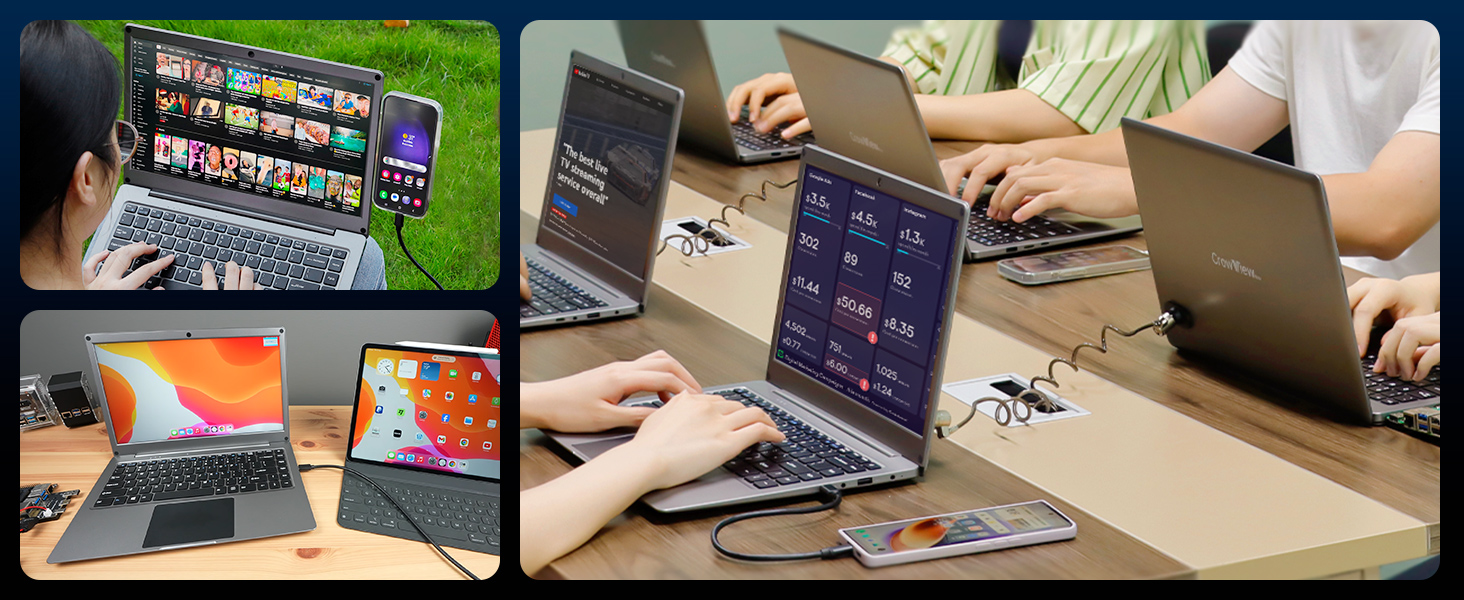
Figura 8: This image demonstrates the 5V/5A PD Protocol Output and compatibility with multiple Single Board Computers (SBCs). It shows the CrowView Note connected to Raspberry Pi 5, Jetson Nano Dev Kit, Banana Pi M5, and Orange Pi 4B, illustrating its use as a portable development platform.
The 5V/5A PD Protocol Output ensures stable power delivery to connected SBCs, facilitating seamless operation for development and project work.
Manteniment
- Neteja de la pantalla: Use a soft, lint-free cloth specifically designed for electronics. Gently wipe the screen to remove dust and smudges. For stubborn marks, slightly dampen the cloth with water or a screen-cleaning solution (avoid harsh chemicals).
- Cleaning the Keyboard and Body: Use a soft, dry cloth to wipe the keyboard and the monitor's body. A can of compressed air can be used to remove debris from between the keys.
- Emmagatzematge: When not in use, store the monitor in a cool, dry place, away from direct sunlight and extreme temperatures. If transporting, use a protective sleeve or case to prevent scratches and damage.
- Cura de la bateria: To prolong battery life, avoid fully discharging the battery frequently. If storing for an extended period, charge the battery to about 50-70% before storage.
Resolució de problemes
| Problema | Causa possible | Solució |
|---|---|---|
| Sense pantalla/Sense senyal | Incorrect input source selected; Loose cable connection; Device not outputting signal. |
|
| Keyboard/Touchpad not working | USB connection not established; Driver issue on host device. |
|
| No hi ha so dels altaveus | Volume too low; Muted; Incorrect audio output selected on host device. |
|
| Battery not charging/reverse charging | Incorrect port used; Power adapter issue; Device not compatible. |
|
Especificacions

Figura 9: Visual representation of the ELECROW 14-inch Portable Monitor's key specifications, including its 14-inch screen size, 180-degree rotation, and overall dimensions.
| Característica | Detall |
|---|---|
| Número de model | CRV12014K |
| Mida de la pantalla | 14 polzades |
| Resolució | 1920 x 1080 píxels (FHD 1080p) |
| Relació d'aspecte | 16:9 |
| Brillantor de la imatge | 300 lm |
| Superfície de la pantalla | brillant |
| Dimensions del producte | 13.2 x 0.67 x 8.7 polzades |
| Pes de l'article | 3.2 lliures |
| Bateries | 1 bateria de polímer de liti (inclosa) |
| Ports USB totals | 1 (USB-A) + 2 (Type-C) |
| Fabricant | ELECROW |
| País d'origen | Xina |
Garantia i Suport
ELECROW products are manufactured to the highest quality standards. This product comes with a standard manufacturer's warranty against defects in materials and workmanship. Please refer to the warranty card included in your package for specific terms and conditions.
For technical support, troubleshooting assistance, or warranty claims, please contact ELECROW customer service through their official channels. You can find more information and contact details by visiting the ELECROW Brand Store on Amazon o el seu oficial weblloc.
Please have your product model number (CRV12014K) and purchase information ready when contacting support.


