Introducció
This manual provides instructions for the setup, operation, and maintenance of your VINABTY MR23GA AN-MR23GA Replacement Magic Remote Control. This remote is designed to be compatible with various LG OLED evo 4K Smart TV models from the 2023 C3, Z3, G3, and B3 Series, offering voice control and pointer functionalities.
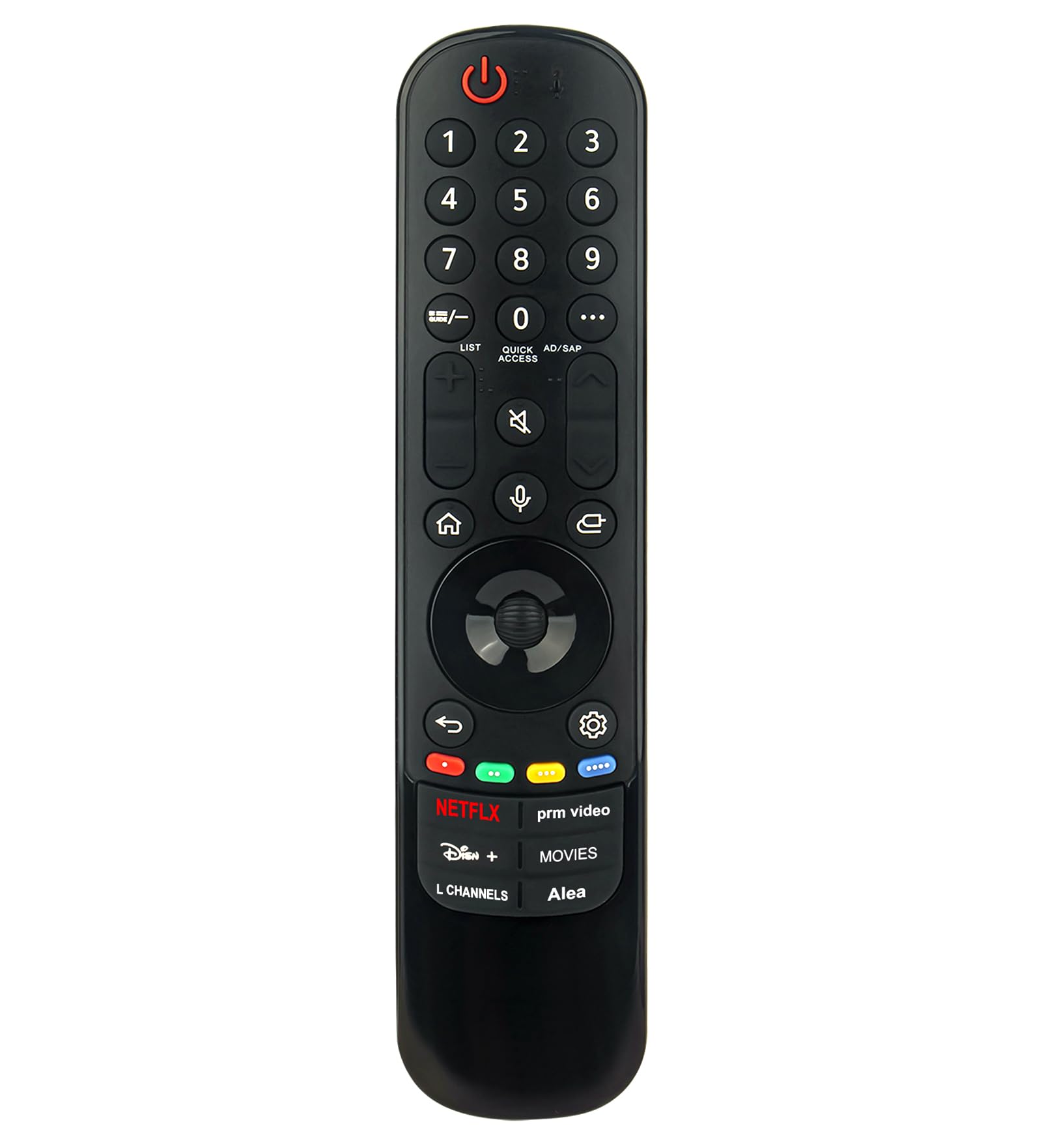
Imatge: Frontal view of the VINABTY MR23GA AN-MR23GA Replacement Magic Remote Control, showing all buttons and the scroll wheel.
Configuració
1. Instal·lació de la bateria
- Localitzeu el compartiment de la bateria a la part posterior del comandament a distància.
- Feu lliscar la tapa de la bateria cap avall per obrir-la.
- Insert two (2) AA batteries, ensuring the positive (+) and negative (-) terminals align correctly with the markings inside the compartment.
- Tanqueu la tapa de la bateria fent-la lliscar de nou al seu lloc fins que sentiu un clic.

Imatge: Enrere view of the remote control, highlighting the battery compartment.
2. Initial Pairing (If Required)
For most basic functions, the remote may work immediately after battery installation. However, to utilize advanced features such as voice control and the pointer function, pairing with your LG Smart TV may be necessary. If the pointer does not appear on screen or voice commands are not recognized, follow these steps:
- Engega el teu televisor intel·ligent LG.
- Apunteu el comandament a distància cap al televisor.
- Premeu el botó Roda (d'acord) button (the center button of the directional pad) on the remote control. The TV should display a message indicating that the remote is registered.
- Si l'emparellament falla, proveu de prémer i mantenir premut el botó Casa botó i Enrere button simultaneously for 5 seconds to unpair, then repeat step 3.
Instruccions de funcionament
The VINABTY MR23GA remote control provides intuitive navigation and control over your LG Smart TV. Familiarize yourself with the key functions below:
Funcions dels botons clau
- Botó d'engegada (⑆): Encén o apaga el televisor.
- Botons numèrics (0-9): Directly input channel numbers or other numerical values.
- LIST / Quick Access: Access channel lists or customize quick access to frequently used apps/functions.
- AD/SAP: Audio Description / Secondary Audio Program.
- Pujar/Bajar el volum (+ / -): Ajusta el volum del televisor.
- Botó de silenci (🔇): Silencia o activa el so del televisor.
- Canal amunt/avall (▲ / ▼): Canvia els canals de televisió.
- Botó d'inici (⌂): Accesses the TV's Home screen/Launcher.
- Botó de reconeixement de veu (🎤): Activates the voice command function.
- Botó d'entrada (⎌): Changes the input source (HDMI, AV, etc.).
- Coixinet direccional (amunt, avall, esquerra, dreta): Navigates menus and selections.
- Wheel (OK) Button: Confirms selections and acts as a scroll wheel for pointer navigation.
- Botó enrere (↶): Torna a la pantalla o al menú anterior.
- Botó de configuració (⚙): Accesses the TV's settings menu.
- Netflix, Disney+, prm video, L Channels, Movies, Alea Buttons: Direct access buttons for specific streaming services and functions.

Imatge: Detallada view of the remote's front face, showing the layout of all buttons.
Utilització del control de veu
To use the voice control feature:
- Manteniu premut el botó Botó de reconeixement de veu (🎤).
- Parla clarament al micròfon que es troba al comandament a distància.
- Release the button when you have finished speaking. The TV will process your command.

Image: The remote control with the microphone icon highlighted, indicating the voice control function.
Using the Pointer Function
The Magic Remote allows you to point and click on screen, similar to a computer mouse:
- Move the remote control in the air to make the pointer appear on the TV screen.
- Move the remote to guide the pointer to your desired selection.
- Premeu el botó Roda (d'acord) botó per seleccionar un element.
- If the pointer disappears, shake the remote gently or press the Roda (d'acord) button to make it reappear.
Manteniment
Neteja del comandament a distància
- Feu servir un drap suau i sec per netejar la superfície del comandament a distància.
- Do not use liquid cleaners, sprays, or abrasive materials, as these can damage the remote.
Canvi de bateria
Replace the batteries when the remote's performance degrades or if the TV displays a low battery warning. Refer to the "Battery Installation" section under Setup for detailed steps.
- Substituïu sempre les dues bateries al mateix temps.
- Use new AA alkaline batteries for optimal performance.
- Eliminar les bateries usades d'acord amb la normativa local.
Resolució de problemes
- El comandament a distància no respon:
- Comproveu si les piles estan inserides correctament i no estan esgotades. Substituïu-les si cal.
- Assegureu-vos que no hi hagi cap obstacle entre el comandament a distància i el sensor del televisor.
- Try re-pairing the remote control as described in the "Initial Pairing" section.
- Pointer not appearing or erratic:
- Shake the remote gently or press the Roda (d'acord) button to reactivate the pointer.
- Ensure the remote is paired correctly.
- Avoid strong light sources directly hitting the remote or TV sensor.
- El control per veu no funciona:
- Ensure the remote is paired and the voice recognition feature is enabled on your TV.
- Speak clearly and hold the Botó de reconeixement de veu mentre parla.
- Comproveu la connexió de xarxa del televisor, ja que les ordres de veu sovint requereixen accés a Internet.
Especificacions
| Característica | Detall |
|---|---|
| Número de model | MR23GA AN-MR23GA AKB76043112 |
| Dispositius compatibles | LG OLED evo 4K Smart TVs (2023 C3, Z3, G3, B3 Series) |
| Tipus de bateria | 2 x piles AA |
| Característiques especials | Voice Control, Pointer Function, Ergonomic Design |
| Dimensions del producte | 6 x 2 x 0.5 inches (19 cm / 7.48 in length, 4.3 cm / 1.69 in width) |
| Pes de l'article | 1.9 unces |

Image: The remote control with its physical dimensions (length and width) indicated.
Garantia i Suport
For warranty information or technical support, please refer to the documentation provided with your purchase or contact the retailer. Keep your purchase receipt for warranty claims.


