1. Introducció
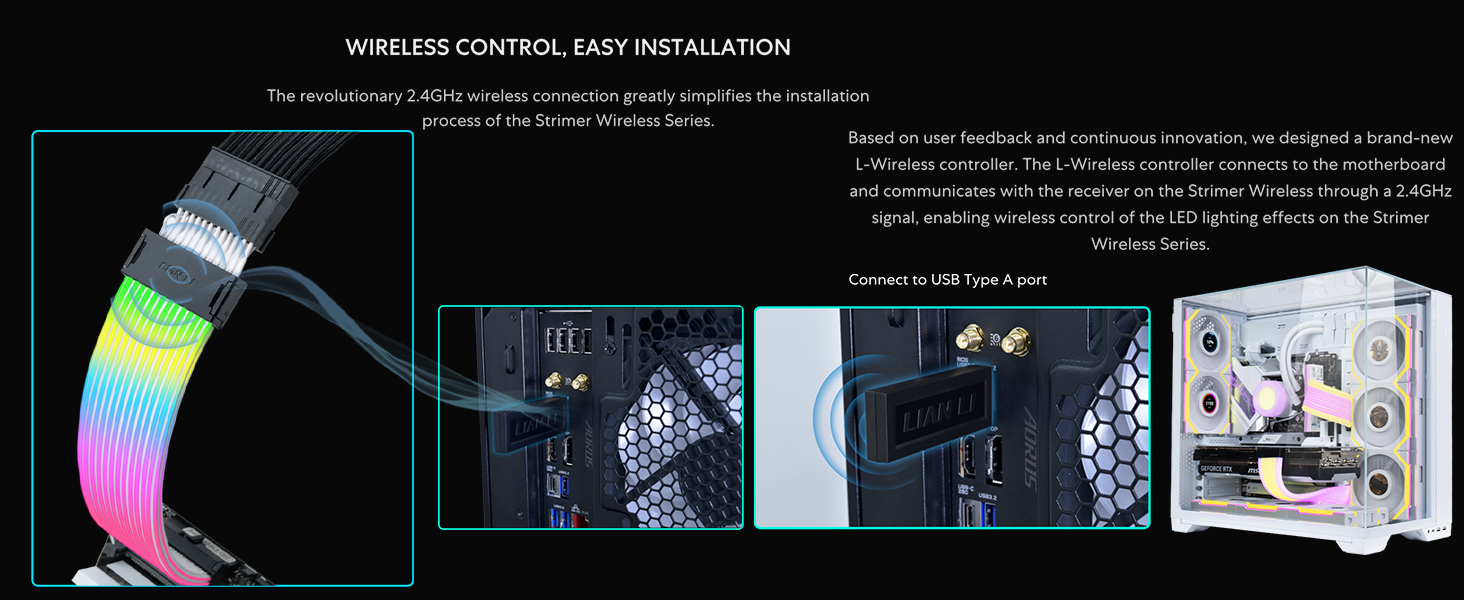
The Lian Li Strimer Wireless 16 Pin (PW16-121W) is an addressable RGB power extension cable designed to enhance the visual aesthetics of your PC build with vibrant lighting effects. Utilizing 2.4 GHz wireless technology, it offers seamless control over its RGB lighting. This cable is specifically designed for GPUs requiring a WIDE12+4 pin connection, compatible with NVIDIA GeForce RTX 50 and 40 Series graphics cards. Control and customization are managed through the L-Connect 3 software.

Image 1.1: Lian Li Strimer Wireless 16 Pin cable showcasing its addressable RGB lighting.
2. Característiques del producte
- 2.4 GHz Wireless Signal: Utilizes next-gen 2.4 GHz technology for seamless and reliable operation of RGB lighting effects.
- L-Connect 3 Software Integration: Provides comprehensive control over RGB lighting, fan speeds (for compatible fans), and hardware monitoring.
- 50/40 Series Ready: Features a 12V-2X6 Connector, compatible with NVIDIA GeForce RTX 50 and 40 Series graphics cards.
- Extended Lighting Coverage: Light strips extend to the sides, creating a more immersive and visually striking effect.
- Personalització i control: L-Connect 3 software ensures a fully customizable experience for lighting effects.
- Improved Cable Management: Designed to reduce cable clutter by powering directly from the extension cable itself, eliminating the need for separate power connections for the LED strip.
- 90-Degree Connector: Features a 90-degree angled male connector for improved clearance with larger graphics cards and flexible orientation.
- Meticulous Refinement: Protective shell at the male end is repositioned closer to the connector for a streamlined and cohesive appearance.
3. Contingut del paquet
The Lian Li Strimer Wireless 16 Pin (PW16-121W) package typically includes the following components:
- Strimer Wireless 16 Pin (PW16-121W) Addressable RGB Power Extension Cable
- Additional white plastic clips for color theme customization
- Small screwdriver for connector adjustments
Nota: The wireless controller is NO included with single pack Strimer Wireless cables (PW16-121W) and must be purchased separately. If you already own a controller from a UNI FAN Triple Pack or PW24-1W-T, it can be used.
Imatge 3.1: acabatview of typical package contents for Strimer Wireless cables, including the extension cable, clips, and tools.
4. Configuració i instal·lació
4.1. Controller Connection (Required)
The Lian Li Strimer Wireless system requires an L-Wireless controller for RGB and fan control. This controller connects to your motherboard via a USB Type-A port and communicates wirelessly with the receiver on the Strimer cable.
- Connect the L-Wireless controller to an available USB Type-A port on your motherboard.
- Ensure the controller is securely connected to receive power and transmit signals.
Video 4.1: Tutorial on setting up the UNI Fan SL Wireless & Strimer Wireless Controller.
4.2. Strimer Wireless Cable Installation
- Prepare the GPU: Ensure your GPU is properly seated in its PCIe slot.
- Connecta't a la GPU: Carefully connect the 12V-2X6 (WIDE12+4 pins) male connector of the Strimer Wireless cable to the corresponding port on your graphics card. Ensure a firm and secure connection. If the connector cannot connect to the GPU port, try reversing the connector.
- Encamina el cable: Gently bend and route the Strimer Wireless cable to achieve your desired aesthetic. The cable is designed to be flexible.
- Assegurar amb clips: Use the provided plastic clips to hold the light guides in place and maintain the cable's shape. You can switch between black and white clips to match your build's color theme.

Image 4.2: Illustration of the 90-degree GPU connector design, highlighting its flexibility and trimmable side for optimal fit.
Video 4.2: Part 1 of the Lian Li SL Wireless and Wireless LCD fan setup guide, which includes Strimer Wireless setup.
5. Instruccions de funcionament
5.1. L-Connect 3 Software
The L-Connect 3 software is your primary interface for controlling the Strimer Wireless cable's RGB effects. Download and install the latest version of L-Connect 3 from the official Lian Li weblloc.
- Launch L-Connect 3 after installation.
- The software should automatically detect your L-Wireless controller and connected Strimer Wireless devices.
- Navigate to the 'L-Wireless Sync Setup' section to bind your devices. Click the 'Bind' icon for each device to link it with the controller. The device will flash yellow to confirm identification.
- Once bound, go to the 'Strimer Wireless' tab to customize lighting effects.
- Choose from pre-set themes or customize individual light guides for unique combinations. Adjust brightness, speed, and direction of effects.

Image 5.1: L-Connect 3 software interface showing options for customizing Strimer Wireless RGB effects.
5.2. Dynamic RGB Control
The Strimer Wireless offers various dynamic lighting effects. Experiment with different modes to find the perfect aesthetic for your PC build.
- Modes d'efecte: Select from a range of effects such as Rainbow Wave, Gradient Ribbon, Electric Current, Transformation, and more.
- Conjunt de colors: Choose specific colors or color combinations for your effects.
- Brillantor i velocitat: Adjust the intensity and animation speed of the lighting effects to match your preference.
6. Manteniment
To ensure the longevity and optimal performance of your Lian Li Strimer Wireless cable, follow these maintenance guidelines:
- Neteja: Gently wipe the cable and light guides with a soft, dry, anti-static cloth to remove dust. Avoid using harsh chemicals or abrasive materials.
- Integritat del cable: Periodically inspect the cable for any signs of wear, fraying, or damage. Ensure all connections are secure.
- Actualitzacions de programari: Keep your L-Connect 3 software and device firmware updated to the latest versions to benefit from new features and bug fixes.
7. Solució De Problemes
If you encounter issues with your Strimer Wireless cable, refer to the following troubleshooting steps:
- Sense il·luminació RGB:
- Ensure the L-Wireless controller is properly connected to a USB Type-A port on your motherboard and receiving power.
- Verify that the Strimer Wireless cable is securely connected to your GPU and the wireless receiver is attached to the cable.
- Check L-Connect 3 software to ensure the device is bound and lighting effects are enabled.
- Colors/efectes incorrectes:
- Open L-Connect 3 and re-select your desired lighting effects and colors.
- Ensure the software and firmware are up-to-date.
- L-Connect 3 Not Detecting Device:
- Verify all physical connections for the controller and Strimer cable.
- Restart L-Connect 3 software and your computer.
- Manually set the wireless channel in L-Connect 3 if other wireless devices are causing interference.
- Problemes del connector:
- If the 12V-2X6 connector does not fit, try reversing its orientation.
- Ensure the connector is fully seated to prevent power delivery issues.
8. Especificacions
| Característica | Especificació |
|---|---|
| Número de model | PW16-121W |
| Dimensions del producte | 16.38 x 2.8 x 1.93 polzades |
| Pes de l'article | 12 unces |
| Longitud del cable | 370 mm (14.56 polzades) |
| Guies de llum | 12 |
| Nombre de LED | 174 |
| Potència de sortidatage | 12.15W |
| Tipus de connector | 12V-2X6 (WIDE12+4 pins) |
| Tecnologia sense fils | 2.4 GHz |
| Programari de control | L-Connect 3 |

Image 8.1: Detailed specifications table for various Strimer Wireless models.
9. Garantia i assistència
Lian Li products typically come with a manufacturer's warranty. Please refer to the official Lian Li website or your product's packaging for specific warranty terms and conditions. For technical support, troubleshooting assistance, or any product-related inquiries, please visit the official Lian Li support page or contact their customer service.
Recursos en línia:
- Lian Li Official Weblloc: www.lian-li.com
- L-Connect 3 Download Page: www.lian-li.com/l-connect3/


