Introducció
This user manual provides comprehensive instructions for setting up, operating, and maintaining your TECLAST T60Plus 12-inch Android 14 Tablet. Designed for optimal performance and user experience, this tablet features a vibrant 2K IPS display, a powerful MediaTek Helio G88 Octa-Core processor, and a long-lasting 8000mAh battery. Please read this manual carefully to ensure proper use and to maximize the potential of your device.
Què hi ha a la caixa
Upon opening your TECLAST T60Plus package, you should find the following items:
- Android 14 T60Plus tablet x 1
- Carregador x 1
- Cable de càrrega x 1
- Manual d'instruccions x 1
- Ejection pin x 1

Image: The TECLAST T60Plus tablet, along with its USB-C charging cable and power adapter, as found in the product box.
Video: An unboxing video of the TECLAST T60Plus 12-inch tablet, demonstrating the contents and initial appearance of the device.
Guia de configuració
- Càrrega de la tauleta: Before first use, fully charge your tablet using the provided USB-C cable and charger. Connect the USB-C end to the tablet's port and the other end to the power adapter, then plug into a wall outlet. The battery indicator on the screen will show charging status.
- Encès/apagat:
- To power on, press and hold the Power button until the TECLAST logo appears.
- To power off, press and hold the Power button until a power-off menu appears, then select "Power off".
- Configuració inicial: Follow the on-screen prompts to complete the initial setup process. This includes selecting your language, connecting to a Wi-Fi network, signing in with your Google account, and setting up security features like Face Unlock.
- Inserting SIM/Micro SD Card: Use the provided ejection pin to open the SIM/Micro SD card tray. Insert your 4G LTE SIM card(s) and/or a Micro SD card (up to 1TB, FAT32/exfat format) into the designated slots. Ensure the tray is fully reinserted.
Funcionament de la tauleta
Característiques de visualització
The TECLAST T60Plus boasts a 12-inch 2K IPS display (2000 x 1200 resolution) for vivid and detailed visuals. The 90Hz refresh rate ensures smooth scrolling and fluid animations, enhancing your viewing and gaming experience. It also features TÜV SÜD blue light certification for comprehensive eye protection.

Image: The TECLAST T60Plus tablet highlighting its 12-inch display.

Imatge: Detallada view of the tablet's 12-inch IPS touch screen and its 90Hz AdaptiveSync capability.

Image: A visual comparison demonstrating the clarity of the 2K IPS display.
Rendiment i emmagatzematge
Equipped with a 2.0Ghz MediaTek Helio G88 Octa-Core processor and Mali-G52 multi-core GPU, the T60Plus delivers reliable mobile performance for gaming and multitasking. It features 16GB RAM (6GB physical + 10GB extended) and 128GB internal storage, expandable up to 1TB via a Micro SD card.

Image: An illustration of the tablet's powerful Octa-core processor, RAM, and storage capabilities.

Image: Visual representation of the tablet's 16GB RAM and 128GB ROM with 1TB Micro SD expansion.
Durada de la bateria
The 8000mAh large-capacity battery provides extended usage, allowing you to enjoy movies, series, and music for prolonged periods without frequent recharging.

Image: The 8000mAh battery capacity displayed on the tablet screen.
Sistema operatiu i programari
The T60Plus runs on Android 14 and is GMS certified, ensuring full access to the Google Play Store for downloading your favorite applications. It also supports Widevine L1 for high-quality streaming of copyrighted content.

Image: The Android 14 interface on the TECLAST T60Plus tablet.
Connectivitat
Stay connected with Dual 4G LTE support (check supported frequency bands for your region), high-speed AC dual-band 2.4Ghz/5Ghz Wi-Fi, and efficient Bluetooth 5.0 wireless connectivity. The tablet also includes GPS for precise navigation.
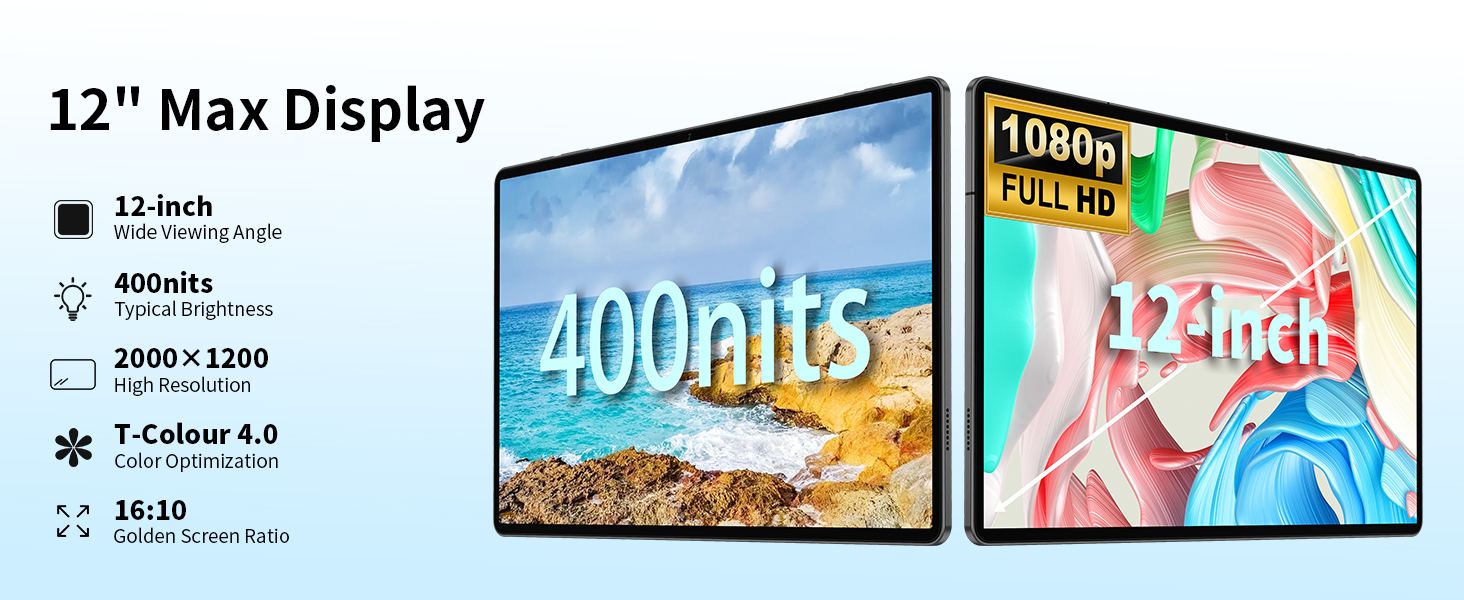
Image: The tablet demonstrating its wireless connectivity options including Wi-Fi and Bluetooth.

Image: Information on supported 4G LTE network frequencies.
Càmeres
Capture moments with the 13MP rear camera, designed for clear photos even in low light. The 5MP front camera is ideal for selfies and video calls.

Image: Close-up of the tablet's dual camera system.
Àudio
Experience rich sound with the SWEET 4 Sound System and SmartK Intelligent Amplifier Chip. A 3.5mm headphone jack is also included for private listening.
Imatge: La tauleta que es mostraasing its audio features, including the 3.5mm headphone jack.
Disseny
The T60Plus features a slim 8.2mm profile and weighs approximately 550g, making it highly portable. Its Aqua Blue color and durable metal panel contribute to its stylish and robust design.

Image: The tablet's sleek profile i disseny lleuger.
Característiques especials
- Projecció sense fil: Easily connect your tablet to a large TV for an enhanced viewexperiència.
- Control parental: Manage screen time, monitor app usage, and remotely lock the device for child safety.
- Multi-View Window & Split Screen: Efficiently multitask by using multiple applications simultaneously.
- Reconeixement facial: Securely unlock your device with a glance.
- Automatic Screen Brightness Adjustment: Optimizes display brightness for comfortable viewen diferents condicions d'il·luminació.

Image: Wireless screen projection in action.

Image: Parental control features demonstrated.

Image: Guide to using multi-view and split screen.

Image: Face Unlock feature in use.
Manteniment
- Neteja: Feu servir un drap suau i sense borrissol per netejar la pantalla i el cos de la tauleta. Eviteu utilitzar productes químics agressius o materials abrasius.
- Cura de la bateria: Per allargar la durada de la bateria, eviteu exposar la tauleta a temperatures extremes. Es recomana mantenir la càrrega de la bateria entre el 20% i el 80% per a una longevitat òptima.
- Actualitzacions de programari: Regularly check for and install system updates to ensure your tablet has the latest features and security patches.
Resolució de problemes
| Problema | Possible solució |
|---|---|
| La tauleta no s'encén. | Ensure the tablet is fully charged. Press and hold the Power button for at least 10-15 seconds to force a restart. |
| Problemes de connexió Wi-Fi. | Restart your Wi-Fi router. Forget the network on your tablet and reconnect. Ensure you are within range of the Wi-Fi signal. |
| Les aplicacions són lentes o es bloquegen. | Close background applications. Clear app cache (Settings > Apps > [App Name] > Storage > Clear cache). Restart the tablet. Ensure sufficient storage space is available. |
| La bateria s'esgota ràpidament. | Reduce screen brightness. Disable unused features like Bluetooth or GPS. Close power-intensive apps. Check for background app activity. |
| Cannot connect to 4G LTE. | Ensure your SIM card is correctly inserted and activated. Verify that your carrier's frequency bands are supported by the tablet. Check network settings and APN configurations. |
Especificacions
| Característica | Detall |
|---|---|
| Marca | TECLAST |
| Nom del model | T60Plus |
| Sistema operatiu | Android 14 |
| Mida de la pantalla | 12 polzades |
| Resolució de pantalla | 2000x1200 Pixels (2K IPS) |
| Freqüència d'actualització | Fins a 90 Hz |
| Processador | MediaTek Helio G88 Octa-Core (2 GHz) |
| Coprocessador gràfic | Mali G52 MC2 |
| RAM | 16GB (6GB + 10GB extend) |
| Mida de la memòria flash | 128 GB |
| Emmagatzematge ampliable | Up to 1TB Micro SD (FAT32/exfat) |
| Capacitat de la bateria | 8000mAh (Average 10 Hours) |
| Tipus sense fil | 802.11n, 802.11b, 802.11a, 802.11ac, 802.11g (Dual-band 2.4Ghz/5Ghz Wi-Fi) |
| Bluetooth | BT 5.0 |
| Connectivitat cel·lular | Dual 4G LTE (TD-LTE, FDD-LTE) |
| posterior WebResolució de la càmera | 13 MP |
| Davant WebResolució de la càmera | 5 MP |
| Pes de l'article | 1.35 lliures (aprox. 612 g) |
| Dimensions del producte | 11 x 7 x 0.3 polzades (aprox. 27.9 x 17.8 x 0.76 cm) |
| Color | Blau Aqua |
Garantia i Suport
TECLAST products are designed for reliability and performance. Your TECLAST T60Plus tablet comes with a standard manufacturer's warranty. Please refer to the warranty card included in your product packaging for specific terms and conditions.
For technical support, troubleshooting assistance, or warranty claims, please contact TECLAST customer service. Most questions are answered within 24 hours to ensure a good experience with your product.
You can find more information and support resources on the official TECLAST weblloc web o a través de la seva botiga de marca Amazon: TECLAST Brand Store.


