1. Introducció
Thank you for choosing the HTC True Wireless Earbuds 6. These earbuds are designed to provide a high-quality audio experience with advanced features such as Bluetooth 5.3 connectivity, smart touch controls, and a comfortable in-ear design. This manual will guide you through the setup, operation, maintenance, and troubleshooting of your new earbuds.
2. Producte acabatview
The HTC True Wireless Earbuds 6 offer immersive stereo sound, extended playtime, and robust connectivity, making them ideal for various activities from exercising to gaming.

Image: The HTC True Wireless Earbuds 6 in pink, shown with their clear charging case.
Característiques principals:
- So estèreo immersiu: High-quality audio with powerful bass and dynamic treble.
- Control tàctil intel·ligent: Intuitive controls for music playback, calls, and voice assistant.
- Temps de joc ampliat: Up to 5 hours on a single charge, with 22 hours total playtime using the charging case.
- Bluetooth 5.3: Ensures instant pairing, stable connection, and low latency.
- Resistent a la suor IPX5: Designed to resist sweat and light rain, suitable for workouts.
- Àmplia compatibilitat: Works seamlessly with iOS and Android devices.
3. Configuració
3.1 Càrrega inicial
Before first use, fully charge the earbuds and the charging case. Connect the provided USB-C cable to the charging case and a power source. The indicator light on the case will show charging status.
3.2 Emparellament amb el dispositiu
- Assegura't que els auriculars estiguin a l'estoig de càrrega i que l'estoig tingui carregador.
- Obre la tapa de la funda de càrrega. Els auriculars entraran automàticament en mode d'emparellament.
- On your device (smartphone, tablet), go to Bluetooth settings and turn Bluetooth on.
- Select "HTC TWS6" from the list of available devices.
- Un cop connectats, sentireu un to de confirmació i els auriculars estaran a punt per al seu ús.

Image: Illustration of Bluetooth 5.3 technology, highlighting low latency, strong compatibility, and extended transmission range up to 10 meters.
3.3 Com posar-se els auriculars
Choose the ear tips that provide the most comfortable and secure fit for optimal sound quality and noise isolation. Gently insert the earbuds into your ear canal and twist slightly to secure them.
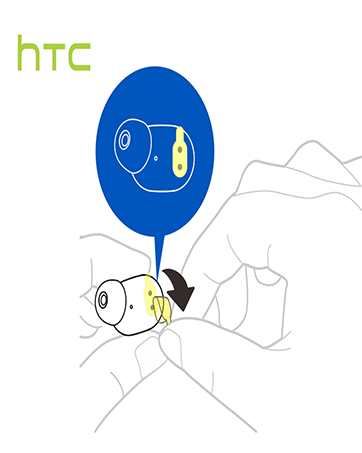

Image: Dimensions of the HTC True Wireless Earbuds 6 charging case, showing its compact size for portability.
4. Funcionament dels auriculars
4.1 Controls tàctils intel·ligents
The HTC True Wireless Earbuds 6 feature intuitive touch controls on each earbud. Refer to the table below for common functions:

Image: A visual guide to the smart touch controls on the HTC True Wireless Earbuds 6, detailing actions for playback, calls, volume, and voice assistant.
| Funció | Acció |
|---|---|
| Reproduir/Pausa | Tap left/right earbud once |
| Pista següent | Tap and hold right earbud for 2 seconds |
| Pista anterior | Tap and hold left earbud for 2 seconds |
| Puja el volum | Toca l'auricular esquerre dues vegades |
| Baixa el volum | Toca l'auricular dret dues vegades |
| Respon a la trucada | Toca l'auricular esquerre una vegada |
| Penja la trucada | Toca l'auricular dret una vegada |
| Rebutja la trucada | Tap and hold earbud for 2 seconds |
| Activa l'Assistent de veu | Tap right earbud three times |
4.2 Mode estèreo i mono
The earbuds can be used together for stereo sound or individually (mono mode) for calls or to save battery. Simply take one earbud out of the case to use it independently.

Image: The HTC True Wireless Earbuds 6 and charging case, demonstrating their use with smartphones for an HD stereo sound experience.
5. Manteniment i cura
Proper care will extend the lifespan of your HTC True Wireless Earbuds 6.
- Neteja: Feu servir un drap suau i sec per netejar els auriculars i l'estoig de càrrega. No utilitzeu productes químics agressius ni materials abrasius.
- Resistència a l'aigua: The earbuds are IPX5 sweatproof, meaning they can withstand splashes and sweat. Do not submerge them in water or expose them to heavy rain.
- Emmagatzematge: Quan no els utilitzeu, guardeu els auriculars a la seva funda de càrrega per protegir-los i mantenir-los carregats. Eviteu temperatures extremes.
6. Solució De Problemes
Si teniu problemes amb els auriculars, proveu les solucions següents:
- Auriculars que no s'emparellan:
- Assegureu-vos que els dos auriculars estiguin carregats.
- Desactiva el Bluetooth al dispositiu i torna'l a activar.
- Forget "HTC TWS6" in your device's Bluetooth settings and re-pair.
- Torneu a col·locar els auriculars a la funda, tanqueu la tapa, espereu uns segons i, a continuació, obriu-los per reiniciar-los.
- No se sent cap so d'un auricular:
- Assegureu-vos que els dos auriculars estiguin carregats.
- Prova de tornar a col·locar els dos auriculars a la funda i de tornar-los a treure.
- Netegeu els contactes de càrrega tant dels auriculars com de la funda.
- Volum baix o qualitat de so deficient:
- Adjust the volume on your device and through the earbud touch controls.
- Ensure ear tips are properly seated and form a good seal in your ear.
- Netegeu qualsevol residu de la malla de l'altaveu dels auriculars.
- Problemes de càrrega:
- Assegureu-vos que el cable USB-C estigui connectat correctament tant a la carcassa com a la font d'alimentació.
- Proveu un cable USB-C o un adaptador d'alimentació diferent.
- Netegeu els contactes de càrrega dels auriculars i de l'interior de la funda.
7. Especificacions tècniques
| Característica | Especificació |
|---|---|
| Nom del model | TWS6 |
| Tecnologia de connectivitat | Sense fil (Bluetooth) |
| Versió Bluetooth | 5.3 |
| Durada de la bateria (auriculars) | Fins a 5 hores |
| Temps de reproducció total (amb estoig) | Fins a 22 hores |
| Temps de càrrega | Approximately 5 Hours (for full system charge) |
| Nivell de resistència a l'aigua | IPX5 a prova de suor |
| Mètode de control | Toca |
| Col·locació de l'orella | A l'orella |
| Dispositius compatibles | Telèfons intel·ligents, tauletes (iOS, Android) |
| Pes de l'article | 3.03 unces |
| UPC | 768649987938 |
8. Garantia i Suport
HTC stands behind the quality of its products.
- Garantia: Your HTC True Wireless Earbuds 6 come with a 360 Days Warranty Extension. Please retain your proof of purchase for warranty claims.
- Atenció al client: For any questions, technical assistance, or warranty inquiries, please contact our 7*24 Live Chat Support.
- Recursos en línia: Visit the official HTC Store for more product information and support: HTC Official Store


