Producte acabatview
The AT&T Essentials True Wireless Bluetooth Comfort Fit Stereo in-Ear Earbuds are designed for high-quality wireless audio. They feature extended battery life, advanced noise cancellation for clear calls, and intuitive smart controls. The earbuds and charging case are IPX4 water and dust resistant, making them suitable for various environments.

Image: The AT&T Essentials True Wireless Earbuds are shown in their open charging case, displaying the digital battery percentage and individual earbud charge indicators. The earbuds are black and fit snugly within the case.
Configuració i ús inicial
Càrrega dels auriculars i la funda
Before first use, fully charge the earbuds and the charging case. Connect the charging case to a USB power source using the provided cable. The LED display on the case will indicate the charging status and battery level.

Image: A close-up of the AT&T Essentials charging case with the lid open, showing the digital battery display. The display shows "100" indicating a full charge, along with individual battery bars for the left and right earbuds.
Video: This video demonstrates the charging process and the LED battery display of the AT&T Essentials True Wireless Earbuds charging case. It shows the case being plugged in and the digital percentage incrementasing, indicating the charge level.
Vinculació amb un dispositiu Bluetooth
- Assegura't que els auriculars estiguin a l'estoig de càrrega i que l'estoig tingui prou càrrega.
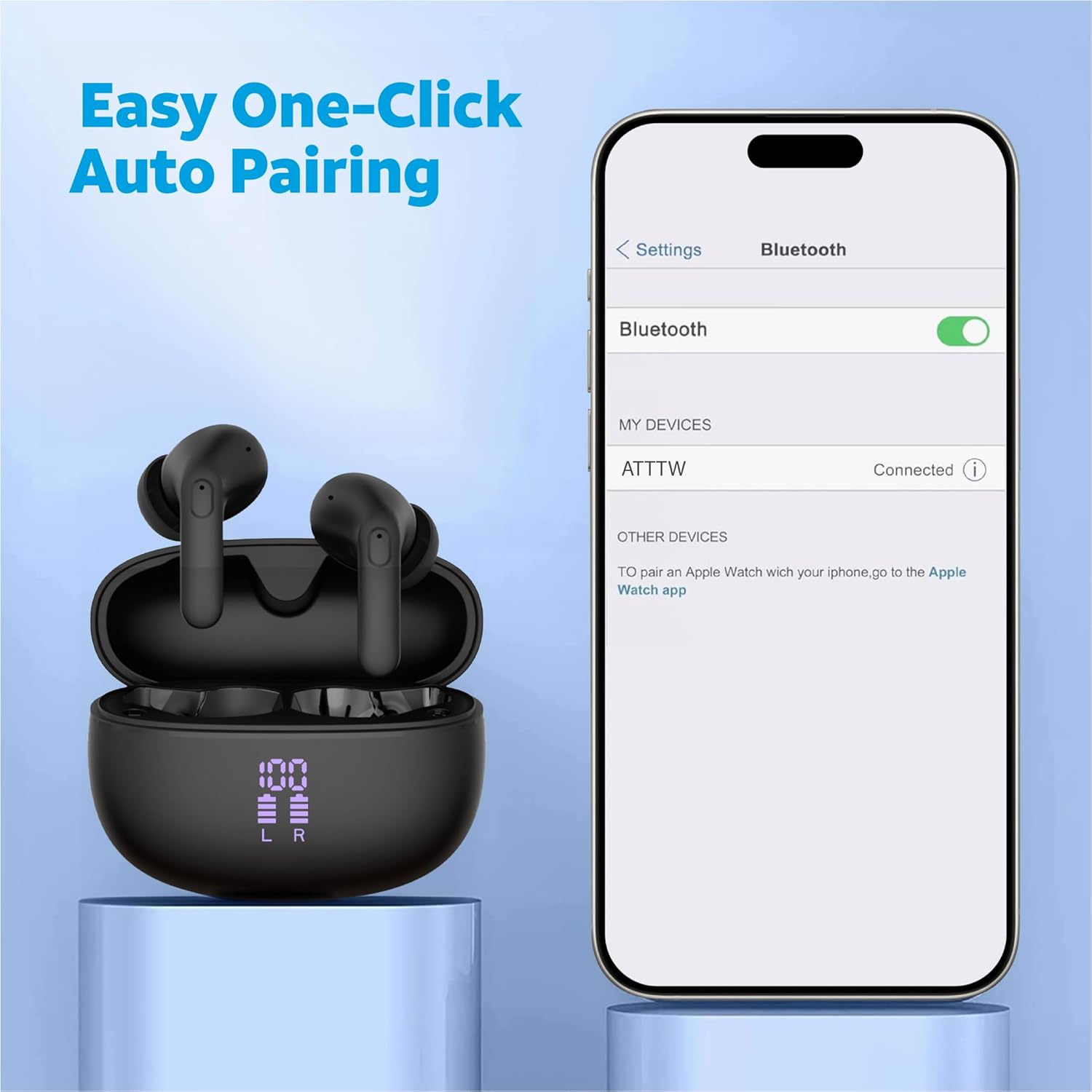
- Obre l'estoig de càrrega. Els auriculars entraran automàticament en mode d'emparellament.
- Al dispositiu (telèfon intel·ligent, tauleta, etc.), navegueu fins a la configuració de Bluetooth.
- Select "ATTTW" from the list of available devices.
- Un cop connectat, sonarà un so de confirmació i el dispositiu mostrarà "Connectat".

Image: The AT&T Essentials True Wireless Earbuds in their charging case are shown next to a smartphone screen displaying Bluetooth settings. The device name "ATTTW" is highlighted as connected, illustrating the pairing process.
Instruccions de funcionament
Controls tàctils intel·ligents
The earbuds feature responsive one-touch smart controls for easy management of audio playback and calls.
- Reproduir/pausa: Un sol toc a qualsevol dels auriculars.
- Pista següent: Toqueu dues vegades l'auricular dret.
- Pista anterior: Toqueu dues vegades l'auricular esquerre.
- Respondre/Finalitzar la trucada: Toqueu un sol cop a qualsevol dels auriculars durant una trucada entrant o activa.
- Rebutja la trucada: Premeu i manteniu premut qualsevol dels auriculars durant 2 segons durant una trucada entrant.
- Activa l'Assistent de veu: Toqueu tres vegades qualsevol dels auriculars.
Imatge: Una imatge detallada view of an AT&T Essentials earbud, highlighting the touch control area with various icons representing functions like call management, music playback, and volume control, indicating its smart touch capabilities.
Cancel·lació de soroll ambiental (ENC)
The built-in quad environmental noise cancellation technology ensures your voice is clear during phone calls, even in noisy environments. This feature automatically activates during calls to filter out background noise.

Imatge: Una explosió view of an AT&T Essentials earbud, showcasing its internal components, including the speaker driver and circuitry. Text overlays indicate "Built-In Quad Environmental Noise Cancellation" and "Experience Crystal-Clear Calls and Immersive Sound with Advanced ENC Technology."
Manteniment i cura
Un manteniment adequat garanteix la longevitat i el rendiment òptim dels teus auriculars.
- Neteja: Netegeu regularment els auriculars i l'estoig de càrrega amb un drap suau, sec i sense borrissol. No utilitzeu netejadors abrasius ni dissolvents.
- Consells per a les orelles: Traieu-vos les puntes de les orelles periòdicament i netegeu-les amb aiguaamp drap. Assegureu-vos que estiguin completament secs abans de tornar-los a enganxar.
- Resistència a l'aigua i a la pols: The earbuds and charging case are IPX4 rated, meaning they are resistant to splashing water from any direction. They are not waterproof and should not be submerged in water. Avoid exposure to excessive moisture or dust.
- Emmagatzematge: Quan no els utilitzeu, guardeu els auriculars a la seva funda de càrrega per protegir-los i mantenir-los carregats. Guardeu-los en un lloc fresc i sec, allunyat de la llum solar directa i de temperatures extremes.
Resolució de problemes
| Problema | Causa possible | Solució |
|---|---|---|
| Els auriculars no s'aparellen | Auriculars no en mode d'emparellament; Bluetooth desactivat al dispositiu; dispositiu emparellat prèviament interfereix. | Ensure earbuds are in case and lid is open. Turn Bluetooth off and on again on your device. Forget "ATTTW" from your device's Bluetooth list and re-pair. |
| No hi ha so d'un auricular | Low battery; earbud not properly connected; earbud settings. | Place both earbuds back in the charging case, close the lid for 5 seconds, then open. Ensure both earbuds are charged. Check device audio balance settings. |
| La funda de càrrega no es carrega | Cable o adaptador de corrent defectuós; port de càrrega brut. | Try a different USB-C cable and power adapter. Clean the charging port on the case gently with a dry cotton swab. |
| Poca qualitat de trucada | Environmental noise; earbud placement; weak Bluetooth connection. | Ensure earbuds are properly seated in your ears. Move closer to your connected device. Avoid extremely noisy environments if possible. |
Especificacions
| Característica | Detall |
|---|---|
| Nom del model | True Wireless Comfort Fit Earbuds |
| Número de model | 4130T |
| Tecnologia de connectivitat | Sense fil (Bluetooth) |
| Durada de la bateria (temps d'escolta) | Fins a 35 hores (amb estoig de càrrega) |
| Control de soroll | Cancel·lació activa de soroll (ENC per a trucades) |
| Nivell de resistència a l'aigua | IPX4 (resistent a l'aigua) |
| Tipus de control | Control tàctil |
| Resposta de freqüència | 20 Hz - 20 kHz |
| Impedància | 140 ohms |
| Sensibilitat | 80 dB |
| Components inclosos | Estoig de càrrega sense fil |
| Color | Negre |
| Pes de l'article | 2.64 unces |
| UPC | 849944091350 |
Garantia i Suport
For warranty information and technical support, please refer to the official AT&T Accessories weblloc web o contacteu directament amb el seu servei d'atenció al client. Conserveu el comprovant de compra per a qualsevol reclamació de garantia.
You can visit the AT&T Store online for more information: AT&T Store


