1. Introducció
Thank you for choosing the Duux Bora Smart Dehumidifier. This manual provides essential information for the safe and efficient operation of your device. Please read it thoroughly before use and retain it for future reference.
The Bora dehumidifier is designed to create a healthier indoor environment by effectively managing high humidity levels. It can remove up to 30 liters of moisture per day, helping to prevent mold and bacterial growth. Featuring an integrated hygrostat for automatic humidity regulation and an active carbon filter for odor removal, the Bora ensures cleaner air. Remote control is available via the Duux application.
2. Instruccions de seguretat importants
Seguiu sempre les precaucions de seguretat bàsiques quan utilitzeu aparells elèctrics per reduir el risc d'incendi, descàrrega elèctrica i lesions.
- Llegiu totes les instruccions abans d’utilitzar l’aparell.
- Assegureu-vos que la font d'alimentació coincideixi amb el voltage especificat a l'etiqueta de qualificació.
- No feu funcionar el deshumidificador amb un cable o endoll danyats.
- Mantingueu l'aparell allunyat de fonts de calor, de la llum solar directa i de materials inflamables.
- No bloquegeu les entrades o sortides d'aire.
- Col·loqueu sempre la unitat sobre una superfície estable i anivellada.
- Desendolleu la unitat abans de netejar-la, fer-ne el manteniment o quan no l'utilitzeu.
- No submergiu la unitat, el cable d'alimentació ni l'endoll en aigua ni altres líquids.
- Aquest aparell no està pensat per ser utilitzat per persones (inclosos nens) amb capacitats físiques, sensorials o mentals reduïdes, o amb manca d'experiència i coneixements, tret que hagin rebut la supervisió o instruccions sobre l'ús de l'aparell per una persona responsable de la seva seguretat.
- Els nens han de ser supervisats per assegurar-se que no juguin amb l'aparell.
3. Producte acabatview
Familiarize yourself with the components of your Duux Bora Dehumidifier.

Figura 3.1: Davant view of the Duux Bora Dehumidifier, showing its sleek design and a smartphone displaying the control app interface.

Figura 3.2: posterior view of the dehumidifier, highlighting the removable air filter cover and the continuous drainage port.

Figura 3.3: Top panel of the dehumidifier, displaying the digital screen and touch controls for various functions.
Components clau:
- Tauler de control: Located on the top, with digital display and touch buttons.
- Entrada/sortida d'aire: Per aspirar i expulsar aire.
- Dipòsit d'aigua: 4-liter capacity, located at the bottom front.
- Filtre de carbó actiu: Located behind the rear air inlet.
- Port de drenatge continu: For connecting a hose for continuous operation.
- Rodes: Per a una fàcil mobilitat.
4. Configuració
- Desembalatge: Carefully remove the dehumidifier from its packaging. Retain all packaging materials for future transport or storage.
- Col·locació:
- Col·loqueu la unitat sobre una superfície ferma i plana.
- Assegureu-vos que hi hagi com a mínim 20 cm (8 polzades) d'espai al voltant de les entrades i sortides d'aire per a un flux d'aire adequat.
- Eviteu col·locar la unitat a prop de fonts de calor o sota la llum solar directa.
- The dehumidifier is suitable for various rooms up to 50 square meters, including basements, laundry rooms, and living areas.
- Connexió d'alimentació: Connecteu el cable d'alimentació a una presa de corrent amb connexió a terra. Assegureu-vos que el volumtage coincideix amb els requisits de la unitat (240 volts).
- Instal·lació del dipòsit d'aigua: Ensure the 4-liter water tank is correctly inserted into the unit.

Figura 4.1: The 4-liter water tank being pulled out from the dehumidifier for emptying or inspection.
- Drenatge continu (opcional): For continuous operation without emptying the water tank, connect a suitable hose (not included) to the continuous drainage port at the back of the unit. Ensure the hose is sloped downwards to allow gravity drainage.
5. Instruccions de funcionament
5.1. Funcionament del tauler de control
Figura 5.1: Detallada view of the control panel with digital display and function buttons.
The control panel allows you to manage all functions of the dehumidifier. Refer to the icons on the panel for specific functions.
- Botó d'encesa: Encén o apaga la unitat.
- Selecció del mode: Cycle through various operating modes (e.g., Auto, Continuous, Laundry Drying).
- Configuració d'humitat: Adjust the desired humidity level using the up/down arrows. The integrated hygrostat will maintain this level.
- Temporitzador: Establiu un temporitzador per a l'apagat automàtic.
- Velocitat del ventilador: Select between 2 fan speeds.
5.2. Smart Control via Duux App
The Duux Bora can be controlled remotely using the Duux application on your smartphone or tablet.

Figura 5.2: The Duux mobile application displaying current humidity and control options for the Bora dehumidifier.
- Download the Duux app from your device's app store.
- Follow the in-app instructions to pair your Bora dehumidifier.
- Once connected, you can power the unit on/off, adjust settings, and receive notifications (e.g., when the water tank is full) from anywhere.
5.3. Laundry Drying Mode
The innovative Laundry Drying Mode is designed to efficiently dry clothes indoors.
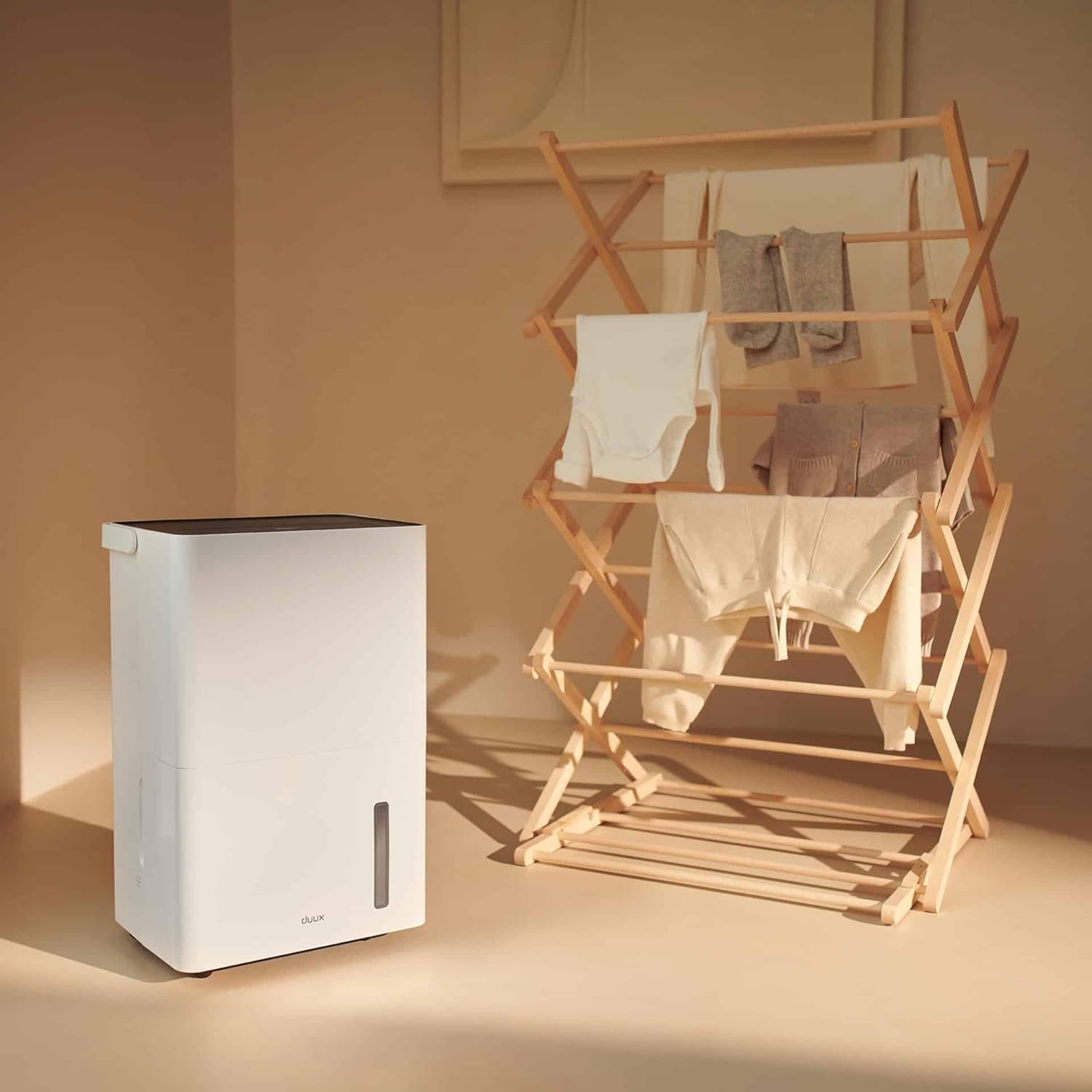
Figura 5.3: The dehumidifier positioned near a laundry rack, demonstrating its use in drying clothes.
- Activate this mode via the control panel or the Duux app.
- This mode operates continuously to remove moisture from the air, accelerating the drying process of laundry.
- It can significantly reduce energy consumption compared to traditional tumble dryers.
6. Manteniment
Un manteniment regular garanteix un rendiment òptim i una llarga vida útil del deshumidificador.
6.1. Buidatge del dipòsit d'aigua
- When the water tank is full, the unit will automatically shut off and an indicator light will illuminate.
- Traieu amb cura el dipòsit d'aigua de la part frontal de la unitat.
- Aboqueu l'aigua recollida en una pica o desguàs.

Figura 6.1: A user emptying the collected water from the dehumidifier's tank into a sink.
- Reinsert the empty water tank firmly into the unit until it clicks into place. The unit will resume operation.
6.2/XNUMX/XNUMX. Neteja del filtre d'aire
The active carbon filter should be cleaned regularly (e.g., every two weeks or as needed) to maintain air quality and dehumidifier efficiency.
- Desendolleu el deshumidificador de la presa de corrent.
- Locate the filter cover at the back of the unit.
- Remove the filter cover and carefully pull out the active carbon filter.

Figura 6.2: A user demonstrating the removal of the active carbon filter from the rear of the dehumidifier.
- Clean the filter with a vacuum cleaner or wash it gently with lukewarm water. Allow it to air dry completely before reinstallation.
- Reinsert the dry filter and replace the filter cover.
6.3. Neteja general
- Netegeu l'exterior de la unitat amb un damp tela. No utilitzeu netejadors abrasius ni dissolvents.
- Assegureu-vos que la unitat estigui desconnectada abans de netejar-la.
7. Solució De Problemes
Abans de contactar amb l'atenció al client, consulteu els següents problemes i solucions habituals:
| Problema | Causa possible | Solució |
|---|---|---|
| La unitat no s'encén. | No hi ha subministrament d'alimentació; cable d'alimentació no connectat; dipòsit d'aigua ple o inserit incorrectament. | Comproveu la connexió elèctrica; buideu i torneu a inserir el dipòsit d'aigua correctament. |
| El deshumidificador no recull aigua. | Room temperature too low; Humidity level already low; Air filter clogged; Unit in fan-only mode. | Ensure room temperature is above 5°C (41°F); Check desired humidity setting; Clean air filter; Select dehumidification mode. |
| La unitat fa soroll. | Unitat no sobre una superfície plana; filtre d'aire obstruït; components interns que vibren. | Place on a level surface; Clean air filter; If noise persists, contact support. |
| Problemes de connexió de l'aplicació. | Wi-Fi signal weak; Incorrect pairing procedure; App requires update. | Ensure strong Wi-Fi signal; Re-attempt pairing as per app instructions; Update Duux app. |
| Olor desagradable de la unitat. | Active carbon filter needs cleaning or replacement. | Clean or replace the active carbon filter. |
8. Especificacions
| Característica | Detall |
|---|---|
| Marca | Duux |
| Número de model | DXDH30 |
| Color | Blanc |
| Capacitat de deshumidificació | Fins a 30 litres/dia |
| Capacitat del dipòsit d'aigua | 4 litres |
| Voltage | 240 Volts |
| Dimensions del producte (L x A x A) | 24.7 x 33.7 x 51 cm |
| Pes de l'article | 16.5 quilos |
| Nombre de velocitats | 2 |
| Apagat automàtic | Yes (when water tank is full) |
| Característiques especials | Integrated Hygrostat, Active Carbon Filter, Laundry Drying Mode, Smart App Control |
| Superfície recomanada | Fins a 50 metres quadrats |
| Components inclosos | 1 filtre de carbó actiu |
9. Warranty and Spare Parts
Duux products are manufactured to high-quality standards. While specific warranty details are not provided in this manual, please refer to your purchase documentation or the official Duux weblloc web per obtenir informació completa sobre la garantia.
Disponibilitat de peces de recanvi: Spare parts for the Duux Bora Dehumidifier are available for up to 10 years from the date of purchase, ensuring long-term usability and repairability.
10. Atenció al client
If you encounter any issues not covered in the troubleshooting section or require further assistance, please contact Duux customer support.
- Visit the official Duux weblloc web amb preguntes freqüents, recursos d'assistència i informació de contacte.
- Utilize the Duux app for remote monitoring and potential in-app support features.


